|

Introduction
In part one, some background information regarding to the COM technology was explained, and a COM component was made by a simple example. In part two, the code in the example was optimized, such that the component was no longer bound to its client, and it could be created via COM Library. This part is about the containment mechanism, and I'll guide the reader to reuse the component made in part two in another component.
Part three - COM Containment
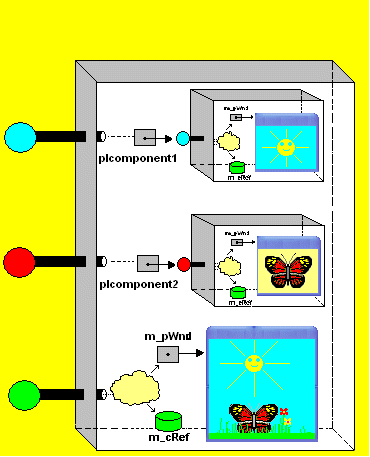
COM provides two mechanisms for code reuse. These mechanisms are called containment or delegation and aggregation. In the containment mechanism, one object (the “outer” object) becomes the client of another, internally using the second object (the “inner” object) as a provider of services that the outer object finds useful in its own implementation. COM containment is similar to C++ containment; however, it is at the interface level. The outer component contains pointers to interfaces on the inner component. The outer component implements its own interfaces using the interfaces of the inner component and it can also re-implement the inner component's interfaces by forwarding calls to the inner component and adding code before and after the code for the inner component. Containment reuses the implementation of the interfaces belonging to the inner components. One of the components (CComponent3) from the demo application (illustrated in the above figure), uses this mechanism. Until now, a component has been created and its interface supports the Print method. Now, in order to use the containment mechanism, we can use this interface in a new component. In the following, a new component will be created, which reuses the previous component’s interface in order to build its own interface. This new interface will support two new mathematical functions and will be called IMath interface.
Step 1: Definition of the Component and implementation of its Server
Using the same method in part two, create en empty project in order to make the component's server(Component2.dll). The steps for creation of the DLL are explained in details in part two.
- Definition of the new interface:
As you may know, every COM interface should be derived directly or indirectly from the IUnknown interface, so the new interface may be derived form the interface which was implemented in the pervious parts, and that interface was derived directly from the IUnknown interface: interface IMath: IComponent;
{
virtual int __stdcall Sum(int a,int b)=0;
virtual int __stdcall Subtract(int a,int b)=0;
};
- Definition of the component's class:
As you may know, the component's class can be defined by deriving a class from the newly created COM interface, and because the containment mechanism will be used, there is a need for a method to create the inner component (which can be called from the class factory), and a pointer to the inner interface: class CComponent2:public IMath
{
private:
long m_cRef;
IComponent* m_pInnerInterface;
public:
virtual HRESULT __stdcall QueryInterface(const IID & iid,void** ppv);
virtual ULONG __stdcall AddRef();
virtual ULONG __stdcall Release();
virtual void __stdcall Print (const char* msg);
virtual int __stdcall Sum(int a,int b){return(a+b);}
virtual int __stdcall Subtract(int a,int b){return(a-b);}
HRESULT __stdcall CreateInnerComponenet();
CComponent2();
~CComponent2();
};
- Implementation of
CComponent2::CreateInnerComponent:

- Implementation of
CFactory::CreateInstance():
HRESULT __stdcall CFactory::CreateInstance(IUnknown* pUnkOuter,
const IID& iid,void** ppv)
{
if (pUnkOuter != NULL)
return CLASS_E_NOAGGREGATION ;
CComponent2* pComponent2 = new CComponent2 ;
if (pComponent2 == NULL)
return E_OUTOFMEMORY ;
HRESULT hr = pComponent2->CreateInnerComponent() ;
if (FAILED(hr))
{
pComponent2->Release() ;
return hr ;
}
hr = pComponent2->QueryInterface(iid,(void**) ppv) ;
if (FAILED(hr))
pComponent2->Release() ;
return hr ;
}
- Forwarding calls to the inner component:
void __stdcall CComponent2::Print(const char* msg)
{
m_pInnerInterface->Print(msg);
}
- Providing GUID for the component's class and interface identifier for
IMath interface, using GUIDGEN.EXE:
extern "C" const GUID CLSID_Component2 =
{ 0xcdd7d97, 0xdd93, 0x450a,
{ 0xbb, 0xcf, 0x6b, 0x22, 0x89, 0x4f, 0xaf, 0xf5 } };
extern "C" const IID IID_IMath =
{ 0xc8ace8cc, 0x480, 0x4f1a,
{ 0x8a, 0x62, 0x89, 0x71, 0x7e, 0x1d, 0x57, 0x5 } };
Step 2: the Client

The following figure shows the output window of the client program:

One of the uses of containment is to extend an interface by adding code to an existing interface. As an example, the inner Component2 from demo application has a window with yellow color, although Component2's background color is initially white. The other change is that the butterfly starts flying after creation of the inner component, although initially it does not fly. These changes are made through the containment mechanism. The following piece of code and figure show how one of the methods of Component2 has been specialized.
void __stdcall CComponent3::ShowWndBackground_Com2(COLORREF bgcolor)
{
bgcolor=RGB(255,255,0);
m_pIComponent2->StartFlying();
m_pIComponent2->ShowWndBackground_Com2(bgcolor);
}

The demo application's code is very similar to the example explained in the article and only a window is used to visualize each component, and each window's menu acts as the component's interface. I hope that these articles were useful for you and could be a guide to begin with "COM" from scratch.
| You must Sign In to use this message board. |
|
| | Msgs 1 to 19 of 19 (Total in Forum: 19) (Refresh) | FirstPrevNext |
|
 |
|
|
 |
|
|
http://www.codeproject.com/KB/COM/COM_from_scratch_1.aspx
http://www.codeproject.com/KB/COM/COM_from_scratch_2.aspx
|
| Sign In·View Thread·PermaLink | |
|
|
|
 |
|
|
Hi, i cannot load these COM dlls in .NET, usually when I add COM dlls (MS Office etc) from VS 2005 --> Add reference VS takes care of all the interop stuff and loads the COM Dll in my C# project, but i when i add these dlls it says that the DLLs are not valid COM objects....ne ideas?
|
| Sign In·View Thread·PermaLink | |
|
|
|
 |
|
|
Can any one refer me the source(on web) from which i can learn and unerstand all com classes and how the interact and work. But before refering me the source keep in mind that i am new to com
|
| Sign In·View Thread·PermaLink | |
|
|
|
 |
|
|
I have loaded into lpStorage(of type IStorage) a regular file. Then I have opened the data into pStream(of type IStream). I am now trying to load pStream into pPersistStream(of type IPersistStream). Since pStream was loaded from a regular file, it does not have an associated CLSID. So when I do the following, hr =CoCreateInstance(clsid,NULL,CLSCTX_ALL,IID_IPersistStream,(LPVOID*)&pPersistStream); What should the value of clsid be?
Thanks for your help in advance!
|
| Sign In·View Thread·PermaLink | |
|
|
|
 |
|
|
Hi, As you may know a GUID is used to identify a component and it is called a class identifier. Components publish their filenames(i.e dll filenames) indexed by CLSIDs in windows Registry. CoCreateInstance looks up the filename by using the CLSID as the key. This function takes a CLSID,creates an instance of the coresponding component, and returns an interface for the instance of the component.
So the clsid should be the class identifier of the component that you want to create an instance.
The following are a summary of the parameters used by this function:
in parameters: 1-The first parameter is the CLSID of the object. 2-second parameter is used to aggregate the object as part of another object. 3-The thrid parameter specifies the execution context of the object. 4-The 4th parameter is the IID(interface Id) of the requested interface.
out parameter: 5-The last parameter which is an out parameter is an interface pointer to the object.
|
| Sign In·View Thread·PermaLink | |
|
|
|
 |
|
|
So in my application where I am trying to load pStream into pPersistStream, the CLSID should be pPersistStream->GetClassID(&clsid). But i get the following error, #define E_NOTIMPL _HRESULT_TYPEDEF_(0x80004001L)
CComPtr pPersistStream; Is IPersistStream the component that needs to be registered? If so how? Do I have to implement the function GetClassID somewhere?
|
| Sign In·View Thread·PermaLink | |
|
|
|
 |
|
|
Basically could you give me some insight on how to open regular files and load their streams into an IPersistStream.
|
| Sign In·View Thread·PermaLink | |
|
|
|
 |
|
|
Hi, If your persistent component inherits from IPersistStream , then the implementation of IPersist’s method (GetClassID) and IPersistStream’ methods (load,save,GetSizeMax,IsDirty) are required. Because IPersistStream interface is derived from IPersist.You may choose a GUID for your class for example:
----------------------------------------------------------------------------- // {49BF12F2-5041-48da-9B44-AA2FAA63AEFB} const GUID CLSID_PersistComponent = { 0x49bf12f2, 0x5041, 0x48da, { 0x9b, 0x44, 0xaa, 0x2f, 0xaa, 0x63, 0xae, 0xfb } };
-------------------------------------------------------------------------- For persistants objects COM requires the component’s class id in order to associate it with persistent data and this can be achieved by implementation of the GetClassID method:
/////////////////////////////////////////////////////////// HRESULT YourPersistComponent::GetClassID(CLSID *pClassID) { *pClassID = CLSID_PersistComponent; return S_OK; }
and for creation of an instance of your persistent component you can pass the component's clsid to the CoCreateInstance method:
CoCreateInstance(CLSID_PersistComponent,NULL,CLSCTX_ALL,IID_IPersistStream,(LPVOID*)&pPersistStream); and it's also required that your component is registered in windows registrey if the client is going to use it via COM library.
|
| Sign In·View Thread·PermaLink | |
|
|
|
 |
|
|
Thank you so much for your reply...I will try the above out. Could you please give me more detailed steps on how to register the components in windows registry in code?
|
| Sign In·View Thread·PermaLink | |
|
|
|
 |
|
|
Hi,
If your COM server is a part of an application setup program, it will automatially be registered, otherwise an Inprocess COM server does the registereation/unregistereation by some entry points in the DLL with the following functions:
HRESULT DllRegisterServer(void); HRESULT DllUnregisterServer(void);
i.e by implementaion of these functions a DLL would be able to register/unregister itself to/from the windows registery.
|
| Sign In·View Thread·PermaLink | |
|
|
|
 |
|
|
I had the following questions, and as I mentioned Im a really new to C++ so please be patient with me!
>the implementation of IPersist’s method (GetClassID) and IPersistStream’ >methods (load,save,GetSizeMax,IsDirty) are required. Because IPersistStream >interface is derived from IPersist. How do I implement these functions?
>You may choose a GUID for your class for example: Which is the class in my case?
>and it's also required that your component is registered in windows registrey if the client is going to use it via COM library. How is this done?
|
| Sign In·View Thread·PermaLink | |
|
|
|
 |
|
|
I had the following questions, and as I mentioned Im a really new to C++ so please be patient with me!
>the implementation of IPersist’s method (GetClassID) and IPersistStream’ >methods (load,save,GetSizeMax,IsDirty) are required. Because IPersistStream >interface is derived from IPersist. How do I implement these functions?
>You may choose a GUID for your class for example: Which is the class in my case?
>and it's also required that your component is registered in windows registrey if the client is going to use it via COM library. How is this done?
Thanks!
|
| Sign In·View Thread·PermaLink | |
|
|
|
 |
|
|
 |
|
|
I found another error in this project. The constructor of component2 trys to call Print, but Print relies on the inner object existsing which it doesnt yet do. In the constructor, m_pInnerInterface points to undefined, and attempting to call m_pInnerInterface->Print will of course kill the problem with a memory protection error. Commenting out the call to Print in the constructor of component2 fixes this error.
Great set of articles by the way. Extremely valuable learning material despite the one or two minor errors I have found. Your contributions are highly appreciated and I urge you to keep up the good work.
|
| Sign In·View Thread·PermaLink | |
|
|
|
 |
|
|
Hi,and thanks for your comment.
In the submitted code the consturctor of the component2 is as the following:
///////////////////////////////////////////////////////////////////////////// CComponent2::CComponent2():m_cRef(1),m_pInnerInterface(NULL) { }
and I did not find the error you have mentioned, as you may view from the code first the class factory's CreateInstance(...) is called, this method creates the outer component and in the constructor the pointer to the inner component(m_pInnerInterface) is nulled. Then the outer component's CreateInnerComponent(...) is called. This method calls the CoCreateInstance(...) method, passing the inner component's class id and it returns a pointer to the inner component(m_pInnerInterface),which will be used to call the inner component's methods.
|
| Sign In·View Thread·PermaLink | |
|
|
|
 |
|
|
Hello all, From the article 'COM from scratch', it is neccessary to ship the header file (interface.h) to the users and the users must to include interface.h file into their code. So do you know how to avoid this case? If the user uses Matlab or VB for example, how do these program can understand the interface writeen in C. Thanks in advance
|
| Sign In·View Thread·PermaLink | |
|
|
|
 |
|
|
Hi, For using your component in VB or Matlab , your COM object should implement the IDispatch interface and by Implementing this interface the clients can get the necessary information about the methods and properties provided by the component.
For the example in this article ignoring the interface.h file requires the followings steps:
In the Server:
1- Define an odl/idl file : like component.idl
2- Define a type library in this file
----------------------------------------------- import "oaidl.idl"; // Library [uuid(9BDC8330-2D1A-458f-B92E-85B9B998F41D), version(1.0), helpstring("Components type Library")] library ComponentLib { importlib("stdole32.tlb"); [uuid(49BF12F1-5041-48da-9B44-AA2FAA63AEFB)] coclass CComponent { [default] interface IComponent; };
// IComponent definition [object, uuid(853B4626-393A-44df-B13E-64CABE535DBF), oleautomation, helpstring("Printing a Message")] interface IComponent:IUnknown { void Print()=0; };
}; ---------------------------------------------
3- Compiling with the command( midl /env win32 /h "component_h.h" "component.idl") will generate these files : Component_h.h Component_i.c Component.tlb
In the Client:
1-Include the files Component_h.h and Component_i.c in your client project
2-Ignore the “interface.h” file
3-Run the Client

|
| Sign In·View Thread·PermaLink | 2.00/5 (1 vote) |
|
|
|
 |
|
|
Hello all, I would like to implement a function that return a vector of string. In C++, it should be like this: vector Function(); Does anyone know how to write an IDL file for it.
|
| Sign In·View Thread·PermaLink | 3.33/5 (3 votes) |
|
|
|
 |
|
|
General News Question Answer Joke Rant Admin
|
