Introduction
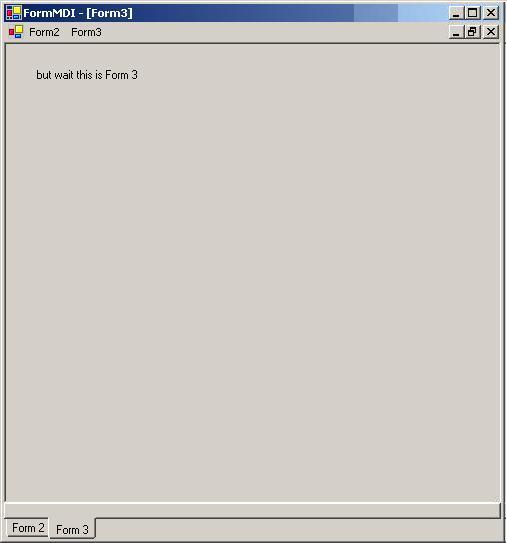
I have tinkered with using a tab control to keep track of open MDI child forms. This has been part of my introduction to .NET, coming from the VB6 needed to find out how to do the basics.
My team is working on rewriting a large legacy application, and we have been working on getting a GUI framework set out. We didn't want the child forms appearing on the Windows task bar, but still wanted users to be able to switch between forms in a similar manner.
Key Components
The tab control has all the functionality, look and feel we were looking for. What we needed was a way to link forms to the tab pages. So we created a private variable as a TabPage object to hold the tab page, basically the description of the form.
How do we get this tab page onto the tab control which is located on the MDI form. Enter stage left, property ParentForm, and Friend function identifier.
When the child form loads we set a variable to the ParentForm of the child form, which leads to the MDI form. On the MDI form we have two functions, AddTabPage and RemoveTabPage.
Friend Sub AddTabPage(ByVal tp As TabPage)
    With TabControl1
        .TabPages.Add(tp)
        .SelectedTab = tp
    End With

End Sub
Friend Sub RemoveTabPage(ByVal tp As TabPage)
    TabControl1.TabPages.Remove(tp)

End Sub
Using the Friend identifier allows the methods to be called from child forms. So when the child form loads we call the AddTabPage, and when the form closes we call RemoveTabPage.
Private Sub Form2_Load(ByVal sender As System.Object, _
               ByVal e As System.EventArgs) Handles MyBase.Load
    pForm = Me.ParentForm
    pForm.AddTabPage(tp)

End Sub
Private Sub Form2_Closing(ByVal sender As Object, _
          ByVal e As System.ComponentModel.CancelEventArgs) _
          Handles MyBase.Closing
    pForm.RemoveTabPage(tp)

End Sub
Final Step
What to do when the tab control pages change? We have used minimizing and maximizing of the child forms. Since the MDI children and the tab pages are managed in parallel, the index of the MDIChildren collection corresponds to the tab pages. So all we need to do is maximize the form which corresponds to the index of the tab page selected.
Private Sub TabControl1_SelectedIndexChanged( _
    ByVal sender As System.Object, _
    ByVal e As System.EventArgs) _
    Handles TabControl1.SelectedIndexChanged

Dim i As Integer
    If TabControl1.TabPages.Count > 0 Then
        For i = 0 To Me.MdiChildren.Length - 1
            If i = TabControl1.SelectedIndex Then
                Me.MdiChildren(i).WindowState = FormWindowState.Maximized
            Else
                Me.MdiChildren(i).WindowState = FormWindowState.Minimized
            End If
        Next
    End If

End Sub
Conclusion
This seems to work for us, we thought it was very simple and couldn't find anything similar out there.
I have been programming since mid 80's. Work mostly with VB / ASP. SQL Server for the longest time.
I am currently at a manufacturing company, running a small development team. We are moving to .Net.
Also have an insane obsession with fractals.



 General
  News
News  Suggestion
  Question
  Bug
Bug  Answer
  Joke
Joke  Praise
  Rant
Rant  Admin
Admin 


 Submit an article or tip


