Introduction
If you made an application that is using an SQL Server database that needs to be located on the client server, VS.NET Setup Project doesn't help too much, you could go for InstallShild or other product that will make things easy but the costs will get higher. So searching for a free solution I've found an article on MSDN about using the Installer class and custom actions to make this happen. The code is in VB.NET, so this article is porting it to c# with some new features that I've found useful. All you need to do is to make a class derived from System.Configuration.Install and add to the solution two Embedded Resources named install.txt & uninstall.txt. The install.txt will contain the SQL script for your database and uninstall.txt the drop script. For the database script, I am using the ASPstate script made by Microsoft team for the ASP.NET InSQL session state:
< sessionState
mode ="SQLServer"
stateConnectionString ="tcpip=127.0.0.1:42424"
sqlConnectionString ="data source=aleph;User ID=ASPsession;Password=ASPsession;"
cookieless ="false"
timeout ="60"
/>
For my web application to work on a client server, I need to make a MSI with my app and the SQL script. To run the script at install time I've made a .dll named ScriptInstall, the code for it will follow.
Installer Class Code
First we declare a string that will have a default value and can be overwrite by the Install method:
string conStr="packet size=4096;integrated security=SSPI;"+
        "data source=\"(local)\";persist security info=False;"+
        "initial catalog=master";
I use two functions that will return the connection string and the script content:
private static string GetScript(string name)
{
    Assembly asm = Assembly.GetExecutingAssembly();
    Stream str = asm.GetManifestResourceStream(
                    asm.GetName().Name+ "." + name);
    StreamReader reader = new StreamReader(str);
    return reader.ReadToEnd();
}
private static string GetLogin(string databaseServer,
                 string userName,string userPass,string database)
{
    return "server=" + databaseServer +
     ";database="+database+";User ID=" + userName +
     ";Password=" + userPass;
}
Then I use two functions that will run the install.txt and uninstall.txt onto the SQL server. The ExecuteSQL has a regex that splits the script after GO so that I can execute one by one with SQLCommand, I am doing this because ADO.NET will throw an exception if the SQL script contains "GO".
private static void ExecuteSql(SqlConnection sqlCon)
{
string[] SqlLine;
Regex regex = new Regex("^GO",RegexOptions.IgnoreCase | RegexOptions.Multiline);
string txtSQL = GetScript("install.txt");
SqlLine = regex.Split(txtSQL);
SqlCommand cmd = sqlCon.CreateCommand();
cmd.Connection = sqlCon;
foreach(string line in SqlLine)
{
if(line.Length>0)
{
cmd.CommandText = line;
cmd.CommandType = CommandType.Text;
try
{
cmd.ExecuteNonQuery();
}
catch(SqlException)
{
ExecuteDrop(sqlCon);
break;
}
}
}
}
private static void ExecuteDrop(SqlConnection sqlCon)
{
if(sqlCon.State!=ConnectionState.Closed)sqlCon.Close();
sqlCon.Open();
SqlCommand cmd = sqlCon.CreateCommand();
cmd.Connection = sqlCon;
cmd.CommandText = GetScript("uninstall.txt");
cmd.CommandType = CommandType.Text;
cmd.ExecuteNonQuery();
sqlCon.Close();
}
Having the functions now we can override the Install(IDictionary stateSaver) and Uninstall(IDictionary savedState). In the Install method besides running the SQL script on to the server I save the connection data submitted by the user. It's dangerous to save connection strings in clear, so I use RijndaelManaged to encrypt it. You can find the class in the source as well. I am saving the connection string because I need it at uninstall to drop the database ASPstate.
public override void Install(IDictionary stateSaver)
{
base.Install (stateSaver);
if(Context.Parameters["databaseServer"].Length>0 &&
Context.Parameters["userName"].Length>0 &&
Context.Parameters["userPass"].Length>0)
{
conStr = GetLogin(
        Context.Parameters["databaseServer"],
        Context.Parameters["userName"],
        Context.Parameters["userPass"],
        "master");
RijndaelCryptography rijndael = new RijndaelCryptography();
rijndael.GenKey();
rijndael.Encrypt(conStr);
stateSaver.Add("key",rijndael.Key);
stateSaver.Add("IV",rijndael.IV);
stateSaver.Add("conStr",rijndael.Encrypted);
}
SqlConnection sqlCon = new SqlConnection(conStr);
sqlCon.Open();
ExecuteSql(sqlCon);
if(sqlCon.State!=ConnectionState.Closed)sqlCon.Close();
}
public override void Uninstall(IDictionary savedState)
{
base.Uninstall (savedState);
if(savedState.Contains("conStr"))
{
RijndaelCryptography rijndael = new RijndaelCryptography();
rijndael.Key = (byte[])savedState["key"];
rijndael.IV = (byte[])savedState["IV"];
conStr = rijndael.Decrypt((byte[])savedState["conStr"]);
}
SqlConnection sqlCon = new SqlConnection(conStr);
ExecuteDrop(sqlCon);
}
Setup Project
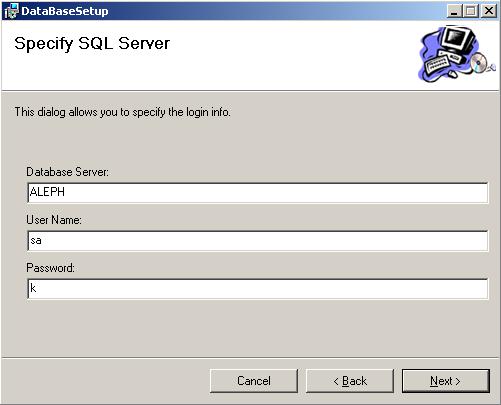
Now that the installer class is done I can make a Setup project and add the primary output. In the User Interface Editor, select the Start node under Install. On the Action menu, choose Add Dialog. In the Add Dialog dialog box, select the Textboxes (A) dialog, then click OK to close the dialog box. On the Action menu, choose Move Up. Repeat until the Textboxes(A) dialog is above the Installation Folder node. Edit the properties of the Textboxes(A) form like this:

Go to the Custom Actions Editor and add the Primary output to the install and uninstall nodes. Click on the Primary output at the Install node and edit the properties. In the CustomActionData, type this:
/databaseServer=[EDITA1] /userName=[EDITA2] /userPass=[EDITA3]
I am getting the values of the Text Boxes in the Installer class using the Context.Parameters.
conStr = GetLogin(
Context.Parameters["databaseServer"],
Context.Parameters["userName"],
Context.Parameters["userPass"],
"master");
All is done now. Just build the two projects and you are ready to install the database. I hope you'll find this code useful, there are a lot of things that can be added to the code like storing safer the Key and IV of the Rijndael or using in the ExecuteSql transactions. Looking foreword to your comments.
History



 General
  News
News  Suggestion
  Question
  Bug
Bug  Answer
  Joke
Joke  Praise
  Rant
Rant  Admin
Admin 


 Submit an article or tip


