Click here to Skip to main content
Licence CPOL
First Posted 11 Apr 2005
Views 178,360
Bookmarked 83 times

DataGrid CheckBox Select Multiple Rows Column

By | 11 Apr 2005 | Article
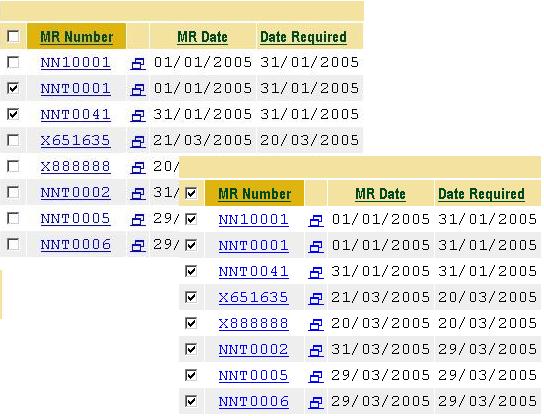
Allow users to select multiple records from your DataGrid. "CheckAll / UnCheck All" functionality on client side.
Prize winner in Competition "ASP.NET Mar 2005"

Sample Image - dgcheckboxcolumn.jpg

Introduction

Multiple row selection in a web DataGrid is a usual requirement and the common and most elegant way to implement that is definitely using CheckBox(s). A checkbox column must of course be accompanied with a CheckAll / UnCheckAll functionality.

Outline

After searching this site, I was surprised not to find anything that suited this requirement completely. I did however find what I was looking for in different segments (acknowledged below). I decided to compile all what I needed in a reusable class / library (for reference). Following is the functionality provided:

  • Checkbox column for DataGrid.
  • CheckAll, UnCheckAll checkbox in the header without PostBack to the server.
  • Static method to register client side JavaScripts.

How to use

Download the supplied .cs file and add to your project. (If your project is in another language, create a new library project and add the supplied .cs to that project, compile the library, and attach the resulting .dll as a reference to your project).

Register a TagPrefix in your aspx page for the new column as follows:

<%@ Register TagPrefix="GridSelectCheckBox" Namespace="solCommon.Web.UI.DataGrid" 
                                                   Assembly="ProjectAssembly" %>

This is, of course, a snippet from my code, you can register any TagPrefix in your page. Should you change the namespace in the supplied .cs file, replace the Namespace attribute accordingly. The Assembly attribute must be your project/library assembly.

The next logical step is to include the column in your DataGrid. You may include the column at any location. Following adds the column at location 0, i.e. the first column:

<asp:datagrid ...>
...
    <Columns>
    <GridSelectCheckBox:DGCheckBoxColumn />
    ...
    </Columns>
...
</asp:datagrid>

Lastly, we use the exposed static method of DGCheckBoxColumn class to register client side JavaScripts for the CheckAll/UncheckAll feature. In the Page_Load method of your aspx page, add the following line:

DGCheckBoxColumn.RegisterClientCheckEvents(this,"Form1");

You should replace "Form1" with the name of the form in which your DataGrid resides.

Your DataGrid is now ready.

You can get the selected indexes or the selected DataKeys by calling one of the exposed properties, i.e. DGCheckBoxColumn.SelectedIndexes and DGCheckBoxColumn.SelectedDataKeys. Let's say, in your button click event handler you try the following:

// since we know that our column in the grid is the first one ...
DGCheckBoxColumn dgchkbxCol = (DGCheckBoxColumn)myGrid.Columns[0];

// iterate through the selection
foreach (int i in dgchkbxCol.SelectedIndexes)
{
   // do something ...
}

Acknowledgements

I must thank the following two articles as I have used much of their contents:

Usage and Copyrights

You may freely use/modify the supplied file for your own usage, as long as you retain the acknowledgements presented above. Please don't forget to rate this article. Thanks and good luck.

License

This article, along with any associated source code and files, is licensed under The Code Project Open License (CPOL)

About the Author

Noman Nadeem

Web Developer

Saudi Arabia Saudi Arabia

Member


Sign Up to vote   Poor Excellent
Add a reason or comment to your vote: x
Votes of 3 or less require a comment

Comments and Discussions

 
You must Sign In to use this message board. (secure sign-in)
 
Search this forum  
 FAQ
    Noise  Layout  Per page   
  Refresh
Questionhow to select through checkboxes? PinmemberMember 466308720:57 27 Apr '08  
QuestionHow Select a row in Data Grid Pinmemberpatelmurtuza2:14 16 Mar '07  
Questionhow can i tell what my project/library assembly is Pinmemberinsignificant6:30 15 Mar '07  
GeneralIt is not a good idea PinmemberMember #2738621:56 31 Jan '07  
QuestionSpecified cast is not valid Pinmemberkrimsondon9:49 19 Dec '06  
QuestionHow to fetch info abt checked rows Pinmembermontysehra23:35 19 Nov '06  
QuestionCheck All button Does not work PinmemberStephen Noronha8:55 20 Oct '06  
AnswerRe: Check All button Does not work Pinmemberphantomvie23:21 29 Nov '07  
GeneralRe: Check All button Does not work PinmemberMember 27961981:54 25 Jan '10  
Generalmy problem:my datasource is a arrayList [modified] Pinmemberrengdongzwf20:28 11 Jun '06  
GeneralPaging Problem Pinmembermshariq18:07 10 Jun '06  
GeneralTo check the checkbox PinmemberOlog-hai8:43 17 May '06  
GeneralRe: To check the checkbox PinmemberTed Husted8:50 30 May '06  
GeneralRe: To check the checkbox PinmemberDonald Bittenbender11:23 17 Dec '08  
Generalcollecting information from a datagrid PinmemberJustmeNick7:15 30 Apr '06  
GeneralCheck All isn't working PinmemberBSegE5:54 12 Mar '06  
NewsProjectAssembly Cannot Load Pinmembertorome16:51 10 Mar '06  
GeneralAdding data PinmemberMiniDawg5:45 25 Jan '06  
Guys,
Got it to work!
 

Trick was to read out of an arraylist, not an array:
Something like this:
ArrayList cd = new ArrayList();
//iterate through logic and do add value x
cd.Add (new AddValue(x));
DGCheckBox.DataSource = cd;
DGCheckBox.DataBind();
DGCheckBoxColumn.RegisterClientCheckEvents(this,"Form1");
 
You will have to define the AddValues though through a class (which I found under Tomohiro's profile: http://www.codeproject.com/cs/miscctrl/valuemembersample.asp)
 
Adjusted for the one column display:
public class AddValue
{
private string m_Display;
//private string m_Value;
//public AddValue(string Display, string Value)
public AddValue(string SelectAll)
{
m_Display = SelectAll;
}
public string SelectAll
{
get{return m_Display;}
}
//public string Value
//{
// get{return m_Value;}
//}
}
 

Thank you to all of you!!!


NOTE:
I did get data displayed.... somewhat. I guess I need to edit the data I desire to display in the Page_Load as I have been prior to trying to appy this code. However, my data is caught within a jagged array and I seem to not get the datasource assignment right. Here is what I use:
 
Format of jagged array:
string[][] cbxJaggedArray = new string[x][];
//where x is a dynamically derived count
//After populating the array:
DGCheckBox.DataSource = (cbxJaggedArray);
DGCheckBox.DataBind();
//this gets me the first element of the array with position 1 and 2 displayed as separate checkbox items.
DGCheckBox.DataSource = (cbxJaggedArray[0]);
DGCheckBox.DataBind();
//does the same
//and...
DGCheckBox.DataSource = (cbxJaggedArray[0][0]);
DGCheckBox.DataBind();
//...gets me the same as when I try to do a single-dim array and ref that one like: cbxJaggedArray[i]--> the result is an iteration through one character as a new checkbox at a time!!!
 
ok, confused enough?


DGCheckBox.DataBind();
 
Ok, this might sound retarded, but I am new to this....
Where and how do I add data (I guess rows) to the data grid? I tried to put it into the "public override void InitializeCell", but that didn't work.
Does it go into the "public DGCheckBoxColumn(): base()"?
Could you please give me a hint? Cry | :((
 
Currently I have the data I would like to display on the grid in an array containing an id and a text/description for display. The array is currently in another class of my project which is a "public class xxx: System.Web.UI.Page". Can I have these communicate with each other?
 
-- modified at 15:13 Wednesday 25th January, 2006
GeneraldgchkbxCol.SelectedIndexes return empty Pinmemberlayoro16:15 5 Jan '06  
GeneralRe: dgchkbxCol.SelectedIndexes return empty PinmemberMiniDawg7:14 26 Jan '06  
JokeRe: dgchkbxCol.SelectedIndexes return empty Pinmemberlayoro14:25 26 Jan '06  
JokeRe: dgchkbxCol.SelectedIndexes return empty PinmemberMiniDawg2:50 27 Jan '06  
GeneralPage Errors...About Length Pinmemberekasal20:48 1 Dec '05  
GeneralClick the header checkbox that is not select all checkbox PinmemberVincent Tan E H0:19 24 Aug '05  
GeneralRe: Click the header checkbox that is not select all checkbox Pinmembererikwi1:08 26 Nov '05  

General General    News News    Suggestion Suggestion    Question Question    Bug Bug    Answer Answer    Joke Joke    Rant Rant    Admin Admin   

Use Ctrl+Left/Right to switch messages, Ctrl+Up/Down to switch threads, Ctrl+Shift+Left/Right to switch pages.

Permalink | Advertise | Privacy | Mobile
Web03 | 2.5.120529.1 | Last Updated 11 Apr 2005
Article Copyright 2005 by Noman Nadeem
Everything else Copyright © CodeProject, 1999-2012
Terms of Use
Layout: fixed | fluid
