 |
|
 |
<b></b>Hello, i have a proble,i want to select some rows in repeater via checkboxes,how to show alert no. of selected rows.
|
|
|
|
 |
|
 |
Dear friend
I have one Datagrid which is filled by a dataset on runtime. How can I select a row in the datagrid without having Button column.
but once the data is fetched the data of the first column becomes hyperlink/select button so that if i click any particular record of first column, it selects that row.
thanks
Murtuza
|
|
|
|
 |
|
 |
seems like a stupid question but how can i tell what my project/library assembly is to put in the
<%@ Register TagPrefix="GridSelectCheckBox" Namespace="solCommon.Web.UI.DataGrid" Assembly="ProjectAssembly" %>
thanks!
|
|
|
|
 |
|
 |
step 1 include javascript function : <script language="javascript"> //全 选或者不选 function selectAll(obj,objs) { var chk =document.all[obj]; var chks = document.all[objs]; var chkds = document.all["staffapprdetailids"]; var len=chks.length; for(var i=0;i<len;i++) { chks[i].checked=chk.checked; chkds[i].checked=chk.checked; } } //全 选或者不选 function syncchecked(obj1,obj2) { var chk1 =document.all[obj1]; var chk2 = document.all[obj2]; var len=chk1.length; for(var i=0;i<len;i++) { chk2[i].checked = chk1[i].checked; } } </script> step 2 bindData in datagrid <asp:datagrid id="dgRentInfo" runat="server" Width="99%" AutoGenerateColumns="False" ShowHeader="False" PageSize="15" AllowPaging="True"> <Columns> <asp:TemplateColumn> <HeaderStyle Wrap="False"></HeaderStyle> <ItemStyle Wrap="False"></ItemStyle> <ItemTemplate> <div style="display:none;"><input type="checkbox" name="staffapprdetailids" value='<%# DataBinder.Eval(Container.DataItem, "staffapprdetailid")%>'></div> <INPUT type="checkbox" name="chkstaffapprids" onclick="Javascript:syncchecked('chkstaffapprids','staffapprdetailids')" value='<%# DataBinder.Eval(Container.DataItem, "staffapprid") %>'> </ItemTemplate> <ItemTemplate> <A href='http://rent.<%=RentDomain%>/cz/cz_jx_<%#DataBinder.Eval(Container.DataItem, "houseid")%>.htm' target=_blank> <%#DataBinder.Eval(Container.DataItem, "Address")%> </A> </ItemTemplate> <FooterStyle Wrap="False"></FooterStyle> </asp:TemplateColumn> </Columns> <PagerStyle Visible="False"></PagerStyle> </asp:datagrid>
<div style="display:none;"><input type="checkbox" name="staffapprdetailids" value='<%# DataBinder.Eval(Container.DataItem, "staffapprdetailid")%>'></div> <INPUT type="checkbox" name="chkstaffapprids" onclick="Javascript:syncchecked('chkstaffapprids','staffapprdetailids')" value='<%# DataBinder.Eval(Container.DataItem, "staffapprid") %>'> help to me email llx_jy
|
|
|
|
 |
|
 |
Hi!
I am using DGCheckBoxColumn in a grid to select multiple rows. But i am getting an error when I try to check the selectedIndexes. The error message is as follows
Exception Details: System.InvalidCastException: Specified cast is not valid
This exception is generated on the following line when i try to get a column from the grid and try to cast it to DGCheckBoxColumn.
DGCheckBoxColumn dgCol = (DGCheckBoxColumn)this.dgWebMasters.Columns[0];
I am surprised to see this as it was working fine for a couple of days. And i didn't make any change into it. Kindly help me avoid this exception as this class is very useful and i want to use it.
Thanks
|
|
|
|
 |
|
 |
It works fine, no problems but how to get the values contained in checked rows
|
|
|
|
 |
|
 |
Hi all,
Nice code and feedback.
Check all button does not work after using a button.
I can see an error on page at the bottom of the page.
any feedback?
Thanks,
Stephen
|
|
|
|
 |
|
 |
You must edit method ResgisterAttributes
if ( wc.HasControls() ){
RegisterAttributes(wc);}
CheckBox chk = null;
if(wc.ID.IndexOf("checkboxCol") != -1)
{
chk = (CheckBox)wc;
}
else if(wc.ID.IndexOf("checkboxHead") != -1)
{
chk = (CheckBox)wc;
}
.....
and DGCheckBoxColumn.RegisterClientCheckEvents(this,"Form1") must be called after DataBind();
Good luck.
|
|
|
|
 |
|
 |
i'd suggest you to replace that bolded code with
if (wc is CheckBox)
and process checkboxess only if that condition is true. You can avoid also try-catch this way
|
|
|
|
 |
|
 |
first:good job!thanks ,i am a chinese.
second:i have a problem , my datagrid's datasource is a arraylist of one refer,but i dont know how to set the DataKeyField,so i cant see anything after the button click ,can anyone help me? thanks!
-- modified at 2:29 Monday 12th June, 2006
|
|
|
|
 |
|
 |
First, I'ld like to thank you because your article was really very helpful for my work. I am having a little problem. I am using check boxes in DataGrid as well as paging. When i select few records from the first page and the move to the next page, records selected from the first page are lost. How can we solve this problem without ignoring paging.
|
|
|
|
 |
|
 |
to check the checkbox you have to modify the class like this. Old code
Public ReadOnly Property SelectedIndexes() As Int32() Get Dim selectedIndexList As ArrayList = New ArrayList 'iterate each DataGridItem and find our checkbox For Each item As DataGridItem In Me.Owner.Items Dim chkBox As CheckBox = CType(item.FindControl("checkboxCol"), CheckBox) 'If it's selected then add it to our ArrayList If Not (IsNothing(chkBox)) And chkBox.Checked Then selectedIndexList.Add(item.ItemIndex) End If Next Return CType(selectedIndexList.ToArray(GetType(Int32)), Int32()) End Get End Property
New code
Public Property SelectedIndexes() As Int32() Get Dim selectedIndexList As ArrayList = New ArrayList 'iterate each DataGridItem and find our checkbox For Each item As DataGridItem In Me.Owner.Items Dim chkBox As CheckBox = CType(item.FindControl("checkboxCol"), CheckBox) 'If it's selected then add it to our ArrayList If Not (IsNothing(chkBox)) And chkBox.Checked Then selectedIndexList.Add(item.ItemIndex) End If Next Return CType(selectedIndexList.ToArray(GetType(Int32)), Int32()) End Get Set(ByVal Value As Int32()) 'iterate each DataGridItem and find our checkbox For Each item As DataGridItem In Me.Owner.Items For Each index As Int32 In Value If item.ItemIndex = index Then Dim chkBox As CheckBox = CType(item.FindControl("checkboxCol"), CheckBox) 'If it's selected then add it to our ArrayList If Not (IsNothing(chkBox)) Then chkBox.Checked = True End If End If Next Next End Set End Property Aspx.vb code after databind. 'check checkbox Dim selectedIndex As New ArrayList For x As Int32 = 0 To ds.Tables("Payee").Rows.Count - 1 If ds.Tables("MyTable").Rows(x).Item("MyField").ToString = "True" Then selectedIndex.Add(x) End If Next If selectedIndex.Count > 0 Then CType(dgPayee.Columns(0), DGCheckBoxColumn).SelectedIndexes = CType(selectedIndex.ToArray(GetType(Int32)), Int32()) End If
______________ Olog-hai Near to Mordor hugues_gauthier@hotmail.com
|
|
|
|
 |
|
 |
Same thing in C#:
set
{
foreach (DataGridItem item in this.Owner.Items)
{
CheckBox[] chkBox = new CheckBox[64];
foreach (Int32 index in value)
{
if (item.ItemIndex == index)
{
chkBox [index] = item.FindControl (CHECK_BOX_COL) as CheckBox;
string check = chkBox.ToString ();
bool isChecked = ((check != null) && (check.Length > 0));
if (isChecked)
chkBox [index].Checked = true;
}
}
}
}
|
|
|
|
 |
|
 |
Genius! Thanks! This has been very helpful.
|
|
|
|
 |
|
 |
what is the code for selecting the information from a datagrid row in asp.net
i am trying to get the info that is displayed in a row..to be added to a listbox..but don't know how..can anyone help me?..please..i have this web application to turn in tomorrow..help
Nab
|
|
|
|
 |
|
 |
Hello Everyone,
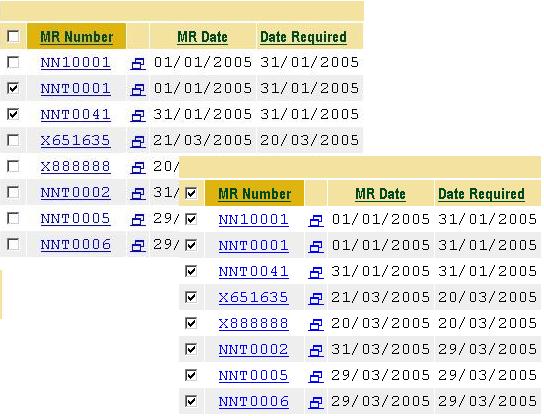
As I understand it, when I implement this control I should see a checkbox column in my datagrid and when I check or uncheck the header checkbox, all of the individual checkboxes in the column should automatically be set accordingly. And, this is accomplished on the client using JavaScript.
My web application is being developed using VB.Net in an ASP.Net 1.1 environment.
I have added a new C# library project to my solution, successfully constructed a DgCheckboxColumn library dll and referenced it in my project.
I registered the control by adding the following line to the top of my HTML page:
<%@ Register TagPrefix="GridSelectCheckBox" Namespace="solCommon.Web.UI.DataGrid" Assembly="DgCheckboxColumn" %>
And I added the control to my datagrid as the 1st column using the provided example.
Next I added the following line immediately after calling the databiind methid in my datagrid:
DGCheckBoxColumn.RegisterClientCheckEvents(Me, "WebForm1")
The good news is that everything builds correctly and when executed my page displays the new checkbox column correctly.
However when I check the box in the column header, nothing else changes and I receive “An error has occurred in the script on this page” error further indicating “‘length’ is a Null or not an object”.
I went back and stepped through the execution. When the dgcheckboxcolumn code executes, it creates the following two scripts:
<script language=JavaScript> function CheckAll( checkAllBox )
{
var frm = document.[frmID];
var ChkState=checkAllBox.checked;
for(i=0;i< frm.length;i++)
{
e=frm.elements[i];
if(e.type=='checkbox' && e.name.indexOf('checkboxCol') != -1)
e.checked= ChkState ;
}
}
</script>
<script language=JavaScript>function CheckChanged()
{
var frm = document.[frmID];
var boolAllChecked;
boolAllChecked=true;
for(i=0;i< frm.length;i++)
{ e=frm.elements[i];
if ( e.type=='checkbox' && e.name.indexOf('checkboxCol') != -1 )
if(e.checked== false)
{
boolAllChecked=false;
break;
}
}
for(i=0;i< frm.length;i++)
{ e=frm.elements[i];
if ( e.type=='checkbox' && e.name.indexOf('checkboxHead') != -1 )
{
if( boolAllChecked==false)
e.checked= false ;
else
e.checked= true;
break;
}
}
}
</script>
I’m not Java literate, so I really can’t see anything obviously wrong here.
After building the scripts dgcheckboxcolumn moves on and ultimately fails in the registerattributes subroutine when executing the line:
CheckBox chk = (CheckBox)wc;
Ok, what did I do wrong?
|
|
|
|
 |
|
 |
why clue to "ProjectAssembly Cannot Load"
please help!
Dotnet,I Love!
-- modified at 22:53 Friday 10th March, 2006
|
|
|
|
 |
|
 |
Guys,
Got it to work!
Trick was to read out of an arraylist, not an array:
Something like this:
ArrayList cd = new ArrayList();
//iterate through logic and do add value x
cd.Add (new AddValue(x));
DGCheckBox.DataSource = cd;
DGCheckBox.DataBind();
DGCheckBoxColumn.RegisterClientCheckEvents(this,"Form1");
You will have to define the AddValues though through a class (which I found under Tomohiro's profile: http://www.codeproject.com/cs/miscctrl/valuemembersample.asp)
Adjusted for the one column display:
public class AddValue
{
private string m_Display;
//private string m_Value;
//public AddValue(string Display, string Value)
public AddValue(string SelectAll)
{
m_Display = SelectAll;
}
public string SelectAll
{
get{return m_Display;}
}
//public string Value
//{
// get{return m_Value;}
//}
}
Thank you to all of you!!!
NOTE:
I did get data displayed.... somewhat. I guess I need to edit the data I desire to display in the Page_Load as I have been prior to trying to appy this code. However, my data is caught within a jagged array and I seem to not get the datasource assignment right. Here is what I use:
Format of jagged array:
string[][] cbxJaggedArray = new string[x][];
//where x is a dynamically derived count
//After populating the array:
DGCheckBox.DataSource = (cbxJaggedArray);
DGCheckBox.DataBind();
//this gets me the first element of the array with position 1 and 2 displayed as separate checkbox items.
DGCheckBox.DataSource = (cbxJaggedArray[0]);
DGCheckBox.DataBind();
//does the same
//and...
DGCheckBox.DataSource = (cbxJaggedArray[0][0]);
DGCheckBox.DataBind();
//...gets me the same as when I try to do a single-dim array and ref that one like: cbxJaggedArray[i]--> the result is an iteration through one character as a new checkbox at a time!!!
ok, confused enough?
DGCheckBox.DataBind();
Ok, this might sound retarded, but I am new to this....
Where and how do I add data (I guess rows) to the data grid? I tried to put it into the "public override void InitializeCell", but that didn't work.
Does it go into the "public DGCheckBoxColumn(): base()"?
Could you please give me a hint?
Currently I have the data I would like to display on the grid in an array containing an id and a text/description for display. The array is currently in another class of my project which is a "public class xxx: System.Web.UI.Page". Can I have these communicate with each other?
-- modified at 15:13 Wednesday 25th January, 2006
|
|
|
|
 |
|
 |
Please help
dgchkbxCol = (DGCheckBoxColumn)myGrid.Columns[0];
it work well but just dgchkbxCol.SelectedIndexes always return empty?? even i have checked it. Do i miss something ?.....knowing that my checkbox column is the frist column in the datagrid.
Any one has an idea?
Thanks in advance!
layoro
-- modified at 22:16 Thursday 5th January, 2006
|
|
|
|
 |
|
 |
Layoro,
The way I got it to work is to place the datasource assignmentinto a if(!IsPostBack){}
like this:
if(!IsPostBack)
{
//add your data to cd, if you use arrays, put them into an array list first
DGCheckBox.DataSource = cd
DGCheckBox.DataBind();
DGCheckBoxColumn.RegisterClientCheckEvents(this,"Form1");
}
Otherwise your values will be overwritten by the new "page build" before you capture them with DGCheckBoxColumn dgchkbxCol = (DGCheckBoxColumn)myGrid.Columns[0];SelectedIndexes.
Hope this helps,
Regards,
The MiniDawg
|
|
|
|
 |
|
 |
It's working now.....
Thanks so much
layoro
|
|
|
|
 |
|
 |
I am very happy to hear that.
|
|
|
|
 |
|
 |
Browser error msg.
'length is null or not a object' (java script error)
Also still I cannot select all checkboxes.
|
|
|
|
 |
|
 |
After I tried the code that I click the header check box can't select all column check box.
Any sample available?
Thank you very much.
|
|
|
|
 |
|
 |
I have the same problem also. Do you have the solution yet?? if you have please help .
|
|
|
|
 |
