Introduction
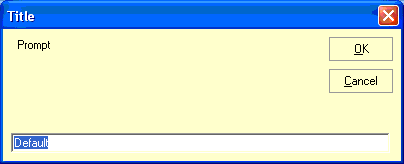
Visual Basic 6.0 has an InputBox() function, Visual Basic .NET has one but in C# you don't. You can easily solve this by adding a reference to 'Microsoft.VisualBasic.dll' and using the static method 'Microsoft.VisualBasic.Interaction.InputBox()'.
See reference to MSDN 2001 in VB help.
InputBox Function
Displays a prompt in a dialog box, waits for the user to input text or click a button, and returns a string containing the contents of the text box.
Syntax
InputBox(prompt[, title] [, default] [, xpos] [, ypos] [, helpfile, context])
The InputBox function syntax has these named arguments: see the help file MSDN\2001OCT\1033.
In the VB 6.0, there were the title, default, xpos and ypos optional values to the call of InputBox function. It is the same thing I have made.
But in this example we make ours own.
InputBox Class
The InputBox class is a public class there are not inherited from System.Windows.Forms.Form class. You use it by calling the static function name 'Show' like we also do in MessageBox. This method is returning a public InputBoxResult. This object has two public properties one called Text with a string and a ReturnCode.
There is an enum. It the same as the MessageBox returns, but the InputBox only returns these two parameters, DialogResult.OK or DialogResult.Cancel.
See the class header:

Usage
You activate the InputBox by calling the static Show() method. It has one required and four optional arguments (using overloading).
Why there are so many new lines in the prompt argument is that, the old VB 6.0 made the InputBox form bigger after the size of the prompt argument.
private void button1_Click(object sender, System.EventArgs e)
{
InputBoxResult test = InputBox.Show("Prompt" + "\n" + "DDDD" +
"Prompt" + "\n" + "DDDD" +
"Prompt" + "\n" + "DDDD" + "Prompt" + "\n" + "DDDD" +
"Prompt" + "\n" + "DDDD" +
"Prompt" + "\n" + "DDDD"
,"Title","Default",100,0);
if( test.ReturnCode == DialogResult.OK )
MessageBox.Show(test.Text);
}
The best of all is that the drop down list there comes from the InputBox is very small. If we have inherited from Windows.Form then it will have been bigger.
This is one of the methods in the InputBox class where we assign values to all the properties in the control. It regulates the InputBox size and the prompt textbox size based on the size of the prompt input string.
static private void LoadForm()
{
OutputResponse.ReturnCode = DialogResult.Ignore;
OutputResponse.Text = string.Empty;
txtInput.Text = _defaultValue;
lblPrompt.Text = _formPrompt;
frmInputDialog.Text = _formCaption;
System.Drawing.Rectangle workingRectangle =
Screen.PrimaryScreen.WorkingArea;
if((_xPos >= 0 && _xPos < workingRectangle.Width) &&
(_yPos >= 0 && _yPos < workingRectangle.Height))
{
frmInputDialog.StartPosition = FormStartPosition.Manual;
frmInputDialog.Location = new System.Drawing.Point(_xPos, _yPos);
}
else
{
frmInputDialog.StartPosition =
FormStartPosition.CenterScreen;
}
string PrompText = lblPrompt.Text;
int n = 0;
int Index = 0;
while(PrompText.IndexOf("\n",Index) > -1)
{
Index = PrompText.IndexOf("\n",Index)+1;
n++;
}
if( n == 0 )
n = 1;
System.Drawing.Point Txt = txtInput.Location;
Txt.Y = Txt.Y + (n*4);
txtInput.Location = Txt;
System.Drawing.Size form = frmInputDialog.Size;
form.Height = form.Height + (n*4);
frmInputDialog.Size = form;
txtInput.SelectionStart = 0;
txtInput.SelectionLength = txtInput.Text.Length;
txtInput.Focus();
}
Conclusion
The InputBox a simple static class which you can use in Windows Forms application to prompt for a text. It can also be used from Visual Basic .NET when you compile it in a library and refer this library from your VB project.
If we will make our own MessageBox, then we have to make in the same way as we made the InputBox. Then we will support other languages with our own MessageBox.
Have fun!
I have working with C since 1988, and updates to VC++ in 1998. The first software I was making in VC++ was Fan calculation program with graph. This Fan Was integrated with the Oracle system.
I've been working almost exclusively with C# and .NET since
beginning of the technology.
Now I am working with Web API and CRM, MVC 6.0, SQL Server, C# and .NET. The Similix ApS is a IT konsult house and working with GIS (Esri).
In my work, I have gained extensive experience with web security. ADFS etc..
Have also gained experience with DevOps CI and automatic deployment



 General
  News
News  Suggestion
  Question
  Bug
Bug  Answer
  Joke
Joke  Praise
  Rant
Rant  Admin
Admin 


 Submit an article or tip


