Introduction
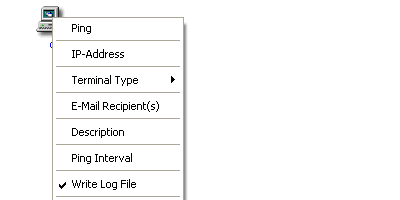
Add a Ping control to your form and set the following properties:
- The IP-address to ping.
- The terminal type (Server, Router, Desktop, ….).
- The e-mail address of the person who will be notified when
the remote host does not respond.
- The short description of the remote host.
- The ping interval.
- Write a log file - Yes or No. The log file can be viewed and printed.
Controls can be added to build a visual representation of your network.
When a remote host does not respond, the image will change, a warning message
will be displayed and a log will be generated with the date and time. The e-mail
recipient will also be notified.
This member has not yet provided a Biography. Assume it's interesting and varied, and probably something to do with programming.



 General
  News
News  Suggestion
  Question
  Bug
Bug  Answer
  Joke
Joke  Praise
  Rant
Rant  Admin
Admin 


 Submit an article or tip


