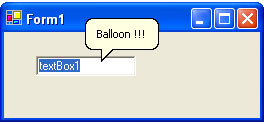
In this post, I present a solution about balloon Tooltip which I think is the easiest and does not influence existing System.Windows.Forms.ToolTip implementation.
Introduction
There are a lot of articles about "balloon" Tooltip, many lines of codes written with classes which solved the problem. Here, I show yet another solution which I think is the easiest and does not influence existing System.Windows.Forms.ToolTip implementation.
Solution
Probably you may know, reflection is a big advantage in .NET Framework, and I think will use it this time also. System.Windows.Forms.ToolTip class holds handle to the native tooltip window. This handle is non public, so we need to use reflection to get this member. Then, we can change the style of the window to "balloon".
Usage
Need to call function SetBalloonStyle from place where the ToolTip window handle is created. In my example, I do it in OnLoad of the Form. If you call the function with handle which is not valid, an exception will be thrown.
protected override void OnLoad(EventArgs e)
{
base.OnLoad (e);
NativeMethods.SetBalloonStyle ( toolTip1 );
}
Final Notes
Same approach can be used in many places, like the example in System.Windows.Forms.PropertyGrid to make it flat.
History
- 2nd May, 2005: Added
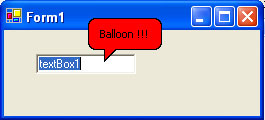
SetBackColor function, showing how you can change the color of the tooltip window
License
This article has no explicit license attached to it, but may contain usage terms in the article text or the download files themselves. If in doubt, please contact the author via the discussion board below. A list of licenses authors might use can be found here.


 General
  News
News  Suggestion
  Question
  Bug
Bug  Answer
  Joke
Joke  Praise
  Rant
Rant  Admin
Admin 


 Submit an article or tip


![Rose | [Rose]](https://www.codeproject.com/script/Forums/Images/rose.gif)


