Introduction
Here I am going to discuss the implementation of the Exception Application block of Enterprise Library 1.0., as I have gone through various sites but found there is no tutorial or any article which has highlights on this topic. Sometimes it may happen we have lots of modules having many layers in it. In that case if any exception is raised, we might not be able to find out from which aspx page or from which module or from which layer this exception has taken place. So here is the solution for this one, you can log the exception into a trace.log file which is a text file. This log file gives details of the exception. We can also trace this logging into a database too. I will cover this in the next article. So here we go.
Prerequisites:
Install Enterprise library 1.0.
Step By Step Implementation:
- Using Microsoft Visual Studio .NET, create an ASP.NET Web Application project in C# named as 'ExceptionConfigurationBlock'.
- Add reference to the project from Solution Explorer Window. Right click on project in Solution Explorer, click on Add Reference, browse through path c/Program File/Microsoft Enterprise Library/bin. Select Microsoft.Practices.EnterpriseLibrary.ExceptionHandling.dll, Microsoft.Practices.EnterpriseLibrary.ExceptionHandling.Logging.dll and then click OK.
- Now include these references in the webform 'ExceptionapplicationBlock.aspx.cs':
using Microsoft.Practices.EnterpriseLibrary.ExceptionHandling;
using Microsoft.Practices.EnterpriseLibrary.ExceptionHandling.Logging;
- This is an important step. Once Enterprise Library is installed in your system, go to Program menu, click on ‘Microsoft Patterns and Practices’, there you will find ‘Enterprise library’. Under it open ‘Enterprise Library Configuration’.
- Once Enterprise Library configuration is open, click on File menu, select Open Application. Now you will see the file browser window. Browse your application through the path stated as inetpub/wwwroot/Exception Configuration Block and select Web.config file and click OK.
- Right click on Application menu, select New and click on Exception Handling application block. On doing this, there appears sub nodes menu section of Exception Handling application block.
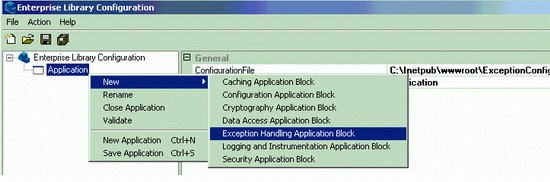
- Right click on 'Exception Handling Application Block', select New and click on Exception Policy. Once that is done, one can find that Exception Policy appears. Rename 'Exception Policy' by double clicking on it, to 'Business Layer Policy'.

Note: Exception Policy is a way to categorize the exception. One can have a number of exception types under Exception Policy.
- Right click on 'Business Layer Policy', select New and click on Exception Type. A dialog box appears in which the list of exceptions is displayed. Select 'Exception' under System. Click OK button. See the following figure for this.
- Right click on 'Exception', select New and click on Logging Handler.
- Change the setting for Logging Handler on the right side. Make
LogCategory=trace, see figure.
- Now click on 'Client Setting', see on right-hand side that there appears an Attributes section, make '
TracingEnabled=true'.
- Click on 'Distributed Settings', see Attribute settings, make
DefaultCategory=trace. See figure for this.
Note: This setting enables tracing of exceptions into the Trace.log file.
- Settings for filename (Trace.log): one can change filename as well as its path for by specifying its path in 'Flat File Destination' node menu of Trace, listed under Distributed settings. See figure for this.
- Save the file.
- On saving the Enterprise configuration file, go to the ASP.NET web project in Solution Explorer window, select 'All files' icon and include all configuration files.
Everything is set and done. Basically, we have set the configuration for Exception environment such as type of exception, category of exception, logging of exception and its various parameters as a whole.
Now interesting part of the application is invoking this exception layer into application layer. Here is the code-behind ...
Code Behind
Create a button on which I have raised "Divide by Zero Exception":
public void btnException_Click(object sender, System.EventArgs e)
{
try
{
int i=5;
int j=0;
int z=i/j;
}
catch(Exception ex)
{
bool rethrow =
ExceptionPolicy.HandleException(ex, "Business Layer Policy");
if (rethrow)
{
throw;
}
}
finally
{
}
}
}
Key Scenarios:
If the required output is as given in the figure, then there is logging of Exception in Trace.log file as well as on the page. This is due to the setting of PostHandling=NotifyRethrow. If PostHandling=NotifyRethrow is set then we can have exception rethrown on to aspx page as well as on to the Trace.log file or any database. If PostHandling=None is set, then we cannot have exception rethrown on to the aspx page but can skip logging in 'LogCategory=general' or have logging of exception in LogCategory=trace mode.
- '
LogCategory=general' no logging of exception.
- '
LogCategory=Trace' logging of exception into log files or in database etc.
Important: If there is Exception as 'Security' and no logging takes place, then right click on your project folder in inetpub/wwwroot/ExceptionconfigurationBlock, select Security and give full right privileges.
Generated output file Trace.log file content:
----------------------------------------
Timestamp: 4/25/2005 2:15:48 PM
Message: HandlingInstanceID: 3030db61-cccb-4b0b-8a3a-3661df5924db
An exception of type 'System.DivideByZeroException' occurred and was caught.
----------------------------------------------------------------------------
04/25/2005 14:15:48
Type : System.DivideByZeroException, mscorlib,
       Version=1.0.5000.0, Culture=neutral, PublicKeyToken=b77a5c561934e089
Message : Attempted to divide by zero.
Source : ExceptionConfiguration block
Help link :
TargetSite : Void btnException_Click(System.Object, System.EventArgs)
Stack Trace :
  at ExceptionConfiguration_block.WebForm1.btnException_Click(Object sender,
  EventArgs e) in c:\inetpub\wwwroot\exceptionconfiguration
  block\exceptionapplicationblock.aspx.cs:line 55

Additional Info:

MachineName : ITL232
TimeStamp : 4/25/2005 8:45:48 AM
FullName : Microsoft.Practices.EnterpriseLibrary.ExceptionHandling,
           Version=1.0.0.0, Culture=neutral, PublicKeyToken=null
AppDomainName :
  /LM/w3svc/1/root/ExceptionConfiguration block-10-127588725471560100
ThreadIdentity :
WindowsIdentity : ITL232\ASPNET

Category: Trace
Priority: 0
EventId: 100
Severity: Error
Title:Enterprise Library Exception Handling
Machine: ITL232
Application Domain:
  /LM/w3svc/1/root/ExceptionConfiguration block-10-127588725471560100
Process Id: 1924
Process Name: C:\WINNT\Microsoft.NET\Framework\v1.1.4322\aspnet_wp.exe
Win32 Thread Id: 1932
Thread Name:
Extended Properties:
----------------------------------------
So here you get actual magic running for you.
History
I have already written an article on Configuration Application Block of Enterprise Library 1.0.
Conclusion
My objective was to make the learner aware of such a good technology on run. One can use these layers and make things easier and structured. Your suggestions, criticisms, advise are most welcome. Please do let me know how you find this article helpful.



 General
  News
News  Suggestion
  Question
  Bug
Bug  Answer
  Joke
Joke  Praise
  Rant
Rant  Admin
Admin 


 Submit an article or tip


