Click here to Skip to main content

Multiple Column Dropdownlist for the ASP.NET DataGrid

By , 1 Jun 2005
 
Prize winner in Competition "ASP.NET Apr 2005"

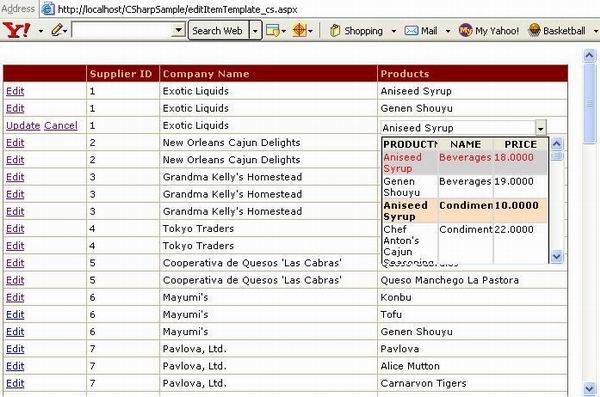
Image showing when a control is added to EditItemTemplate.

Introduction

Based on my previous control "Multiple Column DropDownList for ASP.NET", I received many emails asking for the same control to be used in the DataGrid for web applications. Here we go.. This control can be used as the regular MS DropDownList in the DataGrid and also as a regular dropdownlist. It has all the properties, like DataTextField, DataValueField, DataSource, SelectedIndex etc. The download file contains the samples both in VB.NET and C#. In this sample, I have used the Northwind database of SQL Server.

Building the Control

The following web server controls were used to build this control:

  1. TextBox
  2. Label
  3. Panel

Adding the Control to DataGrid

This control can be added either to the ItemTemplate or EditItemTemplate of the DataGrid through Property Builder.

  1. Drop a DataGrid onto your webform.
  2. Right click the DataGrid and select Property Builder and select Columns.
  3. A bound column may or may not be required, I have shown samples of both.
  4. Add two bound columns, set the header and the text field: SupplierID and CompanyName.
  5. Add one Template Column and set the header text to Products.
  6. Uncheck the checkbox "Create columns automatically at run time".
  7. Click OK.
  8. Now right click the DataGrid and select Edit Template, now either you could add this in ItemTemplate or EditItemTemplate.
  9. Set the properties of the control, like CssClass, GridRowcolor, DataTextfield etc.
  10. Close the template box.

Points to Note:

The DataValueField property is readonly, which means you cannot set the value, so make sure that in your query, the row value field is always the first column, which will not be displayed in the dropdown. The DataTextField returns an integer value, so while setting this property, type the column position from your "SELECT" statement, which needs to get displayed in the textbox. (For e.g., to display the second column "LastName" in the textbox, set DataValueField =2.) If your DataGrid is inside the "Table/Div/Span", then make sure the "Position" attribute in the "Style" property is set to absolute, and if not used in any of these tags, then set the DataGrid's Style property.

Make sure that the HorizontalAlign and VerticalAlign properties of the ItemStyle of your DataGrid is set as shown, else the control may not be positioned properly inside the DataGrid. E.g.:

<ItemStyle HorizontalAlign="Left" VerticalAlign="Top"></ItemStyle>

See the code below. E.g., to populate the dropdown with FirstName and LastName:

SELECT Employeeid,Firstname,LastName
From Employees

Now if added in the EditItemTemplate (based on your requirement, bounded column may or may not be required), in my sample I used two <BoundColumn>s:

<ASP:DATAGRID id="jskDataGrid" runat="server" 
    Font-Size="8pt" HeaderStyle-ForeColor="Tan" 
    AutoGenerateColumns="False" HeaderStyle-BackColor="Maroon" 
    HeaderStyle-Font-Bold="True" Font-Name="Verdana" ShowFooter="false" 
    BorderColor="Tan" DataKeyField="SupplierID" 
    OnUpdateCommand="MyDataGrid_Update" OnCancelCommand="MyDataGrid_Cancel" 
    OnEditCommand="MyDataGrid_Edit" CellSpacing="0" CellPadding="3" 
    Width="800" Style="Position:absolute;Top:0px;Left:0px">

  <HeaderStyle Font-Bold="True" ForeColor="Tan" BackColor="Maroon"></HeaderStyle>
  <Columns>
        <asp:EditCommandColumn ButtonType="LinkButton" 
             UpdateText="Update" CancelText="Cancel" EditText="Edit">
          <ItemStyle VerticalAlign="Top"></ItemStyle>
        </asp:EditCommandColumn>
        <asp:BoundColumn DataField="SupplierID" 
              ReadOnly="True" HeaderText="Supplier ID">
          <ItemStyle Wrap="False" VerticalAlign="Top"></ItemStyle>
        </asp:BoundColumn>
        <asp:BoundColumn DataField="CompanyName" 
              ReadOnly="True" HeaderText="Company Name">
          <ItemStyle Wrap="False" VerticalAlign="Top"></ItemStyle>
        </asp:BoundColumn>
        <asp:TemplateColumn HeaderText="Products">
    <ItemStyle HorizontalAlign="Left" VerticalAlign="Top"></ItemStyle>
        <!-- Set these two properties as shown-->
        <%# DataBinder.Eval(Container.DataItem, "ProductName") %>
          </ItemTemplate>
          <EditItemTemplate>
            <TABLE cellSpacing="0" cellPadding="0" width="100%" border="0">
              <TR>
                <TD>
                  <jsk:mcDDList id="McDDList1" 
                    Width="200" 
                    SelectedIndex='<%# DataBinder.Eval(Container.DataItem, 
                                                          "ProductID") %>' 
                    cssClass="cStyle" Runat="server" 
                    DataSource="<%# PopulateDDList()%>"
                    DataTextField="2">
                  </jsk:mcDDList>
                </TD>
              </TR>
            </TABLE>
          </EditItemTemplate>
        </asp:TemplateColumn>
      </Columns>
</ASP:DATAGRID>

If you want to show the existing values then add the "SelectedIndex" property.

Properties

  • DataTextField - The field to be shown in the Ccontrol.
  • DataValueField - Read only property (value field to identify the row - default is first column {0}).
  • DataSource - DataSet to populate the dropdown.
  • DDTextboxReadonly - If false, can type your own text.
  • GridRowColor - OnMouseMove changes the row color.
  • GridTextColor - OnMouseMove changes the text color.
  • ListBoxHeight - Sets the height of the dropdown.
  • ReturnsValue - To get the text, set it to false. To get the value, set it to true, while updating.
  • SelectedIndex - If set, shows the existing value in the dropdown.

Populating the DataGrid

private void Page_Load(object sender, System.EventArgs e)
{
    // Put user code to initialize the page here
    if (! IsPostBack)
    {
        BindDataGrid();
    }
}

protected void BindDataGrid()
{
    string sqlStr = "SELECT S.CompanyName, S.SupplierID," +
                    " P.ProductName, P.ProductID " +
                    "from Suppliers S inner join Products P " +
                    "on S.SupplierID = P.SupplierID ";
    sqlDa = new SqlDataAdapter(sqlStr, SqlCon);
    ds = new DataSet();
    sqlDa.Fill(ds, "Prod");
    jskDataGrid.DataSource = ds.Tables["Prod"];
    jskDataGrid.DataBind();
}

Populating the DropDownList

public DataSet PopulateDDList()
{
    string sqlString = " select ProductID, ProductName, " +
                       "CategoryName as Name,UnitPrice as Price " +
                       "from Products p inner join Categories c " +
                       "on p.categoryid = c.categoryid ";
    SqlDataAdapter ad = new SqlDataAdapter(sqlString,SqlCon);
    DataSet ds = new DataSet();
    ad.Fill(ds,"Categories");
    return ds;
}

Codes to Edit/Update/Cancel

protected void jskDataGrid_Edit(object sender, DataGridCommandEventArgs e)
{
    jskDataGrid.EditItemIndex = e.Item.ItemIndex;
    BindDataGrid();
}

protected void jskDataGrid_Cancel(object sender, DataGridCommandEventArgs e)
{
    jskDataGrid.EditItemIndex = -1;
    BindDataGrid();
}

protected void jskDataGrid_Update(object sender, DataGridCommandEventArgs e)
{
    try
    {
        string itemValue;
        string itemText;

        // To get the DataValueField of the DropDown
        ((ddList.mcDDList)e.Item.FindControl("McDDList1")).ReturnsValue = true;
        itemValue =
          ((ddList.mcDDList)e.Item.FindControl("McDDList1")).Text.ToString();

        // To get the DataTextField of the Dropdown
        ((ddList.mcDDList)e.Item.FindControl("McDDList1")).ReturnsValue = false;
        itemText =
          ((ddList.mcDDList)e.Item.FindControl("McDDList1")).Text.ToString();

        //write your update query
        //update table set col1 = itemtext where col2 = itemvalue
        //Execute the Query

        jskDataGrid.EditItemIndex = -1;
        BindDataGrid();
    }
    catch(Exception ex)
    {
        Response.Write(ex.Message);
    }
    finally
    {
        /*Close your Connection */
    }
}

Points of Interest

The control is built mostly using JavaScript. There is a property "DDTextboxReadonly", this property is used to enable/disable the textbox, means either you could select the text from the list or you could type.

Using the Intellisense

As in my previous article, I showed how to use the Intellisense. The zip file contains the .xsd, copy it to the following location:

  • C:\Program Files\Microsoft Visual Studio .NET 2003\Common7\Packages\schemas\xml

and in the <body> tag of your aspx page, add the following code:

<body MS_POSITIONING="GridLayout"
  xmlns:jsk="urn:http://schemas.ksjControls.com/DGDD/ASPNET">

History

  • ver. (1.0) - Initial version (posted 12th May 2005)
  • ver. (1.1) - New property has been added, ListBoxHeight to adjust the height of the dropdown.
  • ver. (1.2) - Control does not expand the DataGrid rows.

License

This article has no explicit license attached to it but may contain usage terms in the article text or the download files themselves. If in doubt please contact the author via the discussion board below.

A list of licenses authors might use can be found here

About the Author

Jayarajan S Kulaindevelu
Web Developer
United States United States
Member
I'm a .Net Programmer/Web Developer, mostly working on ASP.Net C# and VB.Net,Oracle,SQL server 2000.


Sign Up to vote   Poor Excellent
Add a reason or comment to your vote: x
Votes of 3 or less require a comment

Comments and Discussions

 
You must Sign In to use this message board.
Search this forum  
    Spacing  Noise  Layout  Per page   
GeneralMy vote of 5memberD-Kishore4 Sep '12 - 0:55 
super
GeneralMy vote of 5membermanoj kumar choubey17 Feb '12 - 21:46 
Nice
GeneralMy vote of 1memberdannnnnnnn2 Jul '09 - 5:22 
No source code
Questiondropdown list problem----urgently help mememberlavanyakv10 Aug '08 - 23:45 
hai all,
i bind data dropdownlist.datatextfield i have taken "product name".i set datavaluefield as "id".if select product name
i need to enter that particular id for product name must save to database...
 
i am unable to get value.
plzz help me any one...
Generalresizing Image in asp.netmemberUnknown Ajanabi27 Jun '08 - 23:28 
can anyone send code of how to resize image of any size in asp.net??
 
no knowledge in .net

GeneralIs the full source code with documentation for sale? [modified]memberTony39911 May '08 - 7:24 
I am interested in the full source code and documentation for your Multiple Column Dropdownlist for the ASP.Net 2.0 GridView of Visual Studio 2008. I would greatly appreciate if you could add more explanations, comments, and screen shots used to build an application. I prefer c#.
And, If the Multiple Colum DropDownList is documented in one of your books, please provide the Title and ISBN.
Thank you.
 
modified on Thursday, May 1, 2008 2:30 PM

GeneralIs Filtering allowed for this DropDown List.memberBruce Pataki20 Sep '07 - 19:03 
I have faced two problem by using your dropdownlist which are mentioned below :
(1) When i do dragging of mouse on dropdown list its size grows horizontally so, how can i control this behaviour.
 
(2) How can i enter the text on DropdownTextBox & get relevant results(e.g. i type Na... and i expect records starting with Na being listed in the dropdown)
Further i tried setting property DDTextBoxReadOnly = false but this didnot help.
 
So, please help if anyone has solutions for above two problems, Thanks.


Bruce Pataki
GeneralASP.NET 2.0 VersionmemberScott Starker9 May '07 - 13:44 
Can I add my voice to those who want ASP.NET 2.0 of the dll? I can't wait to have it!
 
Thanks!
 
Scott
GeneralJavascript ErrormemberMember #38892935 Mar '07 - 3:01 
I am new to this ASP.net. I am trying to use MCDDLIST contorl in .net with language "VB" .I am getting the following problems.
1.While Choosing an item from the Dropdown List it is giving GetElement By id JavaScript Error.So unable to choose an item from the dropdown list.
2.When i am using this control in Datagrid and click the update button
it is giving some Extra white space on top of the screen.
 
Can any one help me pls. It is very urgent pls. I am waiting for ur valueble solution
 
thanx
Nokia1100.
ezhilvannan_88@yahoo.co.in


nokia100

Questionplaceholdersmembersddsf28 Dec '06 - 23:28 
how to change the effect of placeholders at runtime??????
 
vivekgoel
GeneralAbout the Response timemembercyeung5 Nov '06 - 21:38 
Hi,
 
It is a great article and it works fine. One thing I concern is the response time. It was quite slow when I click the edit/update and cancel. Did I do something wrong?
 
Please advice.
 
Thanks in advance,
ClaraBlush | :O
QuestionArticle title ?memberjaffka2 Nov '06 - 23:49 
Very good article . Now I know how to use Grid asp.net controls - Yeahh. I'm sure that nobody has seen articles about Grids on codeproject before. Wink | ;)
 
So thank You. Your article helped me a lot and explained how to build "Multiple columns DropDown List controls", especially clear source code included in.
 
You do not want to give us the solution and the source code - Ok I understand it. So PLEASE CHANGE THE ARTICLE TITLE, because it is confusing for me and now everyone may treat this as ADVERTISEMENT.
 
What is this mistification for ? Your library isn't obfuscated, and reflector shows everything.
 
By the way. My question is: How does the licence look like, and how long are You going to support the schema located at mentioned web site ?
 
Best Regards.

QuestionArticle title ?memberjaffka2 Nov '06 - 23:48 
Very good article Laugh | :laugh: . Now I know how to use Grid asp.net controls - Yeahh. I'm sure that nobody has seen articles about Grids on codeproject before. Wink | ;)
 
So thank You. Your article helped me a lot and explained how to build "Multiple columns DropDown List controls", especially clear source code included in.
 
You do not want to give us the solution and the source code - Ok I understand it. So PLEASE CHANGE THE ARTICLE TITLE, because it is confusing for me and now everyone may treat this as ADVERTISEMENT.
 
What is this mistification for ? Your library isn't obfuscated, and reflector shows everything.
 
By the way. My question is: How does the licence look like, and how long are You going to support the schema located at mentioned web site ?
 
Best Regards.

QuestionWhy not share the code?memberNeem1227 Jul '06 - 6:17 
Where is the dropdownlist code??
I need it to work without a dataset(table)..
Please share!!!
 
tia
GeneralNo codemembercogili25 Jun '06 - 15:54 
there are no code
only dll
bad guy!

GeneralFormating Resultsmemberbazn8r7 Jun '06 - 17:19 
Hi,
This control was just what I needed! Thanks!
 
I just need to know how to format it, at the moment the results text is huge! and looks bland!
 
I've never used CSS Unsure | :~ but I see you reference "cStyle", is it an extra file that wasn't added in the zip?
GeneralRe: Formating Resultsmemberbazn8r7 Jun '06 - 17:54 
Nevermind I just noticed the tags at the top of the HTML!! Smile | :) Cool | :cool:
GeneralDataGird CheckBox in Asp.netmemberEniran23 Feb '06 - 16:13 

Hi friends,


CheckBox gold=(CheckBox)e.Item.FindControl("ckGold");
CheckBox silver=((CheckBox)e.Item.FindControl("ckSilver"));
string txt=((TextBox)e.Item.FindControl("txt1")).Text;;
 

This code to be display ERROR:'Object Reference is set a instance of an object"
 
What.s the solution .
 
Send reply.
 
Thank u
 
Ranjit
GeneralRe: DataGird CheckBox in Asp.netmemberskannapiran19 May '07 - 4:29 
you need to place
 
If e.Item.ItemType = ListItemType.Item Or e.Item.ItemType = ListItemType.AlternatingItem Then
 
CheckBox gold=(CheckBox)e.Item.FindControl("ckGold");
CheckBox silver=((CheckBox)e.Item.FindControl("ckSilver"));
string txt=((TextBox)e.Item.FindControl("txt1")).Text;;
 

End if
 

like this
 
U won't get error
Generalfetching windows usernamememberbalajinarayanan20 Jan '06 - 22:58 
Hi All,
 
Hope you are all doing great.I am facing a problem in fetching the windows useraccount name thro a web application.could any one help me on this.if code is available then it will be well and good.
 
thanks,
balaji narayanan.
 
balaji narayanan.
GeneralDoesn't work on firefoxmemberjohn586730 Dec '05 - 5:18 

 
Tried it on FireFox 1.0.7, after you click edit, the cell goes blank and no control pops up, works on IE.
 
I like this control it has potential, but its not versatile enough to be of any real world value. I got it working on IE 6.0.2900.2180, but it was off center and the drop down button was to large, to list some. If the dll source code was available I'm sure this community could turn this control into something big.
 
JB

GeneralASP.NET 2.0 VersionmemberGary Dryden22 Dec '05 - 11:14 
Are you planning on upgrading to the 2.0 GridView.
(or does it work as is in 2.0)

GeneralRe: ASP.NET 2.0 VersionmemberJayarajan S Kulaindevelu23 Dec '05 - 3:38 
I'm working on it
GeneralRe: ASP.NET 2.0 VersionmemberLozze6 Mar '06 - 23:34 
does this control work in 2.0 ?
GeneralRe: ASP.NET 2.0 Versionmemberdarshanmarathe23 Aug '06 - 3:17 
What is the release date of ASP.Net 2.0 Version of this control
 
Darshan
GeneralRe: ASP.NET 2.0 VersionmemberMember 427698816 Jun '09 - 9:15 
Hi,
I got the example to work, however, i am getting a javascript error when i select a value.
null object error. Also, the dropdown box grows horizontally as i mouse over. Any help is greatly appreciated. Many thanks!
 
yang.chia@aaa-calif.com
 
Chia Yang
GeneralDon't support all the dropdownlist Event handlingmemberbegreat21 Dec '05 - 0:23 
Hi!!
This is great work!!
I would like to know how can i use all events for a dropdownlist like selectindexchanged, ..etc.
 
Thanks
KuldeepFrown | :(
-- modified at 8:32 Wednesday 21st December, 2005
QuestionWould you kindly post the Source For this Control?memberkennster28 Sep '05 - 5:47 
Thanks for the posting.
 
I wonder if you could share the source code of your ddList.dll file?
 
Regards,
 
Kenneth S.
 
This is a test of the emergency broadcast system. In the event of an actual emergency, this test would have been followed by important news and information. Again, this was only a test.
The Management
QuestionRendering of the control?memberKoki4 Aug '05 - 12:54 
Somehow the list renders on top of the page (right above head etc) instead of rendering inside on the grid?
any ideas?
Thx!
AnswerRe: Rendering of the control?memberKoki4 Aug '05 - 13:14 
yeah - unfortunately the ONLY way to make this work is by using absolute layout which isn't very flexible...
I'm sure it could be corrected by fixing rendering of the control. could you publish it or fix it?
Thx!
AnswerRe: Rendering of the control?sussJay SK5 Aug '05 - 6:56 
Try to put the grid inside the table and set the position of the table to absolute
GeneralBlank section on top of the pagememberddanse26 Jul '05 - 21:54 
Sorry, I have posted my question bottom of your previous article.
 
When I use your component, I have a big blank zone on top of the page because visibility is set to "hidden". You said me to change the style property (which is ReadOnly) that's what I did with ApplyStyle.
 
It did not work. So I change de CssClass property. cStyle class contains position: absolute; and when the Item is created (and if Ddl is added), I change CssClass. The second css class contains position: relative; but the blank is come back.
 
How can I suppress the blank section? I don't find it Frown | :(
 
Please help me.
 
Thanks a lot.
GeneralRe: Blank section on top of the pagesussJay KS27 Jul '05 - 2:28 
Hi,
 
Could you please send me the portion of the code where you are using the dropdown in the grid.
 
Thanks
Jay
QuestionHow did you expose DataSource in the HTML view??memberjachyuen22 Jul '05 - 0:45 
Hi Jay:
 
I am trying to build a custom column just like the one you built. But when I try to specify the DataSource property in the HTML view, I always get the "XXX does not contain a definition for 'DataBinding'" error.
 
Could you please tell me what did you do to overcome that error??
 
Thanks,
 
Jach.
Generalabout cStylemembersuro61520 Jul '05 - 17:57 
My page has some problem when show the MultiColDdList.
it is about cssclass="cStyle"?
 
thanks
GeneralRe: about cStylesussJay KS21 Jul '05 - 2:49 
Hi,
 
Could be, paste this code under the <Head> section of your page.
 
<style type="text/css">
.cStyle {
FONT-SIZE: 8pt; FONT-FAMILY: verdana,arial,helvetica,sans-serif
}
</style>
 
Thanks
Jay
GeneralNot workingmemberken_in_oz17 Jul '05 - 20:33 
Hi:
 
I just try to test a simple dropdown list, so i added reference to your dll and only create populateList.
 
the page shows the ddl but when I click the down icon, it throws javascript error says "object required".
 
function showDD(getDIVID,lheight,clss){
window.event.cancelBubble = true;
//var newName = '\'' + getDIVID + '_tbl\''
var newName = getDIVID + '_tbl';
//var newName = getDIVID + '_div';
var browserName = navigator.appName;
 
if (document.getElementById(getDIVID).style.visibility == 'hidden') {
document.getElementById(getDIVID).style.width = document.getElementById(newName).style.width; //dd1
 
it fails the last statement
GeneralRe: Not workingsussJay KS18 Jul '05 - 4:11 
Hi,
 
It may be because, your datasource connection may be giving error, so its not able to generate the dropdown. Check you connection string.
 
Thanks
QuestionWhere to get new version?memberkurry31 May '05 - 19:14 
I have downloaded the demo project, but it only contains verion 1.0 of ddList.dll (1.0.1973.13926).
Where can we get the latest version (1.2)?
 

AnswerRe: Where to get new version?sussJay KS1 Jun '05 - 1:50 
Hi,
 
Thanks for noticing the version, the new dll was not updated in the download zip file, I have sent the new version to codeproject, it will be done in next couple of days.


Generalcould you share the source code of ddList.dllmemberthienanmon26 May '05 - 23:28 
Thanks for the posting.
 
I wonder if you could share the source code of your ddList.dll file?
 
thienanmon


tjtumyu
QuestionIs there any way for it to work like normal dropdownlist ?memberpkaeluri19 May '05 - 3:12 
Just Out of Curiosity..Is there any way for this control to work like a normal dropdownlist ?
 
When you click to open a normal dropdown in a datagrid, the column's height is unaffected. The dropdown contents nicely overlay on rest of the rows. Where as with this multicolumn dropdown control the column's height increases to fit the whole control. This completely mis-shapes the grid.
 
While this may not be a problem for many, it might be annoying for some users like i deal with.
 
So if anyone has any ideas, please reply to this thread.
 
Thanks.
AnswerRe: Is there any way for it to work like normal dropdownlist ?sussJay KS19 May '05 - 3:36 
New version has been posted, today, which contains the height to be adjusted.
AnswerRe: Is there any way for it to work like normal dropdownlist ?membercollin parker22 May '05 - 16:53 
I haven't looked at it specifically, but i've done things similar. You'll have to edit the javascript where the dropdown table is created and make the positioning absolute. Get the coordinates from the bottom left corner of the dropdown box, and make them the top left coordinates of the dropdown table. Since the positioning is absolute, the new dropdown table will draw over top of the other controls instead of expanding the grid row.
 
Hope this helps,
 
collin parker
Generalthe Enable of the controls is not workmemberevon_adel17 May '05 - 4:30 
when i make the drop down enable False the dropdow stl work and make me select i know that the drop down return no vale when u select the item but t dont what it to show the data grid if it s enable equal false
plz answer me so soon
thanks for ur nice tool
bye bye
 
evon
GeneralRe: the Enable of the controls is not worksussJay KS17 May '05 - 4:39 
Could you be more specific, are you talking about the DDTextboxReadonly property.
Questioncould you share the source code of ddList.dll?membertim73di15 May '05 - 3:40 
Thanks for the posting.
 
I wonder if you could share the source code of your ddList.dll file?
 
Regards,
 
Tim
Generalproblemmembersimone_b13 May '05 - 1:16 
the example doesn't seem to be working
GeneralRe: problemsussJay KS13 May '05 - 2:52 
Hi,
 
Check your connection string.
GeneralRe: problemmembersimone_b13 May '05 - 2:56 
this is what i get:
 

Descrizione: Errore durante l'analisi di una risorsa necessaria per soddisfare la richiesta. Rivedere i dettagli relativi all'errore e modificare in modo appropriato il codice sorgente.
 
Messaggio di errore del parser: Impossibile caricare il tipo 'CSharpSample.WebForm6'.
 
Errore nel codice sorgente:
 
Riga 1: <%@ Page language="c#" Codebehind="editItemTemplate_cs.aspx.cs" AutoEventWireup="false" Inherits="CSharpSample.WebForm6" %>
Riga 2: <%@ Register TagPrefix="jsk" Namespace="ddList" Assembly="ddList" %>
Riga 3: <!DOCTYPE HTML PUBLIC "-//W3C//DTD HTML 4.0 Transitional//EN" >


since im italian, the translation in english must be more or less this:
 
Description: Unable to load 'CSharpSample.WebForm6' etcetera..

General General    News News    Suggestion Suggestion    Question Question    Bug Bug    Answer Answer    Joke Joke    Rant Rant    Admin Admin   

Permalink | Advertise | Privacy | Mobile
Web03 | 2.6.130523.1 | Last Updated 1 Jun 2005
Article Copyright 2005 by Jayarajan S Kulaindevelu
Everything else Copyright © CodeProject, 1999-2013
Terms of Use
Layout: fixed | fluid