Introduction
Did you ever face the need of maintaining a family of similar web applications, eventually hosted on multiple web servers in a farm? If yes, for sure you must have discovered how uncomfortable the standard IIS management user interface (the "IIS Manager" MMC) can be for this kind of tasks. In fact, its classical "tree on the left / details on the right" structure is not suitable for the management of different web sites "in parallel", because it forces the user to concentrate each time on a specific node or sub tree of the hierarchical structure.
In my experience, I felt the lack, in "IIS Manager", of such a cross-application and cross-server transversal management when dealing with virtual directories of a web site developed in nine languages and hosted on a 10 web servers farm. Then, I wrote a simple tool (named Virtual Directory Viewer) useful to check virtual directory settings on multiple web sites and web servers, through a tabular "synoptic view" obtained programmatically inspecting the IIS metabase.
The Virtual Directory Viewer
Basically, the behavior of the Virtual Directory Viewer is very simple:
- at the beginning, you have to configure the list of the web sites and of the IIS servers you need to inspect;
- then, the tool collects data about virtual directories defined under the web sites specified by you;
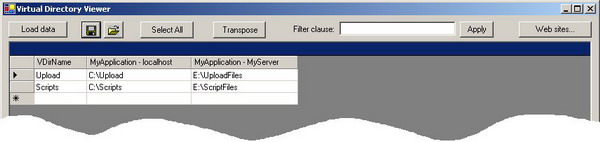
- the collected data are presented in the form of a matrix: each column represents a web site, each row represents a virtual directory, each cell holds the physical path to which the specific virtual directory is pointing to;
- the shown matrix can be easily transposed and/or sorted (for a more comfortable reading), and it can be saved in an XML file for future reference or post-processing.
Using the tool
First of all, you need to configure the list of the web sites and of the IIS servers you need to inspect. To do this, on the main form, click on the "Web sites.." button. The "Web site Chooser" dialog box will appear:

Inside the "Web site Chooser" form, you can:
- manually edit the list of the web sites you want to check, by entering the full metabase path of each of them;
- automatically retrieve the web sites list, by clicking on the "Reload web sites list" button (the Virtual Directory Viewer will populate the list with all the web sites hosted on the servers specified in the "Server Chooser" - see below);
- select/deselect the web sites to include in the actual virtual directory check.
The "Web site Chooser" form also allows simple query filtering and multiple selection/de-selection on the listed entries, to make the setup easier. The "Servers..." button lets you access the "Server Chooser" form, another configuration form (very similar to the previously described one) where you have to specify the web servers included in the virtual directory check.
This form offers similar filtering and selection facilities, but in the case of the web server list the editing is manual. The Virtual Directory Viewer uses two DataTable objects to hold both the list of the web servers and the list of the web sites to be inspected. (The latter eventually obtained by the former, as described.) These lists are automatically stored in an XML file to persist your working session environment.
After the setup of the web servers / web sites lists, run the automatic inspection of the virtual directory by clicking the "Load data" button on the main form. On the status bar, you will see the web site currently enumerated during the scan operation.
After the data collection, the resulting matrix - as already stated - can be read, sorted, transposed, exported in XML, copied to clipboard etc. (for pasting it, for example, in a Microsoft Excel sheet).
Points of interest
The core of the Virtual Directory Viewer tool uses the System.DirectoryServices .NET namespace to manage IIS metabase information. I have used the methods and properties of the DirectoryEntry class. Other points of interest include DataTable and DataSet manipulation and serialization.
I was born in 1970.
My first computer experience dates back to early 80s, with a Sinclair ZX81.
From that time on, as many "friends" say, my IT-illness has increased year by year.
I graduated in Electronic Engineering and earned the following Microsoft certifications:
MCP, MCT, MCDBA, MCSD, MCAD, MCSD for .NET (early achiever).
I worked in IT as a developer, a teacher, a consultant, a technical writer, a technical leader.
IT knowledge applied to real life is my primary interest and focus.



 General
  News
News  Suggestion
  Question
  Bug
Bug  Answer
  Joke
Joke  Praise
  Rant
Rant  Admin
Admin 


 Submit an article or tip


![Rose | [Rose]](https://codeproject.global.ssl.fastly.net/script/Forums/Images/rose.gif)