Introduction
Here is part 2 of the series on putting .NET applications on the network and getting around the security issues. This time I will be describing how to use a strong name key pair to mark an assembly as a strong named assembly, then we will do something similar to the last article in marking that strong name key as fully trusted. If you did not get a chance to read part one, you might want to take a few minutes to read it.
Background
So there are options in .NET for distributing applications. If you have a local intranet you can host an ASP.NET application. This can be somewhat limiting for extremely complex applications that are better suited for a Windows style application. It is not always easy to release something new on the web either, even if it is your local intranet. You can use a web server to help distribute the application. Something like: it checks to see what version you have locally and if there is a newer version it is installed locally and then launched. You can use a terminal server. The application only exists on the terminal server and your users have to log into the terminal server to access the app. We have tried all these approaches and personally I don't care much for them. So on to the next two. First, the one I like best, create a machine level runtime security policy. Then put it into a MSI script and have your users run the MSI script (they only have to once), or have Active Directory distribute the MSI script at login. This policy marks a network server and folder on that server as fully trusted. The other option is to use the SN.exe tool to create a strong name key and mark all of your applications with the strong name key and then create a runtime security policy allowing anything with that strong name key to be fully trusted. In part 2 of this article, I will be reviewing how to do the machine level runtime security policy that marks a strong name key as fully trusted.
One more thing to know here on strong name keys. When I first started working with them, I assumed that you have to create a new strong name key pair for each application. Well, of course, that is silly. You should in fact only have one strong name key pair and reuse it for any assemblies you want to mark as strong name assemblies. Of course there are good reasons to use different strong name keys, but that is a subject for a different discussion.
How do you do it...
Let's start off again with what you get when a .NET app is not fully trusted.

Next we need to create the strong name key pair. You use the SN.exe tool for this. If you have Visual Studio installed then you can open a Visual Studio .NET command prompt. This allows the command prompt to know what the SN.exe is, otherwise you will need to navigate to where the sn.exe program resides which is in the .NET framework folder. Navigate to the folder you want the strong name key to be created in. The command is sn -k filename.snk:
Next you need to consume the strong name key pair in your .NET app. Open your AssemblyInfo.vb or AssemblyInfo.cs file and add this code:
<ASSEMBLY: AssemblyKeyFile("c:\keys\Liberty.snk")>
[assembly: AssemblyKeyFile("c:\keys\Liberty.snk")]
Note you will need to point to your file path and key file name. You can also use the AssemblyKeyName attribute. Now you will need to compile your .NET app. This is important since the easiest way to get the strong name public key is to import an assembly that already has it compiled in.
Creating the code group
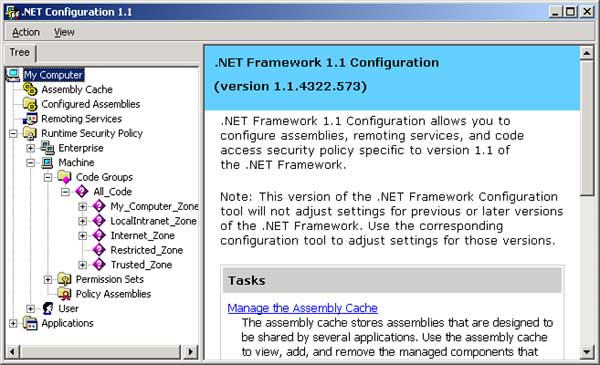
Now we will follow the familiar process from part 1 of creating a new code group. On to creating the run time security policy that marks a strong name key pair as fully trusted. You set up a machine level runtime security policy in the .NET framework configuration tool, which can be found in Control Panel->Administration tools. Note that if you are not an Administrator on your PC, you will not be able to set a runtime security policy. Under Runtime Security Policy\Machine\Code groups\All code\localIntranet_zone\, you want to add a child code group.
Put in a name and comment for the new code group:
Now you will need to select a strong name from the drop down. Then click the Import button and select the .NET app you just compiled with the strong name key. This will bring in the strong name public key into the code group dialog.
Next you need to select what security you want this folder to have. Full trust is what I usually pick, but there are several options. Then click Next and finally click Finish. At this point you would be able to launch a .NET Windows app from the server\folder you just set up in a code group and you would not get a security violation.
Creating the MSI script
On to creating the MSI script for this code group. Click on the runtime security policy. You should see an option for creating a deployment package. Click that option.
Next you should select the machine on the radio group and put in a local path and name for the MSI script.
Click Next and click Finish.
Conclusion
Now you have an MSI script that people can run, they only have to do it once, and they will be able to launch a Windows .NET app from a network server and they will not get a security violation. Note, when the MSI script is run, it will replace any current runtime security policies on the machine level. You can distribute the MSI script over Active Directory, but I will not include that in this article. I am planning on writing a third article on this subject. Since the main down side to distributing .NET apps on a network server is that, when you need to release a new version, if someone is in the app you can not copy over the new version, I have written an app that allows you to see all the files on a network server and who has those files open. That way you would know who to notify, that is who to ask to get out of the app so you can release it. (I do realize that if you have admin rights to the network server you have access to this information already, but for those of us who are not admins on the network server...).
I started my programmer career over 26 years ago doing COBOL and SAS on a MVS mainframe. It didn't take long for me to move into windows programming. I started my windows programming in Delphi (Pascal) with a Microsoft SQL server back end. I started working with vb.net when the beta 2 came out in 2001. After spending most of my programming life as a windows programmer I started to check out asp.net in 2004. I achieved my MCSD.net in April 2005. I have done a lot of MS SQL database stuff. I have a lot of experience with Window Service and Web services as well. I spent three years as a consultant programing in C#. I really enjoyed it and found the switch between vb.net and C# to be mostly syntax. In my current position I am programming in C# working on WPF and MSSql database stuff. Lately I have been using VS2019.
On a personal note I am a born again Christian, if anyone has any questions about what it means to have a right relationship with God or if you have questions about who Jesus Christ is, send me an e-mail. ben.kubicek[at]netzero[dot]com You need to replace the [at] with @ and [dot] with . for the email to work. My relationship with God gives purpose and meaning to my life.



 General
  News
News  Suggestion
  Question
  Bug
Bug  Answer
  Joke
Joke  Praise
  Rant
Rant  Admin
Admin 


 Submit an article or tip


 as the process is almost identicle as VB and C#.
