Click here to Skip to main content

Deep Binding

By , 2 Jul 2005
 

Introduction

DataBinding is a very powerful tool to push data from objects to the user interface and pull back user data to the object. However, when you have complex objects, Windows Form DataBinding is not so powerful.

In this article, I will demonstrate how we can make a complex databinding between business objects and Windows Forms controls by implementing a few interfaces.
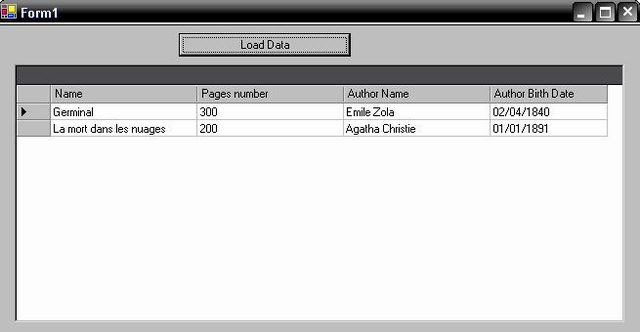
Sample screenshot

The "Complex Object" Sample

The sample here is a book that has Name, PagesNumber and Author properties. The author has name and BirthDate properties. In the object model, we create a book class that implements book properties and a second class Author. The Author property in the Book class is typed as Author.

Here is the code needed in the Book class:

public class Book : BindableObject
{
public Book()
{
}
public Book(string name,int pagesnumber, Author a)
{
this.Name = name;
this.PagesNumber = pagesnumber;
this.Author = a;
}
private string _Name;
public string Name
{
get{return _Name;}
set{_Name = value;}
}
private int _PagesNumber;
public int PagesNumber
{
get{return _PagesNumber;}
set{_PagesNumber = value;}
}
public Author _Author = new Author();
public Author Author 
{
get{return _Author;}
set{_Author = value;}
}
}

The DataBinding Problem

When we want to create a collection of books and show it to the user in datagrid, we can show only the name and Pagesnumber information. That is because in the MappingName property of the DatagridTextBox, we cannot put Author.Name for example to display the name of the book's author.

The Solution

When binding an object to a Windows Form control, the Framework uses reflection to get bindable properties of the object. However, when an object implements the IcustomTypeDescriptor interface, the framework gets object properties from IcustomTypeDescriptor.GetProperties() method. So the solution is to include all the properties we need to display.

In book example IcustomTypeDescriptor.GetProperties() will return : Name, PagesNumber, Author.Name and Author.BirthDate properties.

Doing this, you can display the Author name of a book in a datagrid just by writing "Author.Name" in the MappingName property of the DatagridTextBox. Also if you have a multicolumn combobox, you can display both Book Name and Author Name.

The Source Code

A class name BindableObject is included in the project. This class implements IcustomTypeDescriptor interface. All business objects created (Book and Author classes) inherit from this class. So no code must be written in business classes.

To get properties of an object, reflection is used. To increase performance, I implemented a cache in which I store objects structure, so reflection is used only one time for each type.

When binding a collection, it must implement the ItypedList interface to call the IcustomTypeDescriptor.GetProperties() method. So the BookCollection class inherits from BindableCollection class included in the project.

History

  • 2nd July, 2005: Initial post

License

This article, along with any associated source code and files, is licensed under The Code Project Open License (CPOL)

About the Author

Hayder Marzouk
Web Developer
France France
Member
MCSD Asp.Net certified developer

Sign Up to vote   Poor Excellent
Add a reason or comment to your vote: x
Votes of 3 or less require a comment

Comments and Discussions

 
You must Sign In to use this message board.
Search this forum  
    Spacing  Noise  Layout  Per page   
GeneralMy vote of 5membermanoj kumar choubey8 Aug '12 - 23:39 
Nice
QuestionIf instead of having an object Author is a list object of Author?memberMember 83045903 Mar '12 - 5:21 
Hi Hayder,
 
If instead of having an object Author inside the object Book, We have a list objects of Author. How would you do?.
 
Regards.
 
Albert Gassó
Computer Software Engineer
Barcelona
QuestionStill the way to go in .NET 2.0?memberSoTTo4 Oct '07 - 23:51 
Hi,
 
Is this still the way to do deep binding in .NET 2.0, or is there a better mechanism now?
 
thanks,

AnswerRe: Still the way to go in .NET 2.0?memberHayder Marzouk20 Nov '07 - 6:25 
Hi,
First sorry to be late. It's an old article you know.
Unfortunately there is no specific solution to deep binding in .Net 2.0 with Windows forms. In Asp.Net we can do it since .Net 1.0 using the DataBinder class. The class does not exist in windows forms and really I don’t know why.
 
However this code can cause some bugs with Visual Studio Designer when using the ObjectDataSource to bind classes. I Don't see in details why this occurs sometimes but it does not require a lot of work to be fixed I think.
 
Regards,
Hayder Marzouk
GeneralRe: Still the way to go in .NET 2.0?memberEtreus27 Nov '07 - 23:36 
Hello:
 
Great code... I have just implement my own version of your code too.
 
I'have a question for you. I'm unable to make that in desing time the columns will be populated in my grid controls using ObjectDataSource. I a possible reason for this, itis because objectDataSource doesn't implement ITypedList. Do you know any method to make the object datasource possible to populate column's grid at desing time.
 
Thanks you your code again.
GeneralBug Fixmembershumakercs16 Aug '07 - 5:14 
First, this was a great article and source code. I haven't downloaded this recently, so maybe it's already fixed:
 
public override bool IsReadOnly
{
get { return Prop.CanWrite; }
}
 
Basically the code is written such that it returns true if it is writable, which has nothing to do with IsReadOnly! This causes exceptions to be thrown when I attempt to bind my object as a BindableComponent saying that the property is read-only.
 
I changed it to this to resolve the issue, but am not sure this is exactly right, but it is better:
public override bool IsReadOnly
{
get { return (Prop.CanRead && !Prop.CanWrite); }
}
GeneralRe: Bug FixmemberHayder Marzouk21 Aug '07 - 6:11 
Hi,
I'm glad to see that there some developers still using this code after years of publishing this article.
Thanks for the bug fix.
 

GeneralBindingSource ProblemmemberPrimadi12 Jul '06 - 16:48 
I try to bind to Book Class directly (not BookCollection) using BindingSource,
I bind Name Property to TextBox.
 
I got an error :
Cannot bind to the property or column Name on the DataSource.
Parameter name: dataMember.
 
I cannot trace what causing the bug.
Can you help me to know what is the problem ?
 

GeneralRe: BindingSource ProblemmemberLaurts2 Jan '07 - 2:52 
Hi!
 
The reason why this does not work is beacause The designer and binding context won't recognize any members of ICustomTypeDescriptor.
It was closed as "By Design" WTF | :WTF: (and don't even get me started on that topic)Mad | :mad:
GeneralRe: BindingSource ProblemmemberJohann de Swardt25 Mar '07 - 4:28 
Hmmm, this is currently tickling my naughty bits in a bad way...
 
I am using a custom type descriptor for a business object. When I bind to that object using a System.Windows.Forms.BindingSource object, I get a "Cannot bind to the property or column Name on the DataSource." error.
 
Is there a way around this? It seems that the binding source doesn't pick up on the custom properties internally, but their values are assigned to anyway.
GeneralConversionmemberstevenjnielsen11 Apr '06 - 6:45 
Hey I am working with your code and moving it into VB.NET where I have already created Base Classes and inheritance in a similar way.
 
However when porting your code to VB.NET I am having trouble understanding the following line of code. If you could explain it and possible show the VB.NET equivalant that would be great.
 
System.ComponentModel.AttributeCollection attributes = _
TypeDescriptor.GetProperties(this,true)[P.Name].Attributes;
 
It is in the GetCustomProperties Function of the BindableObject Class.
 
StevenJNielsen
GeneralThis does not work with Iterator properteismembermdn6667 Mar '06 - 22:53 
Great solution!!! But I got one issue. I deveolped a class derived from BindleObject and this class has property
 
public FieldValue this[int index]
 
When the properties are retrieved by GetCustomProperties, I goes wrong with this property. It will see it as an Item proerty and the line
 
System.ComponentModel.AttributeCollection attributes = TypeDescriptor.GetProperties(this,true)[P.Name].Attributes;
 
will raise a System.NullReferenceException. Does anyone know how to catch this one neatly?
GeneralLooks like I gotta first bug.memberAlexei Tarnakin17 Jul '05 - 10:45 
I guess, you hate meSmile | :)
So, I just enclosed one BindableCollection into another and received StackOverflowException.
something like this
public class BookCollection: BindableCollection
{
private BookCollection _books = new BookCollection();
public BookCollection Attached
{
get
{
return _books;
}
}
public BookCollection()
{
//
// TODO: Add constructor logic here
//
this.ItemType = typeof(Book);
}
}
 

I think the problem is somewhere in ITypedList, but I need some sleep now (It's 0:46 AM) Big Grin | :-D
GeneralRe: Looks like I gotta first bug.sussAnonymous17 Jul '05 - 23:12 
It's not an ITypedList Problem. this line is the problem :
private BookCollection _books = new BookCollection();
It generates an overflowexception. The solution is to inialize collection in the get accessor of the property.
private BookCollection _books;
public BookCollection Attached
{
get
{
if (_books ==null)
{
_books = new BookCollection();
}
return _books;
}
set
{
_books = value;
}
}
 
It's the solution when u have properties typed as the parent object.
General[Msg Deleted]memberAlexei Tarnakin18 Jul '05 - 10:50 

GeneralRe: Looks like I gotta first bug.memberAlexei Tarnakin19 Jul '05 - 5:21 
ITypedList inner workings in general
ITypedList defines two methods: GetListName and GetItemProperties. GetListName is not that interesting and not required for what we want to do so we concentrate on GetItemProperties. Complex databinding works with property descriptors. A property descriptor is an object, often derived from the abstract class System.ComponentModel.PropertyDescriptor, which exposes information about a property like its name, type, if it is read only and also methods to get and set the property's value. A datagrid control tries to grab a list of property descriptors for the object type in the bound collection. Most datagrid controls can handle one type of object per hierarchy level or 'band', and the vanilla .NET grids (webforms/winforms) are no exception on this, so it will try this once per bound collection on a hierarchy level. With that list of property descriptors, one per publicly exposed property, it can then build the columns and read the data of each property and also set the data if the user changes the value of a cell.
 
ITypedList inner workings: single level hierarchy
If ITypedList is implemented on the collection bound to the datagrid, the datagrid will simply call ITypedList.GetItemProperties and will use the PropertyDescriptorCollection object returned. If ITypedList is not implemented (and with an ArrayList object, that's the case), the datagrid will call an overload of the static method System.ComponentModel.TypeDescriptor.GetProperties() to retrieve the property descriptors for the type of the object in the bound collection. With an empty ArrayList, there is no type information of the objects in the collection, because they're not there, nor does ArrayList implement ITypedList, which results in the situation where the datagrid doesn't have any property information whatsoever so it will simply display no columns. Some datagrid controls will allow you to pre-define columns and these will also be visible even if the data bound to the datagrid is completely empty, like an empty ArrayList, however in this situation, we don't have predefined columns or our datagrid control doesn't support showing pre-defined columns even if you bind an empty ArrayList.
 
ITypedList inner workings: multi level hierarchy
In the example mentioned earlier with an ArrayList of Customer objects and with each Custom object containing an ArrayList of Order objects, you have a hierarchy of objects which you can navigate through in a datagrid control (most datagrid controls allow you to do that, either by displaying 'bands' or 'levels' or another sort of 'level' description). When you, as a user see the Customer objects in the grid and you navigate to the Orders collection of a particular Customer object, the grid has to retrieve the property descriptors of the objects in the Orders collection. However it doesn't know of this collection, its DataSource is bound to an ArrayList of Customer objects. If the bound collection, in this case thus an ArrayList of Customer objects, doesn't implement ITypedList, the datagrid will try to access an instance of the Orders collection it has to view and will try to retrieve the property descriptors from that instance. If the bound collection does implement ITypedList, it will ask that collection to provide the property descriptors for the collection to view, even if this is another collection.
 
http://weblogs.asp.net/fbouma/articles/115837.aspx
Generalnice job!memberAlexei Tarnakin17 Jul '05 - 10:26 

private Type _TypeofObject;
private Type TypeOfObject
{
get
{
if (_TypeofObject ==null)
_TypeofObject = this.GetType();
return _TypeofObject;
}
}

We really appreciate your efforts to increase performance Big Grin | :-D
Why don't you just join your projects (I mean why not to add ICustomTypeDescriptor functionality to BaseObject and ITypedList functionality to CustomCollection)?
GeneralRe: nice job!sussAnonymous17 Jul '05 - 23:07 
For just one reason : To be simple to test and implement.

General General    News News    Suggestion Suggestion    Question Question    Bug Bug    Answer Answer    Joke Joke    Rant Rant    Admin Admin   

Permalink | Advertise | Privacy | Mobile
Web02 | 2.6.130516.1 | Last Updated 2 Jul 2005
Article Copyright 2005 by Hayder Marzouk
Everything else Copyright © CodeProject, 1999-2013
Terms of Use
Layout: fixed | fluid
