*** UPDATE - 04SEP2017 ***
A quick announcement to inform everyone that I have updated the source code to .NET 4.6.2 and fixed all of the errors that showed up. You can find the latest source code on GitHub here https://github.com/scottpage/FreeCal.
I'm working through an issue that spews files all over the desktop, so use caution when building/running the program. I'll have it resolved in a few hours, so you may want to wait until you see the timestamps change on the master. I posted the latest update around 1930 CDT (0030 UTC)) on 04SEP2017.
I'll revise this write-up as things change.
Cheers!
Introduction
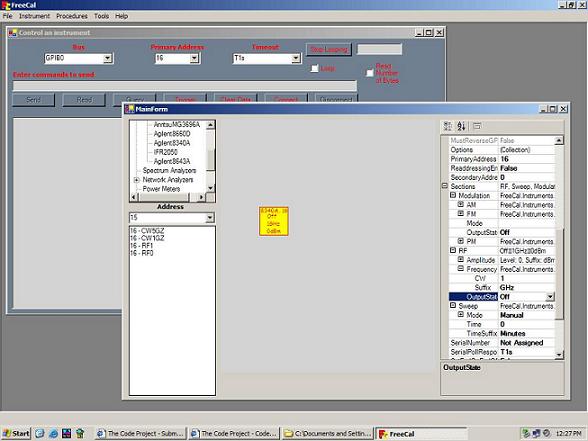
FreeCal is a free 100% .NET suite of utilities, procedures, and instrument drivers for controlling instruments in a Test and Measurement environment. However, it can be used for any type of Instrument Control needs. I have started to develop libraries for TCP/IP, USB and serial devices.
The demo application will not run unless the NationalInstruments.NI4882.dll file is installed in the GAC. You can rebuild the source and change all references from the GAC to a specific file location. The application also requires that you have a National Instruments GPIB interface controller installed (USB, PCI or ISA card) in the system.
You can download the National Instruments drivers from here, but if you are downloading the source for this application then you probably already have everything you need.
Note: My apologies to all of the VS.NET users. For the past 6 months I only had the SharpDevelop IDE and not VS.NET. I now have VS.NET, and have converted the entire application. The new VS.NET source can now be downloaded from this page using the the link provided above.
Scope
My goal for this application is to provide a 100% free alternative to applications like LabView, LabWindows, SureCal, MetCal, and MeasurementStudio for Visual Studio .NET.
Features
- Base instrument libraries for Signal Generators, Spectrum Analyzers, Network Analyzers, Power Meters, Function Generators, Universal and RF/Microwave Counters, Attenuator/Switch Drivers, EEPROM Power Sensors, Digital Multimeters and any other type of instrument that can be controlled remotely. All categories have specific instruments that have been coded for compatibility (due to the fact that all instruments have their own specific language for communication).
- Charts/graphs are integrated into the code with the use of ZedGraph: A flexible charting library for .NET (Thanks to JChampion for ZedGraph, many sleepless nights have been avoided developing an integrated charting library).
- Procedures for Power Sensors, Signal Generators, Spectrum Analyzers and Network Analyzer Calibration Kits have already been developed (so far most of them partially completed due to time), but they are not difficult to create as you will see in the examples below.
- Several conversion functions included to aid in the development and presentation of data: Frequency conversion from one range to another (i.e. MHz to GHz), Amplitude and Time conversions are also included as a base for almost all formulas and instrument communication.
- I recently started construction of a visual editor that allows "drag and drop" style test creation. It is included in the source and can be found in the demo under the Tools menu.
- Integrates with MySQL using the MySQL.NET Connector. I have created a number of data classes that ease the task of saving result data to a MySQL database.
- Various forms have been created for several of the instrument categories, like Network Analyzers. One of the most difficult tasks in RF/Microwave is downloading and manipulating data from the Agilent 8500 Series NWA, so I spent a lot of time writing the NWA data transfer classes.
- Because every instrument has its own tolerances and capabilities, the drivers have been written to include all of this (any missing information is easily added as it is all structure based).
- Instrument drivers and procedures are written with a "One Procedure Any Instrument" mindset. You can write one procedure that can calibrate any instrument of the same category. This is due to each instrument driver including the specifications for each test.
Requirements
The following software/hardware is required to operate FreeCal:
- The National Instruments NI-488.2 (Win32) Version 2.3 driver.
- One of the following NI boards: AT-GPIB/TNT(PnP), GPIB-ENET/100, GPIB-USB-B, PCI-GPIB, PCI-GPIB+, PCI-GPIB/LP, PCI-8212, PCI Express(TM) Interface for GPIB, PCMCIA-GPIB, PCMCIA-GPIB+, PMC-GPIB, PXI-GPIB, or PXI-8212, PXI-8232.
- Some knowledge of GPIB instrument communication may be required depending on the instrument you are creating or the test/procedure you may develop. The NI driver download includes all GPIB documentation you should need to properly understand its use.
Quick Start
If you just want to get started controlling an instrument, the following is all you need:
- First, install the NationalInstruments.NI4882.dll file (located in the FreeCal\Program\Resources folder) into the GAC (all references point to the GAC for this file, unless you want to specify that all libraries look for the file at a specific location instead). This file is also installed when you download the National Instruments Win32 GPIB driver v2.3.
- Add a reference to the NationalInstrument.NI4882 library in the GAC, or if you decide to use the file directly then specify its location. Also reference the FreeCal.Instruments.dll, and depending on the family of instrument you wish to control, its respective library. For example, if you want to control a Signal Generator, then add a reference to the file FreeCal.Instruments.Microwave.SignalGenerators.dll. Some instrument libraries make reference to the FreeCal.Data.dll and if required the compiler will state that a reference must be made.
- Include the following line of code in the Namespace declaration section at the top of your code file (depending on the family of instrument to be controlled).
Imports FreeCal.Instruments.Microwave.SignalGenerators
- Create a variable of the family (or specific instrument you are controlling).
Dim SigGen As SignalGenerator = New AgilentE4433B(0, 19, False)
The first parameter is the board (0 - 3), the second is the Primary Address of the instrument, and the third parameter is normally always false (used for pulling the current instrument state instead of presetting to defaults (not implemented 100%)). There is an optional fourth parameter (boolean) for simulation mode, it is False by default but if it is supplied as True, the instrument will run in a simulated state, not sending commands to the bus, all data sent to the instrument will be returned when read from the instrument.
Now that you have created the instrument variable, each instrument category has its own "Sections" property that will display all of the capabilities an instrument can provide. The following example will show you how to create an instrument and control it:
Imports FreeCal.Instruments.Microwave.SignalGenerators
Imports FreeCal.Instruments.Microwave.PowerMeters
Public Sub ControlInstrument
Dim SigGen As New AgilentE4433B(0, 19, False)
Dim PwrMtr As New AgilentE4417A(0, 13, False)
Dim TestLevel As Single = -10
    SigGen.Sections.RF.Frequency.Suffix = FrequencyEnum.GHz
    SigGen.Sections.RF.Frequency.CW = 3.5
    SigGen.Sections.RF.Amplitude.Suffix = AmplitudeEnum.dBm
    SigGen.Sections.RF.Amplitude.Level = TestLevel
    SigGen.Sections.RF.OutputState = OnOffStateEnum.[On]
    Dim Result As Single = PwrMtr.Sections.Measurements.Measure("A")
    MessageBox.Show("The " & PwrMtr.Model & " read " & Result & ".")
End Sub
Summary
That's all you need to get started, but there are many more instruments, tools and helpful forms that are included to help in the design of tests and procedures.
As of this date, the only documentation is included as a Word doc at the root of the FreeCal_src.zip file. I am working on documenting the entire project for future releases.
Enjoy!



 General
  News
News  Suggestion
  Question
  Bug
Bug  Answer
  Joke
Joke  Praise
  Rant
Rant  Admin
Admin 


 Submit an article or tip


