 |
|
 |
Hello,
Your solution for exporting DataSets to Excel works great for me,
but I am facing a problem. The numeric values get converted to exponential numbers
and dates are seen as '######'.
If you have a solution to this problem, it will be great help.
Anyways my vote of 5 for the Code.
|
|
|
|
 |
|
 |
Thanks for the clean codes!
Just FYI, it works for me after adding the line below in BulkExport.cs and Export.cs:
using Excel=Microsoft.Office.Interop.Excel;
What if you use late binding of Excel application (instead of early binding)?
|
|
|
|
 |
|
 |
its working in local machine..but not in server machine
|
|
|
|
 |
|
 |
I downloaded your code and try to compile it in Visual Studio 2010 but I get errors saying that "The type or namespace name 'Excel' could not be found". There is no problem with the default references that come with your code - "Excel" & "Microsoft.Office.Core".
When I add reference to Excel (Microsoft.Office.Interop.Excel) 12.0.0.0, and add "using Microsoft.Office.Interop.Excel;" but still I continue to get the error.
If you can point out from what assembly are you Referencing the "Excel" object, that would be great.
-Moiz Tankiwala
If you think you can do something, you can do it.
|
|
|
|
 |
|
 |
Please add the line below in BulkExport.cs as well as Export.cs and rebuild the solution:
using Excel = Microsoft.Office.Interop.Excel;
|
|
|
|
 |
|
 |
you use (Visual studio 2008, C#):
using Excel = Microsoft.Office.Interop.Excel;
and a reference to Microsoft Excel 12.0 Object Library
and System.drawing
cheers
|
|
|
|
 |
|
 |
I'm new to the programming thing; and your sample code proved very helpful.
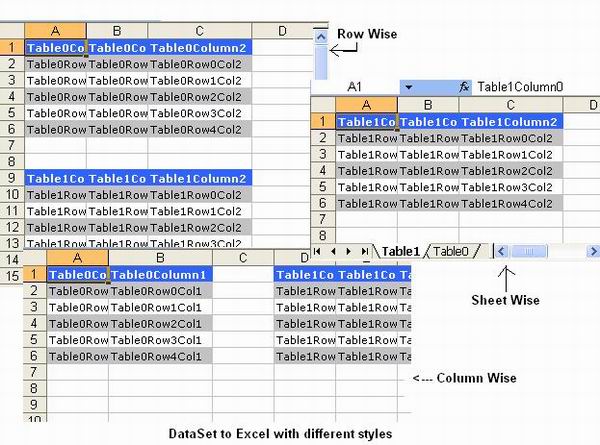
Question i'm using the sheetwise way off exporting, with each dataset goes to a sheet.
in my scenario my dataset comes from a SQL procedure and i've add a couple columns to the datasets before exporting to excel. So i have my datasets per sheet with empty columns that i would like to add formulas that would involve cell within the same row to.
is there any way i incorporate this during the export process?
|
|
|
|
 |
|
 |
Krishna,
I am having problems downloading your code into my machine, since the version is different. Could you please email me the code so that I could use it in my project. (drshreya at gmail dot com)
Your reply will be greatly appreciated.
Thanks,
Shreya
|
|
|
|
 |
|
 |
Many thanks for your effort
|
|
|
|
 |
|
 |
It takes ages for my 20k records and 5 col ....
took almost 10 mins to return me the excel ..rest al is good ....
m i missing anything ????
|
|
|
|
 |
|
 |
It looks like the formatting happens in the looping over rows instead of across bigger ranges. Probably needed this to format alternating row colors.
Still using lots of com.
I thought there was a way to send an array over and that went faster.
need to check the old notes.
Shouldn't take much to fix up.
-- modified at 16:40 Tuesday 30th January, 2007
|
|
|
|
 |
|
 |
yep, could use arrays and ranges, need to keep an eye on the use of rowspace and columnspace.
still shouldn't take long to touch up.
I knew these years of programming would come in handy somewhere.
|
|
|
|
 |
|
|
 |
|
 |
Hello Friends,
I am having a problem with this code. The excel application does not open. I see in the task manager that the Excel.exe process is started when I run the code, but the application will not open. Any ideas? The only thing I notice on the task manager is that the user name of the process is a guess user, not the user I am logged in as.
I appreciate any help
Maria
Thanks
Maria
|
|
|
|
 |
|
 |
I have just now tested your code which is fine. However, it shuold by possible to speciefy a file name and a workbook name.
Thanks.
|
|
|
|
 |
|
 |
Hi , thanks for your article .
When i try to use, i received this message
namespace name 'Excel' is missing
namespace name 'VBIDE' is missing
where i can find this assemblies ?
best Regards
Lucio Bispo(lbispo@hsbc.com.br)
|
|
|
|
 |
|
 |
Hello,
I am getting Access Denied error when i use ur code. i have also checked the permissions for the folder and everything is ok.
Please find below the complete error message for more information on the same.
Access is denied.
Description: An unhandled exception occurred during the execution of the current web request. Please review the stack trace for more information about the error and where it originated in the code.
Exception Details: System.UnauthorizedAccessException: Access is denied.
ASP.NET is not authorized to access the requested resource. Consider granting access rights to the resource to the ASP.NET request identity. ASP.NET has a base process identity (typically {MACHINE}\ASPNET on IIS 5 or Network Service on IIS 6) that is used if the application is not impersonating. If the application is impersonating via , the identity will be the anonymous user (typically IUSR_MACHINENAME) or the authenticated request user.
To grant ASP.NET write access to a file, right-click the file in Explorer, choose "Properties" and select the Security tab. Click "Add" to add the appropriate user or group. Highlight the ASP.NET account, and check the boxes for the desired access.
Source Error:
Line 138: //excel.ExcelFormattingStyle = formatStyle;
Line 139: //Pass your Dataset and Specify the style..
Line 140: excel.ExportDataToExcel(ds,GetExportStyle());
Line 141:
Line 142:
I really appreciate your help on the same.
Thanks and Regards
Srikanth. R
|
|
|
|
 |
|
 |
Put identity impersonate="true" in web.config file.
Mukesh B
|
|
|
|
 |
|
 |
please tell me how to slove this issues
thnx
programming is thinking
|
|
|
|
 |
|
 |
I'm sure your class works well although i havent tried it yet but.... Where's the article??
The idea of posting articles is to allow others to learn how you've solved your particular problem not just to post the code and leave people to it.
Kev
|
|
|
|
 |
|
 |
Receive "Access is denied." on the following line.
excel = new Excel.ApplicationClass();
any tips to resolve this problem?
Thanks, H12
H12
|
|
|
|
 |
|
|
 |
|
 |
it's been a long time, but I think this is how I got it working:
In web.config add:
to get excel = New Excel.ApplicationClass working, added aspnet user client to excel in config mgt....highlight the folder and add aspnet and give privileges.
Control panel/admin/comp services/dcom/Microsoft excel, customize, I added aspnet on the security tab in the 3 sections.
|
|
|
|
 |
|
 |
sorry, the above didn't include what was in the web config file line
identity impersonate="true"
|
|
|
|
 |
|
 |
Hello Krishna,
Your component is great. I use it in my project and it saves me a lot of time.
Many thanks.
Vincent
|
|
|
|
 |
