Click here to Skip to main content

Dynamic 'Sales by Week' Procedure in SQL Server

By , 23 Sep 2005
 

Introduction

Presented in this article is an approach for creating a categorized “Sales by Week” report in SQL Server, in which weeks are represented as columns, categories as rows, with values totaled by those categories. Before describing the stored procedure, where we’ll parameterize this data request and allow for dynamically created columns, it is useful to understand how the general query will work. A detail inner query is used to fit sales numbers under appropriate columns given their position within a particular week. This query is then wrapped in an aggregating outer query that collapses each sales total by its category. For demonstration purposes, Northwind is the target database.

Detail Inner Query

The purpose of the inner query is to provide the table joins we’ll need, and to establish the columns used for each week. The code will work something like this:

SELECT CategoryName
       , <<column defining sales data for the first week>>
       , <<column defining sales data for the second week>>
       , ...
       , <<column defining sales data for the last week>>
  FROM Orders o 
         INNER JOIN [Order Details] od ON o.OrderID = od.OrderID 
         INNER JOIN Products p ON od.ProductID = p.ProductID
         INNER JOIN Categories c ON p.CategoryID = c.CategoryID
 WHERE <<criteria limiting the selection to those dates
          between the first and last weeks>>

The FROM clause is simply a join of each table required to get from a Northwind Category name to the sales amounts on individual orders (found in [Order Details]). The WHERE clause will also be straight-forward - a simple date range comparison.

The SELECT clause warrants attention. If we want, for our result set, each week represented as its own column, then we need a separate definition for each within the SELECT clause. Fortunately, they will all follow the same pattern and can be wrapped in a loop in the stored procedure.

To define each column, we'll use a SQL Sever CASE statement. In the case that a given OrderDate falls within the week in question, we’ll output the sales total as a positive value in that week’s column. In the case that the OrderDate does not fall within the week in question, we’ll output a zero value. For example, to define a column for the week of 1 March 1998, we could use the following CASE statement:

CASE 
  WHEN OrderDate >= '03/01/1998' and OrderDate < '03/08/1998' 
    THEN (od.Quantity * od.UnitPrice) - od.Discount 
  ELSE 0 
END AS [Week0]

The calculation (od.Quantity * od.UnitPrice) – od.Discount is simply a totaling of the sales amount for that given detail record. In this example, we are applying the alias name [Week0] for the column. When looping this in the stored procedure, we’ll see [Week1], [Week2], etc.

The SQL, for an example of this detail query, reporting three weeks’ worth of sales amounts beginning on 3/1/1998 would then look like the following:

SELECT CategoryName
       , CASE 
           WHEN OrderDate >= '03/01/1998' and OrderDate < '03/08/1998' 
             THEN (od.Quantity * od.UnitPrice) - od.Discount 
           ELSE 0 
         END AS [Week0]
       , CASE 
           WHEN OrderDate >= '03/08/1998' and OrderDate < '03/15/1998' 
             THEN (od.Quantity * od.UnitPrice) - od.Discount 
           ELSE 0 
         END AS [Week1]
       , CASE 
           WHEN OrderDate >= '03/15/1998' and OrderDate < '03/22/1998' 
             THEN (od.Quantity * od.UnitPrice) - od.Discount 
           ELSE 0 
         END AS [Week2]
  FROM Orders o 
        INNER JOIN [Order Details] od ON o.OrderID = od.OrderID 
        INNER JOIN Products p ON od.ProductID = p.ProductID
        INNER JOIN Categories c ON p.CategoryID = c.CategoryID
 WHERE (OrderDate >= '03/01/1998' AND OrderDate < '03/22/1998')

The data then looks something like this (note the zeros if the given detail record doesn’t fall within those weeks):

CategoryName    Week0        Week1        Week2                    
--------------- ------------ ------------ ------------ 
Seafood         25.889999    0.0          0.0
Dairy Products  340.0        0.0          0.0
Beverages       1079.75      0.0          0.0
Dairy Products  849.75       0.0          0.0
Confections     418.79999    0.0          0.0
...(etc.)       ...          ...          ...
Condiments      0.0          500.0        0.0
Beverages       0.0          378.0        0.0
Seafood         0.0          249.75       0.0
Grains/Cereals  0.0          71.75        0.0
Seafood         0.0          569.79999    0.0
...(etc.)       ...          ...          ...
Condiments      0.0          0.0          110.0
Dairy Products  0.0          0.0          37.450001
Seafood         0.0          0.0          57.850002
Beverages       0.0          0.0          387.45001
Condiments      0.0          0.0          399.95001

Again, each row here represents a single detail row, with values computed for only a single order item; the category names are duplicated and the values are not aggregated.

Aggregating Outer Query

To achieve the desired format of total sales per category per week, we’ll nest the detail query within an outer query which aggregates the values, grouping by the category name. This outer query is an uncomplicated use of the SUM() function and the GROUP BY clause.

SELECT CategoryName
       ,Sum(Week0) AS [Week of 1 Mar]
       ,Sum(Week1) AS [Week of 8 Mar]
       ,Sum(Week2) AS [Week of 15 Mar]
  FROM (
         << the inner query as defined above >>
       ) AS InnerDetail
 GROUP BY CategoryName

Because we applied zero values for those records that do not fall within the given column, the SUM() functions are effectively producing a total only for their respective weeks. The column alias names [Week of xxx] provide a convenient heading to identify each week. The execution of the complete query, again using 1 March 1998 as a starting week, results in the following:

CategoryName    Week of 1 Mar       Week of 8 Mar       Week of 15 Mar     
--------------- ------------------- ------------------- -------------------
Beverages       3243.9999694824219  2623.9499816894531  4589.3500213623047
Condiments      2806.0              1669.8500061035156  936.95001220703125
Confections     4932.7000503540039  6142.75             5382.8499145507812
Dairy Products  2136.5499877929687  5157.5              2716.4499931335449
Grains/Cereals  843.65000152587891  1196.75             763.80000686645508
Meat/Poultry    1250.3999862670898  330.0               656.0
Produce         1367.9000244140625  2724.7999877929687  2893.1999969482422
Seafood         2197.7900238037109  3154.2999877929687  2396.1500205993652

Creating the Stored Procedure

The value in constructing a stored procedure from this aggregation query is in parameterization. This kind of query is far more useful if we can pass in a starting date and the number of weeks’ data in which we’re interested. We begin the stored procedure with a number of variable declarations.

CREATE PROCEDURE DynamicCategorySalesByWeek
 @startingDate datetime
,@numWeeks int = 4
as
begin
  declare @selectClause varchar(8000)
  declare @fromClause varchar(8000)
  declare @whereClause varchar(8000)
  declare @groupByClause varchar(8000)
  declare @i int;
  declare @sDate datetime
  declare @colHead varchar(255)
  declare @case varchar(1000)
  declare @cases varchar(8000)
  declare @sqlInner varchar(8000)
  . . .
end

We’ll establish starting date and number of weeks as parameters, using a duration of four weeks as a default. The first portion of the procedure establishes a while loop which defines each week’s column in the inner detail SELECT statement.

  -- determine columns to appear in the select clause of the inner detail set
  set @i = 0
  set @cases = ''
  while (@i < @numWeeks)
  begin
    set @sDate = @startingDate + (@i * 7)
    set @colHead = '[Week' + CONVERT(varchar(2), @i) + ']'
    set @case = ', CASE WHEN OrderDate >= ''' 
              + CONVERT(varchar(30),@sDate,101) 
              + ''' and OrderDate < ''' 
              + CONVERT(varchar(30), @sDate + 7, 101) 
              + ''' THEN (od.Quantity * od.UnitPrice) - od.Discount ELSE 0 END'
    
    set @cases = @cases + '
         ' +@case + ' as ' + @colHead
    set @i = @i + 1
  end
  
  set @selectClause = 'select CategoryName' + @cases

In addition to defining the CASE statement for each column using a calculation based on the @startingDate parameter and the loop counter, this code also creates our column headings of [Week0], [Week1], [Week2], etc. The FROM clause for the inner detail set follows in the code:

  -- the from clause of the inner detail set
  set @fromClause = ' 
  from Orders o Inner Join [Order Details] od on o.OrderID = od.OrderID 
        Inner Join Products p on od.ProductID = p.ProductID
        Inner Join Categories c on p.CategoryID = c.CategoryID
 '

The carriage returns embedded in the @fromClause string are purely for debug readability (one may embed print statements to test the SQL being compiled). The WHERE clause then applies the appropriate date range given @startingDate and @numWeeks.

  -- the where clause, based on @startingDate and @numWeeks
  set @whereClause = ' where (OrderDate >= ''' 
           + CONVERT(varchar(30), @startingDate, 101) 
           + ''' and OrderDate < ''' 
           + CONVERT(varchar(30), @startingDate + (@numWeeks * 7), 101) 
           + ''')'

  --remember this "inner" detail query
  set @sqlInner = @selectClause + @fromClause + @whereClause

To create the outer, aggregating query, we use another while loop to apply a SUM() to each of the [WeekX] columns. We’ll also define a friendly title for each column.

  -- now we have the detail; create an outer query that aggregates the detail,
  -- grouping by our CategoryName
  set @i = 0;
  set @cases = ''
  while (@i < @numWeeks)
  begin
    set @sDate = @startingDate + (@i * 7)
    set @colHead = '[Week of ' + CONVERT(varchar(255), @sDate, 6) + ']'
    set @case = ', Sum([Week' + CONVERT(varchar(2), @i) + '])'
    
    set @cases = @cases + '
         ' +@case + ' as ' + @colHead
    set @i = @i + 1
  end

Finally, we compile the complete aggregation query (wrapping the inner detail query) and execute it.

  set @selectClause = 'select CategoryName as Category' + @cases
  set @fromClause = '  from (' + @sqlInner + ') z'
  set @groupByClause = ' group by CategoryName order by CategoryName'  

  -- finally, execute the aggregating query
  execute(@selectClause + @fromClause + @groupByClause)

The complete stored procedure may be downloaded by clicking the link at the top of this article.

About the Demo Project

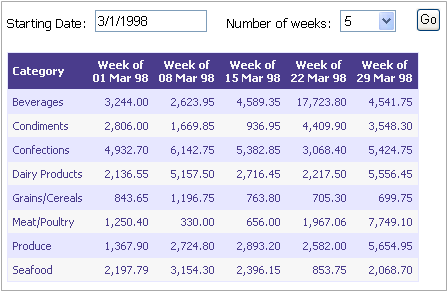
The demo project is a simple ASP.NET application that consumes the dynamically constructed query. The page default.aspx contains a very simple DataGrid control, with only code necessary to retrieve the data source from the stored procedure and apply presentation formatting. To use the demo project, execute the file DynamicCategorySalesByWeek.sql within the Northwind database, establish EXECUTE permissions on it for the ASP.NET user, and modify web.config to contain the appropriate connection string.

Summary

The DynamicCategorySalesByWeek stored procedure presented in this article demonstrates an approach to creating a summative report with a set of dynamic columns based on dates. In this case, we chose weeks for our columns, but the technique could be adapted easily for months, quarters, or years. The procedure constructs an aggregation outer query which wraps an inner detail query, using while loops to assemble columns defined with CASE statements. The CASE statements ensure that only values from detail records within the week are summed within that week’s column. By encapsulating these statements within a dynamic, parameterized procedure, the developer gains flexibility with this data request and can incorporate that flexibility in an application interface.

License

This article has no explicit license attached to it but may contain usage terms in the article text or the download files themselves. If in doubt please contact the author via the discussion board below.

A list of licenses authors might use can be found here

About the Author

Mike Ellison
United States United States
Member
I work for the University of Nevada, Las Vegas in the Office of Institutional Analysis and Planning. Among other things, our office is charged with the mission of deriving useful information in support of administrative decision-making from institutional data. Within the context of that mission, my office mates and I apply technology in the form of custom data processing applications, data extraction and analysis tools, reporting tools, relational databases, OLAP solutions, data warehousing, and data mining.
 
Visit my blog at MishaInTheCloud.com


Sign Up to vote   Poor Excellent
Add a reason or comment to your vote: x
Votes of 3 or less require a comment

Comments and Discussions

 
You must Sign In to use this message board.
Search this forum  
    Spacing  Noise  Layout  Per page   
QuestionThanksmemberMikeS8 Jun '12 - 4:25 
Thumbs Up | :thumbsup:
Great article and kick start for the report I just had to create.......THANKS!
GeneralError in the stored Procmembermitasid115 Aug '10 - 13:53 
Hi Mike
I am executing the following stored proc but I am getting this error:
Column 'CPstage2.Fullname' is invalid in the select list because it is not contained in either an aggregate function or the GROUP BY clause.
 
Here is the code:
USE [LABS_RSM]
GO
/****** Object: StoredProcedure [PEGASUS\mita].[DynamicCategorySalesByWeek] Script Date: 08/16/2010 10:44:42 ******/
SET ANSI_NULLS ON
GO
SET QUOTED_IDENTIFIER ON
GO
ALTER procedure [PEGASUS\mita].[DynamicCategorySalesByWeek]
@startingDate datetime
,@numWeeks int = 4
as
begin
declare @selectClause varchar(8000)
declare @fromClause varchar(8000)
declare @whereClause varchar(8000)
declare @groupByClause varchar(8000)
declare @i int
declare @sDate datetime
declare @colHead varchar(255)
declare @case varchar(1000)
declare @cases varchar(8000)
declare @sqlInner varchar(8000)
 
-- determine columns to appear in the select clause of the inner detail set
set @i = 0;
set @cases = ''
while (@i < @numWeeks)
begin
set @sDate = @startingDate + (@i * 7)
set @colHead = '[Week' + CONVERT(varchar(2), @i) + ']'
set @case = ', case when Current_Reg_start >= '''
+ CONVERT(varchar(30),@sDate,101)
+ ''' and Current_Reg_start < '''
+ CONVERT(varchar(30), @sDate + 7, 101)
+ ''' then count(CarePlus_reg_id) else 0 end'

set @cases = @cases + '
' +@case + ' as ' + @colHead
set @i = @i + 1
end

set @selectClause = 'select Fullname' + @cases

 
-- the from clause of the inner detail set
set @fromClause = '
from CPstage2
'
 
-- the where clause, based on @startingDate and @numWeeks
set @whereClause = ' where (Current_Reg_start >= '''
+ CONVERT(varchar(30), @startingDate, 101)
+ ''' and Current_Reg_start < '''
+ CONVERT(varchar(30), @startingDate + (@numWeeks * 7), 101)
+ ''')'
 

--remember this "inner" detail query
set @sqlInner = @selectClause + @fromClause + @whereClause
print @sqlInner
 

-- now we have the detail; create an outer query that aggregates the detail,
-- grouping by our CategoryName
set @i = 0;
set @cases = ''
while (@i < @numWeeks)
begin
set @sDate = @startingDate + (@i * 7)
set @colHead = '[Week of ' + CONVERT(varchar(255), @sDate, 6) + ']'
set @case = ', Sum([Week' + CONVERT(varchar(2), @i) + '])'

set @cases = @cases + '
' +@case + ' as ' + @colHead
set @i = @i + 1
end
 
set @selectClause = 'select Fullname as Category' + @cases
set @fromClause = ' from (' + @sqlInner + ') z'
set @groupByClause = ' group by Fullname order by Fullname'
 

-- finally, execute the aggregating query
execute(@selectClause + @fromClause + @groupByClause)


end


Thanks
GeneralRe: Error in the stored ProcmemberMike Ellison17 Aug '10 - 8:35 
Hi there. In looking at what you've posted, there isn't anything standing out to me that looks wrong. What version of SQL Server are you working with?
 
For troubleshooting, temporarily change the "execute" line at the end to a "print" line, so you can see the complete concatenated SQL statement being generated... then copy that to a clean query window and run it. Does it work when you execute it from a clean query window?

GeneralThis is an awful approach and bad codemember--CELKO--11 Mar '09 - 15:21 
1) Proprietary code
2) Failure to use ISO-8601 formats
3) Procedural programming
4) ISO-11179 data element name violations
5) display formatting in SQL
 
SQL is a data language and not a computational one. We would build a Calendar table (a century requires only 365245 rows) with the Julianized week number as one of the columns and write very simple queries with a little integer math.
QuestionAlternatives?memberaroddd3 Aug '07 - 5:40 
Very nice work. I took your example and implemented something very similar, only the proc takes a start date and an end date, rather than a start date and a number of weeks.
 
The only problem is, for large date ranges (or in your case, a large number of weeks), you are limited by the 8000 character max of t-sql scalar variables. I tried using text as my variable type but it looks like that is now allowed.
 
Often when I come up with a solution, then weeks or months later I randomly come up with different ways I could have done it. Have you thought of any alternatives that would allow you to submit a large number of weeks? In other words, something that would get around that 8000 character max?
AnswerRe: Alternatives?memberMike Ellison3 Aug '07 - 6:39 
Hi there. Thanks for the comments.
aroddd wrote:
Have you thought of any alternatives that would allow you to submit a large number of weeks? In other words, something that would get around that 8000 character max?

That's a tricky issue for crosstab reports in Sql Server 2000. I can't think of an alternative that doesn't use dynamic sql at some point.
 
If you're using Sql Server 2005, you can make use of the PIVOT command and a temporary table that stores your criteria defining a week's parameters. Something like this: (it's off the top of my head so the syntax may not be quite right, but hopefully you'll get the point)
-- create a temporary table to hold information about each week
Create Table #weeks
 (
   startDate  datetime
  ,endDate    datetime
  ,title      varchar(128)
 )
 
 -- populate the temporary table based on @startDate and @endDate arguments
 declare @insStart datetime
 declare @insEnd datetime
 
 set @insStart = @startDate  --@startDate passed in as an argument to the proc
 while @insStart <= @endDate --@endDate passed in as an argument to the proc
 begin
    set @insEnd = DATEADD(d, 7, @insStart)
    Insert Into @weeks Values(@insStart, @insEnd, 'Week of ' + CONVERT(varchar(128),@insStart))
    set @insStart = @insEnd
 end
Then you could use the #weeks temp table in your inner query *without* a join, but with criteria that would limit which title will be associated with the given date. Something like:
 select a.*, w.title
   from MyTableWithADate a, #weeks w
  where a.MyDateField >= w.startDate and a.MyDateField < w.endDate
At that point you could use the PIVOT statement in Sql Server 2005 against the w.title field. But for 2000, the only way I can think of requires dynamic sql statements which are inherently limited to varchar variables of 8000 characters apiece.

AnswerRe: Alternatives?memberDFelix19 Jun '08 - 22:42 
Hi..Once downloaded I could not find the stored procedure.
GeneralRe: Alternatives?memberMike Ellison20 Jun '08 - 5:35 
DFelix wrote:
Hi..Once downloaded I could not find the stored procedure.

 
It's the file DynamicCategorySalesByWeek.sql.
GeneralThank youmemberuv50720 Jul '07 - 3:26 
Thank's a lot for this article. It is very usefull
Your stored procedure was just what I needed to build my query
GeneralRe: Thank youmemberMike Ellison20 Jul '07 - 5:53 
I'm glad it was helpful.
QuestionError - related to SQL 2005?memberGSC_DB11 Jul '07 - 1:42 
Hi - this is exactly what I have been looking for, however after changing the fields to suit my needs, I am getting this error:
 
Msg 8120, Level 16, State 1, Line 1
Column 'Alias' is invalid in the select list because it is not contained in either an aggregate function or the GROUP BY clause.
Msg 4104, Level 16, State 1, Line 1
The multi-part identifier "Alias" could not be bound.
Msg 4104, Level 16, State 1, Line 1
The multi-part identifier "Alias" could not be bound.
 
I found this article which says it should be now fixed...
http://forums.microsoft.com/MSDN/ShowPost.aspx?PostID=374291&SiteID=1
 
Any thoughts or suggestions appreciated.
 
GSC

AnswerRe: Error - related to SQL 2005?memberMike Ellison11 Jul '07 - 5:54 
Without seeing your statement, I'm not sure what I can tell you.
GeneralRe: Error - related to SQL 2005?memberGSC_DB11 Jul '07 - 6:02 
Hi Mike,
 
Here is the code:
 
/****** Object:   StoredProcedure [dbo].[prcNUI_DynamicPILSalesByWeek]      Script Date: 07/11/2007 16:55:12 ******/
SET ANSI_NULLS ON
GO
SET QUOTED_IDENTIFIER ON
GO
ALTER procedure [dbo].[prcNUI_DynamicPILSalesByWeek]
@startingDate datetime
,@numWeeks int = 4
as
begin
   declare @selectClause varchar(8000)
   declare @fromClause varchar(8000)
   declare @whereClause varchar(8000)
   declare @groupByClause varchar(8000)
   declare @i int;
   declare @sDate datetime
   declare @colHead varchar(255)
   declare @case varchar(1000)
   declare @cases varchar(8000)
   declare @sqlInner varchar(8000)
 
   -- determine columns to appear in the select clause of the inner detail set
   set @i = 0;
   set @cases = ''
   while (@i < @numWeeks)
   begin
      set @sDate = @startingDate + (@i * 7)
      set @colHead = '[Week' + CONVERT(varchar(2), @i) + ']'
      set @case = ', case when dbo.tmpNUI_CommissionedIVUs.COMMISSIONTIME >= '''
                     + CONVERT(varchar(30),@sDate,101)
                     + ''' and dbo.tmpNUI_CommissionedIVUs.COMMISSIONTIME < '''
                     + CONVERT(varchar(30), @sDate + 7, 101)
                     + ''' then COUNT(ETL.dynIVU_V.URN) else 0 end'
     
      set @cases = @cases + '
            ' +@case + ' as ' + @colHead
      set @i = @i + 1
   end
  
   set @selectClause = 'select SunReference AS Category' + @cases  
     
 
   -- the from clause of the inner detail set
   set @fromClause = '
   FROM           
     ETL.mapCompanyChannel INNER JOIN
      ETL.mapChannelIVU_V ON
      ETL.mapCompanyChannel.channel_id = ETL.mapChannelIVU_V.Channel_id INNER JOIN
      ETL.mapIVUProductItemLine_V ON
      ETL.mapChannelIVU_V.IVU_id = ETL.mapIVUProductItemLine_V.ivu_id INNER JOIN
      ETL.staProductItemLine_V ON
      ETL.mapIVUProductItemLine_V.ProductItemLine_id = ETL.staProductItemLine_V.ProductItemLine_id INNER JOIN
      ETL.mapIVUSubscription_V ON
      ETL.mapChannelIVU_V.IVU_id = ETL.mapIVUSubscription_V.IVU_id INNER JOIN
      ETL.dynSubscription_V ON
      ETL.mapIVUSubscription_V.Subscription_id = ETL.dynSubscription_V.Subscription_id INNER JOIN
      ETL.dynIVU_V ON ETL.mapChannelIVU_V.IVU_id = ETL.dynIVU_V.IVU_id INNER JOIN
      dbo.tmpNUI_CommissionedIVUs ON ETL.dynIVU_V.IVU_id = dbo.tmpNUI_CommissionedIVUs.IVU_ID
'
   -- the where clause, based on @startingDate and @numWeeks
   set @whereClause = '
WHERE
     (dbo.tmpNUI_CommissionedIVUs.COMMISSIONTIME >= '''
                                             + CONVERT(varchar(30), @startingDate, 101)
                                             + ''' and dbo.tmpNUI_CommissionedIVUs.COMMISSIONTIME < '''
                                             + CONVERT(varchar(30), @startingDate + (@numWeeks * 7), 101)
                                             + ''')'
 

   --remember this "inner" detail query
   set @sqlInner = @selectClause + @fromClause + @whereClause
      print @sqlInner
 

   -- now we have the detail; create an outer query that aggregates the detail,
   -- grouping by our SunReference
   set @i = 0;
   set @cases = ''
   while (@i < @numWeeks)
   begin
      set @sDate = @startingDate + (@i * 7)
      set @colHead = '[Week of ' + CONVERT(varchar(255), @sDate, 6) + ']'
      set @case = ', Sum([Week' + CONVERT(varchar(2), @i) + '])'
     
      set @cases = @cases + '
            ' +@case + ' as ' + @colHead
      set @i = @i + 1
   end
 
   set @selectClause = 'select SunReference ' + @cases
   set @fromClause = '   from (' + @sqlInner + ') z'
   set @groupByClause = ' group by SunReference
                              order by SunReference'  
 

   -- finally, execute the aggregating query
   execute(@selectClause + @fromClause + @groupByClause)
     print @selectClause
     print @fromClause
     print @groupByClause
 

end

 
GSC
GeneralRe: Error - related to SQL 2005?memberMike Ellison11 Jul '07 - 6:19 
Okay - just looking at the final statement that is generated @selectClause + @fromClause + @groupByClause it looks like your statement is generating an outer "Select SunReference" with a "Group by SunReference" and "Order By SunReference"... however, your inner query is using "Select SunReference AS Category", which would mean the field name [Category] is what you should reference in the outer clauses, rather than [SunReference]. So try replacing:
  set @selectClause = 'select SunReference ' + @cases
  set @fromClause = '  from (' + @sqlInner + ') z'
  set @groupByClause = ' group by SunReference
                         order by SunReference'  
with
  set @selectClause = 'select Category ' + @cases
  set @fromClause = '  from (' + @sqlInner + ') z'
  set @groupByClause = ' group by Category
                         order by Category'  
in your stored procedure and see if that helps.
GeneralRe: Error - related to SQL 2005?memberGSC_DB11 Jul '07 - 23:06 
Thank you for your reply. After changing the suggested text, I get the following:
 
Msg 8120, Level 16, State 1, Line 1
Column 'ETL.staProductItemLine_V.SunReference' is invalid in the select list because it is not contained in either an aggregate function or the GROUP BY clause.
 
Any other thoughts appreciated.
 
GSC

GeneralVery Good...memberDomingo M. Asuncion25 Mar '07 - 14:09 
Thank's a lot of your idea donation..it will be usefull to me and to others..
More Power...
 
Domingo M. Asuncion - (Phil.)
GeneralRe: Very Good...memberMike Ellison26 Mar '07 - 7:53 
Hi Domingo. Thanks for the kind words. Cool | :cool:
GeneralRe: Very Good...memberDomingo M. Asuncion20 May '08 - 16:19 
Your Welcome Sir..
GeneralGood Procedure.... one suggestionmemberjaguirre746521 Jul '06 - 4:57 
What about calculate automatically te first day of week for the given date?
I will work on it and send it.
 
Congratulations! very useful.Laugh | :laugh:
 

GeneralRe: Good Procedure.... one suggestionmemberMike Ellison21 Jul '06 - 5:51 
Sure, why not?
 

GeneralJust what i needed..membermaxdesmo28 Sep '05 - 16:39 
I had a similar problem where i needed to count the values instead of summing them in the outer sql query.
 
Because COUNT() in this instance doesn't count NULL's, i substituted 0 for NULL in the ELSE part of the CASE statement so that i wouldn't simply get the same count (total number of rows in the table) for each column.
 
Your solution was just what i needed, thanks!
GeneralRe: Just what i needed..memberMike Ellison28 Sep '05 - 17:54 
Hi there. I've done the same thing for a count - using a 1 or 0 value in the CASE statement, then summing that column.
 
I'm glad it was helpful Smile | :)

GeneralI can learn from thismemberSander Bouwhuis26 Sep '05 - 22:19 
Interesting stuff... I can learn from this.
Thanks
GeneralRe: I can learn from thismemberMike Ellison27 Sep '05 - 3:20 
Hi there. Thanks for the kind words.

General General    News News    Suggestion Suggestion    Question Question    Bug Bug    Answer Answer    Joke Joke    Rant Rant    Admin Admin   

Permalink | Advertise | Privacy | Mobile
Web02 | 2.6.130516.1 | Last Updated 23 Sep 2005
Article Copyright 2005 by Mike Ellison
Everything else Copyright © CodeProject, 1999-2013
Terms of Use
Layout: fixed | fluid
