Click here to Skip to main content

Embed HTML Email Images

By , 5 Jun 2007
 

Other projects you will need to download
Screenshot - PSH_Ne2.png

Introduction

How to embed images into an email; short and sweet, but this is all this does.

Background

My sister wanted to send out an email newsletter and wanted to embed images. So, she asked a friend and they sent her some classic ASP code. Then she asked me to make it work. Yeah, right! I fired up VS 2003 and got a hold of MIL HTML Parser and DotNetOpenMail. Within an hour, I had a small little app that could take a webpage, add all the needed images, and change the img tags to point to the content IDs of the images attached to the email and send it off to an email address.

Using the code

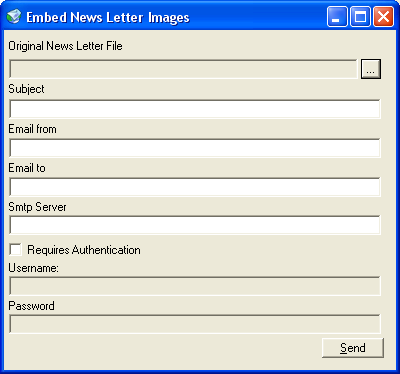
This code is really straightforward. Just select an HTML file that you have created, add a subject, a "from" email address, a "to" email address and the SMTP server name or IP address, and then click Send. But what does the code do? Well, you can't get much simpler than this. The code goes off and gets all the img elements.

    // Get All the img nodes
    GetImageNodes(document.Nodes);
    private void GetImageNodes(HtmlNodeCollection nodes)
    {
        foreach (HtmlNode node in nodes)
        {
            HtmlElement element = node as HtmlElement;
            if (element != null)
            {
                if (element.Name.ToLower() == "img")
                {
                    imageNodes.Add(element);
                }
                if (element.Nodes.Count > 0)
                {
                    GetImageNodes(element.Nodes);
                }
            }
        }
    }

Then all the needed images are attached and the src attributes of the img elements are set to the content ID of the attached images.

    // Change all the img nodes
    foreach (HtmlElement element in imageNodes)
    {
        FileInfo imageFileInfo = new FileInfo(Path.Combine(
            fileInfo.DirectoryName, 
            element.Attributes["src"].Value));
        string contentId = 
            imageFileInfo.Name.Replace(imageFileInfo.Extension, 
            string.Empty);

        if (!images.ContainsKey(element.Attributes["src"].Value))
        {
            // Add Image to the Email
            images.Add(
                element.Attributes["src"].Value, imageFileInfo.FullName);
            FileAttachment relatedFileAttachment = 
                           new FileAttachment(imageFileInfo, contentId);
            if ((imageFileInfo.Extension == ".jpg") || 
                (imageFileInfo.Extension == ".jpeg"))
            {
                relatedFileAttachment.ContentType = "image/jpeg";
            }
            else if (imageFileInfo.Extension == ".gif")
            {
                relatedFileAttachment.ContentType = "image/gif";
            }
            emailMessage.AddRelatedAttachment(relatedFileAttachment);
        }

        //Change the src to "cid:<CONTENTID>"
        element.Attributes["src"].Value = string.Format("cid:{0}", contentId);

    }

And then the changed HTML is added to the email message and sent off.

    // set the email text to the changes html
    emailMessage.HtmlPart = new HtmlAttachment(document.HTML);

    emailMessage.Send(new SmtpServer(this.SmtpServerTextBox.Text));

Points of interest

I just slapped this code together in an hour. In fact, writing the article added another 30 minutes. So, this is not code to look to for best practices. I just wanted to embed images into an email with a minimum of hassle and I achieved that goal with this. I hope others will find it useful.

History

  • 5/6/2007 - Version 2.0
  • 27/9/2005 - Version 1.0 - Also happens to be my birthday! :D

License

This article has no explicit license attached to it but may contain usage terms in the article text or the download files themselves. If in doubt please contact the author via the discussion board below.

A list of licenses authors might use can be found here

About the Author

mwdiablo
Other Grosvenor Financial Services Group Ltd.
New Zealand New Zealand
No Biography provided

Sign Up to vote   Poor Excellent
Add a reason or comment to your vote: x
Votes of 3 or less require a comment

Comments and Discussions

 
You must Sign In to use this message board.
Search this forum  
    Spacing  Noise  Layout  Per page   
QuestionI have an Outlook Integration (without using Exchange)memberPhilip Carter16-Oct-11 6:39 
Have you, or would you be interested in writing this for Outlook. I use Outlook Security Manager to bypass security, have an html editor that I use for setting htmlbody. If interested in doing this, I would pay Smile | :)
Generalweb interface html to emlmemberpieruigi12-Oct-10 10:30 
http://www.codeproject.com/KB/IP/embedemailimages.aspx
good article!
 
if someone need a web go here:
http://www.neuron-webagency.com/shop/eng/convert-html-to-eml
QuestionSSL [modified]memberIvica7619-Sep-10 22:51 
DotNetOpenMail do not support sending mails over SSL!?
 
How to send mail with GMAIL account?
 
Precisely, I wanna remove DotNetOpenMail and use System.Net.Mail class from .NET framework

modified on Monday, September 27, 2010 8:00 AM

QuestionSPAM problemmemberpinokar2-Jul-07 5:57 
There is a problem with Spam, if I attach an image, Outlook or before it (SpamAssasin for example) sign email as a spam
AnswerRe: SPAM problemmembermwdiablo19-Jul-07 12:42 
Outlook has never mark anything I send with this as spam.
It depends on the content you add, not the images itself.
 

GeneralYou can also...memberaxelriet5-Jun-07 13:47 
You can also stay within the framework and use Sytem.Net.Mail to embed images in email with very minimal code (and no custom HTML parser or 3rd party libraries).
 
You can check http://www.systemnetmail.com/[^] (see section 4.4)
 
Cheers,
Axel
GeneralRe: You can also...membermwdiablo9-Jun-07 16:53 
Hi,
 
Thanks for that.
I actually learned a few things in there that I can make use of in other projects.
If I have time someday I might update this project to not use the 3rd party dotnetmail, but for now it does the job so I'll just KISS (Keep It Simple Stupid) Big Grin | :-D
 

GeneralAn Easy Way...membermerlin9815-Jun-07 9:14 
An easy way to embed images into HTML:
 

byte[] imgBuffer = File.ReadAllBytes(ImageFilePath);
string imageHTML = string.Format("<img src=\"data:image/jpg;base64, {0}\" alt=\"Some image alt\"", Convert.ToBase64String(imgBuffer));

 
This works for HTML email, also. This converts an image (saved in a byte array) to a Base64 string. More information is at: http://en.wikipedia.org/wiki/Data:_URI_scheme
 
Note: some email clients treat emails with embeded images as though they are spam.


~~~~~~~~~~~~~~~~~~~~~~~~~~~~~~~~~~~~~~~~~~~~~~~~~~~~~~~~~~~~~~~~~~~~~~~~~~~~~~~~~~~~~~~~~~~~~~
I get my developer tools from Merlin A.I. Soft

I get my news and jokes from Daily Roundup

~~~~~~~~~~~~~~~~~~~~~~~~~~~~~~~~~~~~~~~~~~~~~~~~~~~~~~~~~~~~~~~~~~~~~~~~~~~~~~~~~~~~~~~~~~~~~~

GeneralRe: An Easy Way...membermwdiablo19-Jul-07 12:43 
Yea, fantastic and then it won't show that there are any attachments in the message.
Thanks
 

Questionproblem creating NewsLetter....membermohnish.bilimoria31-May-07 22:52 
Hi,
 
I am creating NewsLetter Templete(just like in outlook), using C#.NET, I am using that same templete to send email from web application.
 
currently i am giving the path of image as they are stored in web server, so how can i embed images for this problem....Sniff | :^)
Generaldon't want to use SmtpServer for sending newslettermemberfarooqahm14-May-07 1:21 
Can i send embed images from local machine . i don't want to use SmtpServer.
how can i do this

GeneralRe: don't want to use SmtpServer for sending newslettermembermwdiablo20-May-07 22:50 
What do you mean you do not want to use SmtpServer?Confused | :confused:
How else do you plan on sending the email?Confused | :confused:
How do you normally send emails?D'Oh! | :doh:
 

GeneralimageNodes errormemberSkip6710-Dec-06 6:41 
Hello.
 
I am what everyone calles a newbie to asp.net developement.
 
I am trying to build a newsletter sending application. My idea was to create a HTML page and simply add it to the e-mail body. Simple idea to start with but has turned out to be one heck of a brain wrecker.
 
I came across this site which seems to have what I need to pull this off. For the moment I have got to a point where, when I build my site I have just one error to take care of.
 
The error says that "The name imageNodes doesn't exist in the current context"
I have VS-2005 installed in french so the error message is a literal translation.
 
The code that generates the error is at the bottom of this post.
 

Thanks in advance for any help.
 

I have also added the using statements that I am using in my c# code behind file, thinking that the problem might come from here:
 
using System;
using System.Data;
using System.Configuration;
using System.Collections;
using System.Web;
using System.Web.Security;
using System.Web.UI;
using System.Web.UI.WebControls;
using System.Web.UI.WebControls.WebParts;
using System.Web.UI.HtmlControls;
using System.Data.SqlClient;
using System.Net;
//using System.Net.Mail;
//using System.Web.Mail;
using System.IO;
using System.Text;
using DotNetOpenMail;
using MIL.Html;
using DotNetOpenMail.SmtpAuth;


//private HtmlNodeCollection imageNodes = new HtmlNodeCollection();
 
private void GetImageNodes(HtmlNodeCollection nodes)
{
foreach (HtmlNode node in nodes)
{
HtmlElement element = node as HtmlElement;
if (element != null)
{
if (element.Name.ToLower() == "img")
{
imageNodes.Add(element);
}
if (element.Nodes.Count > 0)
{
GetImageNodes(element.Nodes);
}
}
}
}


GeneralRe: imageNodes errormembermwdiablo20-May-07 22:48 
uncomment the line
private HtmlNodeCollection imageNodes = new HtmlNodeCollection();


GeneralEmbedd FlashmemberSaarDagan22-Nov-06 3:20 
hi.
nice little app.
anyway you can change the code so it takes flash??
 
Thanks A Bunch
Saar Dagan
Wanna Be Programmer
GeneralRe: Embedd Flashmembermwdiablo20-May-07 22:47 
Hey Saar,
 
The code is all there, just change it yourselve, it is pretty simple.
 
Cheers
 
Pieter


Generalcodsys.dllmemberjbrathwaite9-Aug-06 18:52 
Hi, I had problems with dotnetopenmail - could not connect to any SMTP servers but was able to use cdo directly with help from another posting.
 
Uses MILHTMLParser.dll to parse the HTML downloaded from -http://www.codeproject.com/dotnet/apmilhtml.asp
 
Uses cdosys.dll in system32 for email functionality. Great help from posting at -
http://support.jodohost.com/showthread.php?t=7692
 
public void ConvertImagesToEmbeddedMailImages(string html, ref CDO.Message emailMessage)
{
HtmlDocument document = HtmlDocument.Create(html, false);
HtmlNodeCollection imageNodes = new HtmlNodeCollection();
// Get All the img nodes
GetImageNodes(document.Nodes, ref imageNodes);
foreach (HtmlElement element in imageNodes)
{
string path = HttpContext.Current.Server.MapPath(element.Attributes["src"].Value);
FileInfo imageFileInfo = new FileInfo(HttpContext.Current.Server.MapPath(element.Attributes["src"].Value));
string contentId = imageFileInfo.Name.Replace(imageFileInfo.Extension, string.Empty);
CDO.IBodyPart bodyPart = emailMessage.AddRelatedBodyPart(path, contentId, CDO.CdoReferenceType.cdoRefTypeLocation, string.Empty, string.Empty);
bodyPart.Fields.Append("urn:schemas:mailheader:Content-ID", DataTypeEnum.adVariant, 255, FieldAttributeEnum.adFldMayBeNull, string.Format("<{0}>", contentId));
bodyPart.Fields.Update();
//Change the src to "cid:"
element.Attributes["src"].Value = string.Format("cid:{0}", contentId);
}
// set the email text to the modified html
emailMessage.HTMLBody = document.HTML;
}
 
private void GetImageNodes(HtmlNodeCollection nodes, ref HtmlNodeCollection imageNodes)
{
foreach (HtmlNode node in nodes)
{
HtmlElement element = node as HtmlElement;
if (element != null)
{
if (element.Name.ToLower() == "img")
{
imageNodes.Add(element);
}
if (element.Nodes.Count > 0)
{
GetImageNodes(element.Nodes, ref imageNodes);
}
}
}
}

AnswerRe: codsys.dllmembermwdiablo9-Aug-06 21:55 
Awesome man, glad you found it usefull. Wink | ;)


Blog
Just another rocket scientist, NOT!

Generalhelpmemberbeckymasue1-Aug-06 4:16 
im having problems, or just confused w/ the code... i have my image, can you show me and example of the code that you would put in the email? w/ the image src or whatever.
 
thanks
AnswerRe: helpmembermwdiablo1-Aug-06 13:39 
I'm not sure what your problem is.
The process is very simple, create your html file.
 
<html>
<head>
<title>The Code Project</title>
</head>
<body bgcolor="#FFFFFF" color=#000000>
<p><img border="0" src="PSH_Ne2.jpg" width="400" height="300"></p>
</body>
</html>
 
Save it and then select it from the form as the "Original News Letter File".
Add your Subject, Email From, Email To and Smtp Server and click send.
 
As simple as that. Cool | :cool:
 
HTH
 
Let me know how it went.


Just another rocket scientist, NOT!

Questionbackground imagesmembertianmingkun23-May-06 0:02 
How to analyse background images
AnswerRe: background imagesmembermwdiablo4-Jun-06 15:56 
Hi,
 
Have no idea what you mean by analyze background images.
If you mean how to get background images to work as well then all you need to do is change the code to look at the tags fro background images. I didn't need that functionality so I didn't add it.
 
HTH
 
Pieter
 
Just another rocket scientist, NOT!
Generalthanksmemberdrkwtkns4-Oct-05 6:47 
Thanks for the tip! It might be beneficial (in your next version) to have an option to have the images sit on a web server and link to them from the email - that way users on slow connections don't have to wait for the images to download until they view the email.
 
Dirk Watkins
GeneralRe: thanksmembermwdiablo4-Oct-05 9:44 
Confused | :confused:
That is not the point, you can do that with any html enabled email application like outlook.
With this you do not get the anoying image placeholders when you open the email in outlook (which is a security feature) the images show immediately. And if you optimize your images the email should not be more than a couple of 100KB in the one I did for my sister the email was only 253KB big (and she used very high res pictures to start with) and with 56Kbs being the entry level modems these days that is not very big.
 
In anycase this is a choice you make when sending out your newsletter or email, if your audience has slow connections in general then don't use this method otherwise if they have fast connections then this is an option, but then again you need to look at the size of your images and the size of the email as well and make your dicision.
 
So thanks for the feedback and keep it coming.
Generaleven birthday to me....memberjreddy26-Sep-05 16:37 
nice article

General General    News News    Suggestion Suggestion    Question Question    Bug Bug    Answer Answer    Joke Joke    Rant Rant    Admin Admin   

Permalink | Advertise | Privacy | Mobile
Web02 | 2.6.130617.1 | Last Updated 5 Jun 2007
Article Copyright 2005 by mwdiablo
Everything else Copyright © CodeProject, 1999-2013
Terms of Use
Layout: fixed | fluid
