Introduction
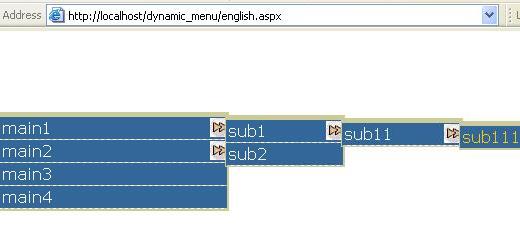
This code is a .NET project that when installed will provide you with three web pages: the first allows you to construct your menu using a tree view as Windows Explorer, you can create unlimited submenus; the second page displays the menu in a left to right manner for an English web site; and the third page displays the menu in a right to left manner for Arabic sites. Now a web site developer need not worry about menus. Just use the first page to construct the menu online, and use one of the other pages to display a menu from the database. They can now create and display menus with unlimited submenus. This module contains JavaScript and CSS code copyright to Bluegrass Technologies.
Using the code
Requirements
Your machine should have:
- .NET Framework v 1.1
- SQL Server 2000
- IIS 5.0
Steps
- Run the file webcontrol/iewebcon.msi.
- Run file setup.exe (websetup1/debug/setup.exe).
- Run the script file dbscript.sql in your SQL Server to create a table menu.
- Make the authentication in your SQL Server mixed.
- Change the connection string to that for your SQL Server in the file data/sqlconnection.txt.
- It will create an application in your IIS called dynamicmenu.
You will find three pages in the application:
- english.aspx to display the left to right menu.
- arabic.aspx to display the right to left menu.

- menuadmin.aspx to construct your menu.
Note: the table menu contains some items, you can remove them.
How to construct a menu
- Go to http://localhost/dynamicmenu.aspx.
- You will find a tree with a node called menu selected.
- Write name and URL of the menu item and press Add, the item will be created and selected.
- Select the node where you want to add the menu and repeat step 3.
How to delete a menu item
You are not allowed to delete an item from the database. But alternatively you can make it hidden or visible by selecting it and pressing the appropriate button.
Note: the menu item will be hidden from the English or Arabic display not from the menu admin tree.
How to change display settings
In the file res/css/english.css or arabic.css, you can change the width of the menu, the image of the arrow, and the color settings.
//////Arabic.aspx///////////////////
ul
{
    width: 230px; ////////width of the menu
    border: solid 1px #cccc99;
    border-top: solid 5px #cccc99;
    border-left: solid 2px #cccc99;
    padding: 0px;
}

li ul
{
    display: none;
    position: absolute;
    margin-right: 260px; //// should be 2*width-5
    margin-top: -30px;
}
////////////////////english.aspx///////////////
ul
{
    width: 230px; //////width of the menu
    border: solid 1px #cccc99;
    border-top: solid 5px #cccc99;
    border-right: solid 2px #cccc99;
    padding: 0px;
}

li ul
{
    display: none;
    position: absolute;
    margin-left: 225px;///////should be width-5
    margin-top: -25px;
}
///////////////////////////////////////////////
In the display page, you will find the stylesheet to change the font, color and hover of the menu.
Points of Interest
I think that the added value is the ability to display unlimited subitems of the menu from the database using recursive functions, and to provide a tree view to build the menu.
This member has not yet provided a Biography. Assume it's interesting and varied, and probably something to do with programming.



 General
  News
News  Suggestion
  Question
  Bug
Bug  Answer
  Joke
Joke  Praise
  Rant
Rant  Admin
Admin 


 Submit an article or tip


