Introduction
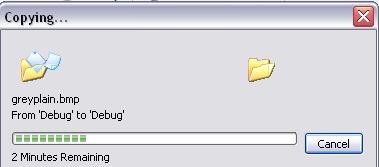
With this code you can use the Windows Shell API in C# to decompress Zip files and do so without having to show the Copy Progress window shown above. Normally when you use the Shell API to decompress a Zip file it will show a Copy Progress window even when you set the options to tell Windows not to show it. To get around this, you move the Shell API code to a separate executable and then launch that executable using the .NET Process class being sure to set the process window style to 'Hidden'.
Background
Ever needed to decompress Zip files and needed a better Zip than what comes with many of the free compression libraries out there? I.e. you needed to compress folders and subfolders as well as files. Windows Zipping can compress more than just individual files. All you need is a way to programmatically get Windows to silently decompress these Zip files. Of course, you could spend $300 on one of the commercial Zip components, but it's hard to beat free if all you need is to decompress folder hierarchies.
Using the code
The following code shows how to use the Windows Shell API to decompress a Zip file. The source folder points to a Zip file. The destination folder points to an output folder. This code as is will decompress the Zip file, however it will also show the Copy Progress window. To make this code work, you will also need to set a reference to a COM library. In the References window, go to the COM tab and select the library labeled 'Microsoft Shell Controls And Automation'.
Shell32.ShellClass sc = new Shell32.ShellClass();
Shell32.Folder SrcFlder = sc.NameSpace(strSrcPath);
Shell32.Folder DestFlder = sc.NameSpace(strDestPath);
Shell32.FolderItems items = SrcFlder.Items();
DestFlder.CopyHere(items, 20);
The sample solution included with this article shows how to put this code into a console application and then launch this console app to decompress the Zip without showing the Copy Progress window.
The code below shows a button click event handler that contains the code used to launch the console application so that there is no UI during the decompress.
private void btnUnzip_Click(object sender, System.EventArgs e)
{
System.Diagnostics.ProcessStartInfo i = new
System.Diagnostics.ProcessStartInfo(
AppDomain.CurrentDomain.BaseDirectory + "unzip.exe");
i.CreateNoWindow = true;
string args = "";
if(txtSource.Text.IndexOf(" ") != -1)
{
args += "\"" + txtSource.Text + "\"";
}
else
{
args += txtSource.Text;
}
if(txtDestination.Text.IndexOf(" ") != -1)
{
args += " " + "\"" + txtDestination.Text + "\"";
}
else
{
args += " " + txtDestination.Text;
}
i.Arguments = args;
i.WindowStyle = System.Diagnostics.ProcessWindowStyle.Hidden;
System.Diagnostics.Process p = System.Diagnostics.Process.Start(i);
p.WaitForExit();
MessageBox.Show("Complete");
}
Points of Interest
- It's free!
- You can use Windows to create the Zip file instead of an expensive Zip library to work with folder hierarchies.
- Works with or without showing the Copy Progress window.
- Uses the Windows Shell API which has a lot of of interesting Windows integration possibilities.
I have been coding since 4th grade in elementary school back in 1981. I concentrate mainly on Microsoft technologies from the old MSDOS/MSBASIC to coding in VC++ then Visual Basic and now .Net. I try to stay on top of the trends coming from Microsoft such as the Millennium Project, Windows DNA, and my new favorite Windows clustering servers.
I have dabbled in making games in my initial VC++ days, but spent most of the past 10 years working on business apps in VB, C++, and the past 7 years in C#.
I eventually hope to get my own company supporting me so I can concentrate on my real dream of creating clusters of automated robots for use in various hazardous industries.



 General
  News
News  Suggestion
  Question
  Bug
Bug  Answer
  Joke
Joke  Praise
  Rant
Rant  Admin
Admin 


 Submit an article or tip


