 |
|
 |
Great tutorial Daniel!
You saved my life with CsJukebox sample !!!
|
|
|
|
 |
|
|
 |
|
 |
I have code for a DirectShow Source Filter written in C++ that builds just fine as a 32-bit project on a Windows 7 64-bit machine (VS2008). However, when built this way it will now load into a filter graph on a 64 bit machine. If I try to build it as a 64-bit project, (/MACHINE:X64), then I get linker errors (unresolved external symbol for both DllCanUnloadNow and DllGetClassObject) which do not show up under a 32-bit build. What do I need to do?
|
|
|
|
 |
|
 |
Oops, I meant to say it will _not_ load on a 64-bit machine...
|
|
|
|
 |
|
 |
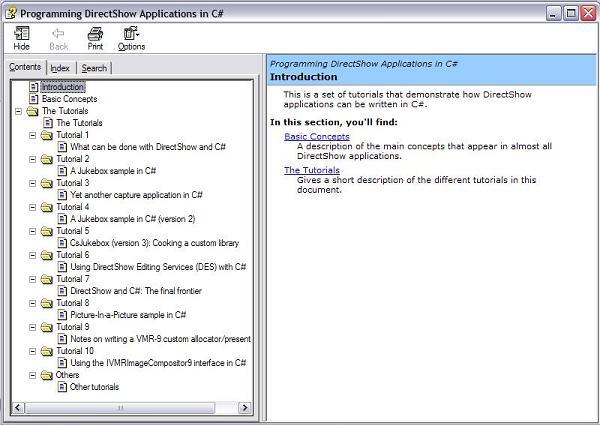
I cannot open the file DirectShowTutorials.chm. Error "Navigation to the webpage was cancelled" occurs. It is not the problem with # in the pathname. Is the file to download corrupted? Thanks for any advise.
Jano Kluson
|
|
|
|
 |
|
 |
CHM file is not self-contained.
|
|
|
|
 |
|
 |
I try to compile tutorialDS1 in Visual C#, and form1.resx can not be found in the project. What happen?
|
|
|
|
 |
|
 |
I have problem when programming camera with Directshow, it is setting local line power frequency. I still don't know how to set it 50Hz or 60Hz. Please help me.
|
|
|
|
 |
|
 |
Hi,
I have seen PIP sample application. It is working fine. I want to save the result of PIP in wmv format.
I appreciate your concern about my requirement.
Thanks,
Ram
|
|
|
|
 |
|
 |
I am using Buffer CB function using two sample Grabber objects,
How may I know the buffer called is video or Audio as I want to process both of them while redering one file with both audio and Video.
Thanks in Advance
It is Kazim
|
|
|
|
 |
|
 |
Why aren't you using the SampleCB method instead? Then you can call GetMediaType to answer your question.
If it is not available in the DirectShow.Net library, you'll find how to use it in one of my blog entry.
http://www.informikon.com/blog/using-isamplegrabbercb--samplecb-in-c.html
|
|
|
|
 |
|
 |
If I open the chm, I receive the following error message:
"This program cannot display the webpage"
Anyone else with this problem?
|
|
|
|
 |
|
|
 |
|
 |
I answered this question, too, in my reply to the message "Can't read help file" in this forum.
-daniel
|
|
|
|
 |
|
 |
I am not able to download the help chm file for directShow from this site could you send me the same at babu_74@rediffmail.com
|
|
|
|
 |
|
 |
Hi
Would this work with compact framework? i am planning to use these directshow libraries on a windows embedded system. unfortunately all the code available out there is using c++
Souhail
|
|
|
|
 |
|
 |
I haven't tried it but it doesn't look promising (the following is taken from MSDN):
"COM Interoperability (COM Interop). This is used to interact with COM objects. Unfortunately, this is not available with the .NET Compact Framework. This feature is memory and processor intensive that defeats the purpose of the .NET Compact Framework."
Maybe others know more about this.
-daniel
|
|
|
|
 |
|
 |
Daniel,
Your CSJukebox program has a 'Step Forward' button that works well.
When a Step Backward button is added, things start to go wrong:
The graph does step backward, but it goes out of pause into play.
Any idea why this happens?
|
|
|
|
 |
|
 |
Since I don't have your code, I can't say for sure, but have you tried to add an extra mediaCtrl.Pause() after the call to frameStep.Step? It might do the trick.
-daniel
|
|
|
|
 |
|
 |
I use many projectsd here in codeproject as dxsnapshot and others it give many errors in Grab single frame did u have any idea how to do that
|
|
|
|
 |
|
|
 |
|
 |
DsROTEntry is defined in the lib at directshownet.sourceforge.net, you can use it as in:
DsROTEntry rot = new DsROTEntry(gb);
-daniel
|
|
|
|
 |
|
 |
Hello,
Please can you help me..
I am going through your tutorial (really interesting!) (I need to access my camera)
In you're Tutorial2: yet another capture sample in c#
I have a few qestions :
1)
I am having this problem while compiling when I am compiling the idl file with midl :
Processing .\cap.idl
Processing C:\DXSDK\Include\DShowIDL\devenum.idl
Processing C:\Include\oaidl.idl
Processing C:\Include\objidl.idl
Processing C:\Include\unknwn.idl
Processing C:\Include\wtypes.idl
Processing C:\Include\basetsd.h
Processing C:\Include\guiddef.h
Processing C:\DXSDK\Include\DShowIDL\axcore.idl
Processing C:\DXSDK\Include\DShowIDL\axextend.idl
Processing C:\Include\ocidl.idl
Processing C:\Include\oleidl.idl
Processing C:\Include\servprov.idl
Processing C:\Include\urlmon.idl
Processing C:\Include\msxml.idl
Processing C:\DXSDK\Include\DShowIDL\control.odl
Processing C:\Include\oaidl.acf
Processing C:\Include\ocidl.acf
midl\oleaut32.dll : error MIDL2020 : error generating type library : LayOut failed : IVideoWindow
Why it doesn't recognize IVideoWindow?
2) My other question is about your .idl file :
what's that?
How do you know you have to add that and where does it come from?
[
uuid(2F5957F4-78A8-4101-B3B4-A30BFC5AD628),
helpstring("Capture type library")
]
3)
I am not a specialist of DirectShow... so how do you know you have to add and what's the signification:
//CLSID_FilterGraph (take from uuids.h DirectX include)
Guid FgGuid = new Guid( "e436ebb3-524f-11ce-9f53-0020af0ba770" );
//CLSID_CaptureGraphBuilder2 (take from uuids.h DirectX include)
Guid CgGuid = new Guid( "BF87B6E1-8C27-11d0-B3F0-00AA003761C5" );
//CLSID_SystemDeviceEnum
Guid DevEnumGuid = new Guid( "62BE5D10-60EB-11d0-BD3B-00A0C911CE86" );
//CLSID_VideoInputDeviceCategory
Guid VidCapGuid = new Guid( "860BB310-5D01-11d0-BD3B-00A0C911CE86" );
// taken from strmif.h
Guid IID_IBaseFilter = new Guid( "56a86895-0ad4-11ce-b03a-0020af0ba770" );
// needed for calls to RenderStream
Guid PIN_CATEGORY_PREVIEW = new Guid( "fb6c4282-0353-11d1-905f-0000c0cc16ba" );
// needed for calls to RenderStream
Guid MEDIATYPE_Video = new Guid( "73646976-0000-0010-8000-00AA00389B71" );
const int WM_GRAPHNOTIFY = 0x00008001;
const int WS_CHILD = 0x40000000;
const int WS_CLIPCHILDREN = 0x02000000;
const int WS_CLIPSIBLINGS = 0x04000000;
Thanks a lot for your reply...Please help me...
|
|
|
|
 |
|
 |
Hi,
Your questions relate to COM programming and since DS is based on COM, it is not surprising. You should look at a good COM reference but if you want to learn as little as needed to program DS, you might want to look at directshownet.sourceforge.net for a complete wrapper of DS that can be used from .Net and you can avoid doing the stuff above since they have already done it for you.
I didn't use it much when I wrote these tutorials because it was being developed at the same time as I was writing them. But now, you can avoid most of this tedious stuff by using their library.
-daniel
|
|
|
|
 |
|
 |
I want to convert mu-LAW audio files to MP3.
Do you have a sample on how to do this in DirectShow?
thanks,
|
|
|
|
 |
