Click here to Skip to main content

Docking CSizingControlBar objects inside ActiveX containers

By , 14 Jun 2001
 

Introduction

A client recently asked me for a component that could be used in a Win32 application, as well as embedded in a web page. My solution was to write an ActiveX control that I could embed in a CDialog for the Win32 app and use the <OBJECT> tag in IE to embed the control in a web page. When they asked me if I could do docking windows like in Visual Studio, that lead me to The Code Project, where I found Cristi Posea's excellent docking window code.

There was one problem, though - the docking code relied on having a CFrameWnd to dock to. I made the assumption that CFrameWnd could only be a top-level window with a title bar, but that turns out not to be true. CFrameWnd can be created with the WS_CHILD style, rather than WS_OVERLAPPEDWINDOW (the default) and you can make it a child of any other window, including an ActiveX control!

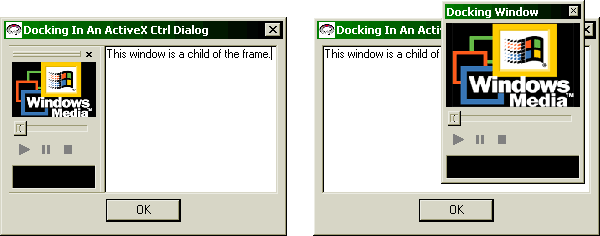
The result is a control that allows you to have docking windows, even inside Internet Explorer. I've included and HTML file called index.htm to illustrate this, which you can open in IE after building the control.

Additionally, I have also figured out how to embed ActiveX controls in the docking windows themselves, so you can now have ActiveX controls inside ActiveX controls, etc. My example code uses the ActiveMovie control.

Here’s what you need to do:

  1. derive your own class from CFrameWnd (ie. CEmbeddedFrame)

  2. derive a class from the docking window code (I used Cristi Posea’s CMyBar as a basis). I called it CDockingWnd.

  3. create a member variable in the control of your frame class
  4. CEmbeddedFrame m_Frame;
    
  5. call Create() on the frame in the OnCreate() override of your control.
    int CDockCtrlCtrl::OnCreate(LPCREATESTRUCT lpCreateStruct) 
    {
        if (COleControl::OnCreate(lpCreateStruct) == -1)
            return -1;
    
        
        CRect r( 0, 0, 100, 100 );
        if( !m_Frame.Create( NULL,                 /// use CFrameWnd default
                             _T("Embedded Frame"),
                             WS_CHILD | WS_VISIBLE | 
                             WS_CLIPCHILDREN,  /// NOT WS_OVERLAPPEDWINDOW
                             r,
                             this,
                             NULL,
                             NULL,
                             NULL ) )
        {
            TRACE( "**** Creation of embedded frame failed\n" );
            return -1;
        }
    
        return 0;
    }
    
  6. Add member variables to the frame for the client area object and the docking window
    CEdit 	         m_wndClient;
    CDockingWnd       m_wndDockingWnd;
    
  7. In OnCreate() of the frame control, create the docking window and any other client-area controls you need, then dock the docking windows as you see fit.
    int CEmbeddedFrame::OnCreate(LPCREATESTRUCT lpCreateStruct) 
    {
        if (CFrameWnd::OnCreate(lpCreateStruct) == -1)
             return -1;
    
        //////////////////////////////////////////////////////////////////////
        /// The regular CMainFrame in the doc-view MFC
        /// apps receive WM_IDLEUPDATECMDUI messages from the
        /// CWinThread::OnIdle(), and calls RecalcLayout if the idleLayout
        /// flag was set by a previous call to DelayRecalcLayout(). Since an
        /// ActiveX control doesn't have this mechanism, I have to fake it
        /// (my thanks to Cristi for this fix).
        //////////////////////////////////////////////////////////////////////
        SetTimer(0, 100, NULL);
        
        //////////////////////////////////////////////////////////////////////
        /// create an edit control within the frame so there's something 
        /// interesting in there...
        //////////////////////////////////////////////////////////////////////
        m_wndClient.Create( WS_VISIBLE|WS_CHILD, 
                            CRect(0,0,0,0), 
                            this, 
                            AFX_IDW_PANE_FIRST );
        m_wndClient.ModifyStyleEx(0, WS_EX_CLIENTEDGE);
    
        //////////////////////////////////////////////////////////////////////
        /// older versions of Windows* (NT 3.51 for instance)
        /// fail with DEFAULT_GUI_FONT
        //////////////////////////////////////////////////////////////////////
        if (!m_font.CreateStockObject(DEFAULT_GUI_FONT))
        if (!m_font.CreatePointFont(80, "MS Sans Serif"))
            return -1;
    
        m_wndClient.SetFont(&m_font);
    
        m_wndClient.SetWindowText(
            _T( "This window is a child of the frame." ) );
        
        //////////////////////////////////////////////////////////////////////
        /// Create the docking window and dock it into the frame...
        //////////////////////////////////////////////////////////////////////
        if (!m_wndDockingWnd.Create(_T("Docking Window"), this,
            IDC_DOCKING_WND))
        {
            TRACE0( "Failed to create Docking Windown" );
            return -1;      // fail to create
        }
        //////////////////////////////////////////////////////////////////////
        /// styles suggested by Cristi Posea.
        //////////////////////////////////////////////////////////////////////
        m_wndDockingWnd.SetBarStyle(m_wndDockingWnd.GetBarStyle() |
            CBRS_TOOLTIPS | CBRS_FLYBY | CBRS_SIZE_DYNAMIC);
    
    
        //////////////////////////////////////////////////////////////////////
        /// Use CBRS_ALIGN_LEFT | CBRS_ALIGN_RIGHT to only dock on sides,
        /// CBRS_ALIGN_TOP | CBRS_ALIGN_BOTTOM to only dock on top and bottom
        //////////////////////////////////////////////////////////////////////
        EnableDocking(CBRS_ALIGN_ANY);
        
        //////////////////////////////////////////////////////////////////////
        /// from Cristi Posea's documentation
        //////////////////////////////////////////////////////////////////////
    #ifdef _SCB_REPLACE_MINIFRAME
        m_pFloatingFrameClass = RUNTIME_CLASS(CSCBMiniDockFrameWnd);
    #endif //_SCB_REPLACE_MINIFRAME
    
    
        //////////////////////////////////////////////////////////////////////
        /// Use CBRS_ALIGN_LEFT | CBRS_ALIGN_RIGHT to only dock on sides,
        /// CBRS_ALIGN_TOP | CBRS_ALIGN_BOTTOM to only dock on top and bottom
        //////////////////////////////////////////////////////////////////////
        m_wndDockingWnd.EnableDocking(CBRS_ALIGN_ANY);
    
        //////////////////////////////////////////////////////////////////////
        /// Actually dock it into the frame, otherwise it'll float.
        //////////////////////////////////////////////////////////////////////
        DockControlBar(&m_wndDockingWnd, AFX_IDW_DOCKBAR_LEFT);
        
        return 0;
    }
    
  8. In the OnCreate() handler of your docking window, create the control(s) you want to be children of the docking window. My sample code shows how to create a simple edit control or how to embed ActiveX controls in your docking window.
      
    int CDockingWnd::OnCreate(LPCREATESTRUCT lpCreateStruct) 
    {
        if (baseCDockingWnd::OnCreate(lpCreateStruct) == -1)
            return -1;
    
        SetSCBStyle(GetSCBStyle() | SCBS_SHOWEDGES | SCBS_SIZECHILD);
            
    #ifdef _USE_EDIT_CTRL_  
    
        if (!m_wndChild.Create( WS_CHILD|WS_VISIBLE|
                                ES_MULTILINE|ES_WANTRETURN|ES_AUTOVSCROLL,
                                CRect(0,0,0,0), 
                                this,
                                IDC_FRAME_EDIT) )
            return -1;
    
        m_wndChild.ModifyStyleEx(0, WS_EX_CLIENTEDGE);
    
        //////////////////////////////////////////////////////////////////////
        /// older versions of Windows* (NT 3.51 for instance)
        /// fail with DEFAULT_GUI_FONT
        //////////////////////////////////////////////////////////////////////
        if (!m_font.CreateStockObject(DEFAULT_GUI_FONT))
            if (!m_font.CreatePointFont(80, "MS Sans Serif"))
                return -1;
    
        m_wndChild.SetFont(&m_font);
    
        m_wndChild.SetWindowText(
            _T( "This docking window is embedded in the control" ) );
    
    #else  //  _USE_ACTIVE_MOVIE_CTRL_
    
        //////////////////////////////////////////////////////////////////////
        /// You need the following call to allow your control to contain 
        /// other controls, like the ActiveMovie control. This is the secret
        /// to getting the docking windows to contain ActiveX controls. The
        /// rest is easy...
        //////////////////////////////////////////////////////////////////////
        AfxEnableControlContainer();
    
    
        //////////////////////////////////////////////////////////////////////
        /// Actually get the CWnd object to instantiate an active movie
        /// control for you
        //////////////////////////////////////////////////////////////////////
        if( !m_AMControl.CreateControl( _T("AMOVIE.ActiveMovie Control.2"), 
                                        _T("Active Movie Ctrl"), 
                                        WS_CHILD | WS_VISIBLE, 
                                        CRect(0,0, 50, 50),
                                        this, 
                                        IDC_ACTIVE_MOVIE_CTRL ) )
        {
            TRACE( "Unable to create Active Movie control. "
                    "GetLastError() == %dn", GetLastError() );
    
            return -1;
        }
    
        //////////////////////////////////////////////////////////////////////
        /// Get the IUnknown of the control so I can QI the IMediaPlayer
        /// interface. See MSDXM.TLH for the interface definition.
        //////////////////////////////////////////////////////////////////////
        IUnknownPtr pUnk = m_AMControl.GetControlUnknown();
        if( pUnk )
        {
            pUnk->QueryInterface( IID_IMediaPlayer,
                                  (void**)&m_pMediaPlayer );
    
            //////////////////////////////////////////////////////////////////
            /// If the QI worked
            //////////////////////////////////////////////////////////////////
            if( m_pMediaPlayer )
        {
            //////////////////////////////////////////////////////////////////
            /// Try to open a sample file. This could be a URL on the web.
            /// This particular clip is a picture of my little girl, Brianna
            //////////////////////////////////////////////////////////////////
            /*
            if( SUCCEEDED( m_pMediaPlayer->Open( L".\brianna.mpg" ) ) )
            {         
                m_pMediaPlayer->put_EnableContextMenu( TRUE );
            }
            */
        }
    }
    
    #endif  // _USE_ACTIVE_MOVIE_CTRL_
    
    
        return 0;
    }
    
  9. In your control’s OnSize() handler, make CEmbeddedFrame as big as the window (of course, you don’t have to, but I will make this assumption here).
  10. You also have to simulate the WM_IDLEUPDATECMDUI behavior that the MFC doc-view architecture gives you. This is the mechanism in doc-view that updates the state of toolbar buttons and deletes temporary objects from memory when the app isn't busy. The docking window code uses a lot of calls to DelayRecalcLayout(), where the RecalcLayout() call for the CMiniFrameWnd of the docking window is deferred until idle processing. If you don't do this, the frame and the control will not get updated properly. In the ActiveX control, we fake it with the timer we set in CEmbeddedFrame::OnCreate(). Again, I wish to thank Cristi for his help on this behavior.
    void CEmbeddedFrame::OnTimer(UINT nIDEvent)
    { 
        CFrameWnd::OnTimer(nIDEvent);
    
        if (nIDEvent != 0)
            return;
    
        if (m_hWnd != NULL)
        { 
            if (m_nShowDelay == SW_HIDE)
                ShowWindow(m_nShowDelay); 
            if (IsWindowVisible() || m_nShowDelay >= 0) 
            { 
                AfxCallWndProc(this, m_hWnd,
                               WM_IDLEUPDATECMDUI, (WPARAM)TRUE, 0); 
                SendMessageToDescendants( WM_IDLEUPDATECMDUI, 
                                          (WPARAM)TRUE, 
    	                              0, 
                                          TRUE, 
                                          TRUE); 
            } 
            
            if (m_nShowDelay > SW_HIDE) 
               ShowWindow(m_nShowDelay); 
            m_nShowDelay = -1; 
    
            //////////////////////////////////////////////////////////////////
            // send WM_IDLEUPDATECMDUI to the floating miniframes 
            //////////////////////////////////////////////////////////////////
            POSITION pos = m_listControlBars.GetHeadPosition(); 
            while (pos != NULL) 
            { 
                CControlBar* pBar =
                    (CControlBar*) m_listControlBars.GetNext(pos); 
                ASSERT(pBar != NULL); 
    
                //////////////////////////////////////////////////////////////
                // skip if not created yet or if it is not a floating CDockBar
                //////////////////////////////////////////////////////////////
                if (pBar->m_hWnd == NULL ||
                    pBar->GetDlgCtrlID() != AFX_IDW_DOCKBAR_FLOAT) 
                    continue; 
    
                CFrameWnd* pFrameWnd = pBar->GetParentFrame(); 
                if (pFrameWnd->m_hWnd != NULL && pFrameWnd != this) 
                { 
                    if (pFrameWnd->m_nShowDelay == SW_HIDE) 
                        pFrameWnd->ShowWindow(pFrameWnd->m_nShowDelay); 
    
                    if (pFrameWnd->IsWindowVisible() 
                          || pFrameWnd->m_nShowDelay >= 0) 
                    { 
                        AfxCallWndProc(pFrameWnd, pFrameWnd->m_hWnd, 
                                       WM_IDLEUPDATECMDUI, (WPARAM)TRUE, 0); 
                        pFrameWnd->SendMessageToDescendants(
                            WM_IDLEUPDATECMDUI, 
                            (WPARAM)TRUE, 0, 
                            TRUE, TRUE); 
                    } 
                    if (pFrameWnd->m_nShowDelay > SW_HIDE) 
                        pFrameWnd->ShowWindow(pFrameWnd->m_nShowDelay); 
                
                    pFrameWnd->m_nShowDelay  = -1; 
                } 
            } 
            //////////////////////////////////////////////////////////////////
            // find if the top level parent is the active window 
            //////////////////////////////////////////////////////////////////
            bool bActive = (GetTopLevelParent() == GetForegroundWindow()); 
            if (bActive != m_bActive) 
            { 
                //////////////////////////////////////////////////////////////
                // notify the floating miniframes of state change 
                //////////////////////////////////////////////////////////////
                NotifyFloatingWindows(bActive ? FS_ACTIVATE : FS_DEACTIVATE); 
                m_bActive = bActive; 
            } 
        } 
    }

If you have any questions on embedding docking windows inside ActiveX controls, please don’t hesitate to email me at docking_windows@intelligentsystems.net. Any problems with the behavior of the docking windows should be directed to Cristi Posea (cristi@datamekanix.com).

Greg Winkler
Intelligent Systems Inc.

License

This article has no explicit license attached to it but may contain usage terms in the article text or the download files themselves. If in doubt please contact the author via the discussion board below.

A list of licenses authors might use can be found here

About the Author

Greg Winkler
United States United States
Member
Greg is a Microsoft Certified developer and runs Intelligent Systems, Inc, a consulting company specializing in user interface design and progamming in Visual C++.


Sign Up to vote   Poor Excellent
Add a reason or comment to your vote: x
Votes of 3 or less require a comment

Comments and Discussions

 
You must Sign In to use this message board.
Search this forum  
    Spacing  Noise  Layout  Per page   
Question3ks,another problem,how can i add tooltips for my toolbar?memberCodeTwinkle13 Jun '07 - 15:25 
re
AnswerRe: 3ks,another problem,how can i add tooltips for my toolbar?memberCodeTwinkle13 Jun '07 - 15:51 
I have send the same two mail(docking_windows@intelligentsystems.netcristi@datamekanix.com)
to you,and they have examples in attachment,
3xs
QuestiononMouseWheel()memberCodeTwinkle28 Mar '07 - 17:26 
why the class can't get onMouseWheel() message? 3xs
AnswerRe: onMouseWheel()memberGreg Winkler9 Apr '07 - 22:32 
Could you provide some code? Which class is not getting the WM_MOUSEWHEEL? If you're instantiating another control inside the docking window, which is taking up the whole window, it's probably getting all the mousewheel messages because it's on top of the docking window.
 
Greg Winkler

GeneralRun executable into activeXmemberGabriel Simoes17 May '04 - 15:57 
Hello...
I'd like to know how can I run an executable application inside an activeX, so this program would run into the browser window ?
Can I execute any application into an activeX if the .ocx is registered ?
Hope you guys can help me
Thanks
Gabriel
GeneralRe: Run executable into activeXmembergwinkler18 May '04 - 3:54 
My impression is that you have a little bit of a misunderstanding regarding what is the boundary between an executable and an ActiveX control. I'll try to explain:
 
The ActiveX control is just a DLL - an executable module that multiple processes can load and call functions upon. The fact that it uses COM as it's interface to the rest of the world is immaterial, or at least secondary.
 
So, in this case, Internet Explorer IS your executable. The ActiveX control and its windows within the browser are all child controls running in the context (or 'sandbox') of Internet Explorer. When a regular MFC dialog application needs to create a list box, it loads comctl32.dll and calls methods/functions in the DLL to create a list box in it's dialog window - and you have a child window in your dialog with the behavior of a list box.
 
The same thing applies with ActiveX controls, be it in your dialog class or in IE... you call CreateControl() on it, it loads your control's DLL, and you get a child window with the behavior of your ActiveX control. YOU WRITE THE BEHAVIOR. YOU DETERMINE HOW IT RESPONDS TO MOUSE CLICKS. YOU DETERMINE WHAT MESSAGES IT SENDS TO IT'S PARENT. YOU are the master.
 
I hope this makes thing a little clearer - your question gives the impression you want to make another application use the ActiveX control running in IE as it's main window - I'm pretty sure that's not possible - or at least it's got something I've ever tried (and is probably loaded with security and implementation problems). But you can write your ActiveX control so that it does all the things your executable does (within the security and implementation constrains of IE), and/or connects (via sockets/DCOM/whatever) to a running instance of your application and then displays the data the application returns.
 
All the best,
 
Greg
Generalnever worksmemberdeepak2190310 Aug '03 - 0:47 
irritating.... first it gave me unicode build problems. then, when i compiled in normal build, it never creates the window and always crashes.... ther's always some problem with this project, or the other. ..... irritating. i wasted lot of my time in that..
GeneralRe: never worksmemberGreg Winkler10 Aug '03 - 4:18 
I will admit to getting quite a few remarks about my lack of _T() macros around string constants - I hadn't done a lot of Unicode coding when I wrote this. For those of you not able to use the old ANSI character set (most of the world, I know), please wrap all string constants in _T( ) before trying to build.
 
I understand you're frustrated and appreciate your letting me know - but you haven't really given me any information that would allow me to help you with your build. Where do you get errors in builds and what are they? That would be a start. For your runtime errors, can you give me some feedback on where it dies? Do ANY breakpoints work?
 
Here to help if I can...
 
G
 
Greg Winkler
http://www.intelligentsystems.net
GeneralPerfect worksussÑî±ò_yangbin20 May '03 - 16:11 
so every ActiveX control can have owner floatBar, i spent 2 weeks for thisFrown | :(
GeneralRe: Perfect workmemberGreg Winkler20 May '03 - 16:33 
Thanks for the feedback. Could you clarify your question again?
 
Greg
 
Greg Winkler
http://www.intelligentsystems.net
GeneralRe: Perfect workmemberyoung_bin21 May '03 - 3:04 
yeahSmile | :) i implement an activex control(an editor control), i need a floating window which could show some info, so i want to do with control bar, and i wondering how to do,
your article do help me, thx
 
in my project i let embeddedFrame invisible, it also work.

GeneralRe: Perfect workmemberGreg Winkler10 Aug '03 - 4:26 
If I understand your statement, you have another Active X control you want to create - not the ActiveMovie control. In that case, modify the code in
 
int CDockingWnd::OnCreate(LPCREATESTRUCT lpCreateStruct)
{
.
.
.
if( !m_AMControl.CreateControl( _T("AMOVIE.ActiveMovie Control.2"),
_T("Active Movie Ctrl"),
WS_CHILD | WS_VISIBLE,
CRect(0,0, 50, 50),
this,
IDC_ACTIVE_MOVIE_CTRL ) )
 
and change the first parameter to the ProgId of the control you want to intstantiate - such as
 
if( !m_AXEditControl.CreateControl(
_T("AXEdit.AXEdit Control"),
_T("AXEdit Ctrl"),
WS_CHILD | WS_VISIBLE,
CRect(0,0, 50, 50),
this,
IDC_AX_EDIT_CTRL ) )
 
You'll also have to change the type and name of m_AMControl to the type and appropriate name for the control you're trying to create.
 
You'll also want to get MFC to wrap your control for you with Project|Add to Project|Components and Controls...
 
Let me know if I can help more.
 
G
 
Greg Winkler
http://www.intelligentsystems.net
GeneralTwo compile errors.memberWREY8 May '03 - 0:32 
The first error I can sort of understand. The second one is totally beyond me (because I don't see anything wrong with it).
 
The first error:
 
DockCtrl\DockingWnd.cpp(192) : error C2664: 'AfxTrace' : cannot convert parameter 1 from 'char [61]' to 'const unsigned short *'
 
Here's the code:
 
TRACE("Unable to create Active Movie control. "
"GetLastError() == %d\n", GetLastError());

 
=====================================
 
The second error:
 
DockCtrl\EmbeddedFrame.cpp(160) : error C2664: 'CreatePointFont' : cannot convert parameter 2 from 'char [14]' to 'const unsigned short *'
 
Here's the code:
 
if (!m_font.CreatePointFont(80, "MS Sans Serif"))
 
======================================
 
Can you make sense of any of these?
 
Thanks.
 
Confused | :confused:
 
William
 
Fortes in fide et opere!
GeneralRe: Two compile errors.memberGreg Winkler8 May '03 - 3:18 
Both compiler errors are occuring because you're trying to do a UNICODE build of the project (where chars are 2 bytes (an 'unsigned short') long). You can try to do an ANSI build and/or put an L before both string constants ( L"MS Sans Serif" ) to change the const char * to a constant (TCHAR) *.
 
Actually, an even better idea is to put the TEXT() and/or _T() macro around both string constants - _T("MS Sans Serif"). That'll work no matter your char set! Honestly, I should have done that...
 
Hope it helps!!!
 
G

 
Greg Winkler
http://www.intelligentsystems.net
GeneralRe: Two compile errors.sussAnonymous6 Aug '04 - 10:28 
I love you!!!
Thanks Greg
GeneralOCX and DLLsusstalex31 Jul '02 - 22:51 
Great Code!
 
U know u'r project makes one .ocx file.
Could we make it .dll file?
 
and please say differebce beetwen them (.ocx an .dll)
 
U know i've to make ActiveX with toolbar, but not add-ins
 
thx u in advance
QuestionIs it a problem of time?memberPaul Selormey14 Jun '01 - 14:26 
Hello,
You did a very good article on this, why is this too short and containing no
information?
 
For those interested in the full story, check Cristi Posea's page.
 
Best regards,
Paul.
 

Paul Selormey, Bsc (Elect Eng), MSc (Mobile Communication) is currently Windows open source developer in Japan, and open for programming contract anywhere!
AnswerRe: Is it a problem of time?memberGreg Winkler14 Jun '01 - 17:51 
Hi Paul,
 
Thanks very much for your feedback!
 
Actually, I think it's a problem of the codeproject losing my original article submission, but I'll be getting
it updated with the article from Cristi's site (http://www.datamekanix.com) as soon as possible!
 
Regards,
 
Greg
 
http://www.intelligentsystems.net
AnswerRe: Is it a problem of time?memberGreg Winkler15 Jun '01 - 9:58 
This is the 'real' text of the article. Thanks again for your input!
 
Greg Winkler
http://www.intelligentsystems.net
GeneralRe: Is it a problem of time?memberPaul Selormey16 Jun '01 - 1:02 
Welcome back!
 
Regards,
Paul.
 

Paul Selormey, Bsc (Elect Eng), MSc (Mobile Communication) is currently Windows open source developer in Japan, and open for programming contract anywhere!
AnswerI want to add a menu to it , how..?memberAnonymous10 Jul '01 - 20:34 
I want to add a menu to it , how..?
GeneralRe: I want to add a menu to it , how..?memberGreg Winkler18 Jul '01 - 6:57 
A menu where? A menu bar? A context menu? If you could explain a little more detail of what you're looking for, I may be able to help!
 
Greg Winkler
http://www.intelligentsystems.net

General General    News News    Suggestion Suggestion    Question Question    Bug Bug    Answer Answer    Joke Joke    Rant Rant    Admin Admin   

Permalink | Advertise | Privacy | Mobile
Web02 | 2.6.130516.1 | Last Updated 15 Jun 2001
Article Copyright 2001 by Greg Winkler
Everything else Copyright © CodeProject, 1999-2013
Terms of Use
Layout: fixed | fluid