Introduction
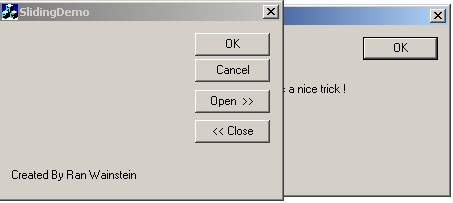
This Source Code is for building a sliding dialog, one that slide's out from under another dialog. I have seen someone who already did it, but this code is easier to understand and I have implemented it in a different (and better) way. The OnTop class can be used with any Dialog. There can even be more than one sliding dialog associated with parent-dialog.
Steps To A Working Sliding Dialog
- Create a MFC dialog based application.
- Create a dialog resource using the resource editor, and then create the dialog class to associate with the dialog resource using class wizard.
- Add
SlidingSon.h and SlidingSon.cpp to your Workspace
- Add a
SlideSon.h include directive to your dialog class header.
- In your newlly created dialog class replace the base class in the associated header file to
CSlideSon from CDialog.
- Do the same thing in the dialog's implementation file. Do not forget to replace class name in the
BEGIN_MESSAGE_MAP declaration.
- In order to make this dialog modeless, add a create member function to your dialog header with no parameters.
- In the dialog's implementation file add the create function as follows:
return CSlideSon::Create(<<Your dialog class name>>::IDD);
- Add a button to your main application dialog to open / close the sliding dialog, or use any other event to open the sliding dialog.
- I recommend adding a boolean value to your main application dialog class which will indicate the state of the
SlidingSon. Because we create a modeless dialog, you will have to add a member variable that will point to your sliding dialog class object.
<<Your sliding dialog class name>>* m_pModeless;
- When you wish to slide the dialog out, use the following code in your application dialog event handlers:
m_pModeless = new <<Your sliding dialog class name>>(this);
if (<<Your sliding dialog class name>> ->GetSafeHwnd()==0)
{
   m_pModeless->Create();
   m_pModeless->SetSlideSpeed(10);
   m_pModeless->SetSlideDirection(RIGHT);
   m_pModeless->StartSlide();
}
- Note that you can control the sliding speed with integer values and slide direction (RIGHT, LEFT)
- When you wish to close the dialog use the following code:
m_pModeless->Close();
delete m_pModelles;
- To slide the dialog back when you press the cancel\ok button of the sliding dialog, add the following line after
ON_MESSAGE(WM_CLOSE_SLIDING,OnClose)
- You can change the ratio between the sliding dialog and its father in the
SlidingSon.cpp
- Catch the
OnMove() event for the main application dialog, and call m_pModelled->RePosition(), to update the sliding dialog’s position.



 General
  News
News  Suggestion
  Question
  Bug
Bug  Answer
  Joke
Joke  Praise
  Rant
Rant  Admin
Admin 


 Submit an article or tip


