Click here to Skip to main content

Coco Custom Tool for Visual Studio.NET

By , 29 Oct 2005
 
Sample Image - vsCoco.png

Introduction

I have been publishing one or two articles about formula evaluation, and so far all programs were written manually. For a recent project, I need to parse far more complex grammars and I really needed some help.

I had a look on the internet and I found a project called Coco/R from the Johannes Kepler Universität Linz. This is how they describe their product : "Coco/R takes a compiler description in the form of an attributed grammar (EBNF syntax with attributes and semantic actions) and translates it into a scanner and a recursive descent parser.... Coco/R has been used successfully in academia and industry. It combines the functionality of the well-known Unix tools Lex and Yacc".

I used Coco for a while and despite being extremely good I found working with it rapidly frustrating because I had to run it manually and it was not really well integrated with Visual Studio.

Background

Anyone wanting to use this tool should be familiar with EBNF grammars. There are several good introductions available on the internet.

I also particularly recommend the reading of the Compiler Generator Coco/R User Manual.

Installing vsCoco

You need to download and run the file vsCocoRegistration.exe. The registration should work fine with Visual Studio 2003.

If you want to use Coco with the given sample, there is nothing else to do.

If you want to use it with your own file, you must add your grammar to your project and set its property to:

  • Build Action: Content
  • Custom Tool: Coco
  • Namespace put what you want or blank
  • Optionally you can provide the Parser.frame and/or Scanner.frame files within your project if you want to customize them.

If it doesn't work with your version, please post in the forum below.

If you are able to fix the vsCoCoRegistration please send me the code pascal_cp@ga$naye.com (remove the $).

Using vsCoco

To start with, you can try to play with the Calculator sample I provided in the download. The calculator calculates formula like 12+34*55/2.

The sample contains only 5 lines of C# code.

private void button1_Click(object sender, System.EventArgs e)
{
        Parser p = new Parser(comboBox1.Text);
        p.Parse();
        textBox1.AppendText(">" + comboBox1.Text + "\r\n" 
                + p.result.ToString() + "\r\n");
}

As you can see, most of the login must be in the Parser Object.
The parser is created automatically from this grammar:

COMPILER calc

    public double result = 0;
 
IGNORECASE 
// The $L option let you compile directly within your grammar
// You can comment and uncomment the line to fit your development requirements.
$L

/*--------------------------------------------------------------------------*/
/*--------------------------------------------------------------------------*/
CHARACTERS
    digit = "0123456789".
    cr  = '\r'.
    lf  = '\n'.  
    tab = '\t'.

TOKENS
    number = digit {digit} ['.' {digit}].
    
// We don't use comments here but this is only a sample
COMMENTS FROM "//" TO cr lf 

IGNORE cr + lf + tab 

PRODUCTIONS

/*--------------------------------------------------------------------------*/
/*--------------------------------------------------------------------------*/
OPERAND<OUT val double>        
=            (.  val = 0; .)
  (
  number         (.    val = Double.Parse(t.val,
                NumberStyles.Float, 
                CultureInfo.InvariantCulture); 
            .)
  | "(" EXPR<OUT val> ")"    
  ).
 
// Priorities in FGL 
//
//       ()        (Parenthesis)
// 10    -        (Unary neg)
// 09    * /        (Multiply and Divide)
// 07    + -        (Add and Subtract)

/*--------------------------------------------------------------------------*/
/*--------------------------------------------------------------------------*/
EXPR10<OUT val double>
=                       (.    bool neg=false; .) 
    {                    
        ( '-'    (.    neg=!neg; .)
        | '+'    (.    /*nothing to do*/ .)
        )
    }
    OPERAND<OUT val>        (.    if (neg) val*=-1; .)
    .

/*--------------------------------------------------------------------------*/
/*--------------------------------------------------------------------------*/
EXPR09<OUT val double>    
= 
    EXPR10<OUT val>        
    {        (.    double val2; .)
        ( '*' 
        EXPR10<OUT val2>    (.    val*=val2; .)
        | '/' 
        EXPR10<OUT val2>    (.    val/=val2; .)
        )
    }                     
    .

/*--------------------------------------------------------------------------*/
/*--------------------------------------------------------------------------*/
EXPR<OUT val double>    
= 
    EXPR09<OUT val>
    {        (.    double val2; .)            
        ( '+'                
        EXPR09<OUT val2>    (.    val+=val2; .)                
        | '-'                
        EXPR09<OUT val2>    (.    val-=val2; .)                
        )
    }                         
    .
  
/*--------------------------------------------------------------------------*/
/*--------------------------------------------------------------------------*/
calc
=                    
    EXPR<OUT result>.

END calc.

This grammar is a fairly standard one. If I try to read it in English, it would say:

  • This grammar will produce a parser called calc.
  • Calc parser return expressions
  • An expression can be a sum or if not, a product of signed numbers.
  • The multiplication should be done before the additions however the minus and plus sign have more priority if they are signs.

As you can see, there is more complexity than it looks. This is a bit hard for me to describe what this grammar does and how it works and this is not my goal.

What I would like to share with you is this tool and hopefully raise an interest for Compiler's compilers if you are new in this subject.

How Does It Work?

Coco Modifications - 1: The #line

I made several major modifications to Coco/R.

First I wanted to trace within the grammar. This was the easy part, I modified Coco source file and added the $L option. If you insert $L in the beginning of your grammar, Coco compiler will add many #line in your code.

For example:

COMPILER calc

    public double result = 0;
 
IGNORECASE 
// The $L option let you compile directly within your grammar
// You can comment and uncomment the line to fit your development requirements.
$L

...

OPERAND<OUT val double>        
=                (.  val = 0; .)
  (
  number             (.    val = Double.Parse(t.val,
                    NumberStyles.Float, 
                    CultureInfo.InvariantCulture); 
                .)
  | "(" EXPR<OUT val> ")"    
  ).

will generate:

    void OPERAND(
#line 31 "C:\dotnet\vsCoco\Calculator\Calc.atg"
        out double val
#line hidden
) {

#line 32 "C:\dotnet\vsCoco\Calculator\Calc.atg"
            val = 0; 
#line hidden

        if (la.kind == 1) {
            Get();

#line 34 "C:\dotnet\vsCoco\Calculator\Calc.atg"
                 val = Double.Parse(t.val,
            System.Globalization.NumberStyles.Float, 
            System.Globalization.CultureInfo.InvariantCulture); 
                            
#line hidden

        } else if (la.kind == 2) {
            Get();
            EXPR(
#line 38 "C:\dotnet\vsCoco\Calculator\Calc.atg"
             out val
#line hidden
);
            Expect(3);
        } else SynErr(9);
    }

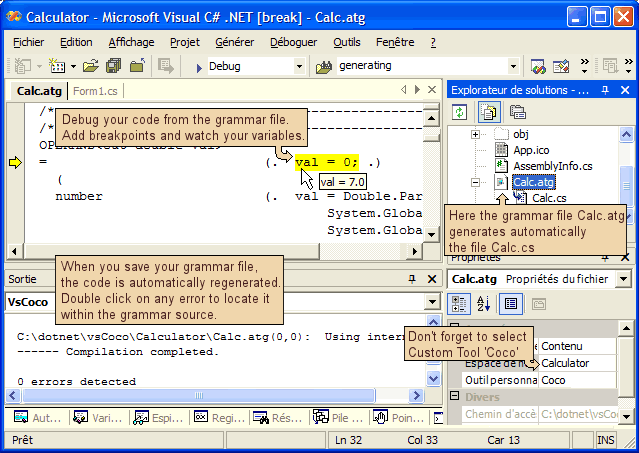
This #lines are very helpful, the Visual Studio IDE understands it well and lets you debug your generated program using the original source grammar.

I find it very useful; you can comment and uncomment the $L line to fit your development requirements.

Coco Modifications - 2: A Real Visual Studio Custom Tool

My second goal was to run Coco directly from Visual Studio as a custom tool, rather than having to use batch files.

The main advantage of a custom tool is that it will be automatically called when the source grammar changes and not at each compile.

Visual Studio publishes an interface called IVsSingleFileGenerator.

This interface defines two methods:

  • int DefaultExtension(out string)
  • int Generate(string, string, string, System.IntPtr[], out uint, Microsoft.VisualStudio.Shell.Interop.IVsGeneratorProgress)

Providing these two interfaces is the base of the work needed to make a Visual Studio Custom tool.
With the good information, this is after all fairly straight forward. I used and modified the GotDotNet User Sample: BaseCodeGeneratorWithSite.

Coco Modifications - 3 : An Installer for the Visual Studio Custom Tool

Now that we have a DLL which can be a Visual Studio plugin, you need to register it. This could prove a lot harder than expected. Fortunately, I read a excellent article called Automated Registration of Visual Studio Custom Tools by Michael McKechney.

I butchered his sample program and produced vsCocoRegistration.exe.

Known Bugs

vsCocoRegistration does not yet work with all version of Visual Studio .NET. This is just a question of changing the Registry GUIDs but I don't have that many versions to test it with. So feel free to ask in the forum below.

Links

History

  • October 29th 2005 - First release
  • November 1st 2005 - Corrected a couple of mistakes in the article

License

This article, along with any associated source code and files, is licensed under The Code Project Open License (CPOL)

About the Author

Pascal Ganaye
Software Developer (Senior)
United Kingdom United Kingdom
Member
I am a French programmer.
These days I spend most of my time with the .NET framework, JavaScript and html.


Sign Up to vote   Poor Excellent
Add a reason or comment to your vote: x
Votes of 3 or less require a comment

Comments and Discussions

 
You must Sign In to use this message board.
Search this forum  
    Spacing  Noise  Layout  Per page   
GeneralWanto to use this skeleton and replace cocoR parser with a C# lex program i've ported te C# from JLexmemberAndyHo8 Feb '09 - 9:30 
Hello, good work of your's.!
 
As I am using/building Parser Generator and Lexer's,
I have recently written a port of JavaLex (JLEX) and JavaCup to C#, among several GLR C# parsers.
 
They all work good as command line tools, and all of them write decent and useful C# code, as Lexer's and LR(k) + GLR + LALR(k) Attributed Grammar Parsers/Lexers.
 
A useful feature I will/would include is to write the Error's right into the generated .cs (C#) code as comment's, because actually it simply rejects the error in the ATG files, writing only a title as a .cs file, and to see the error, I had to use the command line CocoR tool in another window.
 
Now as I saw your work I decided to use the skeleton and let LexC# use it, initially.
The problem I have is how to debug this visual studio tools?
Is there a SDK to debug the vs-tools, I ported all accordingly, it compiles and installs (included a version of my C#-Lex) But it don't work, may be due to a mistake I've made.
 
Have also some questions to make:
Are the registry and custom directory GUIDs arbitrary? (I used the same and changed only the last digit)
The system installed (I modified the .bat) but it asks me for a strong signature: How can I get one for this new project? (have no experience with signed assemblies)
thanks
 
thanks anyways, and best regards
 
Andres H
GeneralRe: Wanto to use this skeleton and replace cocoR parser with a C# lex program i've ported te C# from JLexmemberPascal Ganaye9 Feb '09 - 6:53 
Hi Andres,
 
This is a bit far and I don't remember everything in detail.
I did a bit of debugging at the time.
 
The trick is to use Visual Studio to debug another instance of visual studio.
From memory, I think you can either :
- In your project debug properties you select start external program and enter: 'C:\Program Files\Microsoft Visual Studio 9.0\Common7\IDE\devenv.exe'
- You can also use the menu debug 'Attach to process' and select a second instance of Visual Studio you have run previously.
 
For the GUID, perhaps changing a digit is ok.
The best though is to use the menu tools create guid.
I created a few for your own use:
{B08919D1-73B1-46c8-AA95-CFCD02519B98}
{9C57B160-D1D2-4f31-BDAF-9DD530322864}
{74F63F7D-5CCA-4b26-A190-FB5B5DFCD953}
{81A2B711-D30C-4468-B635-6321027B2BAE}
{973AF25C-4469-423a-808E-B90D1128ADEC}
 
Let me know how you're going. my email is : pascal 2007 at ganaye dot com.
GeneralRe: Wanto to use this skeleton and replace cocoR parser with a C# lex program i've ported te C# from JLexmemberPascal Ganaye9 Feb '09 - 7:09 
For the generation of errors you can add 2 lines in your generated file:
Like those:
 
#line 45 "examplegrammar.g"
#error Invalid LALR blah blah blah
 
The #error line will be treated as an error by the C# compiler.
The #line just before will locate the error exactly where you want in the source grammar (or whatever source it is).
GeneralRe: Wanto to use this skeleton and replace cocoR parser with a C# lex program i've ported te C# from JLexmemberPascal Ganaye9 Feb '09 - 7:11 
Actually I just realize that many people already replied the same question better than me, in earlier posts.
GeneralRe: Wanto to use this skeleton and replace cocoR parser with a C# lex program i've ported te C# from JLexmemberPascal Ganaye9 Feb '09 - 7:14 
For the SNK file, this is a very frequent question and you can get an answer by googling it.
 
Creating a Key Pair[^]
GeneralUsing in VS2k8memberRichardM120 Nov '08 - 14:36 
I tried using it in VS 2k8, and I had to made a few, minor, changes.
You need to change the registry entry, as described by others, and you need to change the vsCoco project properties page, in the debug tab.
'Start external program' points to VS7 path, needs changing.
'Working directory' points to VS7 path, needs changing.
The path that worked for me is:
 
C:\Program Files\Microsoft Visual Studio 9.0\Common7\IDE
 
This is a very neat article.
Thanks for your time and effort
Richard
 
Silver member by constant and unflinching longevity.

GeneralRe: Using in VS2k8memberalex_zero23 Nov '08 - 21:45 
you can try this : http://www.codeplex.com/vsCocoR[^]
for both vs 2005 and vs 2008
GeneralUsing your own Scanner.frame and Parser.framememberDangersaur25 Jun '08 - 8:30 
I am using Visual Studio 2005, and for some reason I could not get VS Coco to let me use my own Scanner.frame or Parser.frame files.Confused | :confused: The instructions say that you just have to include them in the same directory as the atg, but for me this was not working. I finally tracked it down to two lines of code in the VsCoco Project and got it working. Shucks | :-> Here's how...
 
Step 1:
The line you need to change is the same in the WriteScanner function and the WriteParser function. On line 818 of the file DFA.cs, in the WriteScanner function, change tab.frameDir.Trim() to tab.srcDir.Trim(). Do the same in WriteParser and you are ready to build. Only problem is, if you are not using 2003 it won't build quite yet.
 
Step 2:
Go to Project->Properties->debug, and change the values of "start external program", and "working directory" to the location of your Visual Studio's IDE folder. For me it was in C:\Program Files\Microsoft Visual Studio 8\Common7\IDE. on the top one, "external program" you will need to add "\devenv.exe" on the end to get it to start VS for debugging.
 
Step 3:
Place your custom Scanner.frame and Parser.frame in the same directory of your atg file, and when you run the Coco custom tool it will use them to create the final Scanner.cs and Parser.cs files. You will know that it used your custom frames if upon compilation it does NOT say "using internal parser.frame", or "using internal scanner.frame".
 
Hope this helps somebody.Rose | [Rose]
GeneralRe: Using your own Scanner.frame and Parser.framememberRichardM120 Nov '08 - 14:48 
Yes it did, thanks.
Don't know who you ticked off and gave you a 1 WTF | :WTF: , but I am happy to give you a 5.
Thanks
Richard
 
Silver member by constant and unflinching longevity.

GeneralvsCocoR for vs2005 releasememberalex_zero14 Jan '08 - 20:19 
http://www.codeplex.com/vsCocoR[^]
GeneralRe: vsCocoR for vs2005 release [modified]memberRichardM120 Nov '08 - 11:19 
I down loaded this project, and it has a file it wants more a password for: vsCocoRkey.pfx
What is this locking? Do I need it for anything?
Thanks
 

To answer my own question, I deleted it, and it seems to make no difference.
 
Silver member by constant and unflinching longevity.
modified on Thursday, November 20, 2008 8:37 PM

GeneralquerymemberRana ji3 Apr '07 - 23:22 
hi
do u have source code for compiler or macro proccessor in c/ c++ or .net or vb or c#??
GeneralRe: querymemberPascal Ganaye7 Jan '08 - 0:37 
No I don't.
I personnally would not use Coco to write a full compiler.
AnswerRe: querymemberRana ji10 Jan '08 - 21:24 
Sir, my question is very different from what you have answered.
GeneralRe: querymemberRana ji10 Jan '08 - 21:27 
btw thank you
GeneralquerymemberRana ji3 Apr '07 - 23:21 
hi
do u have source code for compiler in c/ c++ or .net or vb or c#??
GeneralGrammars in subfolders in VS2005 and diff.memberdmoonfire22 Mar '07 - 8:59 
This isn't a perfect patch, but I found a case where the plugin doesn't find the proper .frame files. In specific, I keep my .atg files (using VS 2005) in a sub folder and it won't find the parser and scanner.frame from that subfolder. This is a patch fix (i.e. it keeps going well outside of the tree), but if you can't get it to use a provider .frame file, this might be a temporary solution.
 
Other than that, great little package!
 
diff -ur vsCoco/VsCoCo/Coco/DFA.cs /home/dylan/sil/Coco Grammar/VsCoCo/Coco/DFA.cs
--- vsCoco/VsCoCo/Coco/DFA.cs 2005-10-29 11:09:40.000000000 -0500
+++ /home/dylan/sil/Coco Grammar/VsCoCo/Coco/DFA.cs 2007-03-22 13:48:55.000000000 -0500
@@ -814,13 +814,20 @@
int[] startTab = new int[CharClass.charSetSize];
string fr = tab.srcDir + "Scanner.frame"; /* pdt */
if (!File.Exists(fr)) {
- if (tab.frameDir != null)
- fr = tab.frameDir.Trim() + Path.DirectorySeparatorChar + "Scanner.frame";
- if (!File.Exists(fr))
- {
- fr=null;
- }
- }
+ if (tab.frameDir != null)
+ {
+ FileInfo fi = new FileInfo(tab.frameDir.Trim() + Path.DirectorySeparatorChar + "Scanner.frame");
+
+ while (!fi.Exists && fi.Directory != null && fi.Directory.Parent != null)
+ {
+ // Move up
+ fi = new FileInfo(fi.Directory.Parent.FullName + Path.DirectorySeparatorChar + "Scanner.frame");
+ fr = fi.FullName;
+ }
+ }
+
+ if (!File.Exists(fr)) fr = null;
+ }
if (fr==null)
{
vsCoco.WriteError(0,0,vsCoco.ErrorLevel.info,"Using internal Scanner.Frame file.");
diff -ur vsCoco/VsCoCo/Coco/ParserGen.cs /home/dylan/sil/Coco Grammar/VsCoCo/Coco/ParserGen.cs
--- vsCoco/VsCoCo/Coco/ParserGen.cs 2005-10-29 11:09:44.000000000 -0500
+++ /home/dylan/sil/Coco Grammar/VsCoCo/Coco/ParserGen.cs 2007-03-22 13:48:55.000000000 -0500
@@ -408,8 +408,19 @@
symSet.Add(tab.allSyncSets);
string fr = tab.srcDir + "Parser.frame";
if (!File.Exists(fr)) {
- if (tab.frameDir != null) fr = tab.frameDir.Trim() + Path.DirectorySeparatorChar + "Parser.frame";
- if (!File.Exists(fr)) fr=null;
+ if (tab.frameDir != null)
+ {
+ FileInfo fi = new FileInfo(tab.frameDir.Trim() + Path.DirectorySeparatorChar + "Parser.frame");
+
+ while (!fi.Exists && fi.Directory != null && fi.Directory.Parent != null)
+ {
+ // Move up
+ fi = new FileInfo(fi.Directory.Parent.FullName + Path.DirectorySeparatorChar + "Parser.frame");
+ fr = fi.FullName;
+ }
+ }
+
+ if (!File.Exists(fr)) fr = null;
}
if (fr==null)
{
GeneralWorks with Microsoft Visual C# 2005 Express Edition on VistamemberCarstenKnop27 Feb '07 - 12:21 
In the bin/vsCocoRegistration.reg change the line
[HKEY_LOCAL_MACHINE\SOFTWARE\Microsoft\VisualStudio\7.1\Generators\{FAE04EC1-301F-11D3-BF4B-00C04F79EFBC}\Coco]
into
[HKEY_LOCAL_MACHINE\SOFTWARE\Microsoft\VCSExpress\8.0\Generators\{FAE04EC1-301F-11D3-BF4B-00C04F79EFBC}\Coco]

QuestionIt is free to use ?memberm.raetzel28 Sep '06 - 2:20 
First, great work. And it works fully under Visual Studio 2005 with some simple changes on the installer.
 
It is possible to use this tool for commercial works too? I have not found a hint to a licence.
AnswerRe: It is free to use ?memberTveitane1 Oct '06 - 6:36 
Hi,
Sounds good that it can easily be made to works with VS2005 - how about your changes to the installer for VS2005, would you like to share them with the world? I would be grateful...

 
All the best,
Knut Tveitane
GeneralRe: It is free to use ?memberRené André22 Dec '06 - 22:11 
In the bin/vsCocoRegistration.reg change the line
[HKEY_LOCAL_MACHINE\SOFTWARE\Microsoft\VisualStudio\7.1\Generators\{FAE04EC1-301F-11D3-BF4B-00C04F79EFBC}\Coco]
into
[HKEY_LOCAL_MACHINE\SOFTWARE\Microsoft\VisualStudio\8.0\Generators\{FAE04EC1-301F-11D3-BF4B-00C04F79EFBC}\Coco]

QuestionvsCoco with VS 2005?memberhahnl5 Aug '06 - 4:08 
Is there an update planed for vsCoco with VS 2005???
AnswerRe: vsCoco with VS 2005?memberPascal Ganaye5 Aug '06 - 5:07 
No not really I do not use it anymore.
Feel free to post it yourself if you want to.
What are you writing ? a C# interpretor?
 
I am writing a multi-language script engine (VB/C# for now) with 4GL capabilities, but I don't use coco anymore.
I write the tokenizer parser entirely from scratch (originally based on coco) and with habit it is not that hard.

GeneralC# Generics with Cocomemberhahnl4 Aug '06 - 21:32 
Hi,
is there any ATG file for C# including generics syntax??
GeneralRe: C# Generics with CocomemberTveitane5 Oct '06 - 1:50 
The C#2 example grammar found on the Coco/R home page handles generics
 
Cheers,
 
Knut Tveitane
GeneralLanguage files for Coco/RmemberCoolDaddy4 Nov '05 - 6:36 
Does anyone know where I can get a VB & Perl language file for Coco/R?
GeneralRe: Language files for Coco/RmemberDaniel Grunwald4 Nov '05 - 7:13 
SharpDevelop also uses Coco/R and includes a C# and VB.NET parser for code completion.
GeneralRe: Language files for Coco/RmemberPascal Ganaye4 Nov '05 - 8:22 
I would quite like to get the VB.NET grammar
GeneralRe: Language files for Coco/RmemberDaniel Grunwald4 Nov '05 - 8:27 
The grammar for VB 7 is included in SharpDevelop 1.1[^] (in the source code download, the "SharpRefactoryVB" project).
The grammar for VB 8 is included in SharpDevelop 2.0[^] (only when you get the source code from the subversion repository, in the project "NRefactory")
QuestionAnyone tried ?memberpascal ganaye30 Oct '05 - 4:12 
I look forward to see if it works on your systems, please let me know.
AnswerRe: Anyone tried ?memberIske30 Oct '05 - 22:34 
Yes, I did.
 
I extracted the contents of the bin/ directory to my local drive, ran the exe (even included the reg file into my registry) but I do not see any difference, when I open my existing solution that includes an ATG Grammar file.
 
I'm running VS.NET 2003 Enterprise Developer English on Win XP Pro
 
What'd be a good way to test it?
 
Regards
 
Kai
AnswerRe: Anyone tried ?memberIske30 Oct '05 - 23:04 
Pascal,
 
never mind my previous post. Just should have set the Custom Tool properly.
 
Haven't tested the debugging functionality but apart from that this is really helpful and works just fine.
 
Thanks for this.
 
Regards
 
Kai
GeneralRe: Anyone tried ?memberpascal ganaye31 Oct '05 - 2:15 
Smile | :)
AnswerRe: Anyone tried ?memberneolithos1 Nov '05 - 9:52 
I've no idea what I make wrong.
 
I extract the archive.
I run vsCocoRegistration.exe
I run vsCocoRegistration.reg
 

Then I started the VS 2003 7.1.3088 (German).
Add to a project a text-file and changed the extension to atg.
I set
- Custom Tools to 'Coco'
- Buildaction to 'Compile'
 
Then I tried to compile the project and VS used the C# compiler for the atg-file.
GeneralRe: Anyone tried ?memberneolithos1 Nov '05 - 9:57 
I looked up Contenu. And this content in english.
 
Sorry!
GeneralRe: Anyone tried ?memberPascal Ganaye1 Nov '05 - 11:57 
Yes sorry for the screenshot in French
I will amend the article !
AnswerRe: Anyone tried ?memberAndyHo2 Nov '05 - 1:17 
Pascal
 
Hi, you have done a wonderful job with coco/R porting it towards C#!
 
This was JUST a benediction for me, as I was peeking around with all this compiler-compiler’s and got no good results.
 
ANSWER: YES! Installed OK into VS2003, no problem, almost instantly usable! Sample provided Wordk ok!..but:
 
I have some questions on this:
 
1) I cannot DEBUG/TRACE into the “dynamically” generated code (the scanner does not work for me as expected (at least with my specs).
2) When there is a (coco-compiler) error in the ATG, the error (syntax or whatever) is not displayed and the class is empty yielding in "sintax errors" because of the lacking classes (Scanner/Parser), just not useful to debug, only confusing. the real compiler outpur and warnings are hidden (can they be retrieved/displayed in the output (result) section?) Wink | ;) I worked it around by running in another (XP-cmd) window the coco.exe against the sane ATG, and there I saw the errors to correctly edit my grammar.Frown | :(
 
SUGGESTION
Is there another way to introduce a line into the “results” of visual studio, and make possibly the cursor jump whew the error are (line/column) ?
 
A deeper question:
 
I want to (need) to have an external hook into the Parser, specially the Scanner, because I want to parse a NLP language (Natural Spanish) and this language has a lot of “ambiguities” is not easily convertible into LL(1) and also the words are of more than one kind at all times ( “EL” can be a pronoun or an article ) and many adverbs and adjectives can be used as nouns in a sentence. This may need a hook into the scanner, producing "executabel code" as a token is being recognized.. (much like a PRAGMA but with TOKENS (this wolud be a useful/nice enhancement) Wink | ;)
 
So my next strategy is to use a highly customizable Scanner/Parse integrating code to disambiguate based on semantic and morphologic relations and accidents like: (number/gender/person/tense)
 
For accomplishing this I need to first Tag the individual words as all the possible syntactic particles, then pass the parser and check if they build a grammar, testing every (possible and plausible) combination of the function of every word in the sentence, and if the sentence has unknown words, then assign the most (possible) type of function+gender+number to form a reasonable “guessed” phrase/sentence.
 
This may be accomplished by modifying the internal scanner/parser structure/interface, I guess.
 
Can you help me with this?Smile | :)
 
UPGRADING Big Grin | :-D
Checking deeply into your VsCoco code I’ve found something interestingly to be done:
 
If you use a enumeration for the tokens with the same integer relationship, then in the generation of the syntax you can use the token names w/o having to add the “_” and also this will definitively enhance readability of the written C# code.
 
FORMER REFERENCES D'Oh! | :doh:
I have used several Compiler-Compiler tools. The best was CsCUP + CsLEX (C# version) they work very good, but they generate separate scanner and parser’s but the internals are very odd. (as they have been ported from C/C++ towards Java and then to C#.. a very common and ugly route)
 
I really wanted to get a GLR parser or a Early or CYK one., but I have found none in the internet (for C# or Java) but lots of them implemented for “strange+odd+conceptual?” languages like python, happy, earley and perl.Cry | :((
 
If you like I can send you some of my former work in C# with “grammatica” (Per Cederberg) Suspicious | :suss: where I wrote a interactive grammar editor (with a parser inside to assist the writing of the grammar)
 
I declined Frown | :( to use grammatica because it is a LL(k) parser and its production’s lookahead is too-lazy (slooowwww) so it is impractical to try something else there. (>10 seconds a parsing of a 10 words phrase with about 500 lookaheads) also It does not let me disambiguate on-the-fly like coco’s WEAK tags.
 
I was using CUP as this (your work) broke in …and I am testing the integration with VS is greath!!!
 
Any help appreciated.
 
Laugh | :laugh:
 
Andrés Hohendahl
(Argentina)
GeneralRe: Anyone tried ?memberPascal Ganaye2 Nov '05 - 2:32 
Hi André.
I am going to try to reply your questions.
 
1) I cannot DEBUG/TRACE ...
Did you put a $L at the beginning of your grammar ?
If yes the generated parser will contains #line directives.
 
2) When there is a (coco-compiler) error in the ATG, the error (syntax or whatever) is not displayed...
 
It should be visible within the pane "Coco" in the Output window (like on the screen shot).
 
Double clicking on the error should make your cursor jump to the line of grammar where the error occurs.
 
Deeper question:
You can provide alternatives parser.frame and scanner.frame files within your project if you want to need to.
I also know that Coco will let you some fiddling with their IF() statement but I did not use it yet. In fact I wrote this utility after having used Coco only for a day.
I am afraid to admit that your knowledge of LL grammars is far supperior to mine. I am not sure I can help you that much.
 
Did you read : http://www.codeproject.com/useritems/englishparsing.asp[^]

GeneralRe: Anyone tried ?memberAndyHo2 Nov '05 - 3:37 
Yes I've read it.
The problem is that the method is memory-hungry (250Mb) and this don't allow to deploy a useful thing other than for research/testing. Also the learned-syntax are English "only" Cry | :(( and I did not get them out of the OpenNLP CVS place (at least in my effort to download them)
 
I've posted this mail (kinda) separatedly to yor personal e-mail address but it came back as spam..Cry | :((
(My SMTP server is a REAL server but the domains for POP3 are in another thius they are seen as spam by many sites Frown | :( )
 
My knowledge on parsing is not so big,Confused | :confused: I wanted to create a GLR parser and it's VERY complicated to start this w/o a code skeleton.. (at least in a few hours/days) and I've got no such time span.Sigh | :sigh:
 
regards.
 
and.. Thanks!, the output tab. do contain the Error "messages", I've not seen it before..!
 
ANOTHER ISSUE:
the compiled directives (like $G) other than $L don't work:
Error Fatal error :Object reference not set to an instance of an object.
GeneralRe: Anyone tried ?memberverdant28 Sep '06 - 1:50 
I am trying to do exactly the same as you, but I am doing it in English and am using OpenNLP.
Yes, it is memory-hungry, but that will always be a problem with Natural Language Parsing.
 
What I am doing is this:
 
1. Using COCO/R (not this tool, but commandline) to generate a parser. I have created 8 general sentence structures so far, and most of what I need fits very simple statements.
 
S = NP VP
NP = "[NP" [DT] [ADJ+] [N] "]"
etc
 
2. Parse the sentence using an English POS Tagger in OpenNLP to generate the semantic structure of the sentence (eg [NP [DT The] [N cat]] [VP [V is] [PP on] [NP [DT the] [N mat]])
 
3. Run it through the Coco generated compiler to generate a chart
 
4. Process the chart into logic.
 
I am sure OpenNLP has a Spanish POSTagger. It wouldn't take too long to port it to SharpNLP from the Java version, and with the model converter you could take the original Spanish Model and convert it for use with C#
 
What I am looking to do next is to build a look-ahead text-editor. Problem is OpenNLP is too slow for this. You say you have used Earley and CYK parsers. Do you know any for C#?
 
Dominic Messenger
GeneralOpenNLP performance (was Re: Anyone tried ?)memberRichard Northedge17 Nov '06 - 9:37 
My .NET port of OpenNLP (SharpNLP) is driven from maximum entropy models read by SharpEntropy, a port of the Java MaxEnt library. The default configuration is for the model files to be read entirely into memory, then accessed from memory as needed. So for instance, loading all the models necessary for the OpenNLP Parser tool into memory takes about 12 seconds on my machine, but once the models are in memory, parsing a sentence is pretty much instantaneous. The problem with this approach is if your machine doesn't have enough RAM to hold the model files in memory. Then that 12 seconds turns into several minutes or more as physical memory is full and the machine starts using virtual memory on your hard disk instead.
 
I changed SharpEntropy's implementation of the model reader / writer interfaces so they are no longer identical to the Java MaxEnt interfaces. These changes make it possible to create reader / writer pairs that do not load the entire model into memory up front, but keep it on disk and access the parts of the model as needed. This scenario means that there is no initial load time hit, but each individual access of the model takes longer. when your machine doesn't have enough RAM to hold the model files in memory, this is probably a better bet. You'll need to use the overloads in OpenNLP that take in objects implementing SharpEntropy.IMaximumEntropyModel, rather than the methods that just take a path to a model file in the .NET "in memory" binary format.
 
Now, I have implemented model reader / writer classes that use SQL Server and SQLite as the format for holding model files. But a relational database is probably not the most efficient way to go. I envisage a binary format optimised for fast lookups of blocks of data based on a string key.
 
As far as the Spanish goes: I am slowly catching up with the changes made in the Java OpenNLP library version 1.3. Watch the SharpNLP space on Codeplex for updates.
 
Richard
 

AnswerRe: Anyone tried ?memberFedy22 Nov '05 - 6:22 
Hi,
I have tried the tool in VS 2005 (beta 2) and seem working.
I just changed the registration key (8.0 instead of 7.1):
....\VisualStudio\8.0\Generators\.....
 
A good feature can be a Grammar Hightlight.
 
Thanks or Merçi beacoup.
Federico

GeneralRe: Anyone tried ?memberPascal Ganaye2 Nov '05 - 6:42 
What do you mean grammar highlight ? you mean color coding in the editor ?
GeneralRe: Anyone tried ?memberFedy22 Nov '05 - 7:08 
Yes, i mean syntax highlight in the editor.
 
Another feature can be also a code tree like in this eclipse-plugin:
http://www.ssw.uni-linz.ac.at/Research/Projects/Coco/Java/Static/EclipsePlugin/screenshots.html


Federico
GeneralRe: Anyone tried ?memberPascal Ganaye3 Nov '05 - 9:14 
I am not sure how I can change the color coding behaviour of Visual Studio.
Anyone got an idea ?

General General    News News    Suggestion Suggestion    Question Question    Bug Bug    Answer Answer    Joke Joke    Rant Rant    Admin Admin   

Permalink | Advertise | Privacy | Mobile
Web03 | 2.6.130516.1 | Last Updated 29 Oct 2005
Article Copyright 2005 by Pascal Ganaye
Everything else Copyright © CodeProject, 1999-2013
Terms of Use
Layout: fixed | fluid