Click here to Skip to main content
Licence 
First Posted 15 Nov 2005
Views 225,196
Downloads 804
Bookmarked 90 times

Application settings in VB.NET 2.0 and Visual Studio 2005

By itoleck | 11 Jan 2006
An article on using application settings in VB.NET 2.0 and Visual Studio 2005 to save the size and location of a form.
Prize winner in Competition "VB.NET Oct 2005"
1 vote, 4.2%
1
1 vote, 4.2%
2
2 votes, 8.3%
3
9 votes, 37.5%
4
11 votes, 45.8%
5
4.53/5 - 24 votes
2 removed
μ 4.22, σa 1.84 [?]

Introduction

A new feature of .NET 2.0 and Visual Studio 2005 is the ability to save a user's application settings in a user.config file that is saved in the user's desktop profile.

Background

Until .NET 2.0, it was difficult to save a user's settings for an application. User settings had to be saved in the registry, in an .ini file, or in a custom text file. Now, it is possible to save settings for a user's application that will even move with them in a roaming desktop profile.

To view the non-roaming settings, open the user.config file located at %USERPROFILE%\Local Settings\Application Data\<Company Name>\<appdomainname>_<eid>_<hash>\<verison>\user.config.

To view the roaming user settings, open the user.config file located at %USERPROFILE%\Application Data\<Company Name>\<appdomainname>_<eid>_<hash>\<verison>\user.config.

Using the code

To add application or user settings to a project, right-click on the project name in the Solution Explorer window, and click Properties. Then, click on Settings in the left tab list.
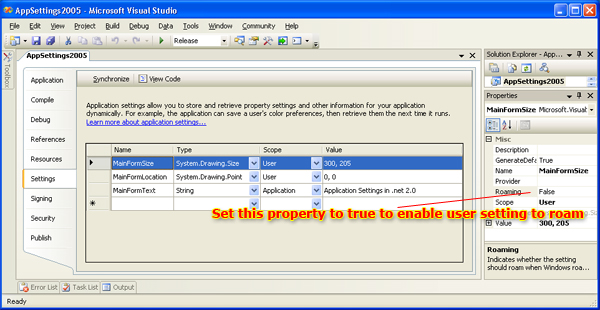
Sample Image - AppSettings2005.jpg

When a setting is added to the Visual Studio designer, a public property is created in the My.Settings namespace. Depending on the scope of the setting, the property will be ReadOnly or writable. This allows you to programmatically change the user setting values and save them with the My.Settings.Save() method.

A second way to save settings is to enable the 'Save My.Settings on Shutdown' setting in the application. To do this, right-click on the project name in the Solution Explorer window, and click Properties. Then, click on Application in the left tab list.

Sample Image - AppSettings2005_save.jpg

To restore the last saved dimensions of a form, we set the size and location of the form from the user settings in the form's Load event.

Private Sub Form1_Load _
    (ByVal sender As Object, ByVal e As System.EventArgs) _
    Handles Me.Load
        'Set textboxes and form name from application and user settings

        'Notice how the application setting property is ReadOnly
        Me.Text = My.Settings.MainFormText

        'Notice how the user settings are writable
        Me.Size = My.Settings.MainFormSize
        Me.Location = My.Settings.MainFormLocation

        Me.txtFormText.Text = My.Settings.MainFormText

        'Show the form now
        Me.Visible = True
    End Sub

In the form's FormClosing event, we save the form's size and location values to the current values.

Main form closing

Private Sub Form1_FormClosing _
    (ByVal sender As Object, _
    ByVal e As System.Windows.Forms.FormClosingEventArgs) _
    Handles Me.FormClosing
        Try
            'Set my user settings MainFormSize to the
            'current(Form) 's size
            My.Settings.MainFormSize = Me.Size

            'Set my user setting MainFormLocation to
            'the current form's location
            My.Settings.MainFormLocation = Me.Location

            'Save the user settings so next time the
            'window will be the same size and location
            My.Settings.Save()

            MsgBox("Your settings were saved successfully.", _
            MsgBoxStyle.OkOnly, "Save...")
        Catch ex As Exception
            MsgBox("There was a problem saving your settings.", _
            MsgBoxStyle.Critical, "Save Error...")
        End Try
    End Sub

Conclusion

You can use application and user settings for many things in .NET 2.0. Just remember that if you want to change the settings then the scope has to be set as User.

History

  • Second revision - Moved around text and image to make the article more readable. Added a Conclusion section.
  • Third revision - Updated user.config file paths, and added profile and auto save on exit explanation.


License

This article has no explicit license attached to it but may contain usage terms in the article text or the download files themselves. If in doubt please contact the author via the discussion board below.

A list of licenses authors might use can be found here

About the Author

itoleck

Help desk / Support
www.swarmsoft.net
United States United States

Member
Chad Schultz
13 years of Computer Information Systems experience
MCSE, MCAD, MCTS SharePoint
 
Blog: ChadSchultz.com

Sign Up to vote   Poor Excellent
Add a reason or comment to your vote: x
Votes of 3 or less require a comment

Comments and Discussions

 
You must Sign In to use this message board. (secure sign-in)
 
Search this forum  
 FAQ
    Noise  Layout  Per page   
  Refresh
QuestionHello how to make my.settings portable? Pinmemberleesong23:31 28 Feb '11  
GeneralTweaking the code to handle window sizing better PinmemberMartin Omander10:03 30 Sep '08  
QuestionHow do I change ConnectionString in app.config PinmemberLeif Thomsen2:57 23 Aug '08  
QuestionIs it safe? PinmemberDan'M0:32 27 Oct '07  
AnswerRe: Is it safe? Pinmemberdepmoddima1:00 2 Nov '07  
QuestionExpress Edition PinmemberFREEYO16:19 17 Jul '07  
Can this be done in Visual Studio 2005 Express Edition?
 
FREEYO

Generalapplication settings in ToolStripMenuItem Pinmemberjhon edison19:25 20 Apr '07  
GeneralRe: application settings in ToolStripMenuItem Pinmemberctwalker5:30 16 Aug '07  
QuestionMy.Settings.Save for complex types? Pinmemberjerome513618:23 9 Apr '07  
GeneralRe: My.Settings.Save for complex types? Pinmemberemoreau8:30 18 May '07  
AnswerRe: My.Settings.Save for complex types? Pinmemberjerome51368:36 18 May '07  
AnswerRe: My.Settings.Save for complex types? Pinmemberjerome51368:37 18 May '07  
GeneralRe: My.Settings.Save for complex types? Pinmemberemoreau8:41 18 May '07  
QuestionIt's possible to have my.Setting from different classes? [modified] Pinmemberpapervegetal23:29 29 Mar '07  
Questionpersist settings between versions PinmemberThomas Fang10:19 18 Dec '06  
AnswerRe: persist settings between versions Pinmemberctwalker5:36 16 Aug '07  
QuestionWindows service is not reading the settings [modified] PinmemberSvenCPA1:35 11 Jul '06  
QuestionRe: Windows service is not reading the settings PinmemberUfiPhil18:20 20 Aug '06  
AnswerRe: Windows service is not reading the settings Pinmemberitoleck4:13 14 Sep '06  
GeneralRe: Windows service is not reading the settings PinmemberDaveBlack3:32 25 Jan '11  
GeneralApplication Bindings Pinmemberdotslashmartyn14:42 9 May '06  
QuestionHow to handle application version change Pinmemberdscemama4:36 1 May '06  
AnswerRe: How to handle application version change PinPopularmembermajze121:11 5 Sep '06  
Questionwhat about C#? PinmemberPaul Horstink2:29 29 Apr '06  
AnswerHoly Crap! PinmemberJohn Saccoccio8:26 9 Nov '06  

General General    News News    Suggestion Suggestion    Question Question    Bug Bug    Answer Answer    Joke Joke    Rant Rant    Admin Admin   

Use Ctrl+Left/Right to switch messages, Ctrl+Up/Down to switch threads, Ctrl+Shift+Left/Right to switch pages.

Permalink | Advertise | Privacy | Mobile
Web01 | 2.5.120210.1 | Last Updated 11 Jan 2006
Article Copyright 2005 by itoleck
Everything else Copyright © CodeProject, 1999-2012
Terms of Use
Layout: fixed | fluid