 |
|
|
 |
|
|
 |
|
|
 |
|
 |
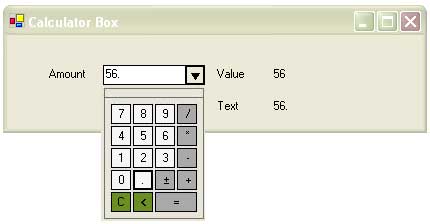
Hi Mr. Masud, I was wondering why the decimal point is invisible on the decimal point button, on your popop control? How can I fix this?
Regards,
Marshall
We're flying on a rock though space and we're lucky to be alive!
|
|
|
|
 |
|
|
 |
|
 |
good job but i have 2 questions. when you enter 2 + 3 and then press enter to obtain the result (5) everything is alright but there is problem here, you can delete the result with Backspace its not correct. another question is when you enter the same operation again and before pressing enter try to press some operators continuously (I mean "+", "-", "*", "/"), the result is interesting. anyway good job
FMZL
|
|
|
|
 |
|
 |
I want to write a calculator in webform technology.in this project i have a textbox and some buttoms.but as you know the webpage object and its child control objects are destroy to freeup resources.what should i do?
s.y
|
|
|
|
 |
|
 |
hello i am student my english is not good sorry.
Your project is too difficult i can't know it can you help me to do just in one form . The form only have 0 1 2 3 4 5 6 7 8 9 + - * / = and clear . and not need use keyboard to input numeral.Only use mouse to click thank you very much.
|
|
|
|
 |
|
 |
Great article... but what would be really cool is if you stored the actual calculations that were used to obtained the final number and the user could go back and see / modify those as well
eg:
20 = 1 + 2 / .5 * 3 + 7
|
|
|
|
 |
|
 |
Hello Masud!
i have developed many custom components & controls and i am in problem to make it show above all controls and even form.
Let take Ur calculator component as an example:
My Observations:
it has 2 main controls in it:
1. one text box
2. one panel or a groupbox which contains the number buttons & all
(u might be using a form).
Even if it is a form i want it simply to be a panel or a groupbox which drops down & goes up.
i used this pattern in my control.
PROBLEMS;
1. when the control is dropped down it doesn't come over all
it resides behind other controls placed below the calculator control (as eg.)
2. when the control is placed in the grid & droped down the falling panel or groupbox gets
detached from the control & the control also gets disappeared many times.
what i want to know is :
1. how to make the component we made & the panel or groupbox control inside it which drops down
be treated as a single control by other controls & form
2. how to show it above all other controls & form & whatever comes between it as it behaving in ur calculator control ( it comes above all other controls).
Can it be done without using a form for the dropped down portion, using a panel or a Gbox.
Thanks & Regards
Anup(S)am
anupam_sam@yahoo.com
|
|
|
|
 |
|
 |
You can use ToolStripDropDown class. It's available in .Net framework 2.0.
protected override void OnMouseClick(MouseEventArgs e)
{
base.OnMouseClick(e);
ToolStripDropDown tsdd = new ToolStripDropDown();
tsdd.Items.Add(new ToolStripControlHost(new ListView()));
tsdd.Show(PointToScreen(e.Location));
}
Thanks
Hasan Shahriar Masud
Senior Software Engineer
Kaz Software limited
Dhaka, Bangladesh
URL: http://www.hsmasud.com
E-Mail: info@hsmasud.com
Company: http://www.kaz.com.bd
|
|
|
|
 |
|
 |
You can do this in two ways. If you are using the source code then add the source project to your solution. Add the reference. Click on My User Control tab in your tool box. Drag the Calculator control to your project. If you are using the binary then add the control by righ click on the tool box. Browse the dll. Then drag the control to your form.
Thanks
Hasan Shahriar Masud
Senior Software Engineer
Kaz Software limited
Dhaka, Bangladesh
URL: http://www.hsmasud.com
E-Mail: info@hsmasud.com
|
|
|
|
 |
|
 |
I was trying to use the calculator in vb.net, and it worked great. But, because of the nature of our application, we have to display the form (which has the control on it) using "topmost". When we do this, the calculator doesn't open. Any suggestions?
|
|
|
|
 |
|
 |
Hi,
Thanks for your comment. Instead of using topmost you can try using AddOwnForm method. In that case you can make your form owned by the form where you place the control.
Hasan Shahriar Masud
Senior Software Engineer
Kaz Software limited
Dhaka, Bangladesh
URL: http://www.hsmasud.com
E-Mail: info@hsmasud.com
|
|
|
|
 |
|
 |
Nice control you got my 5!
|
|
|
|
 |
|
 |
Thank you for your rating.
Hasan Shahriar Masud
Senior Software Engineer
Kaz Software limited
Dhaka, Bangladesh
URL: http://www.hsmasud.com
E-Mail: info@hsmasud.com
|
|
|
|
 |
|
 |
Nice Control, but let me point out a little shortfall in culture support.....In spanish, for instance, the decimal separator is a comma, not a point. The control could only be used if the comma is introduced from keyboard, that´s what the control tries to avoid.
It would be nice if the control could check
with the CultureInfo class what separator is used
and the parsing method called with it. Just an idea
to make the control completely ready for use.
Agapitar
|
|
|
|
 |
|
 |
Hi Agapitar,
Thanks for your suggestion. I appreciate your suggestion. 1.0 would not work properly if the user sets the culture info to Spanish. 1.1 solves the problem.
Thanks
Hasan Shahriar Masud
Senior Software Engineer
Kaz Software limited
Dhaka, Bangladesh
URL: http://www.hsmasud.com
|
|
|
|
 |
|
 |
it's a fifer from me for this cool article. Keep it up mate!
Shahriar Hyder
If you don't stand up for something, you'll fall for anything.
|
|
|
|
 |
|
 |
Thanks
I could not understand what do you mean by "If you don't stand up for something, you'll fall for anything."
Hasan Shahriar Masud
Senior Software Engineer
Kaz Software limited
Dhaka, Bangladesh
URL: http://www.hsmasud.com
|
|
|
|
 |
|
 |
It's my motto meaning if I don't stand up and uphold a principle by following it, i would, at some point of time, be swept away by immorality and then i would be enticed into upholding something of the evil nature.
Anyway enough of philosophy I reckon you deserve a good round of appreciation for the courage, creativity and eagerness you showed for embracing such new things. All the very best for all your future endeavours. Cheers.
|
|
|
|
 |
|
 |
It is a fantastic piece of code for validating only numer inputs, but I'm experiencing difficulty in entering more than 9 digits.
Why is that?
|
|
|
|
 |
|
 |
Hi,
Thanks for your comment. I'm not getting the problem you got. You can try by changing to width of the text box.
Thanks
Hasan Shahriar Masud
Senior Software Engineer
Kaz Software limited
Dhaka, Bangladesh
URL: http://www.hsmasud.com
E-Mail: info@hsmasud.com
|
|
|
|
 |
