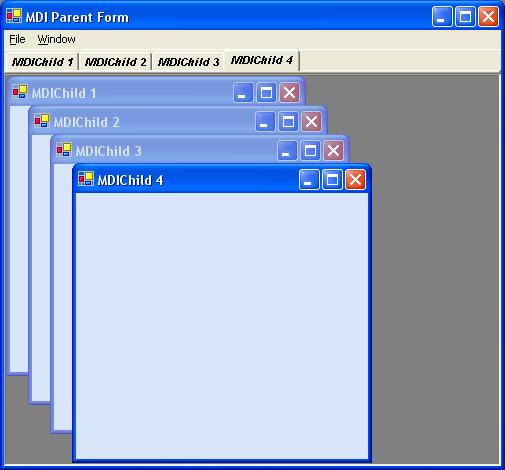
 |
|
|
 |
|
|
 |
|
 |
Coming from someone who has never contributed on this site, your "vote of 1" is meaningless.
|
|
|
|
 |
|
 |
I downloaded your exe and sourcecode. EXE works great. But sourcecode doesnt have the same functionality as exe file.
When i open 5 forms, form1,form2,form3,form4,form5. When i close form5 the focus should go to form4 and it should be activated. It works fine in exe file but not in source code.
In source code when i close form5, form1 is activated instead of form4.
|
|
|
|
 |
|
|
 |
|
 |
I really did find this code useful, however I made a few adjustments. Basically the mdimain form should be the one controlling the tabs, and any child forms of any type should not know about what the main form is up to. This is very easy to accomplish.
private void newMenuItem_Click(object sender, EventArgs e)
{
Form childForm = new Form();
childForm.Text = "MDIChild " + childCount++;
childForm.MdiParent = this;
childForm.Closing += childForm_Closing;
TabPage tp = new TabPage();
tp.Parent = tabControl;
tp.Text = childForm.Text;
tp.Tag = childForm; tp.Show();
childForm.Show();
tabControl.SelectedTab = tp;
tabControl.Visible = true;
}
void childForm_Closing(object sender, System.ComponentModel.CancelEventArgs e)
{
tabControl.SelectedTab.Dispose();
if (tabControl.TabCount <= 0)
tabControl.Visible = false;
}
private void tabControl_SelectedIndexChanged(object sender, EventArgs e)
{
if(tabControl.SelectedTab != null)
(tabControl.SelectedTab.Tag as Form).Activate();
}
By using the above logic, the child form does not need to know about the logic contained in the mdimain form which makes the code much cleaner.
|
|
|
|
 |
|
 |
The concept is very nice . I need one thing.Whenever we make changes in the windows form of particular tab page, I want to show '*' attached to the form text (ie)'mdiChild1 *' on the tab. Is it possible and how can I attain that.Please send me the solution.
|
|
|
|
 |
|
 |
I want code snippet to close child form using menu
I tried to close child form using code snippet:
Form activeChild = this.ActiveMDIChild;
if(activeChild != null)
{
activeChild.Close();
}
after this, child form closed along with tabcontrol
|
|
|
|
 |
|
 |
Thanks for taking the time to write this. I usually don't use tabbed MDI for my apps, so this helped put me in the right mind set before I took off on my own.
Something I noticed...
The line that states, "When the MDI child form is closing, destroy the corresponding tab page.", should mention the "FormClosing" event, instead of just "closing". Developers new to .NET may get confused since the method "Cloe" exists, but the event "Closing" does not.
Also, the "childCount" isn't specified in your code. It is enough enough to figure out what to do here, but you don't include it. It's just an int property on the parent form that can start with a value of one:
private int childCount = 1;
One last thing: to use this as a tabbed MDI-like gui (true tabbed layout), we'd want to set all new child forms to maximized by default. Best way to do this is to have a GotFocus event for the child form:
private void MDIChild_GotFocus(object sender, System.EventArgs e)
{
this.WindowState = FormWindowState.Maximized;
}
Thanks!
--
cipher_nemo (John)
Software Engineer
|
|
|
|
 |
|
 |
I have two predefined forms that are in seperate classes. I want to open them as tabs in the MDIContainer. How would the SelectedIndexChanged method work? I can't get it to switch between the two tabs.
I have created an instance of each form and assigned them to their own tabs. like...
private static Indexing frmIndexingChild = new Indexing();
Where Indexing is the name of the Indexing form's class.
|
|
|
|
 |
|
|
 |
|
 |
Your solution is the correct one. The code presented in this article is too complex and not practical.
Could you submit your solution as an article with project code. It would be much easier to find and to use.
|
|
|
|
 |
|
|
 |
|
 |
Think you for posting this. I have a question though.
How would I use this with different types of child forms?
For example, If I wanted to have 1 tab for CarForm and 1 tab for AirplaneForm, how would I go about doing this?
Thank you.
|
|
|
|
 |
|
 |
You need to create 2 mdichildren forms CarForm.cs and Airplane.cs. If you look at the original code each the MDIChild has some functions in it for the handling of the tabs. Copy these functions to all of your MDIChildren.
public CarForm()
{
InitializeComponent();
this.Closing += new System.ComponentModel.CancelEventHandler(this.MDIChild_Closing);
this.Activated += new System.EventHandler(this.MDIChild_Activated);
}
#region tabcontrol
private TabControl tabCtrl;
private TabPage tabPag;
public TabPage TabPag
{
get
{
return tabPag;
}
set
{
tabPag = value;
}
}
public TabControl TabCtrl
{
set
{
tabCtrl = value;
}
}
private void MDIChild_Closing(object sender, System.ComponentModel.CancelEventArgs e)
{
//Destroy the corresponding Tabpage when closing MDI child form
this.tabPag.Dispose();
//If no Tabpage left
if (!tabCtrl.HasChildren)
{
tabCtrl.Visible = false;
}
}
private void MDIChild_Activated(object sender, System.EventArgs e)
{
//Activate the corresponding Tabpage
tabCtrl.SelectedTab = tabPag;
if (!tabCtrl.Visible)
{
tabCtrl.Visible = true;
}
}
#endregion
now you need to alter the tabControl1_SelectedIndexChanged event in the MDIParent form.
private void tabControl1_SelectedIndexChanged(object sender, System.EventArgs e)
{
try
{
foreach (Form childfrm in this.MdiChildren)
switch (childfrm.Tag.ToString())
{
case "0":
{
CarForm childForm = (CarForm)childfrm;
if (childForm.TabPag.Equals(tabControl1.SelectedTab))
{
//Activate the MDI child form
childForm.Select();
}
break;
}
case "1":
{
Airplane childForm = (Airplane)childfrm;
if (childForm.TabPag.Equals(tabControl1.SelectedTab))
{
//Activate the MDI child form
childForm.Select();
}
break;
}
}
}
catch
{
}
Now set the tag property for each child form so the tabControl1_SelectedIndexChanged knows what type of MDIChild it is trying to set the focus on. In the example above the CarForm is 0 and Airplane is 1.
Now you can add as many different types of children as you like.
|
|
|
|
 |
|
 |
Hiyas,
I've been trying to implement your code into an editor I've been working on for a while, but I'm not sure how to "plug it in' to the child document to allow me to open a file and create a new tab from that.
The project is already MDI, I'm just wondering how to get the above implemented. If needed, I can supply the source, so that you can look at it. All I ask is that you try not to laugh too hard, because I'm still something of a newbie at this whole coding thing It's ugly code, but works, for the most part (except when I can't figure out how to get one part of a package implemented.)
I have a vague notion on how to get it going, but I'm not sure. My file open code is functional and stable, so I'm not wanting to break it until I know I can implement this.
Anyway, thanks in advance for any help or insight that you can offer.
Here's an example of my File Open code, just so that you have something from which to work, if you like.
ArchKaine
public void Open(string FileNameAndPath)
{
FLConfig fc = new FLConfig();
if (Path.GetExtension(FileNameAndPath).IndexOf("rtf") >= 1 && (fc.RTFSaveToggle.Checked)) {
searchableRichTextBox1.LoadFile(FileNameAndPath);
}
else if (Path.GetExtension(FileNameAndPath).IndexOf("fl") >= 1 && (fc.SaveGameToggle.Checked))
{
SavedGame sg = new SavedGame();
searchableRichTextBox1.Text = sg.DecodeCharacter(FileNameAndPath);
}
else if (Path.GetExtension(FileNameAndPath).IndexOf("ini") >= 1 && (fc.IniChunkToggle.Checked))
{
IniChunker ic = new IniChunker();
searchableRichTextBox1.Text = ic.TokenQueue.Peek().ToString();
}
else
{
searchableRichTextBox1.LoadFile(FileNameAndPath, RichTextBoxStreamType.PlainText);
}
this.Text = Path.GetFileName(FileNameAndPath);
DocumentFileName = FileNameAndPath;
statusBarPanel1.Text = ("Path & File Name: " + FileNameAndPath.ToString() + ".");
statusBarPanel2.Text = ("Document Size(bytes): " + searchableRichTextBox1.TextLength.ToString());
searchableRichTextBox1.Modified = false;
}
-- modified at 9:29 Tuesday 22nd August, 2006
Some say that ignorance is bliss... Blissful, aren't they?
|
|
|
|
 |
|
 |
Hello again,
I fiddled around for a while and got everything working beautifully, thanks for the killer code
ArchKaine
Some say that ignorance is bliss... Blissful, aren't they?
|
|
|
|
 |
|
 |
This is near on exactly the sorta thing im doing at the moment for a cummunity project with a few friends.
this application will have menus for showing functions like chat internet and file sharing with each function starting a new tab and each say chat window being a MDI child from the tab that its to do with.
the trouble is not so much getting this far but adding a close button like visual studio has where i can hit this and drop a tab and all its contained windows.
how do i add and use the close button for the tab control ?
good example so far though, my code is pretty much identicle to this so its good to know others thing along the same lines as me.
Im faking it ...
i dont really understand !
|
|
|
|
 |
|
 |
its ok i sorted that.
im now trying to get the application to support plugins using an interface i am loading an indeterminate number of plugin files in the applications plugin folder.
each plugin would in its own right be an application that im making a child of my application.
i add the plugin name to the menu in my mdi parent then when the user hits the plugin name from the menu a new tab page is created and the plugins main form is loaded in to the tab page then the user can switch between tabs / plugins at will.
thats the idea in theory ... but since theres no way to dump a form on to a tab page i just give impression thats whats going on !
i build a collection of each plugins forms and then hide forms that are not relevant to the currently selected tab page ...
i resize the tab control to show only the tabs then use show / hide to get the forms acting like parts of the tab pages they are collection members of.
is this making any sence ?
im lost in half of this but i seem to have a partially working app.
Im faking it ...
i dont really understand !
|
|
|
|
 |
|
 |
you wrote
"i build a collection of each plugins forms and then hide forms that are not relevant to the currently selected tab page ..."
are you trying to say that each tab page inherits all the plugins, but certain plugins are only shown in certain child mdi form?
you need to modify the code so that the application can keep track of each unique child form. In the child form, assign a public unique identifier variable so that when you know what to do when you activate, deactivate or close it
|
|
|
|
 |
|
 |
I have made similar application, but using toolbars. There is a problem with it that I haven't solved yet. If you put some contols to a maximized child form (datagrid for example) you see that when you call childForm.Select() (as well as Activate(), Focus(), BringToFront(), etc.) method form decreases to its normal size and than increases again to maximized state. It looks not very good.
P.S.
Sorry for my bad english
|
|
|
|
 |
|
 |
hmm....
can you give us some code?
nobody's going to understand where the real problem lies if you never supply any code
|
|
|
|
 |
|
 |
You can download source from this article, and modify constructor of MDIChild form this way
public MDIChild()
{
//
// Required for Windows Form Designer support
//
InitializeComponent();
//
// TODO: Add any constructor code after InitializeComponent call
//
DataGrid dg = new DataGrid();
dg.Dock = DockStyle.Fill;
Controls.Add(dg);
}
Then run the application open several mdichild forms, and maximize them. Click on the tab and you will see where the real problem lies.
I suppose the problem is inside CLR. A private method UpdateWindowState() of the Form class sets WindowState of a form to FormWindowState.Normal and then to FormWindowState.Maximized again. I use framework 1.1 sp1
Yesterday I found the solution, but it's not very beautiful, and works slower then ctrl-tab
[DllImport("User32.dll")]
public static extern bool LockWindowUpdate(IntPtr hWnd);
private void tabControl1_SelectedIndexChanged(object sender, System.EventArgs e)
{
foreach (MDIChild childForm in this.MdiChildren)
{
//Check for its corresponding MDI child form
if (childForm.TabPag.Equals(tabControl1.SelectedTab))
{
LockWindowUpdate( childForm.Handle );
//Activate the MDI child form
childForm.Select();
LockWindowUpdate( IntPtr.Zero );
return;
}
}
}
-- modified at 2:24 Friday 3rd March, 2006
|
|
|
|
 |
|
 |
thr culprit lies in the fact that childForm.WindowState is normal before the statement "childForm.Select();" and becomes maximized straight after the statement.
That is why you see that flicker.
I think the problem lies with microsoft on the way they design this interface.
|
|
|
|
 |
|
 |
I got the same flicker problem.
Open and convert the demo project in visual studio 2005. Compile and run, you'll get the flicker when the windows are maximized...
Tried the API method but it didn't work
|
|
|
|
 |
