Introduction
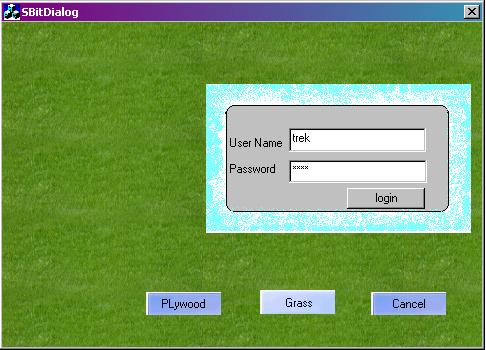
Here, I am introducing a function SBitdraw(CDC *pDC, UINT nIDResource, int i) to load any bitmap to a dialog. There are so many ways by which we can load a bitmap. Here, I am giving a function which you can just add to your project and get the result. No need to add any other header files or .cpp files.
Using the function
First, bring the bitmap to your project.
- Put the function
SBitdraw() as a member function of your main dialog class. Example: bool CSBitDialogDlg::SBitdraw(CDC *pDC, UINT nIDResource, int i). - Add
Messagemap ON_WM_ERASEBKGND() using the MFC ClassWizard. - Then, call
SBitdraw() from OnEraseBkgnd(CDC* pDC) to load any bitmap on the dialog. (Or, you can call from anywhere, and then you use OnEraseBkgnd() and Invalidate() to force refreshing your dialog.
-------------------------------------------------------
Parameters of the function::
SBitdraw(CDC *pDC, UINT nIDResource, int i);
1. pDC  take the device context obj.
2. nIDResource  is the ID of the bitmap.
3. Int i  will take integer 1-3
   (1 for center, 2 for Stretch, And 3 for title)
    to get how bitmap will load.
---------------------------------------------------------------------
Function defination:
 bool SBitdraw(CDC *pDC, UINT nIDResource, int i)
{
            CBitmap* m_bitmap;
            m_bitmap=new CBitmap();
            m_bitmap->LoadBitmap(nIDResource);
            if(!m_bitmap->m_hObject)
                        return true;
    CRect rect;
            GetClientRect(&rect);
            CDC dc;
            dc.CreateCompatibleDC(pDC);
            dc.SelectObject(m_bitmap);
            int bmw, bmh ;
            BITMAP bmap;
            m_bitmap->GetBitmap(&bmap);
            bmw = bmap.bmWidth;
            bmh = bmap.bmHeight;
            int xo=0, yo=0;
            switch(i){
            case 1:
            	pDC->StretchBlt(xo, yo, rect.Width(),
                                    rect.Height(), &dc,
                                    0, 0,bmw,bmh, SRCCOPY);
                break;
            case 2:
                if(bmw < rect.Width())
                    xo = (rect.Width() - bmw)/2;
                else
                    xo=0;
                if(bmh < rect.Height())
                    yo = (rect.Height()-bmh)/2;
                else
                    yo=0;
                pDC->BitBlt (xo, yo, rect.Width(),
                            rect.Height(), &dc,
                            0, 0, SRCCOPY);
                break;
             case 3:
                for (yo = 0; yo < rect.Height(); yo += bmh)
                {
                    for (xo = 0; xo < rect.Width(); xo += bmw)
                    {
                        pDC->BitBlt (xo, yo, rect.Width(),
                                    rect.Height(), &dc,
                                    0, 0, SRCCOPY);
                    }
                }
            }
            return true;

}
---------------------------------------------------------------------
Note: In my demo project, UserId & Password both are "trek". First login and then change the background.
This is Saday Chand Sarkar , New in MFC world.
Working in Trek Technology Pte.Ltd.



 General
  News
News  Suggestion
  Question
  Bug
Bug  Answer
  Joke
Joke  Praise
  Rant
Rant  Admin
Admin 


 Submit an article or tip

