Introduction
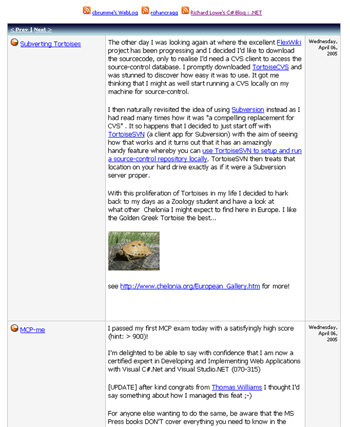
RSS is an XML format for syndicating news and content, from major news sites, community and personal weblogs. But it's not just for news. It's able to deliver rich, dynamic content to a website, if you know how to read the RSS XML. The RSS Aggregator takes a lot of the mystery out of decoding RSS feeds.
Background
Since the RSS Aggregator is a Web User Control, it's really just about as simple as creating a new application, adding the control and associated code, and dragging and dropping the control on your site. Of course, you will have to setup a couple of small things in the code (like the source of the feeds), but overall, it should be fairly straightforward. The enclosed example even contains a styled version of the aggregator, so you won't have to spend additional time adding styles.
This version allows you to configure the aggregator to download any number of feeds (though personally, I wouldn't do more than three or four, or you'll notice a significant delay on page load). The display medium is an ASP.NET DataGrid control. The example code implements paging for the grid.
Using the code
The code is pretty well documented, so I won't include a ton of code here (not like anyone will read it anyway! :)). The only code block I'll post will be the simple act of configuring the aggregator to download feeds. The rest is up to you!
The only method you need to configure is the BindFeeds() method. This method is located in the RSSAggregator.ascx.cs code-behind. Just follow the directions in the code, and in no time, you'll have a working RSS Aggregator!
private void BindFeeds()
{
Aggregator ag = new Aggregator(3);
ag.feeds[0] = "http://blogs.msdn.com/cbrumme/rss.aspx";
ag.feeds[1] = "http://www.rohancragg.co.uk/" +
"blog/SyndicationService.asmx/GetRss";
ag.feeds[2] = "http://blogs.geekdojo.net/" +
"richard/rss.aspx?CategoryID=7";
DataView dv = ag.aggregateFeeds();
this.dgRoller.DataSource = dv;
this.dgRoller.DataBind();
this.lblFeeds.Text = ag.getSources();
}
Points of Interest
The Downloader class comes with three overloaded methods to allow the aggregator to download through a proxy server. Use the one that's right for you. You can find this code in the aggregateFeeds() method of the Aggregator.cs code page. One last point to note is that there is a boolean value for the parseRSS() method in the Parser class. Setting this value to true will make the aggregator render all of the content of the feed. Setting it to false will render only a description of the content. In the example, this value is set to true.
Happy coding!
I have worked professionally in IT since 2004, and as a software architect since 2008, specializing in user interface design and experience, something I am still extremely passionate about. In 2013 I moved into management, and since then I've held positions as Director of Product Development, Director of Engineering, and Practice Director.



 General
  News
News  Suggestion
  Question
  Bug
Bug  Answer
  Joke
Joke  Praise
  Rant
Rant  Admin
Admin 


 Submit an article or tip


