 |
|
 |
Hello all
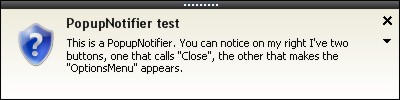
Because this control has not been updated quite a while and still contains a lot of bugs, I decided to fix them myself. I released an improved version of this control in a new article:
Notification Window[^]
regards,
Simon
|
|
|
|
 |
|
 |
this control is lacking of the controls property, how can I do?
PopupNotifier1.controls ?????
i would like to add a panel ,for add other controls
|
|
|
|
 |
|
 |
Just that, what would be the best way to display multiple popups at the same time?
|
|
|
|
 |
|
 |
Hello
I am trying to close the popup through the Close event and calling the Dispose method on the PopupNotifier. However it does not close the popup, is there anything wrong I am trying to do here? please advise on this, below is the code I am working with.
PopupNotifier pn;
void popUp()
{
pn = new PopupNotifier();
pn.BodyColor = System.Drawing.Color.Beige;
pn.BorderColor = System.Drawing.Color.Black;
pn.ButtonHoverColor = System.Drawing.Color.LightGoldenrodYellow;
pn.ContentColor = System.Drawing.Color.Black;
pn.ContentFont = new System.Drawing.Font("Tahoma", 8F);
pn.ContentText = "You\'ve got mail... (I always wanted to say that !)";
pn.HeaderColor = System.Drawing.Color.Black;
pn.ImagePosition = new System.Drawing.Point(12, 21);
pn.ImageSize = new System.Drawing.Size(24, 24);
pn.LinkHoverColor = System.Drawing.Color.DarkSlateGray;
pn.OptionsMenu = null;
pn.Size = new System.Drawing.Size(400, 100);
pn.TextPadding = new System.Windows.Forms.Padding(10);
pn.TitleColor = System.Drawing.Color.Black;
pn.TitleFont = new System.Drawing.Font("Trebuchet MS", 9.75F, System.Drawing.FontStyle.Bold);
pn.TitleText = "Office 2003 anyone ?";
pn.ShowDelay = 5000;
pn.OptionsButton = true;
pn.ShowGrip = true;
pn.Click += new PopupNotifier.ClickEventHandler(pn_Click);
pn.Close += new PopupNotifier.CloseEventHandler(pn_Close);
pn.Disposed += new EventHandler(pn_Disposed);
pn.Popup();
}
void pn_Disposed(object sender, EventArgs e)
{
MessageBox.Show("Closing");
}
void pn_Close()
{
pn.Dispose();
}
|
|
|
|
 |
|
 |
me too
i adi that hide it
PopupNotifier.vb : Sub Hide()
Sub Hide()
tmWait.Stop()
tmAnimation.Start()
End Sub
in form
Private Sub PopupNotifier1_Close() Handles PopupNotifier1.Close
PopupNotifier1.Hide()
End Sub
|
|
|
|
 |
|
 |
Can you post the final .dll file here or make clear how to close the popup using the close button..
|
|
|
|
 |
|
 |
you have to catch those events ...
Dim pop As New PopupNotifier
pop.Popup()
AddHandler pop.Click, AddressOf popclick
AddHandler pop.Close, AddressOf popclose
Public Sub popclick()
'
End Sub
Public Sub popclose()
me.close (maybe ?)
End Sub
|
|
|
|
 |
|
 |
Hello I am a new to Visual Studio and C# as well. I am having hard time in trying to use this. I would really appreciate if someone explains to me how I can make this code to work in an example?
I would like to create an example notification using the PopupNotifier that is similar to the first example above.
Please help.
|
|
|
|
 |
|
 |
Just to update I am now okay with this, as I was able to create an example working very nicely. Only one issue left and I have posted a new thread with the issue for clsoing the popu when the lose button is pressed.
|
|
|
|
 |
|
 |
Would you post your sourcecode here?
I try to convert sourcecode to c# but it won't work.
It popup error when I drop this componet to windows form.
Thank you.
|
|
|
|
 |
|
 |
Hye Nick...........
AWESOM ARTICLE man ..Thanks for making this difficult code so simple & understandable....
Looking forward to ur next post
Cheerz !
|
|
|
|
 |
|
 |
Keep the good work
can u inculde a right to left order in the project....
|
|
|
|
 |
|
 |
I will design a new version of this tool (among other things for Office 2007...) stay tuned !
http://www.blueactivity.com
|
|
|
|
 |
|
 |
Hi Nick,
yes please , a new version that would be grand !
Not that I would not like the current version - no it is sufficient for my needs in the moment. It will be a real quality eye candy for my application. However I would not disregard a newer version with perhaps some text formatting capabilites.
Keep on Your good work!
Semmel
|
|
|
|
 |
|
 |
Link for download ?
|
|
|
|
 |
|
 |
Is it done yet? (I think I heard that before! "are we there yet?!" LOL!)
Btw, this control works great except while threading. Keep up the great job but please post a solution for using this great class in a managed thread.
|
|
|
|
 |
|
 |
The function GetLighterTransparentColor is not used.
|
|
|
|
 |
|
 |
Just an FYI. In the Sub New function the .FormBorderStyle is being set twice.
Sub New()
With fPopup
.TopMost = False
-----> .FormBorderStyle = System.Windows.Forms.FormBorderStyle.None <-----
.StartPosition = System.Windows.Forms.FormStartPosition.Manual
.FormBorderStyle = Windows.Forms.FormBorderStyle.None
.ShowInTaskbar = False
End With
tmAnimation.Interval = 50
End Sub
|
|
|
|
 |
|
 |
Can we use this project for .Net 2003 version.
If we open the project we are getting the following error
"The selected file is a visual studio solution file,but was created with a newer version of visual studio and cannot be opened.
gayathri
|
|
|
|
 |
|
 |
I implemented the PopupNotifierCollection to manage multiple stacking popups. The only problem I see is that the Opacity level of the popup windows are different. The bottom most popup is transparent, and the top most one is fully solid.
It may have to do with the animation. Did anyone correct this? It would be nice to have a setting for the maximum opacity too.
-Frank
|
|
|
|
 |
|
 |
I think I figured it out. You need to take the offset into account in this Function:
Private Function GetOpacityBasedOnPosition() As Double
Dim iCentPourcent As Integer = fPopup.Height
Dim iCurrentlyShown As Integer = Screen.PrimaryScreen.WorkingArea.Height - fPopup.Top - iOffset
Dim dPourcentOpacity As Double = iCentPourcent / 100 * iCurrentlyShown
Return (dPourcentOpacity / 100) - 0.05
End Function
-Frank
|
|
|
|
 |
|
 |
Is it possible to share the source with me ?
Thanks in advance !
|
|
|
|
 |
|
|
 |
|
 |
I got it to run correctly, but how can I add more than one contex line item? I want to create two lines/links that both take seperate actions on their click events... I am finding it hard to change the way it looks, I tried adding labels to popupnotifierform.vb but it does not carry over to the actual popup. I am decent enough with VB but have not tried creating my own component. I was expecting just a form I could change the design of that would pop up.
Thanks on the code though - gives me a place to learn.
|
|
|
|
 |
|
 |
In fact, I've not been using other controls on that form. The form is a placeholder.
Its content is only painted and is not "existing".
You can see for instance in PopupNotifierRenderersOffice2003.vb
Protected Overrides Sub OnRenderContent(ByVal e As PopupNotifierRenderArgs)
If Not e.Parent.Image Is Nothing Then
e.Graphics.DrawImage(e.Parent.Image, e.Parent.ImagePosition.X, e.Parent.ImagePosition.Y, e.Parent.ImageSize.Width, e.Parent.ImageSize.Height)
End If
e.Parent.Form.HeightOfTitle = e.Graphics.MeasureString("A", e.Parent.TitleFont).Height
Dim iTitleOrigin As Integer
If Not e.Parent.Image Is Nothing Then
iTitleOrigin = e.Parent.ImagePosition.X + e.Parent.ImageSize.Width + e.Parent.TextPadding.Left
Else
iTitleOrigin = e.Parent.TextPadding.Left
End If
If e.Parent.Form.MouseIsOnTextLink Then
e.Parent.Form.Cursor = Cursors.Hand
e.Graphics.DrawString(e.Parent.ContentText, New Font(SystemFonts.DialogFont, FontStyle.Underline), New SolidBrush(Color.Black), e.Parent.Form.RectText)
Else
e.Parent.Form.Cursor = Cursors.Default
e.Graphics.DrawString(e.Parent.ContentText, New Font(SystemFonts.DialogFont, FontStyle.Regular), New SolidBrush(Color.Black), e.Parent.Form.RectText)
End If
e.Graphics.DrawString(e.Parent.TitleText, New Font(SystemFonts.DialogFont, FontStyle.Bold), New SolidBrush(Color.Black), iTitleOrigin, e.Parent.TextPadding.Top + e.Parent.HeaderHeight)
End Sub
There is a call to e.Graphics.Drawstring to print the text link and there is a variable that is set by PopupNotifier to define whether we are on the link with the mouse or not. If you just want to have another link, you need to double that feature.
If e.Parent.Form.MouseIsOnSecondTextLink Then
e.Parent.Form.Cursor = Cursors.Hand
e.Graphics.DrawString(e.Parent.SecondContentText, New Font(SystemFonts.DialogFont, FontStyle.Underline), New SolidBrush(Color.Black), e.Parent.Form.RectSecondText)
Else
e.Parent.Form.Cursor = Cursors.Default
e.Graphics.DrawString(e.Parent.SecondContentText, New Font(SystemFonts.DialogFont, FontStyle.Regular), New SolidBrush(Color.Black), e.Parent.Form.SecondRectText)
End If
then in PopupNotifier.vb:
Private sText2 As String
_
Property SecondContentText() As String
Get
Return sText2
End Get
Set(ByVal value As String)
sText2 = value
End Set
End Property
And then for PopupNotifierForm.vb:
Public ReadOnly Property SecondRectText() As RectangleF
Get
If Not Parent.Image Is Nothing Then
Return New RectangleF(Parent.ImagePosition.X + Parent.ImageSize.Width + Parent.TextPadding.Left, Parent.TextPadding.Top + Parent.TextPadding.Top + HeightOfTitle + Parent.HeaderHeight + RectText.Height, Me.Width - Parent.ImageSize.Width - Parent.ImagePosition.X - 16 - 5 - Parent.TextPadding.Left - Parent.TextPadding.Right, Me.Height - Parent.HeaderHeight - Parent.TextPadding.Top - Parent.TextPadding.Top - Parent.TextPadding.Bottom - HeightOfTitle - 1)
Else
Return New RectangleF(Parent.TextPadding.Left, Parent.TextPadding.Top + Parent.TextPadding.Top + HeightOfTitle + Parent.HeaderHeight + RectText.Height , Me.Width - 16 - 5 - Parent.TextPadding.Left - Parent.TextPadding.Right, Me.Height - Parent.HeaderHeight - Parent.TextPadding.Top - Parent.TextPadding.Top - Parent.TextPadding.Bottom - HeightOfTitle - 1)
End If
End Get
End Property
Then alors in the mouse_move event
If SecondRectText.Contains(e.X, e.Y) Then
bMouseOnLink2 = True
Else
bMouseOnLink2 = False
End If
And that should pretty much do the trick
|
|
|
|
 |
