Introduction
This article explains how to tackle one of the most dreadful situations Windows Forms developers encounter during their daily work - WSODs.
Background
The term WSOD (White Screen of Darn) was set by Microsoft employees in an MSDN blog.
Using the code
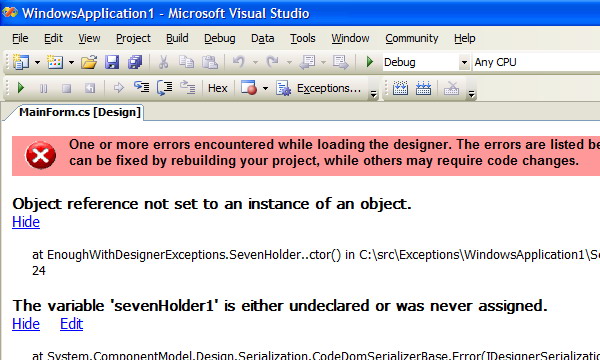
Imagine the following scenario. One morning you arrive at your workplace, turn your monitor on, and then try to open a form in your application that builds and runs perfectly well, and instead of seeing your handcrafted form, you see a big frightening screen with the following title in red, and a big X near it:
One or more errors encountered while loading the designer. The errors are listed below. Some errors can be fixed by rebuilding your project, while others may require code changes.
As a pretty fresh GUI developer, but a pretty experienced software developer all-in-all, I was pretty astonished when I first encountered this phenomenon. My coworkers were not as surprised as I was, but still solving this sort of a problem never seemed to be trivial.
Explaining the problem
When the Visual Studio Designer views forms, it runs the constructor of your code. However, the code may behave in an unexpected way when run out of the application context. This may result in some exceptions thrown. The Visual Studio Designer does not like those exceptions, and may show a screen similar to this one, instead of the screen you really wanted to see:

About the example
My example code consists of a form called MainForm. This form contains a user control called SevenHolder. The SevenHolder user control has nothing but a text box, whose content is updated from a singleton. The singleton class holding this information, simply called Singleton, holds an integer, which seems always to be 7. However, another singleton class called Global, limits the creation of the Singleton instance only to the time when the application is running. The Global instance is created as the first thing in this program, in Program.cs, where its Running attribute is set to true. Since SevenHolder updates the text box in the constructor, but the constructor will only obtain the Singleton instance on runtime, an exception will be thrown when the code is run in design-time.
The solution
Finding this sort of problems may prove very difficult by only reviewing the code. However, an easy solution exists. By taking the following steps, you may find the exact location of the code causing the exception, thus making it possible to change it in a way that the Designer works well with it:
- Open a new Visual Studio instance.
- Open any source file. This is required so that Visual Studio lets you attach to a process.
- Attach the new Visual Studio instance to the first one. The Visual Studio process is called devenv.exe. You only need to attach to managed code. Set Visual Studio to break on Common Language Runtime exceptions - Thrown and User-handled.
- Close the problematic form, and reopen it.
- This should result in an exception caught inside your code in the second instance of Visual Studio!
In our case, the following code was causing the problem:
this.labelSevenHolder.Text = sing.Information.ToString();
In order to fix it, two approaches may be taken. The first one is to check the value of sing before using it:
public SevenHolder()
{
    InitializeComponent();

    Singleton sing = Singleton.Instance();

    if (sing != null)
    {
        this.labelSevenHolder.Text = sing.Information.ToString();
    }
}
The second approach is to check the value of the DesignMode property inherited from System.ComponentModel.Component to see whether the application is indeed running before doing anything useful. This check should always be performed after the call to InitializeComponent though, otherwise your control may not render correctly in design-time:
public SevenHolder()
{
    InitializeComponent();

    if (this.DesignMode)
        return;

    Singleton sing = Singleton.Instance();

    this.labelSevenHolder.Text = sing.Information.ToString();
}
And of course, the complete code should look like this:
public SevenHolder()
{
    InitializeComponent();

    if (this.DesignMode)
        return;

    Singleton sing = Singleton.Instance();

    if (sing != null)
    {
        this.labelSevenHolder.Text = sing.Information.ToString();
    }
}
- After recompiling the code, reopening
MainForm should result with the form. In this case, it does not look exactly in design-time as the form in run-time, because, of course, the content of the label inside the user control is only known to the application in run-time.
Points of Interest
Investigating this sort of problems really makes one understand how the Visual Studio designer works under-the-hood.
History
- Minor fixes: 31/3/2006.
- Initial version: 28/3/2006.
This member has not yet provided a Biography. Assume it's interesting and varied, and probably something to do with programming.



 General
  News
News  Suggestion
  Question
  Bug
Bug  Answer
  Joke
Joke  Praise
  Rant
Rant  Admin
Admin 


 Submit an article or tip


 . But this works in one machine in other machines this is not working. So what would be the solutions? No idea.


