Introduction
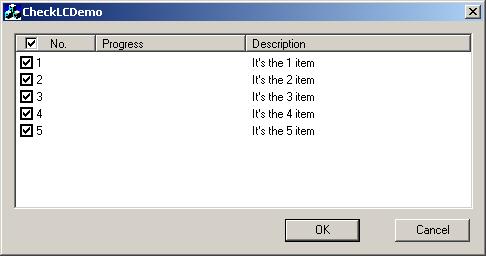
It's easy to add check box in List Control, but the check box is only added in the list's items, not in the head items, and also you could not select or de-select all items in the list by one hit.
This article discusses a method which adds a check box in head items, and could use this check box to select or de-select all items in the list.
Steps
1. Adding Check Box for List Control
It's fairly easy. Just set the extended style: LVS_EX_CHECKBOXES.
m_listCtrl.SetExtendedStyle( m_listCtrl.GetExtendedStyle() | LVS_EX_CHECKBOXES);
2. Adding Check Box for Head Ctrl
First, we must create a Image list which contains the check box bitmap, and then set the image list to headctrl, finally we need to set the image for first head item using CHeadCtrl::setItem.
CHeaderCtrl* pHeadCtrl = this->GetHeaderCtrl();
ASSERT(pHeadCtrl->GetSafeHwnd());

VERIFY( m_checkHeadCtrl.SubclassWindow(pHeadCtrl->GetSafeHwnd()) );
VERIFY( m_checkImgList.Create(IDB_CHECKBOXES, 16, 3, RGB(255,0,255)));
int i = m_checkImgList.GetImageCount();
m_checkHeadCtrl.SetImageList(&m_checkImgList);

HDITEM hdItem;
hdItem.mask = HDI_IMAGE | HDI_FORMAT;
VERIFY( m_checkHeadCtrl.GetItem(0, &hdItem) );
hdItem.iImage = 1;
hdItem.fmt |= HDF_IMAGE;

VERIFY( m_checkHeadCtrl.SetItem(0, &hdItem) );
3. Using Check Box in headctrl to Select or De-select All Items in List
We need to respond to the HDN_ITEMCLICK notification message of headctrl by either notify or notify reflect mechanism. I choose notify reflect.
BEGIN_MESSAGE_MAP(CCheckHeadCtrl, CHeaderCtrl)
ON_NOTIFY_REFLECT(HDN_ITEMCLICK, OnItemClicked)
END_MESSAGE_MAP()
void CCheckHeadCtrl::OnItemClicked(NMHDR* pNMHDR, LRESULT* pResult)
{
NMHEADER* pNMHead = (NMHEADER*)pNMHDR;
*pResult = 0;
int nItem = pNMHead->iItem;
if (0 != nItem)
return;
HDITEM hdItem;
hdItem.mask = HDI_IMAGE;
VERIFY( GetItem(nItem, &hdItem) );
if (hdItem.iImage == 1)
hdItem.iImage = 2;
else
hdItem.iImage = 1;
VERIFY( SetItem(nItem, &hdItem) );
BOOL bl = hdItem.iImage == 2 ? TRUE : FALSE;
CListCtrl* pListCtrl = (CListCtrl*)GetParent();
int nCount = pListCtrl->GetItemCount();
for(nItem = 0; nItem < nCount; nItem++)
{
ListView_SetCheckState(pListCtrl->GetSafeHwnd(), nItem, bl);
}
}
4. Change the Head's Check Status When the Check Status Changed in List Control
We need to respond to the notification message LVN_ITEMCHANGED of list control.
BEGIN_MESSAGE_MAP(CCheckListCtrl, CListCtrl)
ON_NOTIFY_REFLECT(LVN_ITEMCHANGED, OnItemChanged)
END_MESSAGE_MAP()
void CCheckListCtrl::OnItemChanged(NMHDR* pNMHDR, LRESULT* pResult)
{
NMLISTVIEW* pNMLV = (NMLISTVIEW*)pNMHDR;
*pResult = 0;
if ( m_blInited && LVIF_STATE == pNMLV->uChanged)
{
BOOL blAllChecked = TRUE;
int nCount = GetItemCount();
for(int nItem = 0; nItem < nCount; nItem++)
{
    if ( !ListView_GetCheckState(GetSafeHwnd(), nItem) )
    {
        blAllChecked = FALSE;
        break;
    }
}
HDITEM hdItem;
hdItem.mask = HDI_IMAGE;
if (blAllChecked)
hdItem.iImage = 2;
else
hdItem.iImage = 1;
VERIFY( m_checkHeadCtrl.SetItem(0, &hdItem) );
}
}
Demo Project
It is a dialog based application that covers all I mentioned in this article. You could inspect it in your environment.
History
- 27th March, 2006: Initial post
This member has not yet provided a Biography. Assume it's interesting and varied, and probably something to do with programming.



 General
  News
News  Suggestion
  Question
  Bug
Bug  Answer
  Joke
Joke  Praise
  Rant
Rant  Admin
Admin 


 Submit an article or tip


