Click here to Skip to main content
Licence CPOL
First Posted 30 Mar 2006
Views 87,933
Downloads 1,176
Bookmarked 78 times

How to deskew an image

By | 25 Apr 2006 | Article
The article describes an algorithm to calculate the skew angle of an image.

Introduction

The following article describes an algorithm in VB.NET to deskew an image.

Background

Deskewing an image can help a lot, if you want to do OCR, OMR, barcode detection, or just improve the readability of scanned images. For example, think of a camera that automatically takes photos of goods with a barcode. If the skew angle is too high, the barcode can not be detected. After deskewing, the barcode can be read.

Before deskewing:
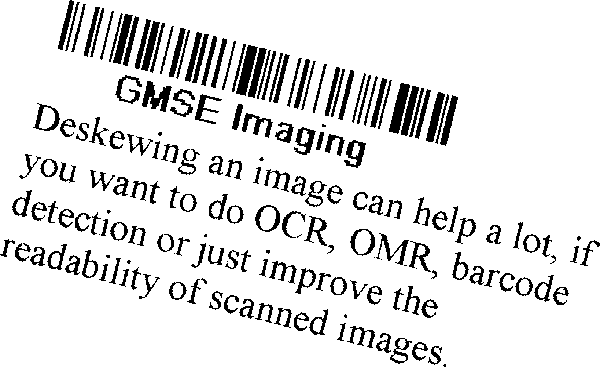
After deskewing:

Using the code

The following code determines the skew angle of the image bmpIn:

Dim sk As New gmseDeskew(bmpIn)
Dim skewangle As Double = sk.GetSkewAngle
Dim bmpOut As Bitmap = RotateImage(bmpIn, -skewangle)

Points of interest

The basic idea of the algorithm is:

  • Find reference lines in the image.
  • Calculate the angle of the lines.
  • Calculate the skew angle as an average of the angles.
  • Rotate the image.

The lines are detected with the Hough algorithm. Each point in the image can lie on an infinite number of lines. To find the reference lines, we let each point vote for all the lines that pass through the point. The lines with the highest number of points are our reference lines.

First, we need the parameterization of a line. A line can be parameterized as:

y = m*x+t

with slope m and offset t. We are interested in the angle and not the slope. The angle alpha of the line satisfies:

m=tan(alpha)=sin(alpha)/cos(alpha)

We get:

y=sin(alpha)/cos(alpha)*x+t

Which is equivalent to:

y*cos(alpha)-x*sin(alpha)=d

We can not search an infinite parameter space, so we have to define a discrete one. We search for all lines with:

-20<=alpha<=20

in 0.2 steps, and we round d to an integer.

The basic algorithm in pseudo code:

1. Create a two-dimensional matrix Hough and initialize the values with 0 
2. for y=0 to Height-1 
3.    for x=0 to Width-1 
4.      if Point(x,y) is black then 
5.        for alpha=-20 to 20 step 0.2 
6.          d= Trunc(y*cos(alpha)-x*sin(alpha)) 
7.          Hough(Trunc(alpha*5),d)+=1 
8.        next alpha 
9.      end if 
10.   next x 
11. next y 
12. Find the top 20 (alpha,d) pairs that have the highest count in the Hough matrix 
13. Calculate the skew angle as an average of the alphas
14. Rotate the image by – skew angle

The algorithm is computationally expensive. To save some time, the number of voting points is reduced. For each text line, you can draw many lines with different angles through the letters:

For deskewing, only the bottom line is important.

The points on the bottom line have a lower neighbour that is white. So, we only let points (x,y) vote that satisfy:

  • The point (x,y) is black.
  • The lower neighbour (x,y+1) is white.

References

The article was taken from GMSE Imaging.

History

  • 03-30-06: Original article.
  • 03-31-06: More explanations about the Hough algorithm.
  • 04-25-06: Added the References section.

License

This article, along with any associated source code and files, is licensed under The Code Project Open License (CPOL)

About the Author

mackenb


Germany Germany

Member


Sign Up to vote   Poor Excellent
Add a reason or comment to your vote: x
Votes of 3 or less require a comment

Comments and Discussions

 
You must Sign In to use this message board. (secure sign-in)
 
Search this forum  
 FAQ
    Noise  Layout  Per page   
  Refresh
QuestionIt's really helpful! Pinmembershimizu_masato22:41 29 Mar '12  
GeneralMy vote of 5 Pinmembermanoj kumar choubey22:18 1 Mar '12  
GeneralMy vote of 5 PinmemberJohannes_Franke1:35 1 Feb '11  
GeneralRe: My vote of 5 [modified] Pinmembernguyenq114:57 12 Mar '11  
GeneralPort to C++ PinmemberSyd Logan23:18 10 Dec '09  
QuestionUpload souce code Deskew, Visual C++ or C#, Please ? Pinmemberlung_tung_chuong_IT10:28 25 Nov '09  
GeneralJava port of this deskew code now available! PinmemberRoland Quast3:33 24 Oct '09  
GeneralThis is excellent and it works in grayscale images at 300dpi Pinmemberdaelin5:42 24 Jul '09  
QuestionUpload a complete Paint App please? PinmemberEdy17:07 11 May '09  
QuestionJust so I understand PinmemberTheGuy7:06 20 Mar '09  
GeneralA note on full page scanning PinmembersmartyP4:59 11 Feb '09  
QuestionHow to run Pinmembernanni_n22:11 25 Feb '08  
GeneralPerformances Pinmemberlucapan5:58 11 Oct '07  
GeneralRe: Performances Pinmembernanni_n22:08 25 Feb '08  
GeneralRe: Performances Pinmemberdefwebserver12:59 20 Apr '08  
The Fastbitmap class does speed things up but you have to replace a few more lines to make it work. Here is the code with the replacements:
 
Imports System.Drawing
Imports System.Drawing.Imaging
Imports FastBitmap
 
Public Class gmseDeskew
' Representation of a line in the image.
Public Class HougLine
' Count of points in the line.
Public Count As Integer
' Index in Matrix.
Public Index As Integer
' The line is represented as all x,y that solve y*cos(alpha)-x*sin(alpha)=d
Public Alpha As Double
Public d As Double
End Class
 
' The Bitmap
Dim cBmp As FastBitmap
' The range of angles to search for lines
Dim cAlphaStart As Double = -20
Dim cAlphaStep As Double = 0.2
Dim cSteps As Integer = 40 * 5
' Precalculation of sin and cos.
Dim cSinA() As Double
Dim cCosA() As Double
' Range of d
Dim cDMin As Double
Dim cDStep As Double = 1
Dim cDCount As Integer
' Count of points that fit in a line.
Dim cHMatrix() As Integer
 
' Calculate the skew angle of the image cBmp.
Public Function GetSkewAngle() As Double
Dim hl() As gmseDeskew.HougLine
Dim i As Integer
Dim sum As Double
Dim count As Integer
 
' Hough Transformation
Calc()
' Top 20 of the detected lines in the image.
hl = GetTop(20)
' Average angle of the lines
For i = 0 To 19
sum += hl(i).Alpha
count += 1
Next
Return sum / count
End Function
 
' Calculate the Count lines in the image with most points.
Private Function GetTop(ByVal Count As Integer) As HougLine()
Dim hl() As HougLine
Dim i As Integer
Dim j As Integer
Dim tmp As HougLine
Dim AlphaIndex As Integer
Dim dIndex As Integer
 
ReDim hl(Count)
For i = 0 To Count - 1
hl(i) = New HougLine
Next
For i = 0 To cHMatrix.Length - 1
If cHMatrix(i) > hl(Count - 1).Count Then
hl(Count - 1).Count = cHMatrix(i)
hl(Count - 1).Index = i
j = Count - 1
While j > 0 AndAlso hl(j).Count > hl(j - 1).Count
tmp = hl(j)
hl(j) = hl(j - 1)
hl(j - 1) = tmp
j -= 1
End While
End If
Next
For i = 0 To Count - 1
dIndex = hl(i).Index \ cSteps
AlphaIndex = hl(i).Index - dIndex * cSteps
hl(i).Alpha = GetAlpha(AlphaIndex)
hl(i).d = dIndex + cDMin
Next
Return hl
End Function
Public Sub New(ByVal bmp As Bitmap)
cBmp = New FastBitmap(bmp)
End Sub
' Hough Transforamtion:
Private Sub Calc()
Dim x As Integer
Dim y As Integer
Dim hMin As Integer = cBmp.Bitmap.Height / 4
Dim hMax As Integer = cBmp.Bitmap.Height * 3 / 4
 
Init()
For y = hMin To hMax
For x = 1 To cBmp.Bitmap.Width - 2
' Only lower edges are considered.
If IsBlack(x, y) Then
If Not IsBlack(x, y + 1) Then
Calc(x, y)
End If
End If
Next
Next
End Sub
' Calculate all lines through the point (x,y).
Private Sub Calc(ByVal x As Integer, ByVal y As Integer)
Dim alpha As Integer
Dim d As Double
Dim dIndex As Integer
Dim Index As Integer
 
For alpha = 0 To cSteps - 1
d = y * cCosA(alpha) - x * cSinA(alpha)
dIndex = CalcDIndex(d)
Index = dIndex * cSteps + alpha
Try
cHMatrix(Index) += 1
Catch ex As Exception
Debug.WriteLine(ex.ToString)
End Try
Next
End Sub
Private Function CalcDIndex(ByVal d As Double) As Double
Return Convert.ToInt32(d - cDMin)
End Function
Private Function IsBlack(ByVal x As Integer, ByVal y As Integer) As Boolean
Dim c As Color
Dim luminance As Double
 
c = cBmp.GetPixel(x, y)
luminance = (c.R * 0.299) + (c.G * 0.587) + (c.B * 0.114)
Return luminance < 140
End Function
Private Sub Init()
Dim i As Integer
Dim angle As Double
 
' Precalculation of sin and cos.
ReDim cSinA(cSteps - 1)
ReDim cCosA(cSteps - 1)
For i = 0 To cSteps - 1
angle = GetAlpha(i) * Math.PI / 180.0#
cSinA(i) = Math.Sin(angle)
cCosA(i) = Math.Cos(angle)
Next
' Range of d:
cDMin = -cBmp.Bitmap.Width
cDCount = 2 * (cBmp.Bitmap.Width + cBmp.Bitmap.Height) / cDStep
ReDim cHMatrix(cDCount * cSteps)
End Sub
 
Public Function GetAlpha(ByVal Index As Integer) As Double
Return cAlphaStart + Index * cAlphaStep
End Function
End Class
GeneralRe: Performances Pinmemberlucapan21:47 18 Oct '09  
Questiongr8 work but ... Pinmemberlooka722:21 30 Mar '07  
GeneralNice work Pinmemberkarulont3:56 28 Mar '07  
GeneralRe: Nice work PinmemberVimmi26113:26 6 Aug '08  
Questioncircular hough transfrom Pinmembershdelpiero12:36 23 Feb '07  
GeneralRenuka PinmemberMember #369869017:45 24 Jan '07  
QuestionDeskew Application PinmemberCholekarSagar0:27 9 Nov '06  
GeneralRegarding Deskew Application PinmemberCholekarSagar0:26 9 Nov '06  
QuestionApproach weakness ? PinmemberNinjaCross5:58 25 Apr '06  
AnswerRe: Approach weakness ? Pinmembermackenb3:48 27 Apr '06  

General General    News News    Suggestion Suggestion    Question Question    Bug Bug    Answer Answer    Joke Joke    Rant Rant    Admin Admin   

Use Ctrl+Left/Right to switch messages, Ctrl+Up/Down to switch threads, Ctrl+Shift+Left/Right to switch pages.

Permalink | Advertise | Privacy | Mobile
Web02 | 2.5.120604.1 | Last Updated 25 Apr 2006
Article Copyright 2006 by mackenb
Everything else Copyright © CodeProject, 1999-2012
Terms of Use
Layout: fixed | fluid
