Introduction
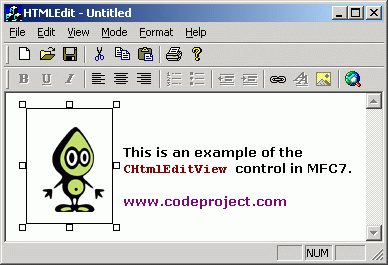
This article provides a bare-bones samples that demonstrates the use of the new HTML editing and browsing classes in
MFC.
MFC7 includes several new classes that encapsulate the Internet Explorer MSHTML
editing control. This control is an ActiveX control that provides WYSIWYG editing
and browsing, and the MFC and ATL wrappers for this class make it's use very straight forward.
The sample application is a simple AppWizard generated application with the view
class derived from CHtmlEditView (the last step in the MFC application wizard).
In specifying CHtmlEditView as your edit class' base class, you automatically
take on CHtmlEditDoc as your Document's base class as well.
These two classes work together to provide HTML file loading, saving, editing,
browsing and printing. Context menus are provided and it is very simple to hook your toolbar button or menu items to the various wrapper methods in the MFC HTML
editing classes.
The sample contains a rebar with two toolbars - one containing the standard load,
save and cut/copy/paste buttons, and one containing formatting options such as bold, italic, indenting, hyperlink and editing mode.
In the CHtmlEditView derived class is a set of macro calls similar to the standard
BEGIN_MESSAGE_MAP macros familiar to MFC programmers. In this case, though, the
macros are of the form
BEGIN_DHTMLEDITING_CMDMAP(CHTMLEditView)
DHTMLEDITING_CMD_ENTRY(ID_EDIT_COPY, IDM_COPY)
DHTMLEDITING_CMD_ENTRY(ID_EDIT_CUT, IDM_CUT)
DHTMLEDITING_CMD_ENTRY(ID_EDIT_PASTE,IDM_PASTE)
DHTMLEDITING_CMD_ENTRY(ID_EDIT_UNDO, IDM_UNDO)
...
END_DHTMLEDITING_CMDMAP()
What these macros do is allow you to associate an MSHTML Command Identifier with a
command ID. When the view receives the given command ID (say, ID_EDIT_COPY) it will
execute the associated MSHTML command (IDM_COPY). This will in turn execute the
appropriate method of the MSHTML ActiveX control.
To associate a toolbar button with ID value ID_UNDERLINE with the MSHTML command
for underlining the current selection, simply add the line
DHTMLEDITING_CMD_ENTRY(ID_UNDERLINE, IDM_UNDERLINE)
Some of the MSHTML identifiers are shown below. For a full list, consult the topic
'MSHTML Command Identifiers' in the online documentation.
IDM_BACKCOLOR | Sets or retrieves the background color of the current selection. |
IDM_BOLD | Toggles the current selection between bold and nonbold. |
IDM_BOOKMARK | Creates a bookmark anchor or retrieves the name of a bookmark anchor for the current |
IDM_COPY | Copies the current selection to the clipboard. |
IDM_CUT | Copies the current selection to the clipboard and then deletes it. |
IDM_DELETE | Deletes the current selection. |
IDM_FONT | Opens a font dialog box to enable the user to change the text color, font, and font size of the current selection. |
IDM_FONTNAME | Sets or retrieves the font for the current selection. |
IDM_FONTSIZE | Sets or retrieves the font size for the current selection. |
IDM_FORECOLOR | Sets or retrieves the foreground (text) color of the current selection. |
IDM_HYPERLINK | Inserts a hyperlink on the current selection, or displays a dialog box enabling the user to specify a URL to insert as a hyperlink on the current selection. |
IDM_INDENT | Increases the indent of the selected text by one indentation increment. |
IDM_ITALIC | Toggles the current selection between italic and nonitalic. |
IDM_JUSTIFYCENTER | Centers the format block in which the current selection is located. |
IDM_JUSTIFYLEFT | Left-justifies the format block in which the current selection is located. |
IDM_JUSTIFYRIGHT | Right-justifies the format block in which the current selection is located. |
IDM_ORDERLIST | Toggles the current selection between an ordered list and a normal format block. |
IDM_OUTDENT | Decreases by one increment the indentation of the format block in which the current selection is located. |
IDM_OVERWRITE | Toggles the text-entry mode between insert and overwrite. |
IDM_PASTE | Overwrites the contents of the clipboard on the current selection. |
IDM_PRINT | Prints the current document using either the default print template or a custom print template. |
IDM_PRINTPREVIEW | Opens the Print Preview window for the current document using either the default print preview template or a custom template. |
IDM_UNDERLINE | Toggles the current selection between underlined and not underlined. |
IDM_UNORDERLIST | Toggles the current selection between an ordered list and a normal format block. |
If you wish to call any one of the MSHTML commands directly, then the MFC wrapper classes
provide you with a number of helper functions
HRESULT ExecHelperNN(UINT nCmdID);
HRESULT ExecHelperSetVal(UINT nCmdID, LPCTSTR szID=NULL) const
HRESULT ExecHelperSetVal(UINT nCmdID, bool bValue) const
HRESULT ExecHelperSetVal(UINT nCmdID, short nNewVal) const
HRESULT ExecHelperGetVal(UINT nCmdID, bool &bValue) const
HRESULT ExecHelperGetVal(UINT nCmdID, short &nValue) const
These functions take a MSHTML Command identifier, plus an optional value (or reference for a
return value) and execute the associated command.
An example is in changing the editing more to Browse:
ExecHelperNN(IDM_BROWSEMODE);
More specific wrappers are provided, such as functions to set the font face (
SetFontFace(LPCTSTR
szFace)
) or functions to set and get the HTML (
GetDocumentHTML/
SetDocumentHTML).
Chris Maunder is the co-founder of
CodeProject and
ContentLab.com, and has been a prominent figure in the software development community for nearly 30 years. Hailing from Australia, Chris has a background in Mathematics, Astrophysics, Environmental Engineering and Defence Research. His programming endeavours span everything from FORTRAN on Super Computers, C++/MFC on Windows, through to to high-load .NET web applications and Python AI applications on everything from macOS to a Raspberry Pi. Chris is a full-stack developer who is as comfortable with SQL as he is with CSS.
In the late 1990s, he and his business partner David Cunningham recognized the need for a platform that would facilitate knowledge-sharing among developers, leading to the establishment of CodeProject.com in 1999. Chris's expertise in programming and his passion for fostering a collaborative environment have played a pivotal role in the success of CodeProject.com. Over the years, the website has grown into a vibrant community where programmers worldwide can connect, exchange ideas, and find solutions to coding challenges. Chris is a prolific contributor to the developer community through his articles and tutorials, and his latest passion project,
CodeProject.AI.
In addition to his work with CodeProject.com, Chris co-founded ContentLab and DeveloperMedia, two projects focussed on helping companies make their Software Projects a success. Chris's roles included Product Development, Content Creation, Client Satisfaction and Systems Automation.



 General
  News
News  Suggestion
  Question
  Bug
Bug  Answer
  Joke
Joke  Praise
  Rant
Rant  Admin
Admin 


 Submit an article or tip


 .
. .....I mean me too.


