Introduction
Some time ago, I started to create a little site about coding and hardware hacking on my hard drive. I took many pictures to document things, made thumbnails, and so. I then presented the result to a friend who spotted a problem about picture copyrights and stealing issues. He also had the same problem as a horse photographer. Pictures had to be water marked to prevent their stealing.
The problem to be solved
I then started to browse the web for a little utility that could watermark my pictures so that I could release my work with less fears. But it appeared that the only available tools were quite expensive for what they offered, in a range from $25 to $50! It just couldn't cost that much, it is just about some pixel blending, which has been available for ages, so where were the difficult problems that deserved such wages? I'm a coder, so I took the problem in my little hands...
Compilation
The Visual C++ 6 .dsw workspace file in the download contains all the projects. Just do a first Rebuild All to compile each project. Because some projects need lib/DLLs that will be compiled afterwards, you'll get some link error. Just wait for the first build session to finish, and then do a Build All to re-link everything once it has been compiled first. You may get some compile warnings in the CxImage project (Jasper), but this isn't a problem...
The quest for the right classes
Being quite regular on the CodeProject, I have some preferred classes that I reuse regularly. I know them well and modified some; here's the list of the ones I used:
Basic explanations of the stamp positioning algorithm
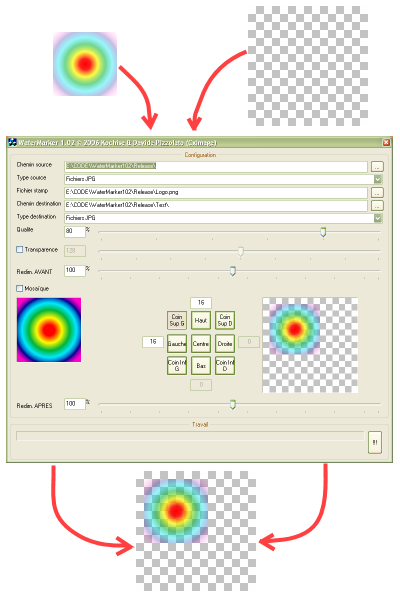
The stamping of an image needs only a few parameters. The relative position of the stamp from the image's corners, the relative displacement from the corner position, and a tiling option. The transparency of the stamp have also to be handled, coming from the original stamp if it supports alpha channel, or add one if the original stamp hasn't. Let's first analyse how CxImage handles pictures.
CxImage picture format

The origin (hot spot) of CxImage is the bottom-left corner. X-axis is right-to-left, and Y-axis is top-to-down. When positioning a stamp at (0, 0), its location is on the bottom-left corner. The CxImage format can be called counter-Cartesian.
Positioning the stamp at the center of the image
Due to the CxImage format, to center the stamp on the center of the image, you have to shift the stamp bottom-left from its half size to center its hot spot, then bring it back top-right from the image's half size, so that the centered stamp's hot spot is now located on the center of the image.
Positioning the stamp in the corners
To locate the stamp in a corner, we just have to shift it from the image center position of half of the size of the image minus half the size of the stamp. It will first edge the hot spot of the stamp, then bring it back in the image.
Relative shifting
From its corner position, we can shift the stamp some more pixels. Just remember that the CxImage format is counter-Cartesian, so to shift right, you have to decrease the X-axis (increase to go shift left), and decrease again vertically if you want to shift the stamp up (increase to shift down).
Tiling the stamp
We can tile it all around the image, we just have to shift'n-loop the stamp several times of its size across the image relative to its calculated relative corner position. For this, calculate the start position and end position by dividing the image size by the stamp size. We will start for the lowest position (X and Y, that's to say, top-right) and increase each position up to the maximum CxImage formatted position (remember, counter-Cartesian, bottom-left). Be careful about the starting location. The initial shift is not the same when starting from the left corner than the right; again, not the same starting from the bottom corner than the top.
Managing some translucency
The PNG format is one of the best image formats. It doesn't compress photographic images well, but beats JPEG pictures on sketches and schematics with flat colours, which is enough for stamps. PNG is always lossless (unlike JPEG, that destroys the picture, even with a 100% quality factor), and includes an alpha layer. By using a PNG picture as stamp, you can nicely use its alpha channel to provide nice looking stamps. If you use another stamp format, you can also provide a flat alpha factor.
Image resizing
You can resize the input image at two locations: before watermarking, and after. By efficiently using these resize factors, you can make the stamp half its size (double the image before stamping, then reduce everything), or double it (reduce first, double after). It may also be quite interesting to release the stamped pictures in a more lightweight format than the original one, which is quite useful (leaving the original size before stamping, then reducing the result by 50%).
Problem solved
Here's the result of my little brainstorming. It's free, it's there, its source code is provided (so don't bug me about the French language, was too lazy to translate before submission). I'm not a UI master, so I recognize things can be improved in this area. But the purpose was just to provide me and my friend a free little watermarking utility that just performs well.
License
This code is thrown in the public domain, there's no secret coding recipe or tricks that might be patented. Commercial usage of this utility is prohibited ! I released it for free, so I expect any other derivative work to remain free as well. Also, please include the original or modified source code with explanations.
History
- 1.02 06/04/05: First release, as is...



 General
  News
News  Suggestion
  Question
  Bug
Bug  Answer
  Joke
Joke  Praise
  Rant
Rant  Admin
Admin 


 Submit an article or tip


 Hope it helped you in any way...
![Beer | [beer]](https://codeproject.global.ssl.fastly.net/script/Forums/Images/beer.gif)


 Well, you did not get my point what I tried to say. Sorry, but it's not that long ago, a bit shorter. Therefore we have a couple of things to discuss about: your lack of history knowledge and your faculty of speech and some more. But, I have no time to do that.

