Introduction
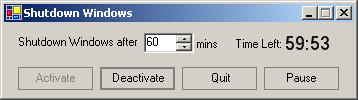
This is a quite simple few minutes build application for shutting down windows after specified minutes with some flare like pausing and resuming shutdown timer.
Imports System.Timers
Public Class ShutDownWin
Inherits System.Windows.Forms.Form
Private WinTimer As New Timer(1000)
Private time As Integer
Private TotalSec As Integer
Private Sub SetClockTimer()
AddHandler WinTimer.Elapsed, AddressOf ClockTimerFired
TotalSec = time * 60
SetTimeStr()
WinTimer.Enabled = True
End Sub
Private Sub SetTimeStr()
Dim Min As Integer = Math.Ceiling(CDbl(TotalSec) / 60)
Dim Sec As Integer = TotalSec Mod 60
If Sec = 0 Then
If Min < 10 Then
Me.lblTime.Text = ("0" & CStr(Min) & ":0" & CStr(Sec))
Else
Me.lblTime.Text = (CStr(Min) & ":0" & CStr(Sec))
End If
Else
If (Min) < 11 Then
If Sec < 10 Then
Me.lblTime.Text = ("0" & CStr(Min - 1) & ":0" & CStr(Sec))
Else
Me.lblTime.Text = ("0" & CStr(Min - 1) & ":" & CStr(Sec))
End If
Else
If Sec < 10 Then
Me.lblTime.Text = (CStr(Min - 1) & ":0" & CStr(Sec))
Else
Me.lblTime.Text = (CStr(Min - 1) & ":" & CStr(Sec))
End If
End If
End If
End Sub
Public Sub ClockTimerFired(ByVal sender As Object, ByVal e As ElapsedEventArgs)
TotalSec -= 1
Me.SetTimeStr()
If TotalSec < 1 Then
'Me.StopTestTimer()
WinTimer.Stop()
WinTimer.Enabled = False
TotalSec = 0
SetTimeStr()
//Shutdown windows
'MsgBox("Shutdown commencing")
System.Diagnostics.Process.Start("Shutdown", "/s")
End If
End Sub
Private Sub btnActivate_Click(ByVal sender As System.Object, ByVal e As System.EventArgs) Handles btnActivate.Click
btnDeactivate.Enabled = True
btnPause.Enabled = True
lblTLeft.Enabled = True
lblTime.Visible = True
btnActivate.Enabled = False
time = numTime.Value
SetClockTimer()
End Sub
Private Sub btnDeactivate_Click(ByVal sender As System.Object, ByVal e As System.EventArgs) Handles btnDeactivate.Click
btnActivate.Enabled = True
btnPause.Enabled = False
btnPause.Text = "Pause"
lblTLeft.Enabled = False
lblTime.Visible = False
btnDeactivate.Enabled = False
WinTimer.Stop()
WinTimer.Enabled = False
End Sub
Private Sub btnPause_Click(ByVal sender As System.Object, ByVal e As System.EventArgs) Handles btnPause.Click
If btnPause.Text = "Pause" Then
'btnActivate.Enabled = False
btnPause.Text = "Resume"
lblTLeft.Enabled = False
lblTime.Enabled = False
'btnDeactivate.Enabled = False
WinTimer.Stop()
WinTimer.Enabled = False
Else
'btnActivate.Enabled = False
btnPause.Text = "Pause"
lblTLeft.Enabled = True
lblTime.Enabled = True
'btnDeactivate.Enabled = False
WinTimer.Start()
WinTimer.Enabled = True
End If
End Sub
Private Sub numTime_KeyPress(ByVal sender As Object, ByVal e As System.Windows.Forms.KeyPressEventArgs) Handles numTime.KeyPress
e.Handled = True
End Sub
Private Sub btnCancel_Click(ByVal sender As System.Object, ByVal e As System.EventArgs) Handles btnCancel.Click
Me.Close()
End Sub
End Class
This member has not yet provided a Biography. Assume it's interesting and varied, and probably something to do with programming.



 General
  News
News  Suggestion
  Question
  Bug
Bug  Answer
  Joke
Joke  Praise
  Rant
Rant  Admin
Admin 


 Submit an article or tip


