Introduction
Download sourcecode
Download demo project
One of my favorite controls shipped with .Net, is the property grid. It is extremely powerful, but raises a few challenges when it comes to customizing it.
I recently finished an application that used the propertygrid to manage a rather complex configuration.
Using the propertygrid along with XML serialization is a very simple, yet effective way to implement complex configuration scenarios.
Just as the application was set to be kicked out the door, I noticed that my property grid did not look as cool as the one in the Visual Studio IDE.
So I spent I few hours trying to get it right.
First of all is the little toolbar at the top displaying icons for sorting and so on.
Why can't I have that nice gradient toolbar in my propertygrid?
Another thing I noticed was that there was no way to make the collection editor display the property description at the bottom as the the propertygrid do.
And the last thing I wanted to fix was the Toolstrip. I wanted that one to have the VS2005 look as well
I wanted to have something like this.
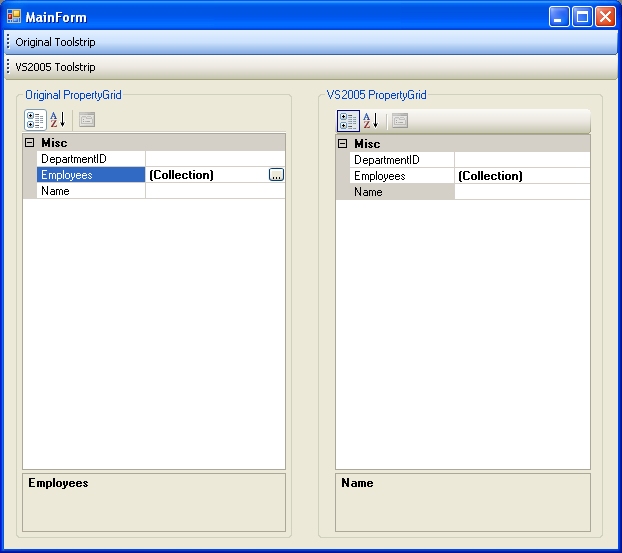
Changing the colors
As for the colors used on the propertygrid toolbar and the toolstrip, the solution was really simple. As I thought maybe I had to do my own painting, all I did was replacing the colortable used by the control's renderer.
Like this
<FONT color=#0000ff size=2><P>public</FONT><FONT size=2> </FONT><FONT color=#0000ff size=2>class</FONT><FONT size=2> </FONT><FONT color=#008080 size=2>CustomPropertyGrid</FONT><FONT size=2> : </FONT><FONT color=#008080 size=2>PropertyGrid</P></FONT><FONT size=2><P>{</P><BLOCKQUOTE dir=ltr style="MARGIN-RIGHT: 0px"><P></FONT><FONT color=#0000ff size=2>public</FONT><FONT size=2> CustomPropertyGrid()</P><P>{ </P><BLOCKQUOTE dir=ltr style="MARGIN-RIGHT: 0px"><P></FONT><FONT color=#0000ff size=2>this</FONT><FONT size=2>.ToolStripRenderer = </FONT><FONT color=#0000ff size=2>new</FONT><FONT size=2> </FONT><FONT color=#008080 size=2>ToolStripProfessionalRenderer</FONT><FONT size=2>(</FONT><FONT color=#0000ff size=2>new</FONT><FONT size=2> </FONT><FONT color=#008080 size=2>CustomColorTable</FONT><FONT size=2>());</P></BLOCKQUOTE><P>} </P></BLOCKQUOTE><P>}</P></FONT>
The Custom Colortable is inherited from the ToolStripProfessionalRenderer and just overrides
the properties describing the colors used in each element of the ex Toolstrip.
Displaying the property description in the collection editor.
This is how the collection editor is displayed when used "out of the box"

This is the result after doing some tweaks
The code
The solution to this problem was to do a little reflection to get a reference to the collection editor's form and propertygrid.
protected override CollectionForm CreateCollectionForm()
{
CollectionEditor.CollectionForm form = base.CreateCollectionForm();
form.StartPosition = FormStartPosition.CenterParent;
Type formType = form.GetType();
FieldInfo fieldInfo = formType.GetField("propertyBrowser", BindingFlags.NonPublic | BindingFlags.Instance);
if (fieldInfo != null)
{
PropertyGrid propertyGrid = (PropertyGrid)fieldInfo.GetValue(form);
if (propertyGrid != null)
{
propertyGrid.ToolbarVisible = true;
propertyGrid.HelpVisible = true;
Type propertyGridType = propertyGrid.GetType();
PropertyInfo propertyInfo = propertyGridType.GetProperty("ToolStripRenderer",BindingFlags.NonPublic | BindingFlags.Instance);
if (propertyInfo != null)
{
propertyInfo.SetValue(propertyGrid,new ToolStripProfessionalRenderer(new CustomColorTable()),null);
}
}
}
return form;
}
As you may notice the custom renderer is also applied to the collection editor's propertygrid.
Using the custom collection editor
[Editor(typeof(CustomCollectionEditor), typeof(System.Drawing.Design.UITypeEditor))]
public List<Employee> Employees
{
    get { return mEmployees; }
    set { mEmployees = value; }
}
Now my application looks like it should and everybody is happy, including me.
I'm a 39 year old software developer living in Norway.
I'm currently working for a software company making software for the retail industry.



 General
  News
News  Suggestion
  Question
  Bug
Bug  Answer
  Joke
Joke  Praise
  Rant
Rant  Admin
Admin 


 Submit an article or tip


 .
. 
