Introduction
I spent almost three to four months looking for a way to get the User Name and Computer Name of the User who is visiting my site. I tried to get it from ASP using Server Variables but that was empty almost every time. Some days before, I visited Microsoft site http://www.microsoft.com/scripting/ and found some material on the Windows Scripting Host. This solved my problem on getting User Name and Computer Name from my Script.
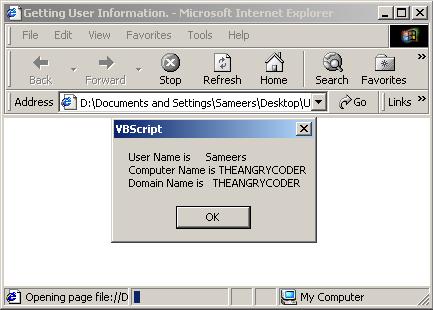
Here is a simple example to get this information. Try it out and then see the detail description below
Dim objNet
On Error Resume Next
Set objNet = CreateObject("WScript.NetWork")
If Err.Number <> 0 Then
MsgBox "Don't be Shy." & vbCRLF &_
"Do not press ""No"" If your browser warns you."
Document.Location = "UserInfo.html"
End if
Dim strInfo
strInfo = "User Name is " & objNet.UserName & vbCRLF & _
"Computer Name is " & objNet.ComputerName & vbCRLF & _
"Domain Name is " & objNet.UserDomain
MsgBox strInfo
Set objNet = Nothing
That's All the code. Now see the description.
First of all, we created an object of type WScript.NetWork under the VBScript tag. Network type object contains all the information about the network you may have. You can get a lot of information by using this object. All the properties and the Methods are listed below. For now, I was in need to get the information about the User Name, User Domain and the Computer Name of the User who is visiting my site.
Before creating the object, I used the On Error Resume Next statement. The goal in using this statement was to prevent any run time error. When you run this example, you will encounter a message from Internet Explorer like this

You have to choose Yes else the statement If Err.Number <> 0 will be true and a message will be displayed and the browser will be redirected to the same page. If I did not used this statement I encountered errors with the script runtime.
If you press the Yes button, the Object will be created and now we are ready to receive the values. We get the values from the properties of the objNet. The Property UserName gives the Name of the Logged on User, same as the LOGON_USER Server variable in ASP. The ComputerName property provides the Name of the Computer and UserDomain provides the Name of the Domain to which the user belongs. Finally, we set the objNet to nothing in order to free the memory.
So, that was all to get the User Info. Now let's see the complete description of the Network object of WScript.
Here are the properties of the Network Object of WScrip.
| Computer Name | A string representation of the computer name. |
| UserDomain | A string representation of the user's domain. |
| UserName | A string representation of the user name. |
These are the methods of Network Object of WScript.
AddPrinterConnection | Maps a remote printer to a local resource name. |
EnumNetworkDrives | Returns the current network drive mappings. |
EnumPrinterConnections | Returns the current network drive mappings. |
MapNetworkDrive | Maps a share point to a local resource name. |
RemoveNetworkDrive | Removes the current resource connection. |
RemovePrinterConnection | Removes a current resource connection. |
SetDefaultPrinter | Sets the default printer. |
You can find more documentations on WSC from the Microsoft site, http://www.microsoft.com/scripting/. I have included a .vbs file too here which do not need any browser. Just double click on it and get the same information.
Be the AngrycodeR on http://www.theangrycoder.com
This member has not yet provided a Biography. Assume it's interesting and varied, and probably something to do with programming.



 General
  News
News  Suggestion
  Question
  Bug
Bug  Answer
  Joke
Joke  Praise
  Rant
Rant  Admin
Admin 


 Submit an article or tip


 <b></b>teret