Click here to Skip to main content
Licence CPOL
First Posted 25 May 2006
Views 73,479
Bookmarked 55 times

A Workaround to Customizing and Localizing the Microsoft ReportViewer .NET Toolbar

By | 25 May 2006 | Article
An article about how to customize and localize the Microsoft ReportViewer Toolbar.

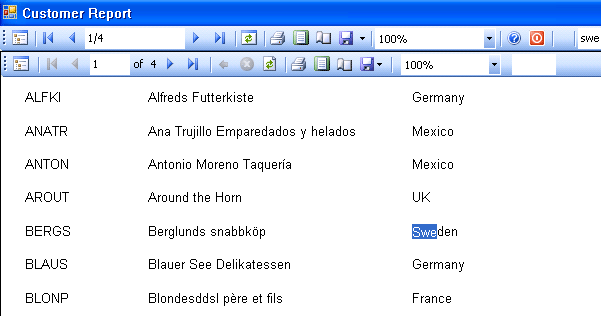
ReportViewer Toolbar

Introduction

Microsoft released a new component called ReportViewer based on the new RDL technology. Since this is a new component, there are not enough samples about it. There are many questions about how to localize and customize the ReportViewer toolbar, in some forums. Some developers want to add a help button on it, some people want to localize it for Turkish etc.

What is RDL - Report Definition Language

A report definition contains data retrieval and layout information for a report. Report Definition Language (RDL) is an XML representation of this report definition. RDL is an open schema; developers can extend RDL with additional attributes and elements.

The standard file extension for report definition files is .rdl. Its MIME type is text/xml.

More resources about RDL

Background

The best way to localize and customize the ReportViewer toolbar is to hide it and implement its methods in your own code. This article is simply based on this idea.

Using the code

You can simply hide the ReportViewer toolbar, like this:

repView.ShowToolBar = false;

This will completely hide the ReportViewer toolbar. Then add your own toolstrip and implement the necessary methods.

To find a string in the report:

private bool frmCmdFind()
{
    int found = this.repView.Find(txtSearch.Text, 1);
    if (found > 0)
    {
        btnFindNext.Enabled = true;
    }
    else
    {
        MessageBox.Show("Searched string not found", 
                        "Info", MessageBoxButtons.OK, 
                        MessageBoxIcon.Information);
        btnFindNext.Enabled = false;
    }
    return true;
}

To exporting a report as an Adobe Acrobat PDF file:

private bool frmCmdPdf()
{
    LocalReport lr = this.repView.LocalReport;
    lr.ReportPath = this.repView.LocalReport.ReportPath;
    string outputFile = this.ReportDisplayName + ".pdf";
    File.Delete(outputFile);
    Warning[] warnings;
    string[] streamids;
    string mimeType = "";
    string encoding = "";
    string extension = "";

    deviceInfo = "";

    byte[] bytes = lr.Render("PDF", deviceInfo, out mimeType, 
                             out encoding, out extension, 
                             out streamids, out warnings);

    FileStream fs = new FileStream(outputFile, FileMode.Create);
    fs.Write(bytes, 0, bytes.Length);
    fs.Close();
    System.Diagnostics.Process p = new System.Diagnostics.Process();
    p = new System.Diagnostics.Process();

    p.StartInfo.FileName = outputFile;
    p.Start();
    return true;
}

For full implementation, see the source file above.

Conclusion

Microsoft ReportViewer is a powerful component to display your report, and RDL is a good way to implement the reporting features. I believe that in the near future, many RDL designer tools and RDL viewer tools will be available in the market.

License

This article, along with any associated source code and files, is licensed under The Code Project Open License (CPOL)

About the Author

yincekara

Software Developer (Senior)
MikroKom Yazilim A.S.
Turkey Turkey

Member

c# , vb6 , mssql , oracle , mysql , asp , asp.net developer.

Sign Up to vote   Poor Excellent
Add a reason or comment to your vote: x
Votes of 3 or less require a comment

Comments and Discussions

 
You must Sign In to use this message board. (secure sign-in)
 
Search this forum  
 FAQ
    Noise  Layout  Per page   
  Refresh
GeneralSimply way to customize report ToolBar Pinmembergeneral.jesiu8:42 5 Nov '09  
GeneralThanks, PinmemberS. Töpfer22:20 28 Sep '09  
GeneralRe: Thanks, Pinmemberyincekara1:09 29 Sep '09  
QuestionHow to invoke the pagesteup dialog box programatically PinmemberMember 42901186:57 10 Apr '08  
AnswerRe: How to invoke the pagesteup dialog box programatically Pinmemberyincekara1:23 29 Sep '09  
Generalcode licence Pinmembermarsu3622:29 22 Dec '07  
GeneralRe: code licence Pinmemberyincekara22:11 14 May '08  
GeneralRefreshing the Report Bounds Pinmemberf r i s c h3:17 13 Sep '07  
GeneralRe: Refreshing the Report Bounds Pinmemberyincekara3:32 13 Sep '07  
GeneralRe: Refreshing the Report Bounds Pinmemberf r i s c h21:33 13 Sep '07  
GeneralRe: Refreshing the Report Bounds Pinmemberyincekara21:58 13 Sep '07  
Generalshowing report in report viewer without using smart tags PinmemberMeSiddy6:37 16 Aug '07  
GeneralRe: showing report in report viewer without using smart tags Pinmemberyincekara7:50 16 Aug '07  
QuestionReportviewer Help Pinmemberabraylyan15:00 11 Mar '07  
AnswerRe: Reportviewer Help Pinmemberyincekara21:47 11 Mar '07  
GeneralReportViewer problem PinmemberKschuler8:31 29 Jan '07  
GeneralRe: ReportViewer problem Pinmemberpolymorphism2:32 8 Feb '07  
GeneralRe: ReportViewer problem PinmemberKschuler2:54 9 Feb '07  
The problem is that no exception is ever thrown. I've pretty much determined that this is some kind of bug. When I run a program that is virtually the same except it is written in C#, I do not have the problem. It is only with VB code. And I think I've proven that, for whatever reason, the issue comes down to the fact that the ReportViewer's RenderingComplete Event fires twice when you run the .exe by itself, but runs only once when you run the program through Visual Studio. At least that appears to be what is going on. I ended up using a work around that counts how many times the RenderingComplete event fires and hides the report until it's the second time...and then I threw in a timer control to always show the report after five seconds no matter what. It's not the nicest solution, but it seem to be working.
 
Thanks for trying to help me out.
GeneralRe: ReportViewer problem PinmemberAeroday6:16 19 Jul '07  
GeneralTurkish language PinmemberMaksi22:25 20 Nov '06  
GeneralRe: Turkish language Pinmemberyincekara22:58 20 Nov '06  
GeneralRe: Turkish language [modified] Pinmemberyincekara0:03 12 Feb '07  
Generallocalization [modified] Pinmemberlemravec8:16 14 Aug '06  
GeneralRe: localization Pinmemberpolymorphism23:26 20 Aug '06  
QuestionAnother approach PinmemberKoru.nl23:31 1 Jun '06  

General General    News News    Suggestion Suggestion    Question Question    Bug Bug    Answer Answer    Joke Joke    Rant Rant    Admin Admin   

Use Ctrl+Left/Right to switch messages, Ctrl+Up/Down to switch threads, Ctrl+Shift+Left/Right to switch pages.

Permalink | Advertise | Privacy | Mobile
Web03 | 2.5.120529.1 | Last Updated 25 May 2006
Article Copyright 2006 by yincekara
Everything else Copyright © CodeProject, 1999-2012
Terms of Use
Layout: fixed | fluid
