Click here to Skip to main content
Licence 
First Posted 29 May 2006
Views 20,996
Bookmarked 18 times

Using C# controls in IE

By | 13 Jun 2006 | Article
An article on how to use C# controls in Internet Explorer

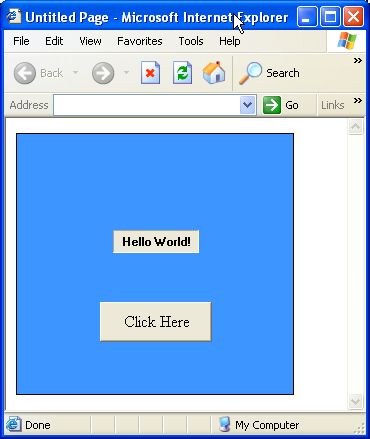
Sample Image - zrabai_article_1.jpg

Introduction

This article describes how you can use programmable C# controls in Internet Explorer without using IIS or other server program, but COM technology.

You have to place an object (identified by a classid) into the html code:

    <body>>
        <object classid="clsid:32F9346E-D34A-47f3-8017-B62E7EEA6CB1">
        </object>
    </body>


Use the same guid in the C# code of a Windows Control Library, and the following attributes before your own UserControl class. 
   namespace UserControlInHtml
   {
       [Guid("32F9346E-D34A-47f3-8017-B62E7EEA6CB1")]
       [ClassInterface(ClassInterfaceType.None)]
       [ProgId("UserControlInHtml.UserControl1")]
       public partial class UserControl1 : UserControl
       {
       ...
       }
   }    

Design your controls as usual. Before build process do not forget about two check boxes:
In Assembly Information dialog check the check box for "Make assembly COM-Visible" (Properties / Application tag).
On Properties / Build tag check the check box for "Register for COM interop".

After building open your html file from IE. Using Demo project you have to register before starting IE, see the attached readme.txt file.


License

This article has no explicit license attached to it but may contain usage terms in the article text or the download files themselves. If in doubt please contact the author via the discussion board below.

A list of licenses authors might use can be found here

About the Author

Zoltan23

Web Developer

Hungary Hungary

Member


Sign Up to vote   Poor Excellent
Add a reason or comment to your vote: x
Votes of 3 or less require a comment

Comments and Discussions

 
You must Sign In to use this message board. (secure sign-in)
 
Search this forum  
 FAQ
    Noise  Layout  Per page   
  Refresh
GeneralMy vote of 1 Pinmemberwilliamnw2:28 23 Feb '09  
QuestionRun Time Add Controls On Browser PinmemberSarita Rajput0:12 24 Jul '08  
AnswerRe: Run Time Add Controls On Browser PinmemberZoltan234:52 24 Jul '08  
QuestionDo you know how to do it with C++ ? PinmemberMarcello4:23 13 Jun '06  
AnswerRe: Do you know how to do it with C++ ? PinmemberZoltan2320:25 13 Jun '06  
QuestionSecurity Context PinmemberThomas Lykke Petersen21:34 29 May '06  

General General    News News    Suggestion Suggestion    Question Question    Bug Bug    Answer Answer    Joke Joke    Rant Rant    Admin Admin   

Use Ctrl+Left/Right to switch messages, Ctrl+Up/Down to switch threads, Ctrl+Shift+Left/Right to switch pages.

Permalink | Advertise | Privacy | Mobile
Web01 | 2.5.120517.1 | Last Updated 13 Jun 2006
Article Copyright 2006 by Zoltan23
Everything else Copyright © CodeProject, 1999-2012
Terms of Use
Layout: fixed | fluid