Click here to Skip to main content

How to Truncate Log File in SQL Server 2005

By , 9 Jun 2006
 
Sample Image - shrink.jpg

Introduction

SQL Server 2005 is quite different from SQL Server 2000. To truncate log file is one thing which is different from SQL Server 2000. In SQL Server 2000, you just use Shrink to whatever file size you like. In SQL Server 2005, sometimes I cannot shrink the log file at all.

Here I want to describe some tricks to truncate log file for a database in SQL Server 2005. The work environment is Microsoft SQL Server Management Studio.

I. Shrink the Log File Size at the Right Time

I found out this trick:

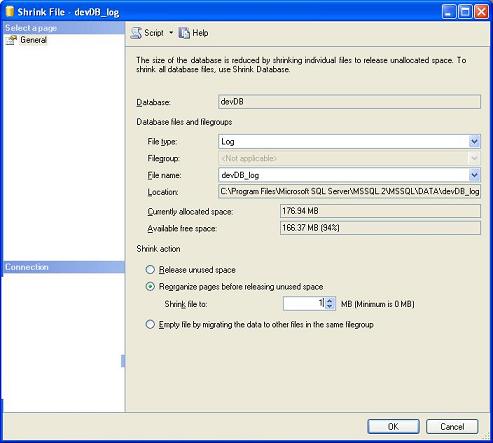
Immediately after I use the SSIS package or Import the data to the database (highlight the database->Tasks->Import data …), or Export the data from the database (highlight the database->Tasks->Export data …), I can shrink the log file to the desired size, for example, 1MB. That is, highlight the database->Tasks->Shrink->Files , set the file size, say, 1MB.

Then, click OK and you are done.

II. Eliminate the Log File Completely

Sometimes, we just do not need the big log file. For example, I have a 40GB log file. I am sure I do not need this log file and want to get rid of it completely to free up the hard drive space. The logic is:

  1. Detach the database
  2. Rename the log file
  3. Attach the database without the log file
  4. Delete the log file

Let’s say, the database name is testDev. In the SQL Server Management Studio,

  1. Highlight the database-> Tasks->Detach..-> Click OK
  2. Go to log file folder -> rename the testDev_log.ldf to be like testDev_log-aa.ldf
  3. Highlight Databases->Attach…-> Click Add -> add the database testDev, highlight the log file and click the ‘Remove’ button. This means you only attach testDev.mdf
  4. After this is done, you can verify the contents of the attached database and then delete the log file

This way we can safely delete the log file and free up the space.

If you think this is very helpful, please leave your comments online. If you have any questions or suggestions, please email me at hong_wei_li@yahoo.com.

Happy SQLing!

History

  • 9th June, 2006: Initial post

License

This article, along with any associated source code and files, is licensed under The Code Project Open License (CPOL)

About the Author

hong_wei_li@yahoo.com
Web Developer
United States United States
Member
.Focus on database (SQL Server 2005/2000/7/6.5 and Oracle 10g) development with C#,
 
ASP.NET, ASP, Java, PHP.
.Like to work with MS Server 2005 SSIS and report service
.Like full cycle software design, development and deployment
.Microsoft Certified SQL Server Developer and DBA.

Sign Up to vote   Poor Excellent
Add a reason or comment to your vote: x
Votes of 3 or less require a comment

Comments and Discussions

 
You must Sign In to use this message board.
Search this forum  
    Spacing  Noise  Layout  Per page   
General[My vote of 1] My vote of 1membermuzzi_w7 Feb '13 - 13:35 
Agree with others who have advised (strongly) against this technique.
 
MSFT warns against this:
Note The transaction logs are very important for maintaining the transactional integrity of the database. Do not delete the transaction log files, even after you make a backup of your database and the transaction logs.
 
Maybe look to change the Recovery Model to 'Simple' instead. http://support.microsoft.com/kb/873235[^]
QuestionVery HelpfulmemberJacky_kooboobird5 Jun '12 - 17:06 
Nice article. Very helpful Smile | :)
QuestionMy vote is 5membermuhamd yusuf14 Feb '12 - 20:29 
thanks
Wink | ;)
GeneralMy vote of 5memberTrong Thao3 Dec '10 - 17:42 
Thank you sir
Generalshrinking log file in SQL2005memberOkeola Mudashiru22 Oct '10 - 14:58 
Thank you for this piece of instruction. It worked for me.
 
Please include print icon on this web page so that the instructions can be printed out without the ADs (advertisements and un-needed images).
 
Thank you.
 
Muda
GeneralMy vote of 1memberblackr2d19 Apr '10 - 23:23 
Extremely bad and dangerous advice...
GeneralRe: My vote of 1memberfaisalcode4 Jun '10 - 11:52 
Can you please describe why it is dangerous. What are the drawbacks.
 
Thanks
GeneralRe: My vote of 1memberblackr2d5 Jul '10 - 22:49 
Point I specifies how to MANUALLY shrink the log after an SSIS bulk load. Errrmm... why not invoke it from SSIS itself???
 
Point II is essentially a way to delete recovery information, but not explaining the risks and why would anyone do it in the first place - a much easier and CLEANER way would be to switch to Simple Recovery Mode. Also better performance IF business case allows that recovery scenario.
 
Log files are created in Full mode for a purpose and there's a point to Full recovery mode - this answer and the whole article is not the right place to discuss that, most basic SQL 2005 documentation covers that topic properly.
 
In essence the whole article says "If you are running out of space on a HD because you have a Full Recovery Mode on the database for transactional integrity and rollback functionality - just delete it (the log), risking potential data loss, wasting the workload resources used to create that log... and then leave the database in Full recovery mode so you can panic and manually delete recovery information all over again".
 
What makes it strange is that I can see SQL gurus much better than me voicing very similar concerns for YEARS now and the article just hangs there to catch out an unwary SQL Admin looking for a quick answer because his HD is full.
 
VERY bad article and advice.
 
What's even more scary is that the author advertises himself as the "Microsoft Certified SQL Server Developer and DBA", as much as I doubt that claim it makes this BAD article more damaging as someone may believe this is a specialist advice.
GeneralRe: My vote of 1membershresthadk@hotmail.com4 Aug '10 - 16:29 
I agree too - VERY bad article and advice - Attaching/Detaching and Deleting
 
Simple advice without Attaching/Detaching and Deleting as follow
 
Step 1: Run following script
----------------------------
 
BACKUP LOG 'myDatabase' WITH TRUNCATE_ONLY
GO
 
DBCC SHRINKFILE ('myDatabase' , 0, TRUNCATEONLY)
GO
 
OR-->
-----
 
Step 2: Right click the 'myDatabase'
Select Task --> Shrink --> Files
Under File type --> select log
Release unused space button should be checked
click OK
 
Right click the 'myDatabase'
Select Properties
Select Files
Check the size of the log files - it is reduced!
 
Step 3: If you don't need log to be backed up then change the recovery model to simple as follow
 
Right click the database 'myDatabase'
Select Properties
Select Options
Change Recovery model to Simple
Click OK
 
Many Thanks
Smile | :)
QuestionHow to create Folder or File Name with Space ?memberGolden Jing22 Dec '09 - 0:08 
Dear All,
 
I use SQL Server 2005.
I created a Folder that name "Company Folder"
 
declare @Path varchar(50)
set @Path = 'mkDir D:\Company Folder'
exec master.dbo.xp_cmdshell @Path
 

But it is issue with space that it creates only "Company".
 
Have any solve with this issue ?
Does SQL Server support with space ?
 
Thanks for your help and feetback.
 
VB.Net

GeneralThis is not the way to shrink the filememberjunk qwe23 Nov '09 - 12:34 
in a query window:
 
USE <DB_NAME>
BACKUP LOG <DB_NAME> WITH TRUNCATE_ONLY
DBCC SHRINKFILE(<LOG_NAME>, 1)

 
where <DB_NAME> is your database name
and <LOG_NAME> is the log name from sys.database_files table, name column (and not the physical filename !)
you can find your the name here:
 
SELECT * FROM sys.database_files
GeneralThanksmemberMember 66136623 Oct '09 - 6:49 
Overall not good advice... But perfect for my situation where
- databases are throw-away, scrubbed, production copies in debug/support environment
- hardware resource are limited, and I need the storage (zero dollar budget for test/dev environment)
GeneralMy vote of 1memberJon Kehayias9 Sep '09 - 17:39 
Horrible Advice You should read:
 
Oh, the horror! Please stop telling people they should shrink their log files!
GeneralHORRIBLE ADVICE! IF YOU ARE A DBA OR ADMIN READ BELOW!memberJon Kehayias9 Sep '09 - 17:32 
Truncating your transaction log is at best a bandaid fix to a bigger problem. You are ripping the transactional heart out of your databases, and eliminating any possibility of point in time recovery. You might as well switch your database to SIMPLE recovery at this point.
 
What do I know, I am just a MCITP DBA and DEV for 2005 and 2008, a SQL Server MVP, and Sr. Database Administrator for a multi-billion dollar a year company. If you want to know more on the subject I'd recommend you see what other real professionals in the industry have to say about it by reading fell SQL Server MVP Aaron Bertrands blog post:
 
Oh, the horror! Please stop telling people they should shrink their log files!
GeneralVery helpfulmemberlingli2004 Sep '09 - 9:10 
Thank you! It is very helpful.
GeneralRe: Very helpfulmemberJon Kehayias9 Sep '09 - 17:36 
This is horrible information, see my comment above. You should not be doing this kind of thing to your database.
GeneralRe: Very helpfulmemberBasel Nimer15 Mar '10 - 2:45 
This is not so horrible, sometimes even a DBA will need to shrink the log file for reasons you might not be aware of.
(2B)||(!2B)

GeneralThank U.member>FLY<</xml>14 Aug '09 - 0:42 
Thank U.
The second way is very easy and helpful Wink | ;)
GeneralMy vote of 1memberHoward Richards22 Jul '09 - 5:54 
BAD ADVICE!! See MSFT comment!!
GeneralThanksmemberabii44427 May '09 - 8:09 
I was looking for some solution to replace the log file which you have given in the second method. Thanks a lot...
 
Abhishek M
GeneralDBCC SHRINKDATABASEmemberMember 45889187 May '09 - 5:21 
hi,
 

In sqlserver 9.0(2005) i got this issue when i execute DBCC SHRINKDATABASE(database_name) command, i' ve got the follow message:
 
"DBCC SHRINKDATABASE: File ID 1 of database ID 9 was skipped because the file does not have enough free space to reclaim.
DBCC execution completed. If DBCC printed error messages, contact your system administrator."
 
any idea??
 
thanks in advance..
 
William
GeneralThanksmemberohnmartun25 Oct '08 - 5:25 
Thanks for ur sharing
GeneralDetaching and deleting the log is definitely not advisablememberDavid Portas8 Apr '08 - 12:18 
Paul Randal explained that this is a bad idea. At best it forces you to take your database offline. Worst case is that you invalidate your entire database and have to restore from backup.
 
The right way is to select Simple Recovery and then make your log files an appropriate size.
GeneralThanks to all contributers [modified]memberSuper Coder!10 Sep '07 - 19:20 
Hi All
 
Having hit this very issue I appreciate everyone's contribution that makes this overall article really good, especially with references to MS technical articles on the subject. Verifying with reliable sources is very important.
 
If you are here for the first time you should read all these posts to be safe.
 
This worked fine for me, but note you should do a backup first if the database is critical:
 
USE AdventureWorks;
GO
-- Truncate the log by changing the database recovery model to SIMPLE.
ALTER DATABASE AdventureWorks
SET RECOVERY SIMPLE;
GO
-- Shrink the truncated log file to 1 MB.
DBCC SHRINKFILE (AdventureWorks_Log, 1);
GO
-- Reset the database recovery model.
ALTER DATABASE AdventureWorks
SET RECOVERY FULL;
GO
 
Source was from Dislektik in this thread and origin is here: http://msdn2.microsoft.com/en-us/library/ms189493.aspx[]
 
Special thanks to the author and Dislektik and thanks to the other posters too....Big Grin | :-D
 
You can contact me at coder@danhog.com or howartthou@danhog.com.
 
Regards
Super Coder!

GeneralNice tipmemberVishal Halbe3 May '07 - 4:59 
hi this was very helpful...I lost data couple of times after deleting the log files...so thanks for tip

General General    News News    Suggestion Suggestion    Question Question    Bug Bug    Answer Answer    Joke Joke    Rant Rant    Admin Admin   

Permalink | Advertise | Privacy | Mobile
Web03 | 2.6.130523.1 | Last Updated 9 Jun 2006
Article Copyright 2006 by hong_wei_li@yahoo.com
Everything else Copyright © CodeProject, 1999-2013
Terms of Use
Layout: fixed | fluid
