Introduction
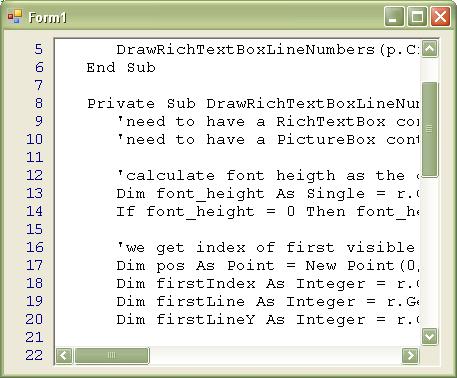
This article demonstrates how to add line numbers to a RichTextBox control. This is done by adding a PictureBox control on the left side of the rich text box control. When the appropriate events happen on the Form or on the RichTextBox control, we call a method that paints the line numbers on the PictureBox control. This approach is more accurate and efficient than other approaches I've seen where another textbox control is used for printing the line numbers. The PictureBox will only print the line numbers that are currently visible in the RichTextBox control. During the process of constructing this code sample, I initially based it on the code sample provided in the article: http://www.codeproject.com/cs/miscctrl/numberedtextbox.asp and enhanced it by doing the following:
- Replace the
Label control for numbering with a PictureBox. - I fixed the scrolling problem with that implementation due to the fact that the
RichTextBox uses smooth scrolling (scrolling with the scrollbar scrolls the text in pixels, not in lines). As a result, sometimes the first line may be displayed in half, in which case, the line numbering should address it.
Here is the code for printing the line numbers. Note that we have a RichTextBox control called MyRichTextBox and a PictureBox control called MyPictureBox. The method gets an argument which is the Graphics of the PictureBox control. This is the method DrawRichTextBoxLineNumbers:
Private Sub DrawRichTextBoxLineNumbers(ByRef g As Graphics)
With MyRichTextBox
Dim font_height As Single
font_height = .GetPositionFromCharIndex(.GetFirstCharIndexFromLine(2)).Y _
- .GetPositionFromCharIndex(.GetFirstCharIndexFromLine(1)).Y
If font_height = 0 Then Exit Sub
Dim first_index As Integer
Dim first_line As Integer
Dim first_line_y As Integer
first_index = .GetCharIndexFromPosition(New _
Point(0, g.VisibleClipBounds.Y + font_height / 3))
first_line = .GetLineFromCharIndex(first_index)
first_line_y = .GetPositionFromCharIndex(first_index).Y
g.Clear(Control.DefaultBackColor)
Dim i As Integer = first_line
Dim y As Single
Do While y < g.VisibleClipBounds.Y + g.VisibleClipBounds.Height
y = first_line_y + 2 + font_height * (i - first_line - 1)
g.DrawString((i).ToString, .Font, Brushes.DarkBlue, MyPictureBox.Width _
- g.MeasureString((i).ToString, .Font).Width, y)
i += 1
Loop
End With
End Sub
This method should be called from the following locations:
- Upon
RichTextBox's Resize event: DrawRichTextBoxLineNumbers(MyPictureBox.CreateGraphics). - When the
VScroll event happens on the RichTextBox: (MyRichTextBox.VScroll).DrawRichTextBoxLineNumbers(MyPictureBox.CreateGraphics). - When the
Paint event happens: (MyPictureBox.Paint).DrawRichTextBoxLineNumbers(e.Graphics). Note that it this method, we send e.Graphics and not MyPictureBox.CreateGraphics, as we would like to repaint only the required region within the PictureBox control.
These are the locations from which we need to invoke the line numbering method:
Private Sub r_Resize(ByVal sender As Object, ByVal e As System.EventArgs) _
     Handles MyRichTextBox.Resize
     MyPictureBox.Invalidate()
End Sub

Private Sub r_VScroll(ByVal sender As Object, ByVal e As System.EventArgs) _
        Handles MyRichTextBox.VScroll
  MyPictureBox.Invalidate()
End Sub

Private Sub p_Paint(ByVal sender As Object, _
        ByVal e As System.Windows.Forms.PaintEventArgs) _
        Handles MyPictureBox.Paint
  DrawRichTextBoxLineNumbers(e.Graphics)
End Sub

Private Sub Form1_Load(ByVal sender As System.Object, ByVal e As System.EventArgs) _
        Handles MyBase.Load
  MyRichTextBox.Text = vbCrLf & vbCrLf & vbCrLf
End Sub
Other general notes
- The code above assumes that the font name and the size of the
RichTextBox control is the same for the entire text. - The
WordWrap property of the RichTextBox control should be set to False. - I've placed this code in the
Form_Load method to assure that the textbox has at least two lines always:
MyRichTextBox.Text = vbCrLf & vbCrLf & vbCrLf
- I recommend docking the
PictureBox to the left and then calculating the width of the PictureBox based on g.MeasureString("000", MyRichTextBox.Font).Width. The width of the PictureBox should be recalculated, and the PictureBox should be redrawn when the font of the RichTextBox changes. - The
PictureBox control may be replaced with a Panel or any other control that exposes the CreateGraphics() method. - The control was designed for
RichTextBox controls with WordWrap = False.
This member has not yet provided a Biography. Assume it's interesting and varied, and probably something to do with programming.



 General
  News
News  Suggestion
  Question
  Bug
Bug  Answer
  Joke
Joke  Praise
  Rant
Rant  Admin
Admin 


 Submit an article or tip


![Rose | [Rose]](https://www.codeproject.com/script/Forums/Images/rose.gif)
 ).
).