Click here to Skip to main content
Licence CPOL
First Posted 26 Jun 2006
Views 37,318
Downloads 1,087
Bookmarked 27 times

Integrating Crystal Reports in .NET using C#

By | 1 Jul 2006 | Article
An article on integrating Crystal Reports in .NET using C#
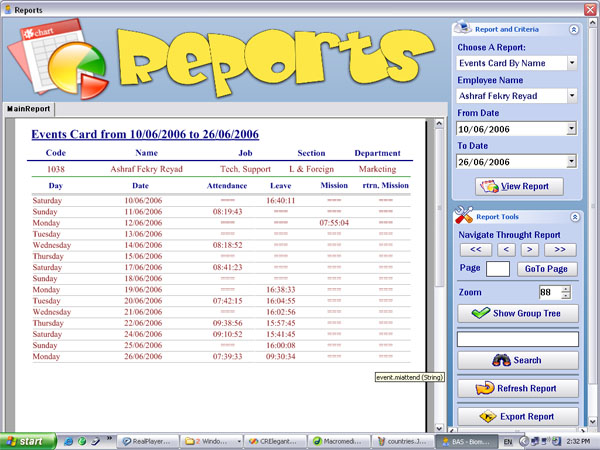
Sample Image - main.jpg

Introduction

This article is aimed at users who want to embed Crystal reports in Windows based .NET applications using C#.

Using the Code

Embedding Crystal Reports in a Windows based application goes through easy steps:

  1. Add your report name in the reports combo:

  2. Apply your criteria:

    //
    // show the controls that create the report criteria
    //
                hideAll();
                if(reportChoose.SelectedIndex==1)
                {
                    cmbCriteria.Visible=true;
                    lblCriteria1.Visible=true;
                    Choose.Size = new Size(224, 208);
                    ShowReport.Location = new Point(40, 168);
                    lblCriteria1.Text = "From Country:";
                    dbutil.fillCombo(cmbCriteria, 
    		"select country from employees group by country");
                    cmbCriteria.Items.Insert(0,"All Countries");
                    cmbCriteria.SelectedIndex = 0;
                }
                else if(reportChoose.SelectedIndex==2)
                {
                }

    So we have this:

  3. Create XML based on your data to create a report depending on it:

    //
    // view report action
    //
                crvReport.ReportSource = null;
                this.Cursor = Cursors.WaitCursor;
                if(reportChoose.SelectedIndex==1)
                {
                    string sql = "select * from employees";
                    if(cmbCriteria.SelectedIndex!=0)// show all employees
                    {
                        sql+= " where country='"+cmbCriteria.Text+"'";
                    }
                    WriteSchemaFile(sql);
                }
                this.Cursor = Cursors.Default;
                System.GC.Collect();

    This will create an XML file on the local drive C: (wait... it is not a fixed path report, it will be dynamic soon) called data.xml.

    //
    // WriteSchemaFile method
    //
            private void WriteSchemaFile(string SQL)
            {
                OleDbDataAdapter da = new OleDbDataAdapter(SQL, dbutil.con);
                DataSet ds = new DataSet("data");
                da.Fill(ds, "dataTable");
                ds.WriteXml("c:\\data.xml", XmlWriteMode.WriteSchema);
            }
  4. Create a report based on the XML file:

    • Add a new report:

    • Choose XML data source:

    • Locate file:

    • Click Finish.

This is the unformatted version of the report.

After formatting:

//
// view report action
//
            crvReport.ReportSource = null;
            this.Cursor = Cursors.WaitCursor;
            if(reportChoose.SelectedIndex==1)
            {
                string sql = "select * from employees";
                if(cmbCriteria.SelectedIndex!=0)// show all employees
                {
                    sql+= " where country='"+cmbCriteria.Text+"'";
                }
                //WriteSchemaFile(sql);
                reports.employees emp = new CRElegantViewer.reports.employees();
                emp.Database.Tables[0].SetDataSource(getDataSet(sql));
                crvReport.ReportSource = emp;
                crvReport.Visible=true;
                tools.IsExpanded = true;
            }
            this.Cursor = Cursors.Default;
            System.GC.Collect();
//
// get DataSet Method
//
        private DataSet getDataSet(string SQL)
        {
            OleDbDataAdapter da = new OleDbDataAdapter(SQL, dbutil.con);
            DataSet ds = new DataSet("data");
            da.Fill(ds, "dataTable");
            return ds;
        }

So now, you don't need the XML file anymore.

Have fun!

License

This article, along with any associated source code and files, is licensed under The Code Project Open License (CPOL)

About the Author

Moutaz Salem

Web Developer

Egypt Egypt

Member


Sign Up to vote   Poor Excellent
Add a reason or comment to your vote: x
Votes of 3 or less require a comment

Comments and Discussions

 
You must Sign In to use this message board. (secure sign-in)
 
Search this forum  
 FAQ
    Noise  Layout  Per page   
  Refresh
GeneralNice GUI PinmemberMuammar©9:12 20 Jun '09  
Questioncreating a crytal report to display a dataset in the run time Pinmemberrkherath23:54 9 Apr '07  
QuestionWhy Crystal at all? PinmemberPeter Wone15:53 2 Jul '06  
AnswerRe: Why Crystal at all? [modified] PinmemberMichael197321:08 2 Jul '06  
AnswerRe: Why Crystal at all? PinmemberBobWorm19:25 3 Jul '06  
AnswerRe: Why Crystal at all? Pinmembereatwork10:15 15 Aug '06  
GeneralRe: Why Crystal at all? PinmemberPeter Wone13:04 16 Aug '06  
GeneralRe: Why Crystal at all? PinmemberM.Khadem1:21 29 Dec '06  
GeneralRe: Why Crystal at all? PinmemberPeter Wone2:07 20 Jan '07  
GeneralNice! PinmemberVertyg023:09 1 Jul '06  

General General    News News    Suggestion Suggestion    Question Question    Bug Bug    Answer Answer    Joke Joke    Rant Rant    Admin Admin   

Use Ctrl+Left/Right to switch messages, Ctrl+Up/Down to switch threads, Ctrl+Shift+Left/Right to switch pages.

Permalink | Advertise | Privacy | Mobile
Web02 | 2.5.120517.1 | Last Updated 2 Jul 2006
Article Copyright 2006 by Moutaz Salem
Everything else Copyright © CodeProject, 1999-2012
Terms of Use
Layout: fixed | fluid
