Introduction
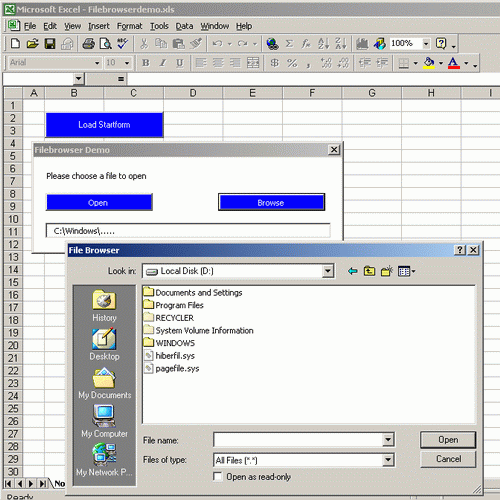
Here is an example of how you can build a common file browser in an Office application. I won't explain all about the Windows API functions used because it would be too much for this article. I made this for Excel, but you can use it with all VBA-aware applications. When you open the Excel file and look at the whole project in the VBViewer (ALT+F11), you will see that the main work is done by the Module called FileBrowser. You can export it and import it to another project.
Explanations of the Code
Declare Function th_apiGetOpenFileName Lib "comdlg32.dll"
    Alias "GetOpenFileNameA" (OFN As thOPENFILENAME) As Boolean
Declare Function th_apiGetSaveFileName Lib "comdlg32.dll"
    Alias "GetSaveFileNameA" (OFN As thOPENFILENAME) As Boolean
Declare Function CommDlgExtendetError Lib "commdlg32.dll" () As Long
The functions of GetOpenFileName are the secret to building this interface. For detailed information about these functions, please read an API guide. Note: OFN is the Container that allows you to browse files.
Function StartIt()
    Dim strFilter As String
    Dim lngFlags As Long
    strFilter = thAddFilterItem(strFilter, "Excel Files (*.xls)", "*.XLS")
    strFilter = thAddFilterItem(strFilter, "Text Files(*.txt)", "*.TXT")
    strFilter = thAddFilterItem(strFilter, "All Files (*.*)", "*.*")
    Startform.filenameinput.Value = thCommonFileOpenSave(InitialDir:=
        "C:\Windows", Filter:=strFilter, FilterIndex:=3, Flags:=lngFlags,
        DialogTitle:="File Browser")
   Debug.Print Hex(lngFlags)
End Function
This is the main function. The thAddFilterItems are shown in the drop-down menu to select the different file types. If you want to add other items, e.g. Word Files (*.doc), copy and paste the line and fill in what you like. What's important is the InitialDir, which gives the path at which to start. The function thCommonFileOpenSave rules the dialog and returns as a string containing the selected file. This string is given to the textbox filenameinput of Startform. So, now you have the control to work with a file in a form chosen by the user. The function thCommonFileOpenSave looks difficult, but most of the time it is only setting properties of the OFN object.
If OpenFile Then fResult = th_apiGetOpenFileName(OFN)
Else fResult = th_apiGetSaveFileName(OFN)
If fResult Then
    If Not IsMissing(Flags) Then Flags = OFN.Flags
        thCommonFileOpenSave = TrimNull(OFN.strFile)
    Else
        thCommonFileOpenSave = vbNullString
End If
This is the important part of the function thCommonFileOpenSave. The first line decides if you want to save or open a file, and calls the functions needed. The if-block statement defines the return value of the function. Either it returns OFN.strFile, which equals the name of the chosen file or a null string. The function TrimNull only kills Nullchars.
I hope the rest of the Module code is clear, but don't ask me about the setting of the hex-values. I found it in an API guide and I don't know what it does particularly. Also, please don't write about my bad English. I'm a student of physics and not a linguistic genius. Have fun with it.
History
- 14th October, 2001: Initial post
- 3rd October, 2008: Download file updated
Bachelor in Computer Science.
Works as a Software Engineer (C#) for Mettler Toledo in Switzerland.
Develops software for formulation and SQC.



 General
  News
News  Suggestion
  Question
  Bug
Bug  Answer
  Joke
Joke  Praise
  Rant
Rant  Admin
Admin 


 Submit an article or tip


