Introduction
This article shows how to create a Flyout Toolbar. Flyout toolbars are used, for example, in 3D Studio & AutoCAD.
The idea is to let the user choose a sub-option of a more
'general' action that can be performed. For example, if we're writing
a 2D graphics editor and we have a 'Draw Rectangle' option, we
would probably have a button on the toolbar showing a rectangle.
But the question is what kind of rectangle? A filled rectangle? Just the
border? Or maybe both?
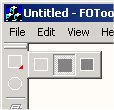
One solution to the problem is to create another 'flyout' toolbar showing all the
'Draw Rectangle' sub-options, which will pop-up next to
the 'Draw Rectangle' button on the toolbar if the user clicks that button a little bit longer. If the user has chosen a different sub-option from the flyout toolbar, the button on the main toolbar is automatically updated.
The class CFOToolBar does just that. It's derived from CToolBar, and has an additional member function called addFlyout(), which takes the zero-based index of the button on the toolbar, and the resource ID of the flyout toolbar to be attached to that button.
Usage
In order to use CFOToolBar, just perform the following steps:
1. Create another toolbar with the resource editor that will contain all the sub options ( in this case, the toolbar that contains the different kinds of
rectangles  . Let's say that it's resource ID is
 IDR_RECTANGLE_TOOLBAR )
2. Derive your main toolbar from CFOToolBar (or just use it
directly instead of deriving from it)
In MainFrm.h (in class CMainFrame)
...
protected:
CFOToolBar m_wndToolBar;
3. Call the addFlyout() member function of your main toolbar object to attach the flyout toolbar to the desired button.
In MainFrm.cpp (in OnCreate())
...
m_wndToolBar.addFlyout(0, IDR_RECTANGLE_TOOLBAR);
m_wndToolBar.EnableDocking(CBRS_ALIGN_ANY);
EnableDocking(CBRS_ALIGN_ANY);
...
4. Add FOToolBar.cpp & FOToolBar.h to your project.
That's it.
Now if you click the first button on the toolbar a little bit longer, you'll
see the 'rectangle' flyout oolbar pop up.
How it works
By overriding the ON_WM_LBUTTONDOWN() message of the main toolbar, we can do two things:
1. Check if a the user clicked on a button to which we previously attached a
flyout toolbar.
2. If so, initiate the timer for X milliseconds. In the timer function, we create the flyout toolbar and display it in the right place. The flyout toolbar is also CToolBar-derived. All we had to do is simply remove the caption and float it.
There are a few problems though when displaying the flyout toolbar. It
doesn't get any mouse messages because the main toolbar gets them. That's the reason we also had to override ON_WM_MOUSEMOVE() to
detect if a flyout toolbar is displayed, and if so, delegate that message to it.
We also override ON_WM_LBUTTONUP() in which we kill the timer and update the new button from the flyout if neccessary.
A strange side effect happens if the user changes the application (by
clicking Ctrl+Alt) while a flyout is on, and unclicks the mouse in the other
application. When getting back, neither the main
toolbar nor the flyout toolbar receive the ON_WM_LBUTTONUP() message, so you'll see that flyout is still displayed until you actually click on one of its buttons.
These are the main guildelines of the implementation. For more specific
details please looks at the code, and feel free to e-mail me with questions or
suggestions.
This member has not yet provided a Biography. Assume it's interesting and varied, and probably something to do with programming.



 General
  News
News  Suggestion
  Question
  Bug
Bug  Answer
  Joke
Joke  Praise
  Rant
Rant  Admin
Admin 


 Submit an article or tip


 Because there are several tricks to be implemented in order to get this work.


 . Please update the project with the complete files required.


 ). Still, I'm planning on improving this code, and maybe at some point I'll write an upgrade article and put it here. Let me know if everything worked out okay, or you still have problems. I'll check this site once in a while.


