Click here to Skip to main content
Licence CPOL
First Posted 20 Aug 2006
Views 126,366
Downloads 1,933
Bookmarked 184 times

Groupable ListView

By Kel_ | 15 Sep 2006
Extended ListView with GUIs for easy grouping.
1 vote, 2.9%
1

2
1 vote, 2.9%
3
7 votes, 20.6%
4
25 votes, 73.5%
5
4.80/5 - 34 votes
2 removed
μ 4.52, σa 1.43 [?]

Sample Image - GroupableListView.png

Introduction

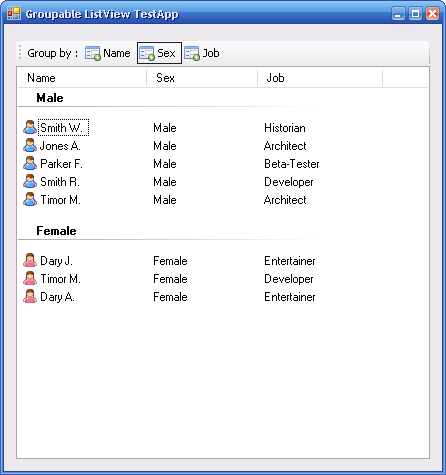
Some time ago, I thought about writing a small extension to the ListView control. This would dynamically create a graphic user interface to allow the end-user create/modify groups, something like ‘GROUP BY’ in SQL. The control will automatically create a ToolStrip and a ToolStripButton for each column.

Usage

To use the control, just add ExListView.cs to your project, and switch the GroupsGUIs property to true, if you want to give the possibility to group items for the users.

Properties

  • GroupsGUIs - Show or not the ToolStrip to allow group items.
  • ToolStripImage - The image to show on ToolStripButtons of the groups.
  • ShowGroupLabel - Show or hide the 'ShowGroup' label.
  • ShowGroupLabelText - The 'ShowGroup' label. Default: 'Group by:'.

Example

I prepared a small example project, with a ListView which contains some employees. Each employee has a name, sex, and a job. So, if the user wants to group the employees by sex, he just needs to press one button, and the ListView will analyze each ListViewItem and create groups for the data. It creates one group for each different data in selected colums.

Here you see an example of ListView, grouped by Sex and Job:

Sample Image - GroupableListView.png

Code

To analyze and create the groups, I wrote a GroupBy(ColumnHeader[] Headers) method, it’s a simple thread-safe method with a few loops which add groups for each new different data found.

delegate void dGroupBy(ColumnHeader[] Headers);
public void GroupBy(ColumnHeader[] Headers)
{
    if (this.InvokeRequired)
    {
        dGroupBy d = new dGroupBy(GroupBy);
        this.Invoke(d, new object[] { Headers });
    }
    else
    {
        //code
        foreach (ListViewItem lvi in this.Items)
        {
            string header = "";

            foreach (ColumnHeader ch in Headers)
            {
                header += " " + 
                   lvi.SubItems[ch.Index].Text;
            }
            ListViewGroup group = 
                new ListViewGroup(header);
            ListViewGroup found = null;
            foreach (ListViewGroup g in Groups)
            {
                if (g.Header == group.Header)
                { found = g; break; }
            }
            if (found == null)
            {
                this.Groups.Add(group);
                group.Items.Add(lvi);
            }
            else
            {
                found.Items.Add(lvi);
            }
        }
    }
}

Sample Image - GroupableListView.png

History

  • 06/09/06 – v.1.01: Dock fill bug fixed.
  • 20/08/06 – Initial release.

License

This article, along with any associated source code and files, is licensed under The Code Project Open License (CPOL)

About the Author

Kel_

Software Developer (Senior)

Belgium Belgium

Member

Follow on Twitter Follow on Twitter
Roman Atachiants (aka Kel) is a software engineer and scientist with extensive experience in different computer science domains, programming languages/principles/patterns & frameworks.
 
Founder and active developer of the Spike-Engine Project: www.spike-engine.com, a real-time networking library with automatic proxy generation.
 
His main expertise consists of C# and .Net platform, Video Gaming technology, Data Bases and Artificial Intelligence. He has an extensive programming knowledge and R&D expertise. He successfully designed various large software systems: from CRMs and ERPs to video games and on-demand movie distribution system.


Sign Up to vote   Poor Excellent
Add a reason or comment to your vote: x
Votes of 3 or less require a comment

Comments and Discussions

 
You must Sign In to use this message board. (secure sign-in)
 
Search this forum  
 FAQ
    Noise  Layout  Per page   
  Refresh
GeneralVery nice extension! PinmemberSam Jacobs13:40 17 Mar '10  
Generalwrite text in Grouping PinmemberRohit Mahajan22:39 21 May '08  
GeneralVista Style Group/Sort PinmemberAlexandru Stanciu18:54 27 Feb '08  
Any idea on how to get something like the Windows Vista Explorer ListView with the nice per column Sort/Group feature?
QuestionNo scroll bar PinmemberBill W5:29 15 Nov '07  
QuestionStrange Issue Pinmember-_-_-_-_-_22:10 22 Aug '07  
AnswerRe: Strange Issue Pinmember-_-_-_-_-_22:18 22 Aug '07  
QuestionWidth-Problem when ListView in LargeIcon-Mode PinmemberStephan Mantel4:21 17 Jun '07  
GeneralGrouping Sorted Pinmemberchancer1015:56 16 May '07  
GeneralSeem a bug PinmemberdvptUml17:05 3 Apr '07  
Generaluse combobox instead of a toolstrip... [modified] PinmemberTheCardinal22:04 17 Oct '06  
QuestionExpand/Collapse Group Pinmemberriz33223:06 3 Oct '06  
AnswerRe: Expand/Collapse Group Pinmembersonofdaedalus9:23 24 Jan '07  
QuestionRe: Expand/Collapse Group PinmemberSoxiz12:32 11 Jun '07  
QuestionA Question Pinmemberphonefans8:41 15 Sep '06  
AnswerRe: A Question PinmemberKel_10:47 15 Sep '06  
GeneralRe: A Question Pinmemberphonefans17:52 15 Sep '06  
GeneralThanks but there is no group if listview is full dock Pinmemberjvhow21:59 5 Sep '06  
GeneralRe: Thanks but there is no group if listview is full dock PinmemberKel_23:00 5 Sep '06  
GeneralI think its great. Pinmemberilovthecov2:16 29 Aug '06  
GeneralRe: I think its great. PinmemberKel_2:24 29 Aug '06  
Questiontree diagram produced by ? PinmemberBillWoodruff2:11 26 Aug '06  
AnswerRe: tree diagram produced by ? PinmemberKel_6:51 26 Aug '06  
QuestionWhy this code ???? PinmemberDotNET748:04 22 Aug '06  
AnswerRe: Why this code ???? PinmemberSteven Roebert12:07 22 Aug '06  
QuestionReturn of Groupable ListView ....? PinmemberMahesh Sapre21:29 20 Aug '06  

General General    News News    Suggestion Suggestion    Question Question    Bug Bug    Answer Answer    Joke Joke    Rant Rant    Admin Admin   

Use Ctrl+Left/Right to switch messages, Ctrl+Up/Down to switch threads, Ctrl+Shift+Left/Right to switch pages.

Permalink | Advertise | Privacy | Mobile
Web03 | 2.5.120210.1 | Last Updated 15 Sep 2006
Article Copyright 2006 by Kel_
Everything else Copyright © CodeProject, 1999-2012
Terms of Use
Layout: fixed | fluid
