Prologue
As most people learning about OpenGL tend to find out, it provides a wonderful means of allowing developers direct access to the underlying graphics hardware and/or the GPU for a computer. What it does not provide is any mechanisms, whatsoever, to work with its host operating system environment.
This includes things like system IO, Windowing, timing, etc. just to name a few. The traditional approach to fill this gap has been to use yet another library to handle the specifics. This approach can be nice in the fact that the abstraction can allow platform-independent GUI, etc. operation. But, as with most abstractions the underlying OS functionality - ready for the picking and tweaking - is hidden from you.
The second method is to interface with the platform's specifics directly to achieve the extra functionality necessary. This approach does not allow for platform independent code, but it does allow you fine-grained control on how your application works and without the extra overhead involved. Being a longtime Windows developer myself, this is the route I chose because to me, speed is important and getting exactly what I want out of Windows is important.
So, I propose a skeleton Windows-based application that hosts an OpenGL rendering environment. Unlike most other skeletons or wizards out there for OpenGL-based applications, this is more complete with the functionality required to create a real-world application rather than a hello world scenario, and actually uses multithreading to achieve a performance boost on newer systems.
Goals
The goal of this application is to provide the mundane work required to get an OpenGL rendering environment up and running using no external libraries other than what is already provided by Windows by default. This also allows us to use a common set that is well-tested and debugged.
The design followed the KISS principle. Rather than including everything in the world that doesn't apply directly to an OpenGL command, it includes the functionality that would be present in just about every application you make. It does, however, contain enough of a structure to allow you plug in extra functionality as needed.
Features
- Timed-Based Animation
One of the age-old issues in animation for games has been when running on a faster CPU/GPU than the game was designed for the game becomes unplayable as it runs too fast. The opposite of this is true as well. If a game was designed on a fast system, but run on a slower one, the animation can be too slow.
Due to this, the skeleton application employs a technique called timed-based animation, which uses the amount of CPU cycles per second the computer takes to render a frame as a multiplicative factor when animating. Using this method allows for smooth animation regardless of the frame rate.
- Multithreading
The skeleton application takes advantage of a multithreaded paradigm. It uses one thread to handle the Windows specific processing and a separate thread to handle the OpenGL specifics. This has two distinct advantages. One, this will allow for a performance boost on modern CPUs that use Hyper Threading and/or dual core technologies. Two, this also ensures a smoother operation of the rendering pipeline for OpenGL, as it will not be bottlenecked by Windows message processing (which is required so the user can interact with the application).
- Inter-Thread Communication
In the application, the two threads are able to communicate via a messaging system. The main thread can use the PostThreadMessage() API to talk to the render thread, and the render thread can use the SendMessage() API to talk to the main thread. This allows for a customizable, extensible means for the two threads to share information.
- Serialization
Realistically, any Windows-based application will tend to use some means to save and restore settings. One very popular way is to take advantage of the Windows registry. As such, the application supports reading and writing to the registry under the Users hive, but can be easily adapted to also write to the System one, etc.
By default, the skeleton will check for BPP data, main Window positioning data, and the vertical refresh rate to use for fullscreen mode.
- Command Line Parsing
And what would an application be, if it didn't use the command line? The skeleton application allows you easy add support for as many command line options as you wish. By default, it checks for a /fullscreen option that allows the user to specify if they wish to run in fullscreen or windowed mode.
- Debug Macros & Information
For debug mode only, the skeleton application will do two extra things:
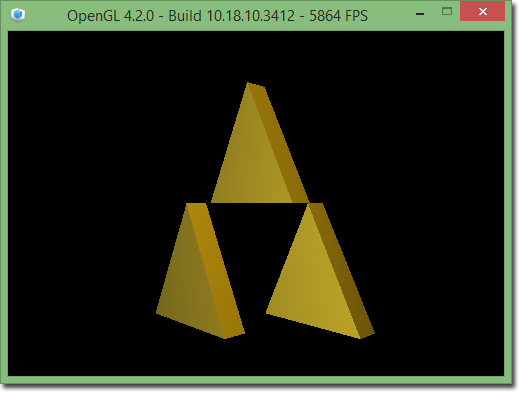
First, it will provide you with status information on the title bar of the main window providing the version of OpenGL installed on the system and the frame rate (FPS). This information is useful in determining what you can do with your installed implementation and performance tweaking.
Second, it enables two debug macros called ENTER_GL and LEAVE_GL, which is intended to be used to surround code blocks of OpenGL calls. OpenGL's error handling mechanism isn't straightforward, and these macros will help alleviate this. The application itself demonstrates the usage of them.
- Extensive Configuration Options
To accommodate many different scenarios, the skeleton application makes use of preprocessor directives in WinMain.h to enable or disable or configure the features to use. Below is a description of the ones that may provide a bit of confusion:
| CONFIG_ALLOW_FULLSCREEN | Set this to true if you wish to allow the application to enter fullscreen mode; otherwise set it to false. Note: if false, this will override all other settings (registry, command line, etc.) regarding fullscreen. |
| CONFIG_ALLOW_RESIZE | Set this to true if you wish to allow the main application window to be resized; otherwise set it to false. Note: if false, the application will not take into account any information regarding the window's size (only position). |
| CONFIG_ALLOW_MENU | Set this to true if you wish to allow a standard Windows menu on the main application window; otherwise set it to false. Note: if true, the application assumes the menu's resource id is IDR_MAINFRAME. Also, by default, the ESC key will show and hide the menu. Doing this will enable the user to free up more real estate on the screen. |
| CONFIG_ALLOW_VSYNC | Set this to true if you wish to allow the application to adjust the vertical refresh rate synchronization for the frame rate (VSync) on the video card. Note: if true, it attempts to turn VSync on or off depending on if it's possible for the system and configurations. If it is not possible or set to false it will do nothing no matter what the settings. If allowed VSync can be turned on or off by using the VSync key in the registry. |
| CONFIG_DEF_BPP | Default bits-per-pixel (BPP) to use if the application is in fullscreen mode. Note: This can be overridden by setting a BPP key in the registry. |
| CONFIG_DEF_FULLSCREEN | If fullscreen mode is allowed, then set this to true if you want to the application to default to fullscreen mode or false if you want to default to windowed mode. Note: as it is currently, the /fullscreen switch can override this as it's just a default value. |
CONFIG_DEF_HEIGHT
CONFIG_DEF_WIDTH | Default width and height of the main application window. Note: if the window is not allowed to resize this will effectively be the main window's size always. |
CONFIG_MAX_REFRESH
CONFIG_MIN_REFRESH | By default the application will look into the registry for a vertical refresh rate to use for fullscreen mode under the key Refresh. These two settings will determine the maximum and minimum refresh rates allowed as a safety precaution. |
CONFIG_MIN_HEIGHT
CONFIG_MIN_WIDTH | Allows you to specify the minimum width and height of the main application window. If set, the window cannot be resized below these points. Note: setting these to 0 effectively means there are no minimums. |
| CONFIG_SINGLE_INSTANCE | Set to true if you want the application to limit itself to only one instance (using a mutex); otherwise, set it to false. |
Points of Interest
- The Use of C Over C++
The skeleton application is written in C rather than C++. Many of you may prefer using C++ and more power to you. It should be easy enough to wrap the functionality of the application into a few classes. I have nothing against C++, but my choice in C is more a practical one rather than a philosophical one.
As a result of using C, the skeleton app defines and uses bool and tribool data types akin to the C99 boolean definition and the C++ Boost library's triple-state boolean type.
- Source Code Key Areas
- Main\Application.h
This is the main application include file and houses the configuration options outlined in this article.
- Render Delegate
While the majority of the code is relatively self-explanatory, it is worth noting that the delegate function passed to pRenderFrame in the RENDERARGS struct that is passed to the render thread will be the starting point for anything that is to be rendered in OpenGL. It will be called once every frame and all rendering operations that don't include preloading, etc. should stem from it.
Example Application
The downloadable application projects also demonstrate a simple usage of the skeleton to animate the Triforce from the well-known Zelda series by Nintendo. They are bare bones examples, written for for clarity. Also, they take advantage of the time-based animation mentioned in this article.
It is important to note that if you are using Visual Studio 2017 you need to also install the Windows 8.1 SDK since it is not included by default. This is due to Microsoft making the distribution of Visual Studio more modular.
Credits & History
| <nobr>Article's Author - | <nobr>Jeremy Falcon |
| <nobr>High Resolution Timer Suggestion - | <nobr>El Corazon |
| <nobr>InitScene() Update Suggestion - | <nobr>JWood |
| | |
| Application Icon - | Graciously provided by iconshock.com as part of their SIGMA Graphics collection. |
- <nobr>2017-11-14 - Ver. 1.3 released.
- <nobr>2014-11-26 - Ver. 1.2 released.
- <nobr>2006-08-27 - Ver. 1.1 released.
- <nobr>2006-08-26 - Ver. 1.0 released.
|
|
I've been in software development since 1994. Over the years I've learned quite a lot in what it takes to complete the process of pushing out a quality product to customers in a timely fashion. As most of my colleagues could attest, there have been many challenges in our new and growing field in the past couple of decades as the industry matures rapidly. Much more so than most others historically speaking.
As such, I've learned one of the best aspects of software engineering is embracing the change that inherently comes along with it as new technologies constantly emerge to help us improve our world one application at a time as we make sense of the overwhelming amount of data now prevalent in the Information Age.
We truly live in a time unlike that ever known to mankind in recorded history, and it is my hope to do my part to help it along to face the challenges and demands of tomorrow.



 General
  News
News  Suggestion
  Question
  Bug
Bug  Answer
  Joke
Joke  Praise
  Rant
Rant  Admin
Admin 


 Submit an article or tip


