Click here to Skip to main content
Licence 
First Posted 6 Sep 2006
Views 208,499
Bookmarked 102 times

ASP.NET DropDownList with OptionGroup support

By | 12 Sep 2006 | Article
An implementation of a DropDownList Control Adapter which provides OptionGroup support.

Introduction

ASP.NET 2.0, for all its bells and whistles, lacks the odd bit of functionality for reasons completely unknown. One such notable omission is that of OptionGroup (<optgroup>) support in the DropDownList control. For those unfamiliar with the <optgroup> element, it is part of the XHTML standard, and has the effect of categorising items in a <select>, as the following image shows.
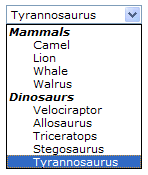
Option Groups

When I first began to look for a solution to implement this in ASP.NET, I found very few articles on the topic that offered any viable solution. Another CodeProject member came up with a nice clean solution, but it looked like a lot of code and I was convinced there was an easier way. After reading some comments, it became apparent a Control Adapter was the way to go. Control Adapters are new in ASP.NET 2.0, and allow the developer to override the rendering behaviour of any control, very powerful stuff! Furthermore, Control Adapters are used in conjunction with a browser file, so specific browsers may be targeted, if required. Armed with that knowledge, the solution became simple. The attached download contains the requisite files to implement this solution in your own projects, but for posterity, I paste it here also.

public class DropDownListAdapter : 
       System.Web.UI.WebControls.Adapters.WebControlAdapter {
    protected override void RenderContents(HtmlTextWriter writer) {
        DropDownList list = this.Control as DropDownList;
        string currentOptionGroup;
        List<string> renderedOptionGroups = new List<string>();
        foreach(ListItem item in list.Items) {
            if(item.Attributes["OptionGroup"] == null) {
                RenderListItem(item, writer);
            } else {
                currentOptionGroup = item.Attributes["OptionGroup"];
                if(renderedOptionGroups.Contains(currentOptionGroup)) {
                    RenderListItem(item, writer);
                } else {
                    if(renderedOptionGroups.Count > 0) {
                        RenderOptionGroupEndTag(writer);
                    }
                    RenderOptionGroupBeginTag(currentOptionGroup, 
                                              writer);
                    renderedOptionGroups.Add(currentOptionGroup);
                    RenderListItem(item, writer);
                }
            }
        }
        if(renderedOptionGroups.Count > 0) {
            RenderOptionGroupEndTag(writer);
        }
    }
    private void RenderOptionGroupBeginTag(string name, 
                 HtmlTextWriter writer) {
        writer.WriteBeginTag("optgroup");
        writer.WriteAttribute("label", name);
        writer.Write(HtmlTextWriter.TagRightChar);
        writer.WriteLine();
    }
    private void RenderOptionGroupEndTag(HtmlTextWriter writer) {
        writer.WriteEndTag("optgroup");
        writer.WriteLine();
    }
    private void RenderListItem(ListItem item, 
                 HtmlTextWriter writer) {
        writer.WriteBeginTag("option");
        writer.WriteAttribute("value", item.Value, true);
        if(item.Selected) {
            writer.WriteAttribute("selected", "selected", false);
        }
        foreach(string key in item.Attributes.Keys) {
            writer.WriteAttribute(key, item.Attributes[key]);
        }
        writer.Write(HtmlTextWriter.TagRightChar);
        HttpUtility.HtmlEncode(item.Text, writer);
        writer.WriteEndTag("option");
        writer.WriteLine();
    }
}

License

This article has no explicit license attached to it but may contain usage terms in the article text or the download files themselves. If in doubt please contact the author via the discussion board below.

A list of licenses authors might use can be found here

About the Author

lotuspro

Web Developer

United Kingdom United Kingdom

Member


Sign Up to vote   Poor Excellent
Add a reason or comment to your vote: x
Votes of 3 or less require a comment

Comments and Discussions

 
You must Sign In to use this message board. (secure sign-in)
 
Search this forum  
 FAQ
    Noise  Layout  Per page   
  Refresh
Suggestion<optgroup> support with ASP.net web componenets - An alternate way PinmemberShan Veerakutty9:55 12 Sep '11  
QuestionBinding data from Db Pinmembersudheshna12320:46 5 Aug '11  
GeneralCan you specific a license or terms or use... Pinmemberhhearst3:53 24 Apr '11  
GeneralRe: Can you specific a license or terms or use... Pinmemberlotuspro11:07 25 Apr '11  
GeneralDropdowlist with optiongroup support using ajax PinmemberMember 45236060:43 31 Aug '10  
GeneralListBoxAdapter Pinmembervoleona12:51 1 Feb '10  
QuestionEvent validation errors PinmemberMember 44693049:00 17 Aug '09  
AnswerRe: Event validation errors PinmemberKishore.ssit21:31 7 Dec '09  
AnswerRe: Event validation errors PinmemberSean_ST11:55 2 Sep '10  
GeneralRe: Event validation errors PinmemberMember 392364417:18 20 Oct '10  
GeneralVB Version Pinmemberianbenoliel3:14 17 Feb '09  
QuestionUse of your code in VS2008 PinmemberMember 43782402:56 11 Feb '09  
AnswerRe: Use of your code in VS2008 Pinmemberlotuspro3:20 11 Feb '09  
Hi,
 
It's pretty straight forward and has nothing to do with the version of the IDE you're using. All you need to do is as follows:
 
1.) Create a class somewhere containing your control adapter. I use /Code/Adapters for this, but you could put it anywhere. Note, this is not the App_Code folder, which is not used in web application projects.
 
2.) Add a browsers file to the special App_Browsers folder. If you dont already have this folder, you can add it by right clicking the project, then choose 'Add' then 'Add ASP.NET Folder', you'll see it in the list. You may choose what to name your file, but it must have the extension .browser
 
I generally keep the default BrowserFile.browser filename.
 
3.) In that file, you need to add some xml code, which tells the runtime to use your adapter when rendering the control. This code will look as follows:
 
<browsers>
  <browser refID="Default">
    <controlAdapters>
      <adapter controlType="System.Web.UI.WebControls.AdRotator"
				   adapterType="My.Namespace.Project.Code.Adapters.AdRotatorAdaptor" />
    </controlAdapters>
  </browser>
</browsers>
 
That should do it. If you still struggle to get it working, there are many examples on control adapters out there, just Google away, you'll find something.
AnswerRe: Use of your code in VS2008 PinmemberMember 43782404:29 11 Feb '09  
Generaloptgroup style change PinmemberJay K R18:51 8 Oct '08  
AnswerRe: optgroup style change PinmemberCaptainRantflaps23:24 12 Nov '08  
Questioncombination of ungroup item [modified] Pinmemberpaidinjav23:07 16 Sep '08  
AnswerRe: combination of ungroup item PinmemberMember 19547272:11 15 Dec '08  
GeneralRe: combination of ungroup item PinmemberSameers (theAngrycodeR )1:08 29 Mar '10  
Generaloptgroup structure disappears after PostBack PinmemberMember 37370023:30 2 Sep '08  
GeneralRe: optgroup structure disappears after PostBack PinmemberLamester13:51 17 Jun '09  
GeneralRe: optgroup structure disappears after PostBack PinmemberVipul12345619:57 26 Apr '10  
GeneralRe: optgroup structure disappears after PostBack Pinmemberridgie16:52 20 Jul '10  
GeneralDrop Down list bind to sql server Pinmemberbismillah120:27 31 Aug '08  
General"OnSelectedIndexChanged" is not working. PinmemberMember 465139922:32 4 Aug '08  

General General    News News    Suggestion Suggestion    Question Question    Bug Bug    Answer Answer    Joke Joke    Rant Rant    Admin Admin   

Use Ctrl+Left/Right to switch messages, Ctrl+Up/Down to switch threads, Ctrl+Shift+Left/Right to switch pages.

Permalink | Advertise | Privacy | Mobile
Web01 | 2.5.120604.1 | Last Updated 12 Sep 2006
Article Copyright 2006 by lotuspro
Everything else Copyright © CodeProject, 1999-2012
Terms of Use
Layout: fixed | fluid
