Abstract
This paper demonstrates an extensible mass emailing framework (Smart Mass Email SME). The demo implementation uses cutting edge .NET technologies available today, such as C#, .NET 2.0, Microsoft® SQL Server 2005 Service Broker, MS Provider Pattern, Enterprise Library January 2006 etc.
Introduction
I thought of writing this article in a different way, just like a conversation session in MSN Messenger / Windows Live Messenger.
Alex: Hi. I am writing a new article on Smart Mass Emailing (SME) feature in .NET 2.0.
Bob: Sounds interesting. Tell me a little bit more about it.
A: Mass Emailing is a very common feature for lots of websites or applications. I have written an extensible and pluggable framework for this SME feature. The demo application that comes with the article provides examples of running SME as a Windows Service and also as a website. The second feature is very useful when you want to run SME in a Shared Web Environment where Windows Services is not available. SME will use the same technique presented in this article, “Simulate a Windows Service using ASP.NET to run scheduled jobs”.
The demo application demonstrates ready to use mass emailing functionality for both Microsoft® SQL Server 2000 and Microsoft® SQL Server 2005. For Microsoft® SQL Server 2005, I have used Service Broker, and for Microsoft® SQL Server 2000, I have used a normal database table. And to make the framework pluggable and extensible, I have used the Microsoft® Provider Pattern.
Technologies Used in SME
B: I am aware of the Microsoft® Provider Design Pattern, but I have heard very little about Microsoft® SQL Server Service Broker. Please, tell me a bit more about it.
A: For a refresher on the Provider Pattern, have a look at my previous article “Flexible and Plug-in-based .NET Applications Using the Provider Pattern”.
Microsoft® SQL Server 2005 Service Broker
And Service Broker is a new feature of Microsoft® SQL Server 2005. It offers asynchronous messaging support, and is tightly integrated with the SQL Server database engine. Service Broker provides a new, queue-based durable messaging framework which can send and receive messages between service endpoints, such as server instances, databases, and .NET 2.0 clients. Messages can be up to 2 GB in size, and can use the varbinary or varbinary(max) data types. I have blogged some links and resources for SSB. Looking at these links will be good starting point.
SME Framework
B: Very interesting. Can’t wait to learn more about the SME Framework.
A: I am very excited to share it as well. Have a look at the following diagrams.
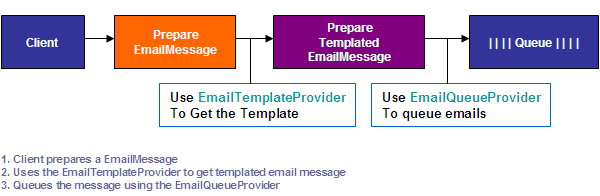

Fig: Smart Mass Email Workflow
From the diagram, you will notice that multiple providers are used to accomplish this task. SME involves five different providers in its framework, and I am going to describe them one by one soon.
To understand the SME Framework, we need to understand the EmailMessage and Template objects, and then all five providers in detail.
EmailMessage Object in the SME Framework
The EmailMessage object is simply a business object which holds the email details. I had to create and use this object to have the serialization feature in the framework.
Fig Business Object: EmailMessage
Template Object in the SME Framework
The Template object is simply another business object which holds the email template.
Fig Business Object: Template
A client application simply needs to create an EmailMessage, get it templated, and send it to the specified queue.
An implementation of Provider Pattern in SME
Fig Smart Mass Email Providers
SME Providers
EmailQueueProvider: This provider provides email queuing functionality.
public abstract class EmailQueueProvider : ProviderBase {
  public abstract bool Send(EmailMessage message);
}
EmailTemplateProvider: This provider finds a template and serves as a templated message.
public abstract class EmailTemplateProvider : ProviderBase {
  public abstract Template GetTemplate(string templateName);
  public abstract EmailMessage GetTemplatedMessage(string templateName,
         EmailMessage message, StringDictionary namevalue);
}
EmailDequeueProvider: This provider provides email dequeuing functionality.
public abstract class EmailDeQueueProvider : ProviderBase {
  public abstract TList<EmailMessage> Recieve();
  public abstract bool Delete(EmailMessage message);
}
EmailDispatchProvider: Provides email dispatching functionality using SMTPClient or SMTPMail.
public abstract class EmailDispatchProvider : ProviderBase {
  public abstract bool Dispatch(TList<EmailMessage> list);
}
ProcessFailureProvider: Processes any of the messages that fail during the email dispatching. For example, compares the maximum retry and the number of retry attempts of a message, and decides whether to queue the message again or to delete it permanently.
public abstract class ProcessFailureProvider : ProviderBase {
  public abstract void Process(TList<EmailMessage> list);
}
Configuration information: As described in the Microsoft® Provider specification, after the concrete provider is implemented, it must be described in the configuration section. The beauty of the Provider Pattern is that the appropriate provider is instantiated at run time from information contained in the configuration file, and you may define an unlimited number of providers.
<smartMassEmail.providers>
  <emailQueue defaultProvider="Sql2005EmailQueueProvider">
    <providers>
      <add name="Sql2000EmailQueueProvider"
           type="SmartMassEmail.ImplementedProviders.Sql2000EmailQueueProvider,
                 SmartMassEmail.ImplementedProviders" />
      <add name="Sql2005EmailQueueProvider"
           type="SmartMassEmail.ImplementedProviders.Sql2005EmailQueueProvider,
                 SmartMassEmail.ImplementedProviders" />
    </providers>
  </emailQueue>
</ smartMassEmail.providers>
In the above section, we have added the Sql2000EmailQueueProvider and Sql2000EmailQueueProvider to our providers list.
The use of Enterprise Library in the SME Framework: SME uses Enterprise Library January 2006 for data access, caching, logging, and exception handling.
Email Queue and Template
B: So the process starts with queuing EmailMessage, if I am correct?
A: Yes, you are. The client application needs to create an EmailMessage, object and can use the EmailTemplateProvider to get a templated message before queuing.
EmailMessage message = new EmailMessage();
message.ID = Guid.NewGuid();
message.EmailSubject = "Subject";
message.EmailTo = "skhan@veraida.com";
message.EmailFrom = "psteele@veraida.com";
…..
message.EmailBody = "Test email";
…..
message.MaximumRetry = 3;
message.NumberOfRetry = 0;
…..
StringDictionary namevalue = GetPreparedNameValue(message);
EmailMessage templatedmessage =
EmailTemplate.GetTemplatedMessage("GenericEmailTemplate",
message, namevalue);
EmailQueue.Send(templatedmessage);
Here, you will notice that I simply created an EmailMessage object, and then this piece of code returns a name-value pair that will be used in the template.
StringDictionary namevalue = GetPreparedNameValue(message);
private StringDictionary GetPreparedNameValue( EmailMessage message ) {
StringDictionary dict = new StringDictionary();
dict.Add("[recievername]", "Shahed");
dict.Add("[sendername]", "Khan");
dict.Add("[body]", message.EmailBody);
return dict;
}
The template used in this demo looks similar to the code below, where the [recievername], [body], and [sendername] will be replaced by the name-value pair, by matching the name and replacing it with the value.
<html>
<body>
Hi <b>[recievername]</b>
This is a Generic Mail.
[body]
Regards,
[sendername]
</body>
</html>
And the following piece of code gets the templated message back.
EmailMessage templatedmessage =
     EmailTemplate.GetTemplatedMessage("GenericEmailTemplate",
                                        message, namevalue);
What this does ‘under the hood’, is that it uses the FileSystemEmailTemplateProvider that is available within the demo application to get the template, by name, from a predefined path. It then reads the file and converts it to an SME Template object. Then it replaces the TemplateBody with the name-value supplied, and returns the templated EmailMessage object.
public override SmartMassEmail.Entities.Template
GetTemplate(string templateName) {
string path =
ConfigurationManager.AppSettings.Get("TemplateFolderPath").ToString();
string fileContents;
using (System.IO.StreamReader sr = new System.IO.StreamReader(
string.Format(@"{0}{1}.txt",path,templateName)))
{
fileContents = sr.ReadToEnd();
}
SmartMassEmail.Entities.Template template =
new SmartMassEmail.Entities.Template();
template.TemplateName = templateName;
template.TemplateBody = fileContents;
return template;
}
public override SmartMassEmail.Entities.EmailMessage
GetTemplatedMessage(string templateName,
SmartMassEmail.Entities.EmailMessage message,
StringDictionary namevalue){
Template template = GetTemplate(templateName);
if (message != null)
….
foreach (DictionaryEntry de in namevalue)
{
template.TemplateBody =
template.TemplateBody.Replace(de.Key.ToString(),
de.Value.ToString());
}
message.EmailBody = template.TemplateBody;
…..
return message;
}
The returned EmailMessage is then queued for dispatch, using the following piece of code:
EmailQueue.Send(templatedmessage);
B: OK, I got you. Here, you have demonstrated how to turn an EmailMessage into a templated email message using the EmailTemplateProvider, and then you have shown how to queue the email.
In this case, you have used FileSystemEmailTemplateProvider for templating the email message, but anyone can also write their own provider inheriting from the EmailTemplateProvider too.
A: Yes you are correct. The SME framework provides the ability to use a templated message, and the demo application implements the FileSystemEmailTemplateProvider which reads a template file from the file system. Different providers can also be written which can provide the ability to read a template from a database or a similar source.
Email Dequeue, Dispatch, and Process Failures
B: OK, I understand. Let’s go back a bit. You mentioned previously that the demo application demonstrates ready-to-use mass emailing functionality for Microsoft® SQL Server 2000 and Microsoft® SQL Server 2005, can you please clarify this further?
A: Sure. What I meant is I have written a couple of providers for SME. I have written providers for Microsoft SQL Server 2005, using Service Broker Technology. So, emails will be queued in Service Broker Queues asynchronously, and then the email dispatch framework will read from the queues and deliver the emails. On the other hand, I provided a solution for users who do not have access to Microsoft SQL Server 2005. They can use Microsoft SQL Server 2000, where the message is added as a row in the database table and later dispatched from there. Let me discuss both implementations one after another.
SME Providers for Microsoft® SQL Server 2005
To make the MessageType, Queue, and Services components ready, I had to run the following T-SQL script on the database.
USE [SmartMassEmailDB2005]
GO
CREATE MESSAGE TYPE [SMEMessageType] AUTHORIZATION
[dbo] VALIDATION = WELL_FORMED_XML
CREATE CONTRACT [SMEContract] AUTHORIZATION [dbo]
([SMEMessageType] SENT BY INITIATOR)
CREATE QUEUE [dbo].[SMEPostQueue] WITH STATUS = ON ,
RETENTION = OFF ON [PRIMARY]
CREATE QUEUE [dbo].[SMEResponseQueue] WITH STATUS = ON ,
RETENTION = OFF ON [PRIMARY]
CREATE SERVICE [SMEPostingService] AUTHORIZATION [dbo]
ON QUEUE [dbo].[SMEPostQueue]
CREATE SERVICE [SMEService] AUTHORIZATION [dbo] ON
QUEUE [dbo].[SMEPostQueue] ([SMEContract])
Sql2005EmailQueueProvider
This provider queues email messages to the Service Broker.
public override bool Send(EmailMessage message)
{
  if (message != null)
  {
    string xml = "";
    using (MemoryStream stream = new MemoryStream())
    {
      System.Xml.Serialization.XmlSerializer x = new
        System.Xml.Serialization.XmlSerializer(message.GetType());
      x.Serialize(stream, message);
      xml = ConvertByteArrayToString(stream.ToArray());
    }
    string sql =
           string.Format (@"DECLARE @dialog_handle UNIQUEIDENTIFIER;
                            BEGIN DIALOG CONVERSATION @dialog_handle
                            FROM SERVICE [SMEPostingService]
                            TO SERVICE 'SMEService'
                            ON CONTRACT [SMEContract] ;

                            -- Send message on dialog conversation
                            SEND ON CONVERSATION @dialog_handle
                            MESSAGE TYPE [SMEMessageType]
                            ('{0}') ;
                            End Conversation @dialog_handle
                            With cleanup", xml);

    string connectionString =
      ConfigurationManager.ConnectionStrings[
     "SmartMassEmailConnectionString2005"].ConnectionString;
    SqlConnection conn = new SqlConnection(connectionString);
    SqlCommand cmd = null;
    try
    {
      conn.Open();
      cmd = conn.CreateCommand();
      cmd.CommandText = sql;
      cmd.Transaction = conn.BeginTransaction();
      cmd.ExecuteNonQuery();
      cmd.Transaction.Commit();
      conn.Close();
      return true;
    }
    …..
  }
As you have noticed, first of all the EmailMessage object is serialized using the XmlSerializer, and then queued to the database using the T-SQL SEND command.
Sql2005EmailDequeueProvider
This provider dequeues email messages from the Service Broker.
m_queueSchema = "dbo";
m_queueName = "SMEPostQueue";
private SqlCommand CreateReceiveCommand()
{
    SqlCommand cmd = m_connection.CreateCommand();
    cmd.CommandText = @"WAITFOR (RECEIVE TOP (10) *, " +
                      @"CONVERT( NVARCHAR(max), " +
                      @"message_body ) as mgb FROM [" +
                      m_queueSchema.Replace("]", "]]") + "].[" +
                      m_queueName.Replace("]", "]]") + "]),
                      TIMEOUT @timeout";
    cmd.Parameters.Add("@timeout", System.Data.SqlDbType.Int);
    cmd.CommandTimeout = 0;
    return cmd;
}
The above command is executed to receive the message from the queue. And after receiving the message, it is turned back into an EmailMessage object, and later passed to the EmailDispatchProvider.
string xml = reader["mgb"].ToString();
if (xml != null)
{
    byte[] bytes = Encoding.Unicode.GetBytes(xml);
    EmailMessage message = new EmailMessage();
    message = (EmailMessage)LoadFromXml(message, bytes);
}
Dotnet2EmailDispatchProvider
This provider uses an SmtpClient to send an email to the client. It loops through the EmailMessage list and sends each email. The error handler catches the exception, keeps the application rolling and sending other emails, but adds the failed emails to the failure list, which is then passed on to the ProcessFailureProvider for further processing.
public override bool Dispatch(TList<EmailMessage> list)
{
TList<EmailMessage> failurelist = new TList<EmailMessage>();
SmtpSetting site = GetSmtpSetting();
…..
SmtpClient client = new SmtpClient();
…..
foreach (EmailMessage em in list)
{
try
{
MailMessage message = new MailMessage();
message.From = new MailAddress(em.EmailFrom);
message.To.Add(new MailAddress(em.EmailTo));
message.Subject = em.EmailSubject;
message.Body = em.EmailBody;
…..
message.IsBodyHtml = em.IsHtml;
…..
client.Send(message);
if (connectionLimit != -1 && ++sentCount >= connectionLimit)
{
Thread.Sleep(new TimeSpan(0, 0, 0,
site.WaitSecondsWhenConnectionLimitExceeds, 0));
sentCount = 0;
}
}
catch (Exception e)
{
…..
failurelist.Add(em);
}
++totalSent;
}
if (failurelist.Count > 0)
{
ProcessFailedMessages(failurelist);
return false;
}
return true;
}
Sql2005ProcessFailureProvider
This provider loops through each of the failed messages, and compares the NumberOfRetry < MaximumRetry defined by the message, and then will queue the message again, or discard it completely.
public override void Process(TList<EMAILMESSAGE> list)
{
…..
foreach (EmailMessage message in list)
{
message.NumberOfRetry = message.NumberOfRetry + 1;
if (message.NumberOfRetry < message.MaximumRetry)
{
string xml = "";
using (MemoryStream stream = new MemoryStream())
{
……
xml = ConvertByteArrayToString(stream.ToArray());
}
string sql =
string.Format(@"DECLARE @dialog_handle UNIQUEIDENTIFIER;
BEGIN DIALOG CONVERSATION @dialog_handle
FROM SERVICE [SMEPostingService]
TO SERVICE 'SMEService'
ON CONTRACT [SMEContract] ;
-- Send message on dialog conversation
SEND ON CONVERSATION @dialog_handle
MESSAGE TYPE [SMEMessageType]
('{0}') ;
End Conversation @dialog_handle
With cleanup", xml); ………
try
{
………
cmd.Transaction = conn.BeginTransaction();
cmd.ExecuteNonQuery();
cmd.Transaction.Commit();
conn.Close();
}
catch (Exception x)
{
…..
B: It is clear to me now how you have used the Microsoft® SQL Server 2005 Service Broker Messaging Framework to create a reliable mass emailing functionality, but how did you implement this in Microsoft® SQL Server 2000, as it lacks the messaging engine functionality?
A: Yes, you are right. SQL Server 2000 does not have the messaging engine, and I had to simulate the messaging feature used in SQL Server 2005, using tables and stored procedures.
SME Providers for MSSQL 2000
Sql2000EmailQueueProvider
This provider simply adds a row to the table EmailMessage with a status = 0 (pending), to be picked up by the EmailDeQueueProvider.
SQL2000EmailDeQueueProvider
This provider uses the following stored procedure to receive pending EmailMessages.
SELECT TOP 5 [ID], [ChangeStamp], [Priority], [Status],
             [NumberOfRetry], [RetryTime], [MaximumRetry],
             [ExpiryDatetime], [ArrivedDateTime], [SenderInfo],
             [EmailTo], [EmailFrom], [EmailSubject],
             [EmailBody], [EmailCC], [EmailBCC], [IsHtml]
FROM dbo.[EmailMessage]
WHERE NumberOfRetry < MaximumRetry and
      RetryTime < getdate() and Status = 0
ORDER BY Priority,RetryTime
B: I notice here that priority is included, which was not there in your Microsoft® SQL Server 2005 implementation.
A: Yes, I was coming to that point; to keep the implementation of Microsoft® SQL Server 2005 simple, I ignored the message priority option. But this blog post, Message Priority, will point you towards the right direction, and some modification to the existing provider will do the trick.
The Microsoft SQL Server 2000 providers of this demo are compatible with Message Priority, and as you have noticed in the stored procedure, the messages are received ordered by Priority, RetryTime.
B: True, and I notice another property RetryTime in your Microsoft® SQL Server 2000 implementation. Will you please elaborate on this?
A: Sure. In this implementation when you queue a message, you can define when to dispatch the message. Also, on the failure of delivery of a message, you can define a new RetryTime for the message to be delivered again. For example, if you want to dispatch the email again after 2 days, just put the RetryTime as such. The EmailDeQueueProvider will pick it up only when RetryTime < getdate().
SMTPDotnet2EmailDispatchProvider
I have used the same dispatch provider as the Microsoft® SQL Server 2005 implementation here, to dispatch the messages.
SMTPDotnet1EmailDispatchProvider
In the demo application, you will also find this dispatch provider which uses SmtpMail, which is the older way of sending mail. However, the .NET Framework 2.0 recommends using the SmtpClient instead of SmtpMail which is marked as obsolete now. I have written this provider using SmtpMail, as initially, I had planned to write a SME for .NET 1.1 as well, but this did not eventuate.
SQL2000ProcessFailureProvider
This provider loops through the failed messages, and compares if NumberOfRetry is less than MaximumRetry. If this condition is true, 10 minutes are added to RetryTime, and the status is changed back to Pending. Otherwise, the message is deleted.
public override void Process(TList<EmailMessage> list )
{
foreach (EmailMessage em in list)
{
if (em.NumberOfRetry < em.MaximumRetry)
{
em.Status = (int)EmailMessage.EmailMessageStatus.Pending;
em.NumberOfRetry = em.NumberOfRetry + 1;
em.RetryTime = em.RetryTime.AddMinutes(10);
DataRepository.EmailMessageProvider.Update(em);
}
else
{
DataRepository.EmailMessageProvider.Delete(em);
}
}
}
B: So, what I understand so far is, SME is an extensible framework for mass emailing, and you have already created providers for Microsoft® SQL Server 2005 and Microsoft® SQL Server 2000. However, end users can modify the existing providers, or implement their own providers if they wish. For example, if someone wants to queue the email messages in Microsoft ® Message Queuing (MSMQ), they simply have to write a provider for that, inheriting from the EmailQueueProvider of the SME Framework. To implement DeQueue and ProcessFailures methods, two more providers will have to be written in the same way.
A: You are correct. The whole idea of using the Microsoft® Provider Pattern is to achieve this flexibility. Now, I'll discuss a bit on running SME as an ASP.NET application and as a Windows Service.
Running the EmailDispatcher as an ASP.NET Application or as a Windows Service
Running SME as an ASP.NET Application
I am not going to explain in great detail how this works, as my friend, colleague, and mentor Omar Al Zabir describes this very elaborately in his article “Simulate a Windows Service using ASP.NET to run scheduled jobs”. To achieve this, we add a dummy page to the ASP.NET cache with a defined cache expiry time. When the cache expires, ASP.NET calls the CacheItemRemovedCallback function. In this function, we also call the DoWork() function, which dequeues the email messages. The HitPage() function is also called, which hits a dummy page and creates the HttpContext which is required by ASP.NET to register a cache item. This will again expire after the defined cache expiry time, and on expiry of the cache, ASP.NET calls the CacheItemRemovedCallback function…. And so on. So we create a constant loop here and keep the task running.
private void RegisterCacheEntry( )
{
if (null != HttpContext.Current.Cache[DummyCacheItemKey])
return;
HttpContext.Current.Cache.Add(DummyCacheItemKey,
"Test", null, DateTime.MaxValue,
TimeSpan.FromMinutes(1),
CacheItemPriority.NotRemovable,
new CacheItemRemovedCallback(CacheItemRemovedCallback));
}
public void CacheItemRemovedCallback( string key, object value,
CacheItemRemovedReason reason)
{
System.Diagnostics.Debug.WriteLine("Cache item callback: " +
DateTime.Now.ToString());
DoWork();
HitPage();
}
private void HitPage( )
{
string siteprefix = ConfigurationManager.AppSettings.Get("SitePrefix");
System.Net.WebClient client = new System.Net.WebClient();
client.DownloadData(siteprefix + DummyPageUrl);
}
private void DoWork( )
{
System.Diagnostics.Debug.WriteLine("Begin DoWork...");
System.Diagnostics.Debug.WriteLine("Running as: " +
System.Security.Principal.WindowsIdentity.GetCurrent().Name);
DequeueEmail();
System.Diagnostics.Debug.WriteLine("End DoWork...");
}
private void DequeueEmail()
{
TList<EmailMessage> list = EmailDeQueue.Recieve();
EmailDispatch.Dispatch(list);
}
Running SME as a Windows Service
I have also provided examples of running SME as a Windows Service. I have used a timer component to dequeue the mail after certain interval. The following piece of code does the trick.
JobRunning jRun = JobRunning.Instance();
private void timer_Elapsed(object source,System.Timers.ElapsedEventArgs e)
{
    if (!jRun.IsRunning)
    {
        try
        {
            jRun.IsRunning = true;
            DequeueEmail();
        }
        finally
        {
            jRun.IsRunning = false;
        }
    }
}
The JobRunning class implements the Singleton design pattern, and checks whether the previous job is still running. This protects against multiple DeQueueEmail operations starting at the same time.
How to Use Smart Mass Email in your own Application
Client Application Steps
The client needs to create an EmailMessage object and then can use the TemplateEmailProvider to template the message, and finally queue the message using EmailQueue.Send(templatedmessage).
The client application needs to add SmartMassEmail.Entities and the providers reference. Also, add the implemented provider for EmailQueueProvider, and TemplateEmailProvider in your solution. Check the app.config / web.config file of the demo application to understand about configuring the providers.
Server Application (EmailDeque and Dispatching) Steps
The EmailDequeue and Dispatch can run as a Windows Service or as an ASP.NET application, and will asynchronously dispatch the emails.
The Service needs a reference to SmartMassEmail.Entities providers and implemented providers for EmailDeQueueProvider, EmailDispatchProvider, and ProcessFailureProvider. Also check the app.config/web.config file of the demo application to understand configuring the providers.
B: So what you meant is, anyone can add the required DLLs into their solution and tweak the app.config/web.config, and the mass emailing feature is ready. They can also use a choice of Microsoft® SQL Server 2000 or Microsoft® SQL Server 2005, depending on what they have access to. Also, you have provided FileSystemEmailTemplateProvider for easy templating of messages.
A: That’s right. It is that easy to have mass emailing as part of your existing .NET application.
Conclusion
SME is a ready-to-use mass emailing feature that can be added to your existing .NET application. It has been architected keeping flexibility and extensibility in mind. SME ships with a couple of useful providers, but you can also write your own. Microsoft® SQL Server 2005 Service Broker is a very powerful technology for asynchronous processing, and SME takes full advantage of this. SME also can be used with existing SQL Server 2000 platforms, preserving compatibility with many previously implemented .NET 2.0 applications.
This can also be used as a reference application of how you can send and receive messages by communicating with the Service Broker from your .NET application. SME uses cutting edge .NET technologies available today such as: Enterprise Library, Microsoft® Provider Pattern, and Microsoft® SQL Server 2005 Service Broker.
Special thanks to Christopher Heale for proof reading this article.



 General
  News
News  Suggestion
  Question
  Bug
Bug  Answer
  Joke
Joke  Praise
  Rant
Rant  Admin
Admin 


 Submit an article or tip


