Click here to Skip to main content

Fixing Overlaying Layers with Dropdowns in IE

By , 9 Oct 2006
 

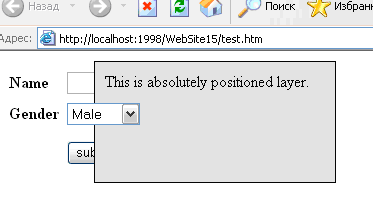
Sample screenshot

Introduction

The problem I want to discuss in this article appears only in Internet Explorer. When an absolutely positioned layer (div) is overlaid with a dropdown or some ActiveX component, the z-index style sheet property does not work and the layer shows under such an object.

Web developers very often use absolutely positioned layers to make navigation elements like drop-down menus, show messages, and even for making-up of whole pages. So, are there any workarounds?

Method 1: Hide all dropdowns on the page

The idea of the first method is simple – hide all the dropdowns on the page. If there won’t be any dropdowns, there is no problem. Yes, it is right, but it does not apply to ActiveX components.

To hide all dropdowns, we can use client script code. For instance, using JavaScript, we can find all the dropdowns on the form by looping through a list of all elements:

// looping through all forms on the page

for (f = 0; f < document.forms.length; f++)
{
    var elements = document.forms[f].elements;
    // looping through all elements on certain form

    for (e = 0; e < elements.length; e++)
    {
        if (elements[e].type == "select-one")
        {
            elements[e].style.display = 'none';
        }
    }
}

The first loop is for the forms array, and the second, for each element on a certain form. Also, for each element, we check the type and if the type equals “select-one”, we change the display property to “none” so the element will be hidden. Finally, add a block to show the layer and we get the function ShowLayer() which we can use to display a layer on the page:

function ShowLayer() {
    // hide all dropdowns on the page

        
    // looping through all forms on the page

    for (f = 0; f < document.forms.length; f++)
    {
        var elements = document.forms[f].elements;
        // looping through all elements on certain form

        for (e = 0; e < elements.length; e++)
        {
            if (elements[e].type == "select-one")
            {
                elements[e].style.display = 'none';
            }
        }
    }
        
    // show layer

    var layer = document.getElementById('layer');
    layer.style.display = 'block';
}

To hide a layer and show dropdowns again, we need to do similar work, but in a reverse fashion. This logic will be encapsulated in the function HideLayer():

function HideLayer() {
    // hide all dropdowns on the page

    for (f = 0; f < document.forms.length; f++)
    {
        var elements = document.forms[f].elements;
        for (e = 0; e < elements.length; e++)
        {
            if (elements[e].type == "select-one")
            {
                elements[e].style.display = 'block';
            }
        }
    }
    // hide layer

    var layer = document.getElementById('layer');
    layer.style.display = 'none';
}

In my opinion, the main disadvantage of such a solution is changing the user interface when the script hides all the dropdowns, so the user could become confused. In addition, using such an approach, we can hide the dropdowns which do not overlay the layer but have an important functionality which the user can use while the layer is shown. Let’s see what we have in method #2.

Method 2: Using IFRAME

The idea of this method is using an IFRAME. This element overlays all other elements of the form and also ActiveX components. But the beauty of this method is that we can set the z-index for it! Thus, we can make a dividing layer between dropdowns and absolutely position the layer. Let’s take a look at this simple example (instead of three dots, I placed a form with a dropdown which I used in method one):

<html>
<head>
    <title>Method Two</title>
    <style>
    #layer {
        position: absolute;
        top: 10px;
        left: 100px;
        width: 220px;
        height: 100px;
        border: 1px solid black;
        background-color: #e4e4e4;
        padding: 10px;
        z-index: 11;
    }
    #iframe {
        position: absolute;
        top: 10px;
        left: 100px;
        width: 222px;
        height: 102px;
        z-index: 10;
    }
    </style>
</head>
<body>
    <form>
    <iframe id="iframe" frameborder="0"></iframe>
    <div id="layer">
    This is absolutely positioned layer.
    </div>
    ...
    </form>
</body>
</html>

If you open this HTML page in IE, you will see that the dropdown will be under the layer. This is because I placed the third layer between the form elements like the dropdown and the layer. I set its z-index to 10, whereas for the layer, I set it 11. I also set the width and height to be exactly like the absolutely positioned layer so it’s hidden for the user and just does the work to hide everything under it.

Let’s change the functions from the example in method 1 to work with the IFRAME:

function ShowLayer() {
    // show layer

    var layer = document.getElementById('layer');
    layer.style.display = 'block';
    // show IFRAME

    var iframe = document.getElementById('iframe');
    iframe.style.display = 'block';
    iframe.style.width = layer.offsetWidth;
    iframe.style.height = layer.offsetHeight;
    iframe.style.left = layer.offsetLeft;
    iframe.style.top = layer.offsetTop;
}

function HideLayer() {
    // hide IFRAME

    var iframe = document.getElementById('iframe');
    iframe.style.display = 'none';
    // hide layer

    var layer = document.getElementById('layer');
    layer.style.display = 'none';
}

The ShowLayer function sets the width, height, left, and top values for the IFRAME depending on the layer properties. We do not need to set those values in the style sheet for a dropdown layer.

Method 3: Replacing SELECTs with SPAN

Volkan.ozcelik posted an interesting method in his article Modal Dialog – enhanced. He proposed to use a replacement to avoid "bleeding". Before a new layer is opened, a JavaScript function searches the whole HTML file and replaces all dropdowns with a SPAN tag. Using CSS, we can make the SPAN look almost like a SELECT so the form view will be changed a little and it won’t annoy users like method 1 when we hide all dropdowns.

Conclusion

I do not see any advantages in the first method. It does not help with ActiveX components and annoys users when the JavaScript hides all the dropdowns in the page. The second method helps with dropdowns and ActiveX components and doesn’t change the SELECTs. The third method helps only with dropdowns and changes the view of the form a little. Also, users cannot use the form while the layer is shown because all SELECTs will be replaced with SPANs.

The first two method examples can be found in the source files. Regarding method 3 example, refer to the Modal Dialog – enhanced article please.


License

This article, along with any associated source code and files, is licensed under The Code Project Open License (CPOL)

About the Author

Alexander Kleshchevnikov
Web Developer
Ukraine Ukraine
Member
Alexander is freelance web developer with 4 years experience. He has skills in ASP.NET/MS SQL Server, PHP/MySQL, Ruby On Rails, XHTML, CSS. You can contact with me by seigo.ua@gmail.com. Also check my homepage at www.klalex.com.

Sign Up to vote   Poor Excellent
Add a reason or comment to your vote: x
Votes of 3 or less require a comment

Comments and Discussions

 
You must Sign In to use this message board.
Search this forum  
    Spacing  Noise  Layout  Per page   
Questionproble inside contentplace holdermemberMember 787007318 Aug '11 - 3:09 
hi,
could you tell me how to use this code inside the content place holder as m using a masterpage m stuck with this issue for long plz help.
 
Thanks & regards
Arpit
GeneralExposure of layersmemberRoger Mc Grevy14 Sep '09 - 19:11 
I have the habit of preparing everything before exposing anything. This does not work with solution 2. You MUST expose the div before you try to use the offsetTop etc. Makes sense but nonetheless caught me out. I just thought I was in for some more of IE's lousy implementation.
This a really clear, concise and useful article. Congratulations
Generalprobelm with movable layermemberanipawar19 Jul '09 - 22:26 
Hi
 
I am trying this for my pop up(div layer)which is movable.
It works fine with fixed div but when I am trying to make
layer movable it's not working. In this case the iframe is fixed
only the layer is movable.
GeneralGreat workmemberMember 30534333 Nov '08 - 20:25 
Thanks a lot
 
Mohammed Zameer
GeneralGreat!memberreutlk21 Nov '07 - 21:15 
The iframe solution is exactly what I needed!
Thanks a lot!

Generalthe 2nd method is also known as 'SHIM technique'membersharapanoff18 Oct '06 - 7:16 
take a look at this article:
How to cover an IE windowed control (Select Box, ActiveX Object, etc.) with a DHTML layer.
Questioncross browsermembermikedepetris17 Oct '06 - 6:40 
Is the 2nd method cross-browser?
 
I am using the third method, have have some problems with netscape-opera-IE-firefox, in fact when I get ocrrect behavior for one, it is bad for the others, it seems there are different ways to get the selectedindex actual value in javascript.
 

AnswerRe: cross browsermemberAlexander Kleshchevnikov18 Oct '06 - 4:13 
Hi Mike,
 
This problem appears in IE and the 2nd method fixs it. Regrading the 3rd method refer to Modal Dialog – enhanced article please.
 
Alexander Kleshchevnikov
email: seigo.ua@gmail.com
www.klalex.com

Generalput a iframe in layer (div)memberzleeway20 Sep '06 - 20:25 
<iframe src="" style="position:absolute;top:0px; left:0px; width:100%; height:100%; z-index:-1;"></iframe>
 
such as:
 
<div>
   <table>
      <tr><td>menu1</td></tr>
      <tr><td>menu2</td></tr>
      <tr><td>menu3</td></tr>
   </table>
   <iframe src="" style="position:absolute;top:0px; left:0px; width:100%; height:100%; z-index:-1;"></iframe>
</div>
GeneralDon't hide dropdowns; users hate it. [modified]membervolkan.ozcelik18 Sep '06 - 18:01 
Believe me, they really do.
 
I used to develop a similar technique for my pseudo pop up but when used on production in real life I saw a lot of people yell
 
"The selection boxes are flickering when the info box displays."
 
and similar comments.
 
Users dislike things happening out of their control.
Instead
  • You can position an IFRAME behind your layer as you suggest in this article to prevent the leakage. I do not like the approach for several reasons but it's imho and ymmv.
  • Or a third approach; you can replace the SELECTs with their SPAN alternatives when the layer is visible.
note:
While I was posting I didn't see the comment below offering my second alternative as "A third option". So I'm kinda repating things but I just wanted to share why and hows of my reasoning.
 
Cheers;
 
-- modified at 0:27 Tuesday 19th September, 2006
 

GeneralRe: Don't hide dropdowns; users hate it.memberAlexander Kleshchevnikov9 Oct '06 - 4:39 
Hi volkan.ozcelik,
 
Thanks for your response! I added your approach as the third method if you do not mind. But I see two disadvantages: it doesn't help with ActiveX components and it changes form so user cannot use form under layer after the replacement.
 
Why you d not like approach with IFRAME? Can you explain?
 
Thanks,
 
Alexander Kleshchevnikov
email: seigo.ua@gmail.com
www.klalex.com

AnswerRe: Don't hide dropdowns; users hate it.membervolkan.ozcelik9 Oct '06 - 6:24 
Well, I have several reasons but most of them are philosophical in nature rather than practical.
 
First of all; it is a non-semantic usage of an IFRAME.
The legitimate usage of the IFRAME is to provide external data; such as a disclaimer or a web service.
 
Introducing a non-semantic element (with or without JavaScript) does not eliminate the fact the it is not used in a semantically correct fashion.
 
Yet another reason; people may tend to browse frame support disabled
(I know, that's equally true for JavaScript).
 
From my testings, IFRAME hack only works in IE5.5 and above (it may be a concern for some people; but I don't think it's a big deal).
 
Activex, Java, Flash etc.. is another story. If you would like to implement the third method; you can replace them with a static alternative (an image or text may be). But I admit that's a bit overkill.
 
As per the good news; you don't need IFRAME masking in IE7. It's no longer necessary.
 
I'd like to stress once more that it is not a bad idea. There are tons of DHTML tooltips, menus etc. around using the IFRAME hack. It's just me being a little picky.
 

Cheers,
 

GeneralA third optionmemberTodd Davis12 Sep '06 - 3:55 
Thanks for posting, and ignore the idiot that posted the rude comment below. A lot of people have this problem and don't know where to begin with it. It is old code, because it's an old problem.
 
Anyway, there is a third, slightly more elegant option, similar to your first, which is to - rather than simply remove the dropdowns, which looks strange - instead replace them with something that looks similar, but doesn't bleed through.
 
Check out how the author handles them in this article.
 
http://www.codeproject.com/useritems/ModalDialogV2.asp[^]
 
-Todd Davis (toddhd@gmail.com)

QuestionScreenshot missing - broken link?memberAlexander Yakovlev11 Sep '06 - 19:44 
Alexander, it seems that the screenshot is missing. Please fix it.
AnswerRe: Screenshot missing - broken link?memberAlexander Kleshchevnikov12 Sep '06 - 4:10 
Hi Alexander,
 
At first thanks for your reply (и это очень приятно, когда встречаешь русское имя в инете Smile | :) . I cannot upload images. I think some problems in article add wizard. I also notified the support of codeproject. Hope they will answer soon and I can add images.
 
Thanks,
 
Alexander Kleshchevnikov
email: seigo.ua@gmail.com
www.klalex.com

GeneralSomethng I was looking formembervik2011 Sep '06 - 19:17 
I was having this problem when using Drag panel(Atlas) and have posted the problem in my blog here http://www.vikramlakhotia.com/Post.aspx?postID=4.
I think this will do the solution
 
Vikram
http://www.vikramlakhotia.com/

General General    News News    Suggestion Suggestion    Question Question    Bug Bug    Answer Answer    Joke Joke    Rant Rant    Admin Admin   

Permalink | Advertise | Privacy | Mobile
Web02 | 2.6.130516.1 | Last Updated 9 Oct 2006
Article Copyright 2006 by Alexander Kleshchevnikov
Everything else Copyright © CodeProject, 1999-2013
Terms of Use
Layout: fixed | fluid